3 Steps to Create a Professional Website with AI

You might think building a website requires a computer science degree or a massive budget for an agency.
That used to be the reality. If you wanted to establish an online presence, you had two choices: spend weeks learning complicated code or spend thousands of dollars hiring a developer.
Those days are over. The landscape of web design has shifted entirely.
Now, knowing how to create a professional website with AI is the smartest skill an entrepreneur can have. It is not about replacing human creativity.
It is about amplifying it.

Technology has democratized design. Whether you are running a local coffee shop, launching a freelance portfolio, or starting a dropshipping empire: AI tools allow you to bypass the technical hurdles. You can go from zero to a fully publishable site in under an hour.
It sounds like magic, but it is just smart software.
We are going to walk you through exactly how to do this. No jargon.
No confusion. Just a straightforward guide to getting your business online today.
This isn't just about speed, though speed is a massive benefit. It is about quality.
The output you get from modern AI website generator for beginners is often cleaner and more optimized than what a junior developer might produce manually.
We see this shift happening across every industry.
In this guide, we will break down the process into three actionable parts. You will learn how to prep your brand: generate the site structure, and refine it for search engines. By the time you finish reading, you will be ready to launch.
Let's look at the first crucial step.
It starts before you even open a browser tab.
What you'll learn
- Plan Your Brand and Pick the Right AI Website Builder
- Generate and Customize Your AI-Powered Website
- Make it Business-Ready with Content and SEO
Step 1: Plan Your Brand and Pick the Right AI Website Builder
Before you let artificial intelligence do the heavy lifting, you need to give it the right instructions. Think of the AI as a very talented assistant.
It can build anything, but it cannot read your mind. You need to clarify the basics so the AI can do its best work.
Start by defining four core elements. First, what is your goal?
Are you looking for lead generation: an online store, a portfolio, or a booking system?
Second, define your audience. Who do you serve and what specific problem do you solve for them?

laura adai / Unsplash
Next up, get clear on what you're actually offering. You'll want to list out your main services or products and have at least a rough idea of what you'll charge.
And finally, pull together your brand essentials.
I'm talking about your business name, a catchy tagline, the colors you like, and your logo if you've got one.
AI website builders work by asking you these questions. They then generate a full site layout, design, and starter content interactions based on your answers.
The clearer your inputs, the better the results. You can learn more about this data-driven approach by visiting Hostinger's guide.
Choose One Primary AI Website Builder
You need to pick one platform to build your main website.
While you might use other tools like ChatGPT for copy or Midjourney for images, your builder is the foundation.
When figuring out how to create a professional website with AI, the tool you choose determines your long-term success.
For a mobile-first site that’s built to convert visitors from day one, we'd naturally point you toward Kleap as your go-to. But let's be honest, the market is full of great options, and the best one for you really depends on your specific goals.
Here is a breakdown of the top choices for non-technical small businesses:
| Tool | Best Use Case | Why it works for Small Business |
|---|---|---|
| Kleap | Creators, Freelancers, Consultants | Focuses on speed and mobile conversion. It builds sites that look like apps and convert visitors into customers instantly. |
| Wix AI | Complex Service Businesses | Create a bespoke site via chat. It is great if you need extensive drag-and-drop customization later. Check out their AI features for more information. |
| Hostinger | Budget-Conscious Startups | Offers low-cost hosting plus an AI that creates design and content based on a brief. Good for standard layouts. |
| Butternut.ai | Single Page Portfolios | You describe your business, and it builds a site in seconds. It’s incredibly fast, though it doesn't offer as much room for tinkering. While you’ll often see general-purpose platforms like Wix and Hostinger ranked highly, we’ve found that Kleap really pulls ahead for anyone building specialized, mobile-first pages. |
The experts at Trickle highlight that the real trick is matching the tool's best features to your business model.
For instance, if you know you will be creating a lot of marketing graphics, you could pair a solid website builder with something like Canva's AI tools. But when it comes to the website itself, trust me. You want a dedicated builder.
Try it — build your site while you read
Describe what you want and get a live, publishable site in seconds. Free to start, no code.
Join 200,000+ makers building real websites with Kleap.
Step 2: Generate and Customize Your AI-Powered Website
Once you have chosen your platform, this is where the real magic happens. Honestly, this step is lightning-fast. The trick is to not overthink the first draft the AI spits out.
Your job is to simply refine that output so it aligns with what's in your head.
Answer the AI Onboarding Questions
You'll find that most good builders kick things off in a similar way. When you sign up, you'll usually get a prompt, either a chat window or a simple form. On Wix, for example, it'll ask you about your business, your main goals, and the style you're after.
From there, the AI whips up a site structure and design just for you. If you're using Hostinger, you'll tell it what type of website you need and give a quick description of its purpose.
In just a couple of minutes, the AI gives you back a complete website. We are talking design, starter content, and features, all based on your industry. It's a surprisingly smooth process that uses smart tech and templates to make sure your site is up-to-date with what’s working right now.
Here’s the thing: when you're figuring out how to create a professional website with AI, the quality of what you tell the AI at the start determines everything. Try to be specific: give it your business name and exact location. Lay out your service categories without any fluff.
And what makes you special?
Throw that in, too. Are you all about "same-day service" or "eco-friendly products"? And please, don't forget to tell it about any features you can't live without.
Let the AI Create the First Version
Modern builders will output a comprehensive starting point.
You will typically see a Homepage with a hero section, benefits list, and placeholders for social proof. Core pages like About, Services, and Contact are usually generated automatically.
The system will also set up a basic site structure and navigation that matches your business type. For instance, if you are a consultant, it will prioritize a 'Book Now' flow. If you are a store, it highlights products.
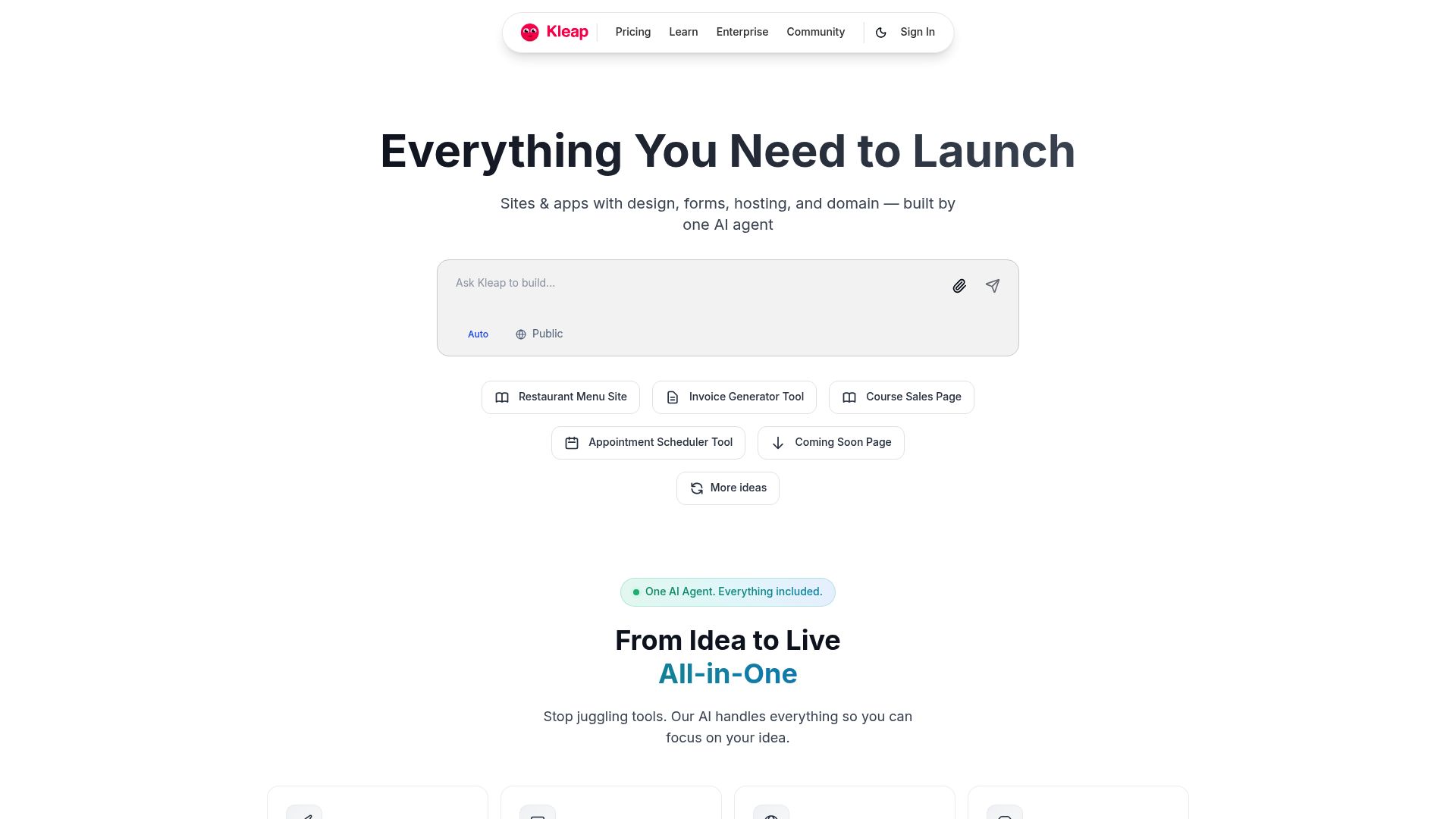
📸 Kleap.co
It is fascinating to watch. Tools like Kleap or Wix can produce a business-ready website in minutes.
This draft often requires only light manual tweaks rather than a complete overhaul.
Customize Key Elements
You should spend 10 to 20 minutes here.
Focus your limited time on the elements that matter most for conversions.
Don't get stuck moving a pixel left or right.
Focus on branding first. Apply your colors and logo.
Validation relates to your fonts too. Choose a typeface that matches your brand personality. What's great is that AI builders often suggest designs that already fit your brand, which means you don't have to waste time playing pretend-designer.
Then, turn your attention to the hero section at the top of your homepage. It needs a super clear headline that tells people exactly who you help and what problem you solve for them.
Toss in a subheadline for a little more context, and make sure you have a bold, can't-miss button like "Book a Free Call" or "Get a Quote." And please, keep your navigation menu uncluttered.
Usually, just sticking to Home, About, Services, and Contact is your best bet. The AI will probably recommend the right pages for your business anyway.
Finally, check critical business features. Does the contact form work?
Are online payments set up if you are selling products?
You can usually drag and drop sections or ask the AI to "add a pricing grid" if it missed one.
Step 3: Make it Business-Ready with Content and SEO
Your site might look good, but looking good doesn't pay the bills. You need visitors. This is where how to create a professional website with AI transitions from design to marketing.
Use AI to Refine Your Content
Most leading platforms embed AI writing tools directly in the editor.
You don't need to hire a copywriter for the first version.
For example, Wix has an AI Text Creator that helps generate and refine product descriptions.
Kleap also offers integrated text assistance to ensure your value proposition is sharp.
For example, Hostinger's AI can whip up the first draft of your website copy and help you tweak it. You'll find that even tools like Butternut AI throw in monthly credits for content generation.
And if you ever hit a wall, you can always use a general AI tool to help flesh out things like an FAQ page or other support articles.

Nangialai Stoman / Unsplash
Your main goal here is to make everything crystal clear.
Verify your pricing model is accurate. To build trust, add your own real testimonials.
AI can write a placeholder that says "Great service," but you need to replace that with "Saved me 10 hours a week, Sarah J."
Turn on Basic SEO and Analytics
For small businesses, "good enough" SEO is fantastic when it is built-in. You don't need to be an SEO wizard. For example, platforms like Wix have AI-powered SEO assistants that practically do the work for you by suggesting keywords and writing meta descriptions.
A tool like Butternut.ai will automatically handle a lot of the basic technical SEO for you. Honestly, your to-do list here is short and sweet. Just use the AI helpers to set your page titles and meta descriptions.
Then, double-check that every page has one clear H1 headline that includes your main keyword. For instance, if you're a photographer, your homepage headline shouldn't just be "Home." It should say "Family Photographer in Austin."

Connect Google Analytics immediately. Most AI builders support this natively.
You cannot improve what you do not measure, so getting this live from day one is critical.
Connect Your Domain and Launch
To look professional and trustworthy, you must use a custom domain. Operating on a subdomain (like yourname.brand.com) screams "hobbyist." Many AI builders bundle a free domain for the first year, plus SSL security and hosting.
Once you hit publish, don't stop. Share the link on your social profiles and your Google Business listing. You can continue to use integrated AI marketing tools to manage social media and email marketing from one central dashboard.
Using this process, non-technical entrepreneurs can realistically launch a professional, AI-built website in less than an hour. It is efficient, cost-effective, and puts you in control of your digital destiny.
Conclusion
We have walked through the three distinct stages of building a site. You start by planning your brand and selecting a tool that aligns with your business goals. Then, you leverage AI to generate the structure and design, customizing the critical conversion points.
Finally, you refine the content and technical SEO to ensure you are discoverable.
The barrier to entry has never been lower.
Learning how to create a professional website with AI is no longer a futuristic concept; it is the standard for modern business speed.
If you are ready to stop planning and start selling, you need a tool that moves as fast as you do.
Kleap is designed for this exact moment. It takes the complexity out of the web and gives you a mobile-first, revenue-ready site in minutes.
Don't let technical fear hold you back.
Your customers are waiting to find you online. Why keep them waiting?
Frequently Asked Questions
Can I really build a website in under an hour?
Yes. With an easy AI website builder, the heavy lifting of coding and design is done instantly.
Your hour is spent mostly on refining text and uploading your specific images.
Will my AI website rank on Google?
Absolutely. Most AI builders generate clean code and mobile-responsive designs, which Google loves.
As long as you follow the SEO steps mentioned above, you have a great foundation for ranking.
Is Kleap better than Wix or WordPress?
It depends on your goals. Use WordPress if you want total control and have time to manage plugins.
Use Wix for complex desktop designs. Use Kleap if you want a fast, mobile-optimized site that converts visitors into customers without the headache.
Do I need to know how to code?
Not at all. The entire purpose of these AI tools is to eliminate the need for coding. You interact with the builder using plain English.