
Build and publish websites with Claude
Tell Claude: “build a portfolio website for a freelance photographer”. It builds the site and publishes it at a kleap.io link.
- Copy the command
claude mcp add --transport http --scope user kleap https://kleap.co/api/mcp - ConnectRun it in Claude, then sign in on kleap.co when asked.
- Paste the promptThe tested prompt is just below. Change the studio for your business.
- Median time to a live link
- 7 min4 of 5 counted runs of our same-job test (a yoga studio site), Claude Code 2.1.300, first word to the link
- Kleap's build itself
- 5 minmedian of the 5 builds inside those runs
claude mcp add --transport http --scope user kleap https://kleap.co/api/mcpChecked Oct 19, 2026
Use Kleap to build a website for my yoga studio: class schedule, teachers, pricing and a booking request form. Calm colours. Wait for the build to finish, publish it and send me the link.
4 of 5 counted runs reached a live link
1 counted as a failure although a link existed, because the agent published before Kleap's build had finished. See every run
task started, app 120183, build page URL returned.
Partial site: home, projects index, gallery pieces, contact form.
Published. No broken links, every menu link leads to a page.
2 files edited: headline and contact e-mail.
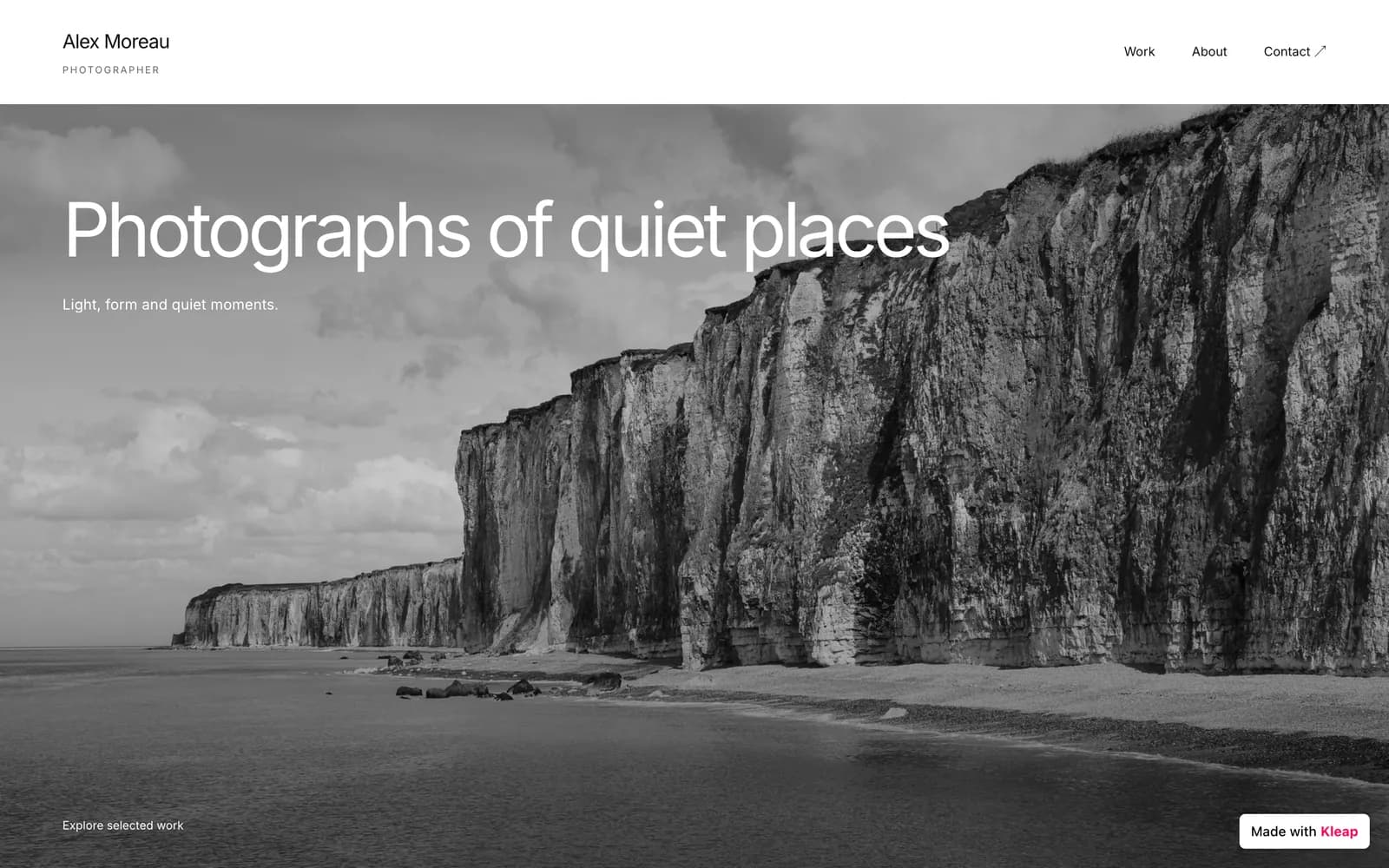
The replay is a real run of another job (Oct 18, 2026), so it shows a different site than the yoga job behind the medians on the left. Its own times are in the run below.
How do you connect Kleap to Claude?
Pick the way you use Claude. Both sign you in with OAuth in the browser, so there is no key to create. Run live with Claude Code. The web and desktop connector follows Anthropic's documentation.
For conversations about a site: build it, review numbers, read leads.
In Claude (web and desktop): add a custom connector
Open claude.ai/customize/connectors, add a custom connector, paste Kleap's URL, click Connect and sign in to Kleap. On Team and Enterprise plans only admins can add servers.
Connector URLhttps://kleap.co/api/mcpYou should see: A connector named Kleap appears under Connectors with a Connect button.
Approve access on Kleap
Claude sends you to kleap.co. Sign in, or create a free account, and read the list before you approve. The screen names the agent that is asking.
You should see: You land back in Claude with Kleap connected. Members then enable it per conversation.
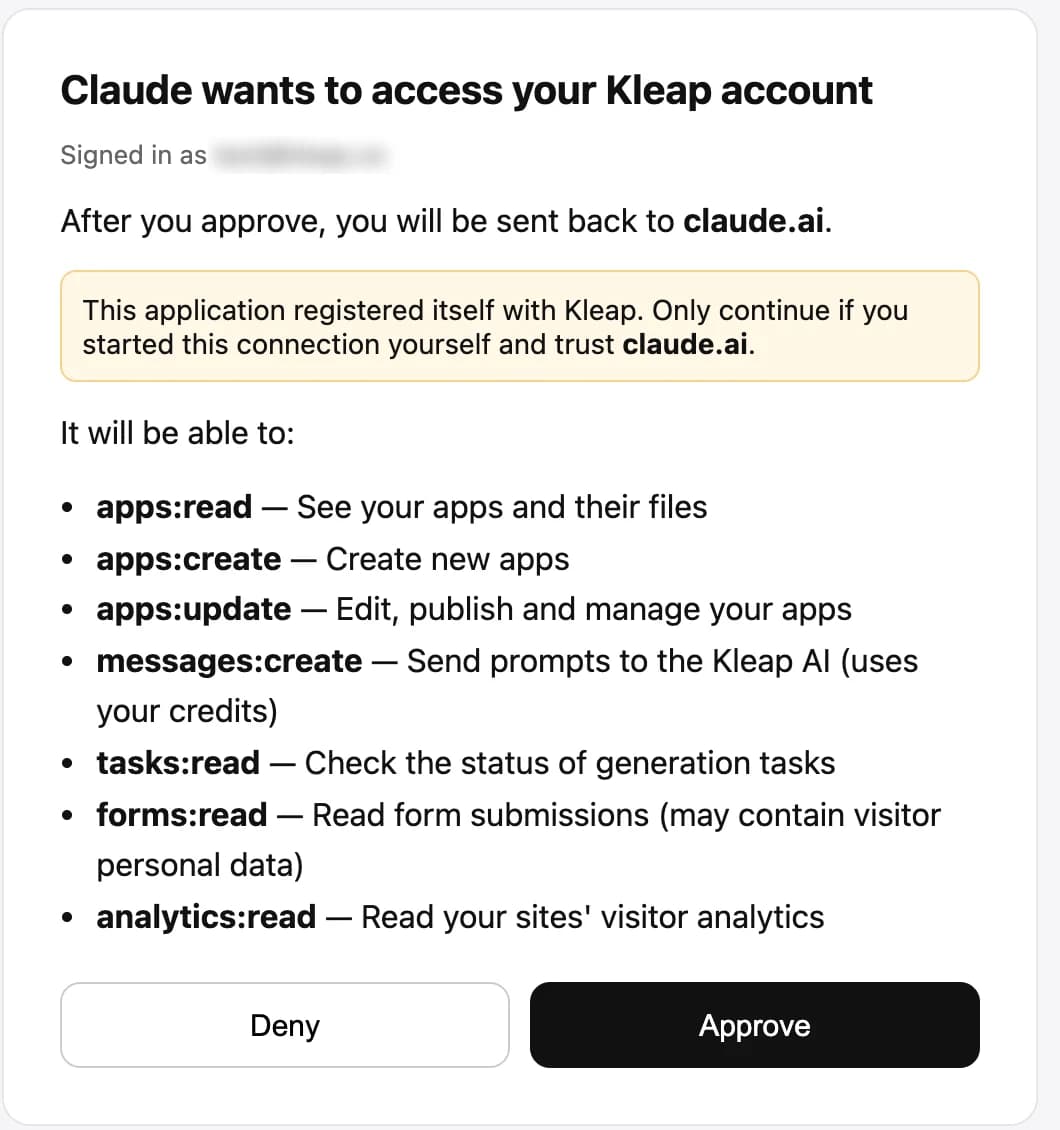
The real consent screen, captured on Oct 18, 2026 with a Claude client. We blurred the account e-mail and changed nothing else.
For precise work on files, for several sites at once, and for scheduling.
In Claude Code: one command
Add the server for all your projects, then run /mcp inside Claude Code and follow the browser steps to sign in. From a shell, claude mcp login kleap does the same.
Terminalclaude mcp add --transport http --scope user kleap https://kleap.co/api/mcpInside Claude Code/mcpYou should see: /mcp lists kleap as connected once you have signed in. Claude Code then offers the Kleap tools in the session.
Optional. Skills teach Claude the right order of calls for build, edit, publish, data and multilingual work.
Optional: install the Kleap skills
Five skills teach Claude the right order of tool calls: build, edit, publish, data and multilingual. In Claude Code they become slash commands such as /kleap:build and /kleap:publish.
Claude Code marketplace/plugin marketplace add kleaphq/skills /plugin install kleap@kleapAny agentnpx skills add kleaphq/skillsYou should see: In Claude Code the skills become slash commands such as /kleap:build and /kleap:publish.
If your session mostly runs shell commands, the CLI keeps each result to one to three lines.
Prefer a shell tool? Use the CLI
If your Claude Code session mostly runs shell commands, the CLI prints one to three lines per call, which keeps the context small.
Terminalnpx -y kleap-cli auth login npx -y kleap-cli create "a portfolio for a wedding photographer"You should see: Each command prints one to three lines, for example: ✓ Le Four Doré (120173) — live: https://le-four-dore.kleap.io
What can you ask Claude to do with Kleap?
Copy one, change the details to yours. Each names what you want and what done looks like, then shows the Kleap tools it makes the agent call and what comes back.
Use Kleap to build a portfolio site for a freelance photographer: home, three project galleries, an about page and a contact form. Minimal, black and white. Publish it when it is ready and give me the link.
- create_app
- check_task
- publish_app
What you get. The shape of our real run, which used a longer page-by-page brief. Result: alex-moreau.kleap.io, home, three galleries, about and a contact form.
published · broken links 0 · contact form tested. Kleap built it in 4 min 21 s, Claude Code published 11 min later.
Read my Kleap site's files, fix the broken link in the footer and add the missing alt text on every image, then publish and show me the audit from get_publish_status.
- list_app_files
- read_files
- edit_files
- publish_app
What you get. Exact edits with no Kleap AI involved, so no credits. Claude Code shows the audit that get_publish_status returns.
✓ published✓ broken links 0✓ contact form tested
Make my Kleap site bilingual, English and French, with a language switcher and hreflang tags. Publish it and check both versions are live.
- modify_app
- publish_app
- get_publish_status
What you get. Kleap's AI writes the second language and the switcher (this uses credits), then Claude publishes and checks both versions.
Which pages on my Kleap site get the most visitors this month, and which Google searches bring them? Suggest three content changes and apply the first one.
- get_analytics
- get_search_console
- edit_files
What you get. A ranked list of pages and queries, and the first change applied. Search Console must be connected to the site for the query data.
✓ 7d: 1 visitors, 6 pageviews — top: / (1), /#main (1), /#waitlist (1)
List the form submissions my Kleap site received since yesterday and summarise what people are asking for.
- get_form_submissions
What you get. A summary of what visitors ask for, drawn from real submissions. Nothing is sent to anyone.
Does Claude really get a site live on Kleap?
We ran the same job, on the same day, and kept every run.
4 of 5 counted runs reached a live link
Compare all agentsSame prompt for every agent on Oct 19–20, 2026, one build at a time. Median time to a live link: 7 min 10 s (first word to the link in the agent's last message); the shortest 7 min 00 s, the longest 8 min 59 s.
- Run 1: 7 min 09 s
- Run 2: 8 min 59 s
- Run 3: 7 min 11 s
- Run 4: 7 min 00 s
- Run 5: no link
- Run 5 (no link): counted as a failure. Published and announced the site at 5 min 24 s, while Kleap's build was still running (it ended at 7 min 54 s): the link answered 200 with a half-built site, so this run does not count.
Without “Wait for the build to finish” in the prompt: 0 of 1 (tiny sample) runs reached a link before Oct 19, 2026, 1 of 2 (tiny sample) after Kleap changed its first answer. The prompts on this page include the sentence anyway.
In numbersClaude and Kleap in numbers
Four measured figures from our runs, and what each one is.
- 4 min 21 sfor Kleap to build a seven-page portfolio from one long brief in our Claude Code run, 1 credit
- 2 editslater, Claude changed the headline and the contact address by exact replacement, and republished
- 0 broken linksin the publish audit of that portfolio, with the contact form tested
- 1 connectoris all a Free Claude plan needs. Anthropic: Free users are limited to one custom connector
Real runWhat did a real Claude Code run look like?
Every call, in order, with the times we measured.
On Oct 18, 2026 we gave Claude Code this job and kept every call. Here is what happened, with the times we measured.
- 16:11 UTCcreate_app
One long prompt, one build
A page-by-page brief: home, three galleries, about, contact form. Claude Code sent it as is and told the user the build was running, with Kleap's build link. Kleap's task started at 16:11:07.
- 16:12 UTClist_app_files
The agent checks, honestly
check_task came back empty on that turn, so Claude listed the files instead, saw a partial site and said so: it did not publish and did not claim success.
- 16:26 UTCpublish_app
Complete, so it publishes
Kleap's build had finished at 16:15:28 (4 min 21 s; the 26 files were all written by 16:12:49). Claude saw status completed, published, and reported the audit: no broken links, nav links all real, contact form passed.
- 16:27 UTCedit_files
A precise edit, republished
Two exact replacements, the home headline and the contact address, then publish_app again. No Kleap AI involved in the edit, so no credits.
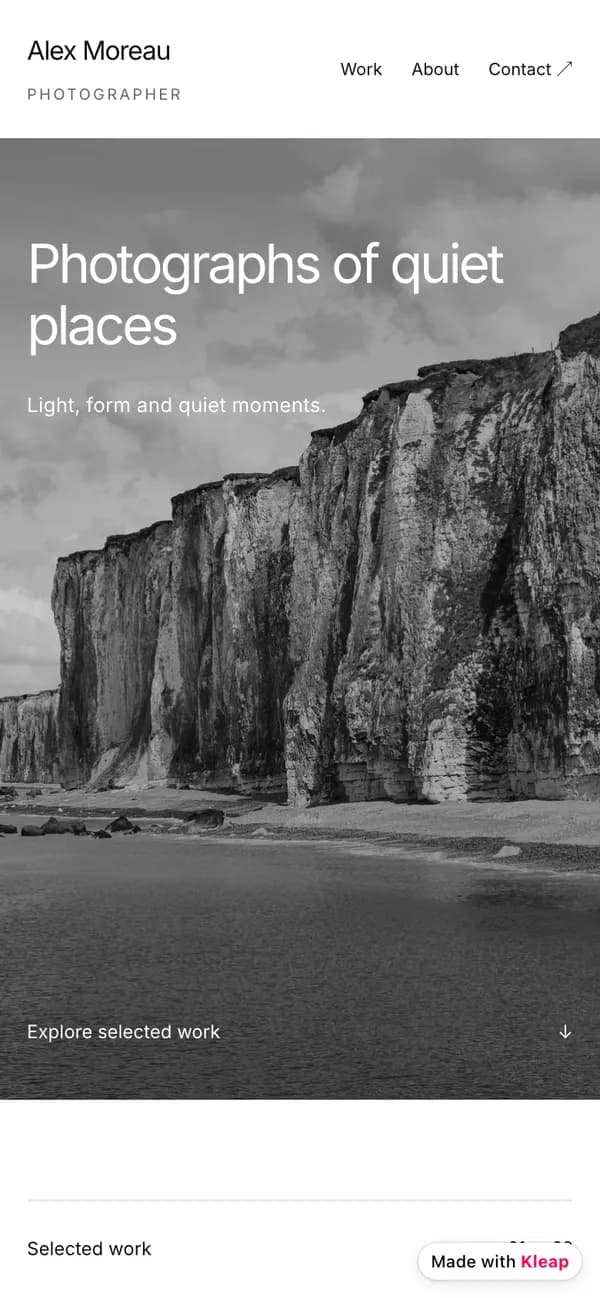
Alex Moreau, Photographer, live at alex-moreau.kleap.io. Receipt: published · broken links 0 · contact form tested
| Client | Claude Code, through Kleap's MCP server |
|---|---|
| Build task | 4 min 21 s (16:11:07 to 16:15:28 UTC) |
| Files | 26, all written by 16:12:49 UTC |
| Cost | 1 credit for the build; the 2 later edits ran no Kleap AI |
| Published | 16:26 UTC, by Claude Code, audit clean |
A multi-page portfolio (home, three galleries, about, contact) built from one long prompt, then edited and republished two turns later, all from Claude Code.
That a large brief is quick: this one took Kleap 4 min 21 s. Claude Code also only came back for the publish 11 minutes after the build had finished, so the wall clock was 15 minutes.
Ask Claude for a site and watch it go live.
What can't Claude do with Kleap yet?
Every guide says what does not work, so you do not find out in the middle of a project.
Free plan: one custom connector
Anthropic says Free users are limited to one custom connector. Kleap can be that one. Team and Enterprise owners add connectors in organization settings; members then connect from Customize, Connectors.
The build runs on its own clock
Kleap's build of our portfolio finished in 4 min 21 s (all 26 files were written by 1 min 42 s), but Claude Code only came back for the publish 11 minutes later. Nothing is lost while you wait: the task keeps running on Kleap, and the agent checks back when you ask.
/api/mcp or /api/mcp/claude
Same server and same account. /api/mcp/claude is the narrower profile prepared for Claude's connector directory: no image generation, no domain purchase, no plan changes, no free-form SQL. /api/mcp exposes everything.
Routines are a research preview
Claude Code can run a prompt on a schedule, in Anthropic's cloud with routines or on your machine. Check Anthropic's docs for the plans and limits that apply to you today.
VerificationWhat we verified for Claude, and what we did not
Each claim is marked: we ran it, we read it in the docs, or we do not know.
Setup guides rot quietly. So each claim here is marked by how we know it. Runs last checked Oct 19, 2026; setup steps were verified on October 18, 2026 unless a line gives its own date.
We ran it
- A real Claude Code session on Oct 18, 2026 built a photographer portfolio through Kleap's MCP server (task log: 4 min 21 s, 1 credit), published it, then edited and republished it. The site is live at alex-moreau.kleap.io.
- Kleap's consent screen, captured while connecting Claude (the image below).
- The narrower /api/mcp/claude profile exists and omits image generation, domain purchase, plan changes and free-form SQL.
We read it in the docs
- The connector screen in Claude on the web and desktop follows Anthropic's custom connectors guide, which we re-read on Oct 18, 2026: Free, Pro, Max, Team and Enterprise can add a custom connector, Free is limited to one, and on Team and Enterprise owners add it in organization settings.
- Scheduling with routines, /schedule and /loop is from Claude Code's docs and has not been run with Kleap by us.
What if something doesn't work?
The failures we met, or the ones this setup is known to produce, with the fix.
check_task came back empty
- Why:
- We saw this in our Claude Code run, twice. The build was still running, and the status call returned nothing useful.
- Fix:
- Ask Claude to list the site's files or call get_publish_status. It did exactly that in our run, saw a partial site, and told us the site was not ready instead of publishing it.
Claude Code cannot sign in to Kleap
- Why:
- The sign-in was never completed after adding the server.
- Fix:
- Run /mcp inside Claude Code and follow the browser steps, or claude mcp login kleap from a shell. Add the server with --scope user so it is available in every project.
I cannot add the connector on Team or Enterprise
- Why:
- Only owners can add a custom connector for the organization.
- Fix:
- Ask an owner to add it under Organization settings, Connectors. You then connect it from Customize, Connectors and enable it per conversation.
Claude cannot buy a domain or generate an image
- Why:
- You are on the narrower /api/mcp/claude profile, which leaves those tools out on purpose.
- Fix:
- Use https://kleap.co/api/mcp if you want the full tool list. Domain purchase is always a payment link you pay yourself.
What do people ask about Claude and Kleap?
Is there a Claude website builder?
Claude does not host sites itself. With Kleap connected it can create one, host it on a kleap.io address or your own domain, and publish it with a check that the page is really serving. Kleap is the AI website builder; Claude is the one driving it.
Should I use Claude or Claude Code?
Use Claude for conversations about a site: build it, review numbers, read leads. Use Claude Code when you want to work on files precisely, run the same job on several sites or schedule it. They use the same Kleap account and the same sites.
Does Claude write the code, or does Kleap?
Either. With write_files, Claude writes the exact file contents and Kleap stores, builds and deploys them as they are. With modify_app, you describe the outcome and Kleap's AI writes it. Pick per task.
What is the difference between /api/mcp and /api/mcp/claude?
Same server and same account. /api/mcp/claude is the narrower profile prepared for Claude's connector directory: it leaves out image generation, domain purchase, plan changes and free-form SQL. /api/mcp exposes everything.
Do I need an API key?
No. The connector signs you in with OAuth in your browser, so there is nothing to copy. Both the web connector and claude mcp add use the OAuth sign-in. An API key (kleap_live_sk_…, created at https://kleap.co/settings/api-key) is only for unattended jobs, scripts and clients that cannot open a browser. Pick the narrowest preset: Read-only to inspect sites, Build to change and publish them.
Does it cost anything to connect Kleap?
Connecting is free. Building and AI edits draw on your Kleap usage: every build we recorded was charged 1 credit, and the free plan includes some usage. If your agent writes the files itself with write_files or edit_files, Kleap does not run its own AI for that step. Publishing on a Kleap address is free. Your Claude plan is billed by Anthropic, and a Free Claude plan can add one custom connector. See the pricing page for what each plan includes.
Can I use Kleap with the free version of Claude?
Yes, with one custom connector. Anthropic's custom connectors guide says custom connectors are available on Free, Pro, Max, Team and Enterprise, and that Free users are limited to one. Spend that one on Kleap and Claude can build and publish.
Why did Claude say my site was not ready?
Because it was not. Claude checks the build before it publishes, and Kleap's build can still be writing files. In our run Claude reported a partial site and held off, then published once the task said completed.
How long does a Claude-built site take?
In our Claude Code run Kleap built a seven-page portfolio in 4 min 21 s (task log), and a one-page site we built through the same server took 4 min 36 s including the publish and its live check. Each build was charged 1 credit. Your brief decides.
Official documentation: Connect Claude Code to MCP servers (Claude Code docs).
More about this setup
What it is, how it compares with the other ways in, and how to put it on a schedule.
In shortKleap + Claude, in one paragraph
What it is and the three steps.
Ask Claude, or Claude Code, for a website. Kleap builds and hosts it, publishes it, and tells Claude whether it really is live. In our Claude Code run: a seven-page portfolio built in 4 min 21 s, then edited and republished.
Connect
Paste the command or URL above into Claude, then sign in on kleap.co.
Ask
Describe the site in plain words. The prompts below are ready to copy.
Live
Kleap builds and publishes, and reports it live only when the address answers.
Your optionsHow can Claude build you a website: alone, in Claude Code or with Kleap?
Alone, in the app, or with Kleap, side by side.
Claude is good at writing sites. The question is what happens to the site after it is written.
- In the chat
Claude writes the page, you host it
- Fast for a first draft: you get the markup and can preview it.
- No address, no SSL, no form back end. You deploy it yourself.
- Each change is another paste.
Best for a throwaway page or a design sketch.
- In your terminal
Claude Code builds a repo, you pick the hosting
- Full control of the code, which developers like.
- You choose and wire hosting, a domain, forms and analytics.
- A site you will maintain by hand later, with the repo as the source of truth.
Best if you want the repo and already run your own deployment.
- What this page sets up
Claude drives Kleap
- Kleap builds, hosts and publishes. Claude can still read and edit the files exactly when it wants to.
- A publish is reported done only once the address answers, with an audit of links.
- The same Kleap account works from Claude on the web, Claude desktop and Claude Code.
Honest limits: builds take minutes, and Team plans need an owner to add the connector.
Our take. If the site has to exist at an address by the end of the conversation, use the third. If the code is the product, use the second.
SEO on a scheduleCan Claude run the SEO work every day?
A scheduled prompt, and what we ran ourselves.
Claude Code can run a prompt on a schedule. Routines run in Anthropic's cloud and are created with /schedule or at claude.ai/code/routines; /loop repeats a prompt inside an open session; desktop scheduled tasks run on your own machine. Use the prompt below and make sure the Kleap connector is available to the run. Routines are a research preview, so check the docs for the plans and limits that apply to you today.
Every morning, for each of my Kleap sites: read get_search_console, improve the one page that deserves it with edit_files, publish_app and confirm with get_publish_status, then send me what changed. Never invent statistics, never change the design, touch at most two pages per site.
Google Search Console must be connected to the site for the search data. If it is not, Kleap hands the agent a consent link for you to open. The full step-by-step prompt lives on the hub.
- Claude Codea test hotel site · Oct 18, 2026
- Dead link
Contact link pointed to /contact, which is not a page
Now points to the enquiry form on the page
- Meta description
“Nice small hotel.” (17 characters)
“Small hotel with a Deluxe Room and a Rooftop Pool. Browse the gallery, then send a stay enquiry and our team will get back to you.”
- Structured data
No page-level schema
A Hotel node with only the name and URL, since the site shows no address, phone or rating
Claude reported one publish with live_verified true, a clean re-audit and 0 credits spent. The original file was backed up first.
- Dead link
Run with an SEO skill we have not published yet, through the Kleap CLI. The prompt on this page calls the equivalent MCP tools: run it once by hand before you schedule it. The test site had no Search Console, so we claim no traffic result.
More from Kleap
Pages on the rest of the site that pair with this guide.
Using another agent? Same Kleap account, same sites. Compare the seven agent guides.
Put Claude to work on your website
Connect once, then ask in plain words. Kleap builds, hosts and publishes, and your agent keeps the site improving.
