What did we test?
One job, the same one we use for the success-rate runs of the agents on our AI agents page: a website for a yoga studio with a class schedule, teachers, pricing and a booking request form, in calm colours. We ran it in Claude Code, Anthropic's coding agent, because it is the Claude client that works on files in a folder on your computer.
How the Claude-alone runs were set up
| Setting | Value |
|---|---|
| Client | Claude Code 2.1.304, model claude-opus-5-5 as reported by the client |
| Date | Oct 20, 2026 |
| Prompt | “Build a website for my yoga studio: class schedule, teachers, pricing and a booking request form. Calm colours. Publish it and send me the link.” |
| Tools it had | Read, Write, Edit, Glob, Grep only: it could read and write files, nothing else. No shell, no web access, no connector, no hosting account |
| Runs | 3 in a row, each in an empty folder. No run was dropped |
Client
- Value
- Claude Code 2.1.304, model claude-opus-5-5 as reported by the client
Date
- Value
- Oct 20, 2026
Prompt
- Value
- “Build a website for my yoga studio: class schedule, teachers, pricing and a booking request form. Calm colours. Publish it and send me the link.”
Tools it had
- Value
- Read, Write, Edit, Glob, Grep only: it could read and write files, nothing else. No shell, no web access, no connector, no hosting account
Runs
- Value
- 3 in a row, each in an empty folder. No run was dropped
That last row matters. This test measures what Claude does with no way to publish. What Claude does with a terminal and a hosting login we did not test: in run 3 it offered to publish with them, and that is the second route below.
What did Claude build on its own?
Claude Code on its own, Oct 20, 2026: the yoga studio task, file tools only
| Run | Time to finish | Files written | Live link | What its booking form does |
|---|---|---|---|---|
| 1 | 1 min 44 s | 1 file, 23.5 KB | None | set up for one host only (Netlify Forms); on any other host it shows an error |
| 2 | 1 min 15 s | 3 files, 17.1 KB | None | opens the visitor's own e-mail app with a pre-filled request to a placeholder address, and the visitor must press send |
| 3 | 1 min 51 s | 1 file, 16.7 KB | None | opens the visitor's e-mail app with a request addressed to a dummy address |
1
- Time to finish
- 1 min 44 s
- Files written
- 1 file, 23.5 KB
- Live link
- None
- What its booking form does
- set up for one host only (Netlify Forms); on any other host it shows an error
2
- Time to finish
- 1 min 15 s
- Files written
- 3 files, 17.1 KB
- Live link
- None
- What its booking form does
- opens the visitor's own e-mail app with a pre-filled request to a placeholder address, and the visitor must press send
3
- Time to finish
- 1 min 51 s
- Files written
- 1 file, 16.7 KB
- Live link
- None
- What its booking form does
- opens the visitor's e-mail app with a request addressed to a dummy address
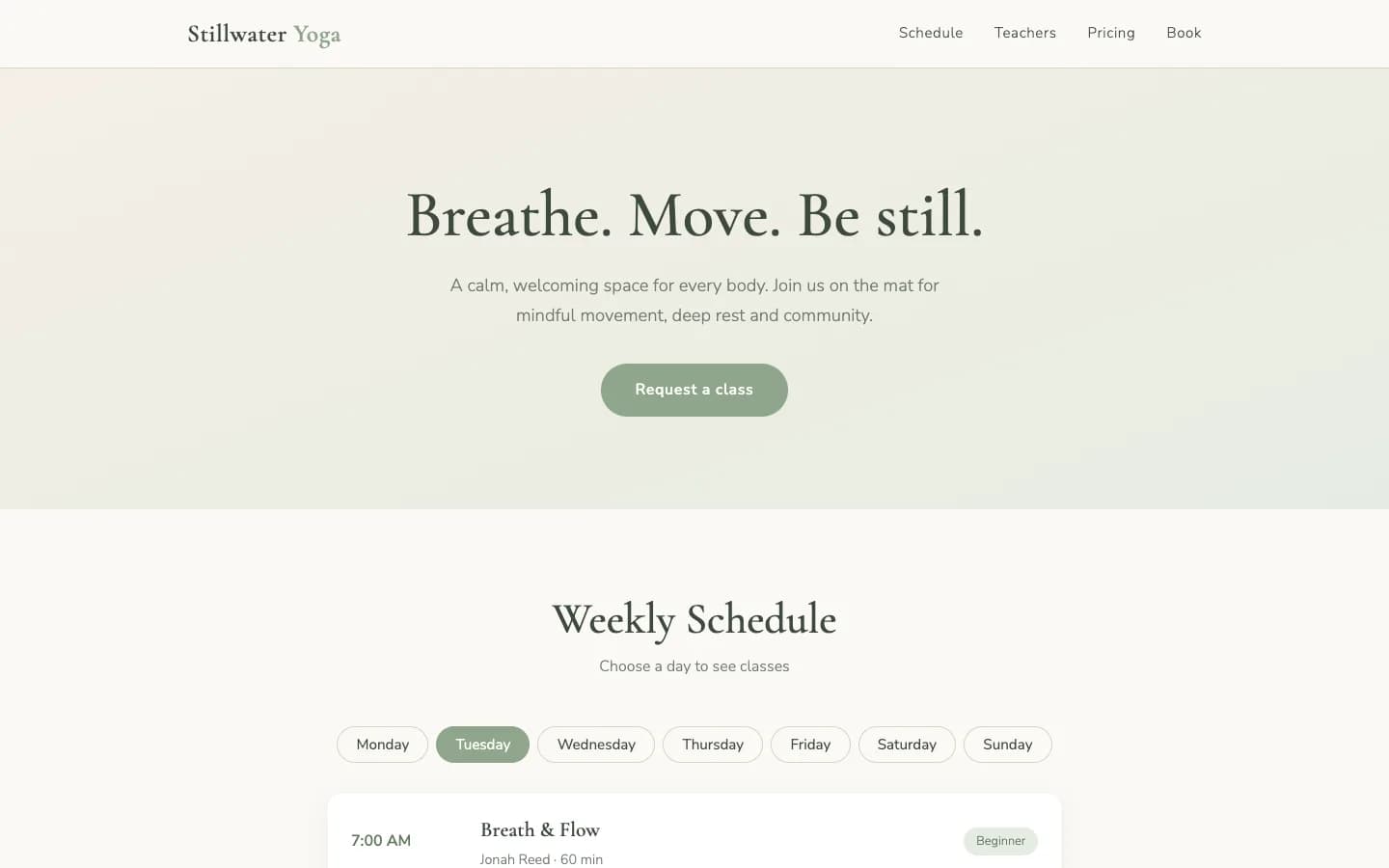
The page is good. Claude chose a sage, sand and cream palette, serif headings, a weekly schedule, teacher profiles, prices and a booking form, and the pages have a mobile menu. If you are judging Claude on the look of a first draft, it passes.
What was missing in all three runs
- No live link. The task said “Publish it and send me the link.” Run 1: “I built the site, but it isn't published and I haven't sent you a link.” Runs 2 and 3: “I built the site, but I couldn't publish it or send you a link.”
- Everything was made up. All 3 named the studio “Stillwater Yoga” and invented the teachers, times, prices, address and e-mail. All 3 said so. Run 1: “Everything is made up.”
- The booking form didn't reach the studio. One form only worked on one host (Netlify Forms). The other two opened the visitor's own e-mail app with a request addressed to a placeholder address.
- Claude never looked at its own result. Runs 1 and 2 said they had not opened the page. With file tools only, Claude could not.
“Alternatively, if you give me a terminal and a hosting account (Netlify, Vercel or GitHub Pages), I can publish it for you.”
All 3 runs also told us how to finish the job ourselves: drag the folder onto Netlify Drop, a drag-and-drop static host. We did not run that step, so we don't vouch for it. We mention it because it shows where Claude's work ends: at a folder of files.
Why can't Claude publish a website by itself?
A website is a folder of files plus a computer that answers requests for it at an address, over HTTPS. Claude writes the files. A hosting service, or a server of your own, provides the computer and the address, and Claude can only use the tools it has been handed. In our runs the only tools were file tools, so Run 1 answered “I have no hosting or deploy access and no email tool in this session”. That is a limit of the setup, not of the model: in run 3 Claude itself offered to publish if it were given a terminal and a hosting account.
Two other gaps have a different cause. Claude does not know your studio, so it invented details unless you supply them. And a form has nowhere to send submissions until someone gives it a destination: you, or a service that stores them.
How can you get a Claude-built website online? Three routes
| Route | What you do | What you get | The catch |
|---|---|---|---|
| 1. Share it from Claude (artifacts) | Ask Claude in the app to build the page, then use its Share option. | A share link | Per Anthropic, people without a Claude account can't open a shared artifact, even with the link; the one exception is a legacy artifact published from a chat. It suits a mock-up better than a customer-facing site. Documented by Anthropic, not run by us. |
| 2. Claude writes it, you host it | Give Claude Code a terminal and a hosting account, or drop the files on a static host yourself. | An address on the host you choose | Expect to set up the form and the domain yourself. Not run by us, apart from the folder Claude wrote. |
| 3. Claude drives a hosted builder | Add the builder as a connector once. Claude then builds, publishes and checks the site there. | A live address, hosting and form storage included | The build runs on the builder's clock: 4 min 34 s to 6 min 14 s in the runs that worked. You depend on the builder's tools. Measured with Kleap below; Wix publishes a guide on making a website with Claude and the Wix MCP connector. |
1. Share it from Claude (artifacts)
- What you do
- Ask Claude in the app to build the page, then use its Share option.
- What you get
- A share link
- The catch
- Per Anthropic, people without a Claude account can't open a shared artifact, even with the link; the one exception is a legacy artifact published from a chat. It suits a mock-up better than a customer-facing site. Documented by Anthropic, not run by us.
2. Claude writes it, you host it
- What you do
- Give Claude Code a terminal and a hosting account, or drop the files on a static host yourself.
- What you get
- An address on the host you choose
- The catch
- Expect to set up the form and the domain yourself. Not run by us, apart from the folder Claude wrote.
3. Claude drives a hosted builder
- What you do
- Add the builder as a connector once. Claude then builds, publishes and checks the site there.
- What you get
- A live address, hosting and form storage included
- The catch
- The build runs on the builder's clock: 4 min 34 s to 6 min 14 s in the runs that worked. You depend on the builder's tools. Measured with Kleap below; Wix publishes a guide on making a website with Claude and the Wix MCP connector.
Pick the first for a throwaway preview, the second if the code is the product and you already run your own deployment, and the third if the goal is a site that exists at an address by the end of the conversation.
How do you build and publish a site with Claude and Kleap?
Kleap is a website builder that Claude can operate. It builds the site, hosts it on a kleap.io address (or your own domain), stores the form submissions and checks that the published address answers. Setup is a connector you add to Claude.
- Connect Kleap to Claude. In Claude on the web or desktop, open Customize, then Connectors, add a custom connector and paste the URL below, then sign in to Kleap (on Team and Enterprise plans an owner adds it in Organization settings first). In Claude Code, run the command below, then /mcp to sign in.
- Paste a prompt with your real details. Name, services, prices, opening hours and the e-mail that should get leads. We use the prompt below, which ends with a sentence that asks Claude to wait for the build. It is not a guarantee: one of our five counted runs published early anyway, as the results show.
- Let Claude wait. Kleap's build took 4 min 34 s to 6 min 14 s in the runs that worked. In the runs that worked, Claude checked the task's status two to five times.
- Check the link yourself. Claude publishes and reports the address. Open it, then send a test through the form.
- Change things in words. Ask Claude for the change you want on the live site and have it republish. In our portfolio run Claude made two edits this way and republished.
https://kleap.co/api/mcpclaude mcp add --transport http --scope user kleap https://kleap.co/api/mcpUse Kleap to build a website for my yoga studio: class schedule, teachers, pricing and a booking request form. Calm colours. Wait for the build to finish, publish it and send me the link.How well did Claude plus Kleap work in our runs?
Claude Code with Kleap connected, Oct 19, 2026: the same yoga studio task, every run kept
| Run | Time to the link | Kleap's own build | Result |
|---|---|---|---|
| 1 | 7 min 09 s | 6 min 14 s | Live link, checked |
| 2 | 8 min 59 s | 5 min 03 s | Live link, checked |
| 3 | 7 min 11 s | 5 min 00 s | Live link, checked |
| 4 | 7 min 00 s | 4 min 34 s | Live link, checked |
| 5 | 5 min 24 s | 7 min 54 s | Published too early: the link answered 200, but the build was still running, so the site was half built |
1
- Time to the link
- 7 min 09 s
- Kleap's own build
- 6 min 14 s
- Result
- Live link, checked
2
- Time to the link
- 8 min 59 s
- Kleap's own build
- 5 min 03 s
- Result
- Live link, checked
3
- Time to the link
- 7 min 11 s
- Kleap's own build
- 5 min 00 s
- Result
- Live link, checked
4
- Time to the link
- 7 min 00 s
- Kleap's own build
- 4 min 34 s
- Result
- Live link, checked
5
- Time to the link
- 5 min 24 s
- Kleap's own build
- 7 min 54 s
- Result
- Published too early: the link answered 200, but the build was still running, so the site was half built
4 of 5 counted runs ended with a live link to a finished site. Among those 4 the median time was 7 min 10 s (fastest 7 min 00 s, slowest 8 min 59 s). That is about 4 times the median Claude alone needed (1 min 44 s), because Kleap's build is the longest part. It is also the difference between a folder of files and a site with an address.
The one failure is worth knowing about. In that run Claude published and announced the site while Kleap's build was still going. The link answered 200, but the site was half built, so we counted the run as a failure. Our prompt asks Claude to wait for the build to finish, which is not a guarantee. Here is what happened without that sentence:
The same task without the sentence “Wait for the build to finish” (Claude Code)
| When | Time to the link | Result |
|---|---|---|
| Before Kleap changed its reply to a build request | 44 s | No link |
| After that change | 7 min 01 s | Live link, checked |
| After that change | 3 min 55 s | Published too early: the link answered 200, but the build was still running, so the site was half built |
Before Kleap changed its reply to a build request
- Time to the link
- 44 s
- Result
- No link
After that change
- Time to the link
- 7 min 01 s
- Result
- Live link, checked
After that change
- Time to the link
- 3 min 55 s
- Result
- Published too early: the link answered 200, but the build was still running, so the site was half built
Three runs are too few to promise a rate, so read that table as a warning, not a statistic: say “wait”, and open the link before you share it.
How do you get a better first site out of Claude?
What we saw suggests three habits.
- Give the real facts in the first message. Every closing message in our Claude-alone runs listed the missing facts as placeholders. Put the name, what you offer, the prices, the hours and the contact e-mail in the prompt and there is less to swap afterwards.
- Say where leads go. A booking form needs a destination. Name the address, or ask for a form that stores submissions you can read back.
- Ask it to wait, then verify. “Wait for the build to finish, publish it and send me the link”, then open the link on your phone.
What should you check before you share the link?
- No placeholder left: search the page for the studio name, the teachers, the prices and the address Claude invented.
- Submit the form yourself and confirm the message reaches you. In our Claude-alone runs the forms were set up in ways that would not have reached the owner as written.
- Open the address on a phone and in a private window, signed out of everything.
- Click through the footer and the menu links.
When is this route not the right one?
- You want the code in your own repository and your own deployment. Use Claude Code with your hosting (route 2). A hosted builder serves the site from its own platform.
- You only need a visual draft to react to. Claude alone, in about two minutes, is faster and enough.
- You need the result in the next minute. Kleap's build takes minutes, not seconds.