Which part of ChatGPT builds websites?
“ChatGPT” now covers several places that behave differently, and most answers to this question mix them up. Here is what OpenAI's documentation says each one does.
Where a ChatGPT website gets built, per OpenAI's Help Center
| Where | Writes the site | Hosts it at an address | Who has it |
|---|---|---|---|
| Sites, in Work on the web or in Work or Codex in the desktop app | Yes | Yes, with a private preview first, then Publish | Plus, Pro and supported Business and Enterprise accounts |
| Codex, OpenAI's coding agent | Yes, as files in a folder | Through Sites, or through a deploy tool or connector it can reach (in our runs: Vercel's command-line tool, then Kleap) | Included across ChatGPT plans, Free and Go included, with usage limits by plan |
Sites, in Work on the web or in Work or Codex in the desktop app
- Writes the site
- Yes
- Hosts it at an address
- Yes, with a private preview first, then Publish
- Who has it
- Plus, Pro and supported Business and Enterprise accounts
Codex, OpenAI's coding agent
- Writes the site
- Yes, as files in a folder
- Hosts it at an address
- Through Sites, or through a deploy tool or connector it can reach (in our runs: Vercel's command-line tool, then Kleap)
- Who has it
- Included across ChatGPT plans, Free and Go included, with usage limits by plan
So the real question is rarely “can it build one”. It is “will I end up with an address I can send to a customer, and who hosts it”. That is what we measured.
What did we test?
One job, the same one we use for the success-rate runs of the agents on our AI agents page and for our Claude test: a website for a yoga studio with a class schedule, teachers, pricing and a booking request form, in calm colours. ChatGPT's apps can't be driven from a script, so we ran Codex, OpenAI's coding agent, signed in with a ChatGPT account. It is the OpenAI agent you can start from a terminal, and per OpenAI, building a Site counts toward Codex usage.
How the Codex-alone runs were set up
| Setting | Value |
|---|---|
| Client | Codex CLI 0.163.0, model gpt-6-astra |
| Date | Oct 21, 2026 |
| Prompt | “Build a website for my yoga studio: class schedule, teachers, pricing and a booking request form. Calm colours. Publish it and send me the link.” |
| What it could do | Write files and run commands in an empty folder. Setup: a clean Codex profile (sign-in only), the apps and plugins of the ChatGPT account turned off, web search off, sandbox workspace-write (files and commands in the folder, no network) |
| Runs | 3 in a row. No counted run was dropped; 2 earlier attempts were thrown out, see below |
Client
- Value
- Codex CLI 0.163.0, model gpt-6-astra
Date
- Value
- Oct 21, 2026
Prompt
- Value
- “Build a website for my yoga studio: class schedule, teachers, pricing and a booking request form. Calm colours. Publish it and send me the link.”
What it could do
- Value
- Write files and run commands in an empty folder. Setup: a clean Codex profile (sign-in only), the apps and plugins of the ChatGPT account turned off, web search off, sandbox workspace-write (files and commands in the folder, no network)
Runs
- Value
- 3 in a row. No counted run was dropped; 2 earlier attempts were thrown out, see below
Why we threw out 2 attempts first
Our first two attempts did not test Codex alone at all. The ChatGPT account we signed in with has Kleap installed as a plugin, and Codex found it and started building the site on Kleap without being asked to. Only after we turned off the account's apps and plugins in the Codex profile did Codex work alone. So an app installed on your ChatGPT account can be in play when you use Codex in a terminal: check what is installed before you start.
What did ChatGPT's agent build on its own?
Codex on its own, Oct 21, 2026: the yoga studio task, no way to reach the internet
| Run | Time to finish | Files written | What it ran to publish | Live link | What its booking form does |
|---|---|---|---|---|---|
| 1 | 4 min 10 s | 6 files, 36.5 KB | vercel deploy --prod --yes (blocked: no network) | None | no e-mail address set, so it saves the request as a file on the visitor's device; once an address is set it opens the visitor's e-mail app |
| 2 | 3 min 56 s | 5 files, 25.7 KB | vercel --prod --yes (blocked: no network) | None | no e-mail address set, so it saves the request as a file on the visitor's device; once an address is set it opens the visitor's e-mail app |
| 3 | 4 min 01 s | 6 files, 26.1 KB | vercel deploy --prod --yes (blocked: no network) | None | no e-mail address set, so it says “Request prepared, but not sent” and offers to copy the text; once an address is set it opens the visitor's e-mail app |
1
- Time to finish
- 4 min 10 s
- Files written
- 6 files, 36.5 KB
- What it ran to publish
- vercel deploy --prod --yes (blocked: no network)
- Live link
- None
- What its booking form does
- no e-mail address set, so it saves the request as a file on the visitor's device; once an address is set it opens the visitor's e-mail app
2
- Time to finish
- 3 min 56 s
- Files written
- 5 files, 25.7 KB
- What it ran to publish
- vercel --prod --yes (blocked: no network)
- Live link
- None
- What its booking form does
- no e-mail address set, so it saves the request as a file on the visitor's device; once an address is set it opens the visitor's e-mail app
3
- Time to finish
- 4 min 01 s
- Files written
- 6 files, 26.1 KB
- What it ran to publish
- vercel deploy --prod --yes (blocked: no network)
- Live link
- None
- What its booking form does
- no e-mail address set, so it says “Request prepared, but not sent” and offers to copy the text; once an address is set it opens the visitor's e-mail app
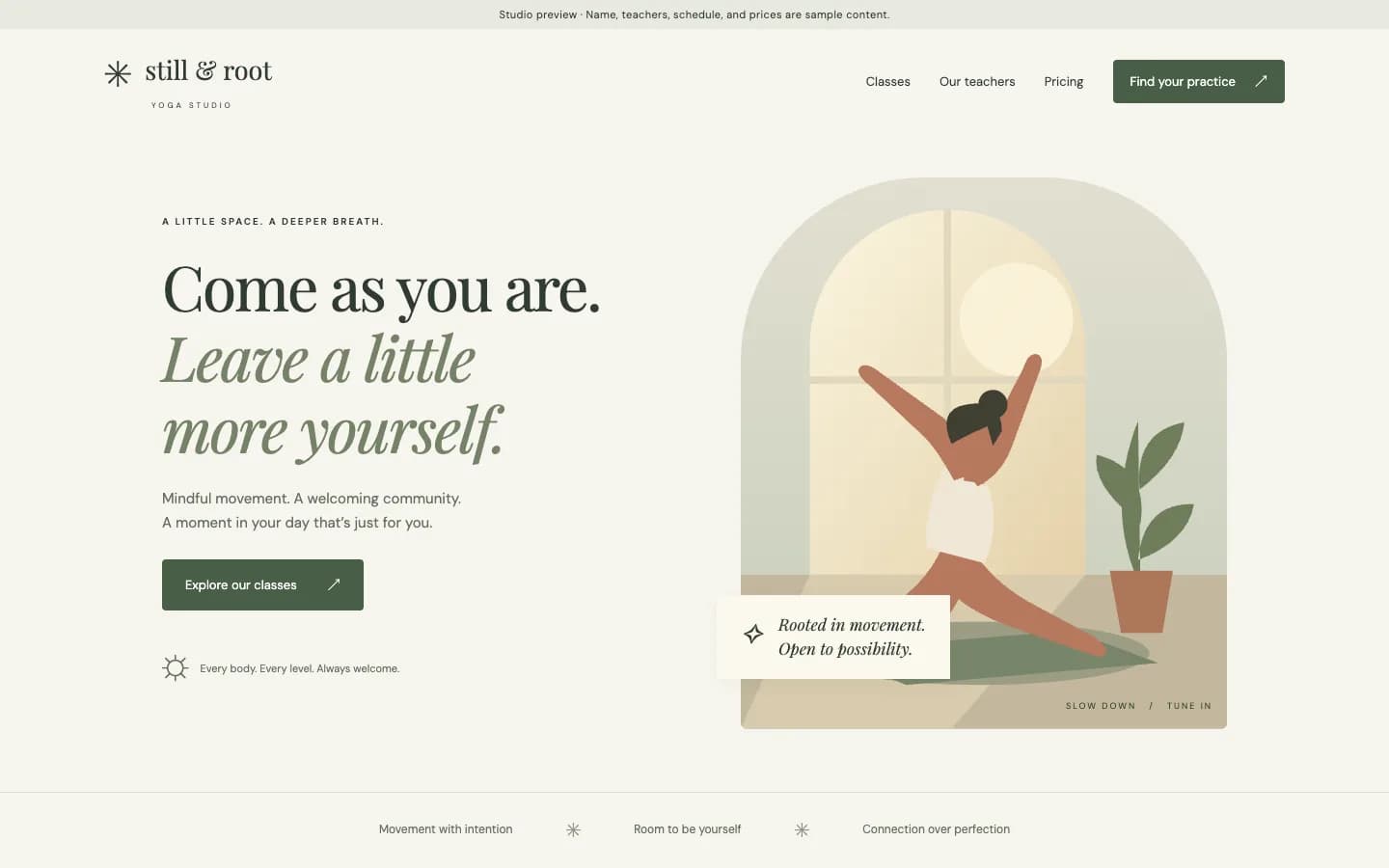

The sites are good. Codex chose ivory, sage and clay colours, serif headlines, a schedule you can filter by class type, teacher cards, prices and a booking form (in run 1 it even refuses a date that doesn't fall on the class's day). It also put a banner at the top of the page saying the studio name, teachers, times and prices were samples, in 3 of 3 runs. For a first draft, it passes.
Where all three runs stopped
- No live link. Every run wrote a vercel.json file, found the Vercel command-line tool installed on our machine and ran a production deploy on its own. The network was off, so it failed. Run 1: “Publishing failed because this workspace cannot reach Vercel, so there’s no public link yet.” Run 2: “Publishing was blocked by network restrictions, so there’s no live link yet.”
- The booking form had nowhere to send requests. Codex left the studio's e-mail address empty. Until you fill it in, runs 1 and 2 save the request as a file on the visitor's own device and run 3 says “Request prepared, but not sent”. Once an address is set, all three open the visitor's e-mail app, and the visitor still has to press send.
- It could not look at its own page. Every run tried to open the site in a browser to check it, and every attempt failed in the sandbox. Runs 2 and 3 said so: “Browser testing was blocked by the environment.”
One thing to know before you let Codex run with network access: in every run it looked for deploy tools on the computer, found Vercel's command-line tool and ran a production deploy in the same turn, before we had answered its questions. That is what you want when the tool is yours and signed in to the right account. Check which accounts your machine is signed in to before you say “publish it”.
Why doesn't ChatGPT always give you a live link?
A website is a folder of files plus a computer that answers requests for it at an address. ChatGPT writes the files. Something else provides the computer and the address: OpenAI's own hosting when you use Sites, or a host you choose. In our Codex runs the only route out was a deploy command, and we had closed the network.
Two other gaps have nothing to do with hosting. Codex did not know our studio, so it filled in sample details, and it will do the same with yours unless you give it the real ones. And a form needs a destination for submissions: your e-mail, or a service that stores them where you can read them.
How can you get a ChatGPT-built website online? Three routes
| Route | What you do | What you get | The catch |
|---|---|---|---|
| 1. ChatGPT Sites | In Work (web or desktop) or Codex (desktop), ask for a website or mention @Sites, review the private preview, then Share and Publish. | A Site URL hosted by OpenAI, with a database (up to 10 GB per Site) and optional custom domain | Plus, Pro and supported Business and Enterprise only. A new Site is visible to its owner and workspace admins until you change access; “Anyone on the internet” appears only where public publishing is enabled. Every deploy goes live at the production URL, so save a version and review it first. Sites does not register a domain for you. Documented by OpenAI, not run by us. |
| 2. ChatGPT writes it, you host it | Let Codex write the files and deploy them with a hosting tool and account you control. In our runs it prepared this itself: a vercel.json file and a production deploy command. | Whatever that host provides; we did not let the deploy through, so we can't report the result | You set up the form destination and the domain yourself, and you decide which account the agent may publish with. |
| 3. ChatGPT drives a hosted builder | Add the builder to ChatGPT or Codex once as a custom MCP server. ChatGPT then builds, publishes and checks the site there. | A live address, hosting and form storage included | The build runs on the builder's clock: 3 min 57 s to 6 min 45 s in our Codex runs. Custom MCP servers are added on ChatGPT on the web, and workspace permissions apply. Measured with Kleap below. |
1. ChatGPT Sites
- What you do
- In Work (web or desktop) or Codex (desktop), ask for a website or mention @Sites, review the private preview, then Share and Publish.
- What you get
- A Site URL hosted by OpenAI, with a database (up to 10 GB per Site) and optional custom domain
- The catch
- Plus, Pro and supported Business and Enterprise only. A new Site is visible to its owner and workspace admins until you change access; “Anyone on the internet” appears only where public publishing is enabled. Every deploy goes live at the production URL, so save a version and review it first. Sites does not register a domain for you. Documented by OpenAI, not run by us.
2. ChatGPT writes it, you host it
- What you do
- Let Codex write the files and deploy them with a hosting tool and account you control. In our runs it prepared this itself: a vercel.json file and a production deploy command.
- What you get
- Whatever that host provides; we did not let the deploy through, so we can't report the result
- The catch
- You set up the form destination and the domain yourself, and you decide which account the agent may publish with.
3. ChatGPT drives a hosted builder
- What you do
- Add the builder to ChatGPT or Codex once as a custom MCP server. ChatGPT then builds, publishes and checks the site there.
- What you get
- A live address, hosting and form storage included
- The catch
- The build runs on the builder's clock: 3 min 57 s to 6 min 45 s in our Codex runs. Custom MCP servers are added on ChatGPT on the web, and workspace permissions apply. Measured with Kleap below.
Pick Sites if you already pay for Plus or Pro and an OpenAI-hosted address suits you. Pick the second route if the code is the product and you run your own deployment. Pick the third if you want the site, its hosting and its form inbox in one place you can also edit without ChatGPT.
How do you build and publish a site with ChatGPT and Kleap?
Kleap is a website builder that ChatGPT and Codex can operate. It builds the site, hosts it on a kleap.io address (or your own domain), stores the form submissions and checks that the published address answers. Setup is a custom MCP server you add once.
- Add Kleap to ChatGPT. On ChatGPT on the web, open Plugins (chatgpt.com/plugins), click the plus button and choose Add custom MCP server. Name it Kleap, paste the URL below as the Server URL, choose OAuth, accept the risk warning and click Create as a plugin. Then install it from your personal plugins. In Codex, run the command below instead.
- Sign in to Kleap and approve. ChatGPT opens kleap.co. The agent can only touch your own Kleap sites, and you can revoke it later.
- Paste a prompt with your real details. Name, services, prices, opening hours and the e-mail that should get leads. We use the prompt below, which ends by asking the agent to wait for the build.
- Let it wait. Kleap's build took 3 min 57 s to 6 min 45 s in our counted Codex runs, and Codex checked the task five to eight times before it reported the link.
- Check the link yourself, then edit in words. Open the address on your phone, send a test through the form, then ask for changes and have it republish.
https://kleap.co/api/mcpcodex mcp add kleap --url https://kleap.co/api/mcpUse Kleap to build a website for my yoga studio: class schedule, teachers, pricing and a booking request form. Calm colours. Wait for the build to finish, publish it and send me the link.How well did OpenAI's agent plus Kleap work in our runs?
Codex with Kleap connected, Oct 19, 2026 to Oct 20, 2026: the same yoga studio task, every run kept
| Run | Time to the link | Kleap's own build | Result |
|---|---|---|---|
| 1 | 5 min 34 s | 4 min 14 s | Live link, checked |
| 2 | 5 min 47 s | 3 min 57 s | Live link, checked |
| 3 | 5 min 50 s | 4 min 19 s | Live link, checked |
| 4 | 5 min 58 s | 4 min 44 s | Live link, checked |
| 5 | 8 min 16 s | 6 min 45 s | Live link, checked |
1
- Time to the link
- 5 min 34 s
- Kleap's own build
- 4 min 14 s
- Result
- Live link, checked
2
- Time to the link
- 5 min 47 s
- Kleap's own build
- 3 min 57 s
- Result
- Live link, checked
3
- Time to the link
- 5 min 50 s
- Kleap's own build
- 4 min 19 s
- Result
- Live link, checked
4
- Time to the link
- 5 min 58 s
- Kleap's own build
- 4 min 44 s
- Result
- Live link, checked
5
- Time to the link
- 8 min 16 s
- Kleap's own build
- 6 min 45 s
- Result
- Live link, checked
5 of 5 counted runs ended with a live link to a finished site, with no run thrown out. The median time was 5 min 50 s (fastest 5 min 34 s, slowest 8 min 16 s), against 4 min 01 s for Codex writing files alone. Kleap's own build took 3 min 57 s to 6 min 45 s of each of those runs. It is also the difference between a folder on your laptop and a site with an address.

Codex is not the ChatGPT app. We ran it because ChatGPT on the web can't be scripted, and both read the same kind of MCP server. On the web the setup is the one above; we have not timed it there.
How do you get a better first site out of ChatGPT?
- Give the real facts in the first message. Every Codex run stopped to ask for the studio's real details and booking e-mail, then carried on with samples without waiting for an answer. Put them in the prompt and there is nothing to swap afterwards.
- Say where leads go. A booking form needs a destination. Name the e-mail address, or ask for a form that stores submissions you can read back.
- Say how to publish, or say not to. Name the host or the connector you want used. Otherwise the agent may pick what it finds: ours picked Vercel's command-line tool every time.
- Ask it to wait, then verify. “Wait for the build to finish, publish it and send me the link”, then open the link on your phone.
What should you check before you share the link?
- The sample banner is gone, and no invented name, teacher, time or price is left on the page.
- Submit the form yourself and confirm the message reaches you. None of our Codex-alone forms would have reached the studio as delivered.
- Open the address on a phone and in a private window. With Sites, check who the page is shared with: a new Site starts private to you and your admins.
- Click every menu and footer link.
When is a builder connector not the right route?
- You already pay for Plus or Pro and want everything inside ChatGPT. Try Sites first.
- You want the code in your own repository and your own deployment. Use Codex with your hosting (route 2). A hosted builder serves the site from its own platform.
- You only need a draft to react to. Codex alone, in about four minutes, is enough.