AI Generated Webpage Examples Explained From Prompt to Published Site

An AI-generated webpage is a web page whose code, layout, text, images, or interactive elements are created partly or entirely by artificial intelligence. The page may be fully generated from a prompt or built with AI assistance for specific components, such as copywriting, styling, or image selection.
AI generation speeds up page creation but doesn't guarantee that the result is accurate, secure, or accessible. Google's guidance states that AI-generated content isn't prohibited but must be useful, accurate, and relevant rather than created primarily to manipulate rankings.
Accessibility requires evaluating semantic structure, keyboard operation, focus behavior, form labels, text alternatives, and contrast. A study of AI-generated interfaces found that explicit accessibility prompts reduced some violations but didn't eliminate persistent semantic barriers.
The examples that follow examine real AI-built sites for structure, usability, functionality, and launch readiness, comparing how different platforms handle responsive design, navigation, forms, and crawlability.
- AI output may omit semantic HTML, form labels, keyboard support, and adequate contrast, requiring both automated and manual testing before publication.
- Google recommends verifying every material claim in AI-generated text, including pricing, specifications, and metadata, not just the visible body content.
What Makes an AI-Generated Webpage Different?
An AI-generated webpage differs from a traditionally built page in how its components are produced. AI can generate HTML, CSS, JavaScript, layouts, text, images, forms, or navigation from prompts, but the degree of AI involvement varies widely.
One site may use AI only for copywriting, while another generates its entire structure and code through a builder platform.

AI-generated content and AI-generated interfaces are separate concepts. A page can have AI-written headlines and product descriptions while its layout remains human-designed, or vice versa.
An AI-built website encompasses multiple pages and backend functionality, making it broader than a single webpage.
Evaluating AI-generated pages requires checking visual hierarchy, mobile responsiveness, functionality, and how clearly the prompt translated into the final design. Accessibility demands particular scrutiny because AI output may omit semantic HTML, form labels, keyboard support, focus states, or adequate color contrast.
A reported study of AI-generated interfaces found that explicit accessibility prompts reduced some violations but did not eliminate persistent semantic barriers.
Speed is the clearest advantage. AI can produce a working page in minutes rather than hours or days.
But, generated output may include incorrect facts, insecure code, poor information architecture, or generic content. Google specifically notes that generative models can produce inaccuracies and recommends human fact-checking before publication, including review of titles, descriptions, structured data, and image alt text.
Visual polish doesn't prove that the code is secure, the information is accurate, or the interactions are accessible.
Try it — build your site while you read
Describe what you want and get a live, publishable site in seconds. Free to start, no code.
Join 200,000+ makers building real websites with Kleap.
Why These 12 AI Website Examples Matter Before You Build
Verify AI-generated metadata and other material claims, including pricing and specifications, because inaccuracies may exist beyond the visible page text.
Twelve examples reveal patterns that appearance alone cannot: whether a platform handles responsive behavior consistently, whether forms collect data reliably, and whether the generated structure supports accessibility testing. These examples were selected because they represent commercial deployment scenarios, product launches, service portfolios, and e-commerce stores, where speed matters but incomplete implementation creates measurable friction.
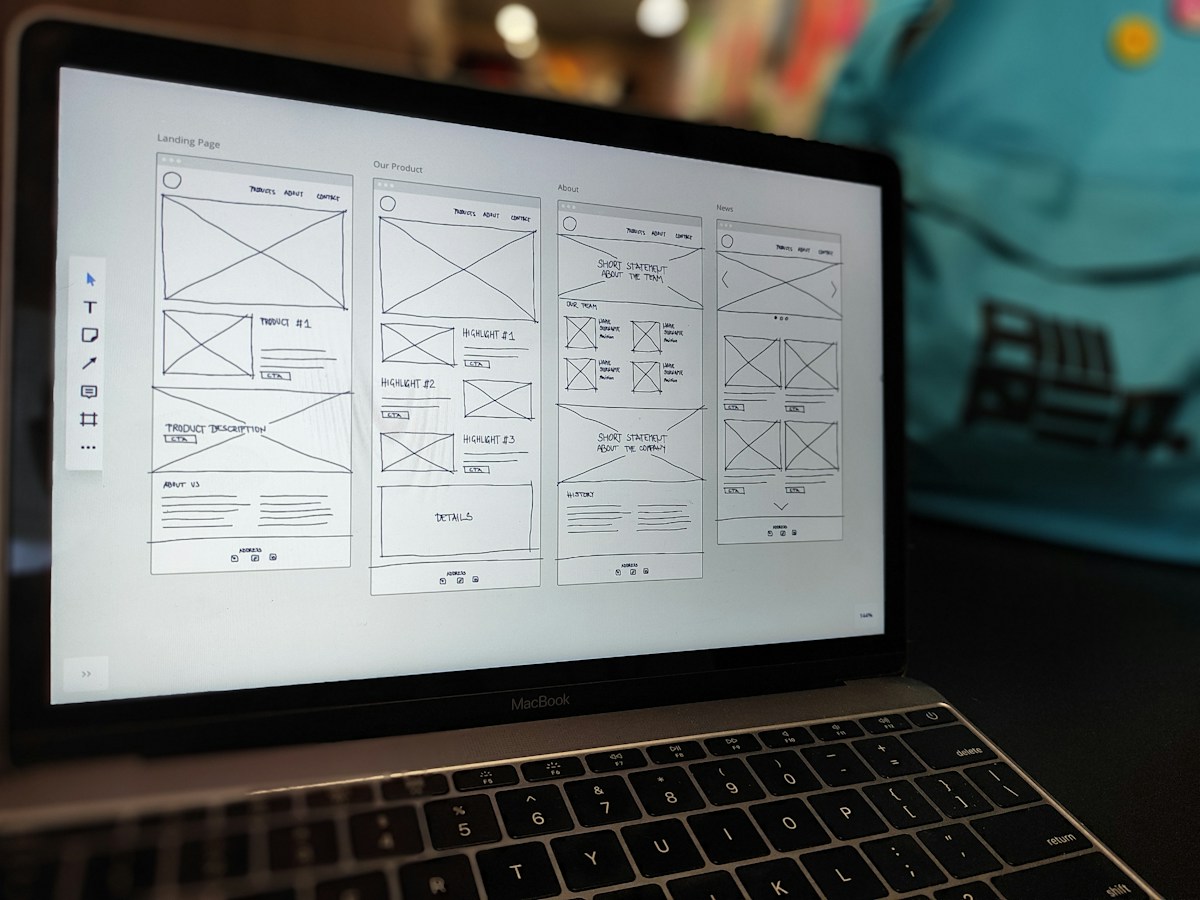
Kleap AI Builder: Full-Stack Deployment With Code Ownership
Kleap builds functional websites from natural-language prompts and includes hosting, custom domains, and forms. The platform gives complete code ownership, allowing handoff to external tools when needed.
This combination fixes the common gap between rapid prototyping and production readiness.
Speed vs. Launch Quality
A generated page can look polished within seconds yet need thorough review before live deployment. Navigation must reach all pages, forms need validation logic and error states, and responsive layouts should adapt predictably across devices.
Google's guidance recommends manual fact-checking of AI-generated content before publication, particularly for titles, descriptions, and alternative text, because generative models can produce inaccuracies.
Security and Infrastructure
Hosting and SSL certificates may be included by the platform, but these features do not guarantee that the generated page itself is secure. Review authentication flows, data handling, and third-party integrations rather than assuming that deployment automation removes all risk.
Workflow Compatibility
Platforms that lock users into proprietary environments limit adaptability when requirements change.
Studying examples clarifies two things: what AI handles well, like layout scaffolding, responsive grids, and placeholder content, and what still needs human judgment, like content accuracy, conversion optimization, and AI create web page accessibility compliance.
How an AI-Generated Webpage Goes From Prompt to Publication
The journey from a natural-language prompt to a live webpage typically involves four stages: generation, iteration, validation, and deployment. While platforms differ in their approach, most follow a similar sequence that balances speed with the need for accuracy and usability testing.

The typical workflow behind the first draft
A clear prompt typically states the audience, purpose, page type, required sections, and functional elements. The system interprets this input and produces page structure, visual styling, copy, navigation, forms, and responsive layouts.
The output may include HTML, CSS, and JavaScript or framework-based code, depending on the platform.
Common capabilities include AI-written headlines and calls to action, generated or selected images, automatic responsive behavior, and basic interactive components. Platforms like Kleap combine generation with hosting, custom domains, and forms, offering full-stack deployment and complete code ownership for handoff when needed.
That said, generated output can contain incorrect facts, an unsuitable tone, or fabricated references. Google recommends manual fact-checking of AI-generated content before publication, including titles, descriptions, structured data, and image alternative text.
Where Human Editing Changes the Result
Iteration fixes issues that appearance alone doesn't reveal. Users refine prompts, correct inaccurate claims, replace unsuitable visuals, adjust hierarchy, and test interactions across devices.
Responsive previews help spot layout problems, but real-device checks remain necessary because generated designs may behave differently across screen sizes.
A 2024 study examining websites from three AI website builders found notable usability and accessibility problems for screen-reader users, showing that technically valid HTML doesn't guarantee good semantic structure or accessible interaction. Accessibility evaluation should cover keyboard operation, focus behavior, form labels and errors, text alternatives, and contrast.
Before publication, verify that forms work correctly, links reach their intended destinations, custom domain settings are applied, analytics track properly, metadata is accurate, and legal notices are present. Deployment automation doesn't remove the need to review authentication, data handling, input validation, and third-party integrations.
Staging, code review, automated tests, and browser testing reduce launch risk but don't guarantee that the page is error-free.
Pro tip: Consider a hypothetical Chicago service business requesting a lead-generation page. Before launch, manually confirm service details, local relevance, form handling, and accessibility rather than assuming the generated result is production-ready.
How Much Does an AI Chatbot Cost?
Pricing for AI chatbots varies widely based on deployment model, feature set, and usage volume. Understanding the cost structure helps you budget accurately and choose a solution that aligns with your business needs.
Subscription-Based Pricing Models
Most commercial chatbot platforms charge monthly or annual subscription fees. Entry-level plans generally start around $50-$100 per month for small businesses with basic automation needs.
These plans often include limited conversation volumes, pre-built templates, and standard integrations.
Mid-tier plans range from $200-$500 per month and support higher message volumes, custom branding, advanced analytics, and API access. Enterprise plans exceed $1,000 per month and offer dedicated support, unlimited conversations, custom integrations, and priority feature development.
Usage-Based Costs
Some providers charge per conversation or per message rather than flat rates. This approach works well for businesses with unpredictable traffic patterns.
Costs usually range from $0.01-$0.10 per conversation, depending on complexity and AI model quality.
API-based solutions, like those using large language models, often charge per token processed. A token represents roughly four characters, and costs vary from $0.0001-$0.01 per token depending on the model.
A typical conversation might consume 1,000-5,000 tokens.
Development and Implementation Costs
Custom chatbot development needs an upfront investment. Building a basic bot internally takes 40-80 hours of developer time.
More sophisticated implementations with natural language understanding, context management, and complex workflows need 200+ hours.
Agency development costs vary by scope and region. Simple rule-based bots start around $5,000-$10,000.
AI-powered conversational bots with learning capabilities range from $20,000-$100,000, depending on features, integrations, and training needs.
Ongoing Maintenance Expenses
Budget for continuous improvement and maintenance.
Monitoring tools, hosting infrastructure, and data storage add $50-$500 monthly, depending on scale.
| Cost Component | Range | Frequency |
|---|---|---|
| Platform subscription (small business) | $50-$100 | Monthly |
| Platform subscription (mid-tier) | $200-$500 | Monthly |
| Platform subscription (enterprise) | $1,000+ | Monthly |
| Per-conversation pricing | $0.01-$0.10 | Per conversation |
| Basic custom development | $5,000-$10,000 | One-time |
| Advanced custom development | $20,000-$100,000 | One-time |
| Annual maintenance | Yearly |
When evaluating costs, think about total cost of ownership beyond initial subscription fees. Implementation time, training requirements, integration complexity, and ongoing optimization all affect real-world expenses.
Start with a clear requirements list and compare multiple vendors to find the best value for your specific use case.
Can AI Website Generation Meet SEO, Accessibility, and Disclosure Needs?
AI generation doesn't prove that a page is accurate, secure, usable, accessible, or optimized for search. Three core areas need human review before any generated page goes live: search optimization, accessibility compliance, and disclosure obligations.
Each requires evaluation against technical standards and relevant regulations that AI output alone can't satisfy.
Search Engine Optimization: Manual Fact-Checking Required
Google advises that automatically generated content should meet its Search Essentials and spam policies, with an emphasis on accuracy, quality, relevance, and human review. AI-generated text can contain fabricated facts, outdated information, misleading claims, or inappropriate wording.
SEO quality comes from satisfying user intent and maintaining trustworthy, technically sound content, not from whether AI was used. Validate claims, links, calls to action, structured content, metadata, and image alternatives before publication.
Accessibility Compliance: Semantic Structure and Testing
AI output often skips semantic HTML, form labels, keyboard support, visible focus states, useful alternative text, captions, or adequate color contrast. A 2024 study examining websites built by three generative AI website builders found major usability and accessibility problems for screen-reader users.
The study showed that technically valid HTML didn't necessarily translate into good semantic structure or accessible interaction. WCAG 2.2 offers the main widely used technical framework for web accessibility, but automated generation can't by itself verify every applicable requirement.
Check keyboard navigation, screen-reader compatibility, contrast, headings, forms, and responsive resizing manually.
Disclosure Obligations: Jurisdiction-Dependent Requirements
There's no universally adopted HTML mechanism for identifying AI involvement at the level of individual page elements. Disclosure requirements depend on the jurisdiction, content type, publication purpose, and degree of human review.
The EU AI Act requires providers of systems that generate synthetic text, images, audio, or video to mark outputs in a machine-readable and detectable way, subject to technical feasibility and applicable conditions. Requirements for publishers may differ, particularly for AI-generated text meant to inform the public about matters of public interest.
Assess compliance against the applicable jurisdiction rather than assuming a universal rule.
Which AI Webpage Workflow Fits Your Next Launch?
Three workflow approaches emerged from the examined examples, each suited to different project constraints and risk tolerances. The decision depends on how much review capacity you have, what integrations you need, and whether code ownership matters for your launch timeline.
Prompt-to-publish platforms: Speed with mandatory review
Tools that create and host pages from natural language work well for landing pages, portfolios, and early product validation when a human can fact-check the output. Google specifically recommends manually verifying AI-generated titles, descriptions, and content before publication.
This workflow fits projects where speed outweighs deep customization and where you can confirm accuracy, accessibility, and security before going live.
AI-assisted builders with manual control: Balanced generation and refinement
Platforms that create components, copy, layouts, and images while keeping human editing control cut the risk of publishing incorrect facts or inaccessible interactions. A 2024 study of AI-generated websites found major usability problems for screen-reader users even when HTML was technically valid, showing that generated output needs accessibility testing regardless of apparent correctness.
This workflow fits projects with moderate complexity, established design systems, or regulatory content requirements.
Full-stack AI platforms with code ownership: Deployment and handoff capability
Kleap fits this category by creating functional sites from prompts while offering hosting, custom domains, forms, and complete code ownership. The ability to export or hand off code fills the common gap between rapid prototyping and production readiness, making this workflow suitable when you need both speed and the option to migrate or integrate with external tools later.
Check that any platform you evaluate supports responsive editing, compatibility with version control, and the security controls your project needs.
Pro tip: Confirm what the platform includes for hosting, SSL, analytics, and ongoing maintenance before committing, since deployment automation doesn't eliminate review responsibilities or guarantee that generated pages are production-ready.
Frequently Asked Questions About AI-Generated Webpages
What is an AI-generated webpage?
An AI-generated webpage is a page where design, layout, content, or code gets created by artificial intelligence instead of manually written by a human developer. The degree of AI involvement varies.
Some pages use AI to draft text or suggest color schemes while a developer finishes the work. Others get built end to end by AI from a natural language prompt, producing functional HTML, styling, and structure without human coding.
The result can range from a static landing page to a multipage site with forms, navigation, and custom features.
Can AI build a complete website from a text prompt?
Yes. Modern AI builders interpret natural language instructions and create working sites with design, hosting, and features included.
You describe what you need, like an e-commerce store, portfolio, or blog, and the system builds the layout, writes initial content, sets up forms, and publishes the site. Platforms like Kleap offer this capability, turning an idea into a live webpage without requiring you to write code or handle separate hosting.
The AI manages structure, responsive design, and basic functionality, though you can still refine the output or request changes through additional prompts.
Are AI-generated webpages good for SEO?
AI-generated pages can rank well if they meet search quality standards, but the method of creation matters less than the result. According to Google, automatically generated content should be accurate, relevant, and useful to readers.
AI text can contain outdated facts, fabricated details, or awkward phrasing that harms credibility and rankings. Review the output for correctness, ensure headings and metadata are descriptive, and verify that the page answers the search intent.
Technical SEO factors, such as page speed, mobile usability, and structured data, apply equally to AI- and human-built pages. Treat AI output as a first draft and refine it to match your audience's needs and your site's quality threshold.
Do AI-generated pages need human editing?
In most cases, yes. AI can create functional structures and plausible text quickly, but it may include errors, irrelevant sections, or generic phrasing.
Review the content for factual accuracy, tone, and completeness. Check that calls to action, contact information, and product details are correct.
Adjust the design if the layout choices don't suit your brand or audience. For public-facing sites, legal pages, or content that influences purchasing decisions, human oversight helps make sure the page meets your standards and avoids misleading claims.
The level of editing depends on the complexity of the page and how closely the AI's output matches your intent.
Can an AI-generated webpage be accessible?
AI generation doesn't guarantee accessibility. A webpage is accessible when people using screen readers, keyboards, or other assistive technologies can navigate and interact with it effectively.
This needs proper semantic HTML, keyboard focus management, form labels, sufficient color contrast, and text alternatives for images. Research into AI-generated interfaces found that explicit accessibility prompts reduced some violations but didn't eliminate persistent semantic barriers.
After generating a page, test it with accessibility tools and, when possible, with real assistive technologies. Check the heading structure, link text, form error messages, and contrast ratios.
Accessibility is an outcome of design and testing, not a feature automatically delivered by AI.
Should AI-generated content or design be disclosed?
Disclosure requirements vary by jurisdiction, content type, and publication purpose. There's no universally accepted web standard for marking AI involvement at the element or page level, though emerging proposals distinguish between AI-assisted, AI-generated, and autonomous content.
Evaluate disclosure obligations based on your location, the nature of your content, and the degree of human review applied. When in doubt, get legal guidance specific to your jurisdiction and use case.
Moving from Generated Draft to Published Page
AI-generated webpages speed up production but don't remove the need for human review. Validation stays essential for accuracy, accessibility, and compliance with applicable disclosure requirements.
Emerging technical proposals support machine-readable indicators for AI involvement, but no universally adopted standard for element-level disclosure exists yet. Accessibility evaluation must handle semantic structure, keyboard operation, focus behavior, form labels, text alternatives, and contrast. Explicit accessibility prompts can reduce some violations but don't eliminate persistent barriers.
The workflow you pick depends on your capacity for fact-checking, your integration requirements, and whether code ownership matters for your timeline. Kleap combines natural-language generation with hosting, custom domains, forms, and complete code ownership, supporting rapid deployment when you can verify the output before publication.
Review claims, test functionality, and confirm the generated structure meets your accessibility and search optimization standards before going live.