Local SEO
How to build a website, rank on google, Chatgpt and get customers for my local business (Full step-by-step guide)
A local-business site that makes the phone ring: the prompt to copy-paste, Search Console the same day, and the reviews + job-photos loop that lifts your ranking.

TL;DR — This is for a local business, or an agency that builds sites for local businesses. You are not selling a pretty website. You are selling quote requests and phone calls.
This is proof, not a site to copy. construction-metallique-vaud.ch already gets 2 to 3 quote requests per week. Do not rebuild that site. Do not paste its name into the prompt. Look at it once, then use the blank prompt below with your business.

Open the AI builder, fill the blanks, hit Create, stay in that chat for extra pages. Publish. Put the domain on it. Then Search Console, job photos, reviews. That is the machine.
This whole article is English.
(Save this page so you can read it later or prompt it with your agent.)
What the customer actually sees
Someone types your job + your city.
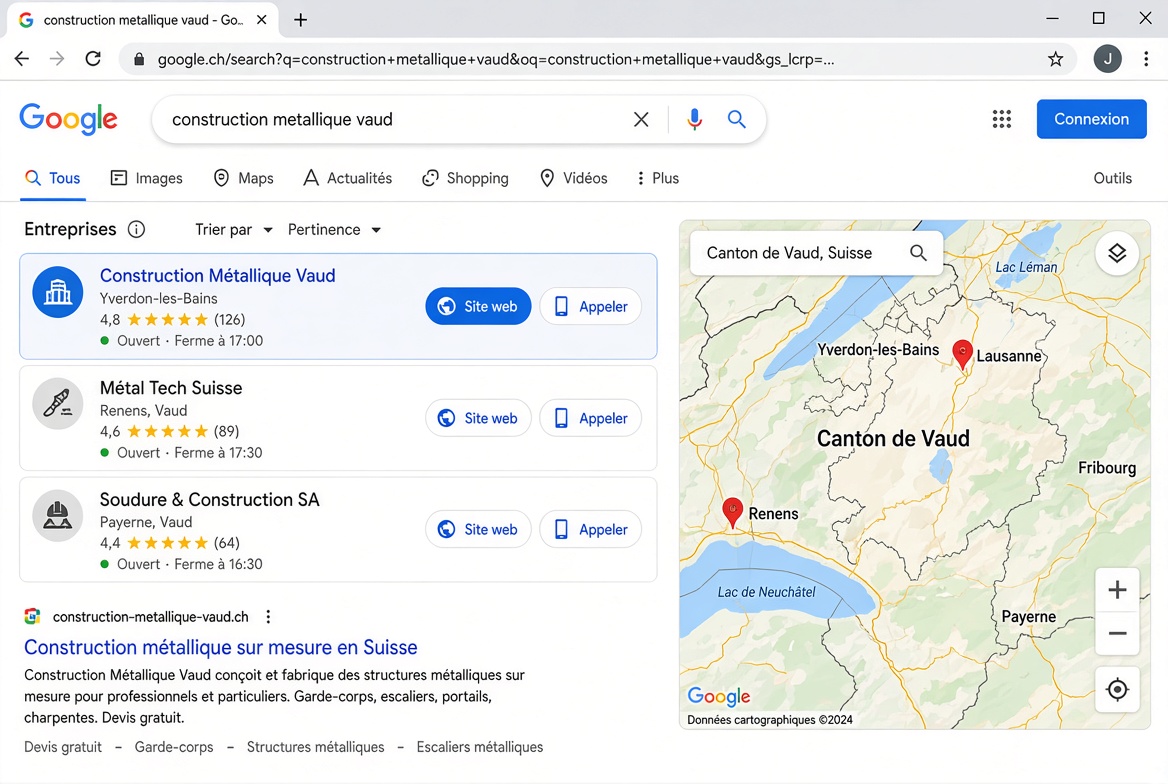
Google shows a map and three businesses. If they tap Website, they have eight seconds. They need: the exact job they searched, the city, and a way to ask for a quote or call.
If that click lands on a poem about passion, they go Back. If it lands on the words they typed + Get a quote, you get the lead.
The site exists for that click. The map pack and the reviews are how they see you more than once before they send the form.
Who this is for
- The owner with a van, a salon, a clinic, a restaurant, a gym, a workshop
- An agency that ships the same system for 10 local clients
If you are the agency: one site per client. Same blank prompt. New facts each time. Do not clone one page across 40 towns the client never drives to.
Paste this. Fill every [BRACKET].
Go to kleap.co, new site, paste this after you replace the brackets, hit Create.
Build a mobile-first website for [BUSINESS NAME], a [TRADE] in [CITY].

Facts only — do not invent awards, 24/7 if we do not pick up, or fake reviews:
Name: [BUSINESS NAME]
Phone: [PHONE]
WhatsApp: [SAME OR NONE]
Email: [EMAIL]
Base: [CITY]. We also work [AREA 2], [AREA 3].
Hours: [HOURS]
Services: [SERVICE 1], [SERVICE 2], [SERVICE 3], [SERVICE 4]
Why people call: [2 REAL REASONS]
Tone: a [TRADE] talking to a neighbour. Short sentences. No "passionate team".
Website language: [LANGUAGE BUYERS TYPE INTO GOOGLE]

Pages to create now (one page per search):
- Home targeting "[TRADE] [CITY]"
- [SERVICE 1] [CITY]
- [SERVICE 2] [CITY]
- [EMERGENCY OR QUOTE SEARCH] [CITY]
- [TRADE] [AREA 2]
- [TRADE] [AREA 3]
- [SERVICE 3] [CITY]
- [SERVICE 4] [CITY]
- [SPECIFIC JOB PEOPLE TYPE] [CITY]
- [FIRST NEIGHBOURHOOD WE ACTUALLY DRIVE TO]
- About
- Contact
- Job gallery with empty photo slots

First screen on every page:
- Big title = the search + [CITY]
- One line of proof
- Call [PHONE] button that uses tel:[PHONE_E164]
- Request a quote button

Footer on every page, identical:
[BUSINESS NAME] · [CITY] · [PHONE]

Contact form: 3 or 4 fields only — Name, Phone, City, What do you need.
Look: clean, serious, huge type on mobile.
Leave photo slots labeled: van or shop, hands at work, a finished job, a close-up.
That is the prompt. The Vaud site is only the proof that this shape of page gets quotes. Nothing from that site goes into your paste.
How to pick the 10 searches: job + city first, then the services people actually type, then 2–3 areas you already drive to. Examples of the pattern — not sites to rebuild:
- Locksmith + New York → locksmith New York, emergency locksmith NYC, car lockout NYC, lock change NYC, locksmith Brooklyn
- Plumber + Manchester → plumber Manchester, leak repair Manchester, boiler install Manchester, then Salford
- Dentist + Austin, salon + Lisbon, gym + Lyon — same pattern
A pro does not publish 80 thin “in [street]” pages on night one. Ship the 10. Then add the next three places the van already goes. Each of those pages needs a different job story, not one paragraph with the city swapped.
Stay in the same chat
Create the page /[service]-[city]
Title: [Service] [City] | [Business name]
Write like a [trade]. Problem first.
What we do, what we do not do, 3 steps, 4 FAQs, Call button again.
Do not copy the other service pages.
Create /[trade]-[neighbourhood]
Only if we actually work [neighbourhood].
One real-sounding job story. No fake customer name.
Link back to the city page and one service page.
Put a sticky Call button on mobile on every page.
Make the Home title: [Trade] in [City] — [two services].
Delete any sentence with best, #1, leading, passionate, tailored.
Set Google titles under 58 characters and descriptions under 155.
Useful words first.
If the copy is fluffy: Cut 40%. No adjectives. Talk like a [trade].
Publish in the top bar. Domain: Settings → Domain → Buy New or Connect Existing. A records as shown. Cloudflare = DNS only, not proxied.
Test on your phone on mobile data. Send the URL to one person who does not work with you: What do they do, where, how do I ask for a price — 8 seconds?
Search Console — this is how Google finds the pages
Do this the day your custom domain works. Not next month.
-
Add a Domain property:
yourdomain.com(no https). -
Google gives you a TXT record or an HTML tag.
-
In the builder chat:
Add this Google Search Console verification tag in the head of every page: [paste the tag].If Google asked for DNS instead, add the TXT at the domain settings (same place you pointed the A record).
-
Back in Search Console → Verify.
-
In the builder: Settings → connect Google Search Console (sign in with the same Google account).
-
Submit the sitemap:
https://yourdomain.com/sitemap.xmlunder Sitemaps. -
URL Inspection → Home, then each of the 10 pages → Request indexing.
That does not rank you tonight. It tells Google the pages exist. If day 21 Search Console still shows zero impressions, you are not indexed — stop writing new pages and fix domain + verification first.
The customer machine (after the site can take a quote)
Four loops. This is more important than a blog.
1. Map pack + reviews
Claim the Google listing. Same name as the van and the footer. Same phone. Real job photos. After every job:
Thanks again for today. If you have 2 minutes, a Google review helps people nearby find us: [LINK]
No discount for a star. The listing and the site must tell the same story or Google treats you as two different shops.
2. Job gallery after every finished job
This is the kind of photo that belongs on the site — a real finished job, not a stock office:
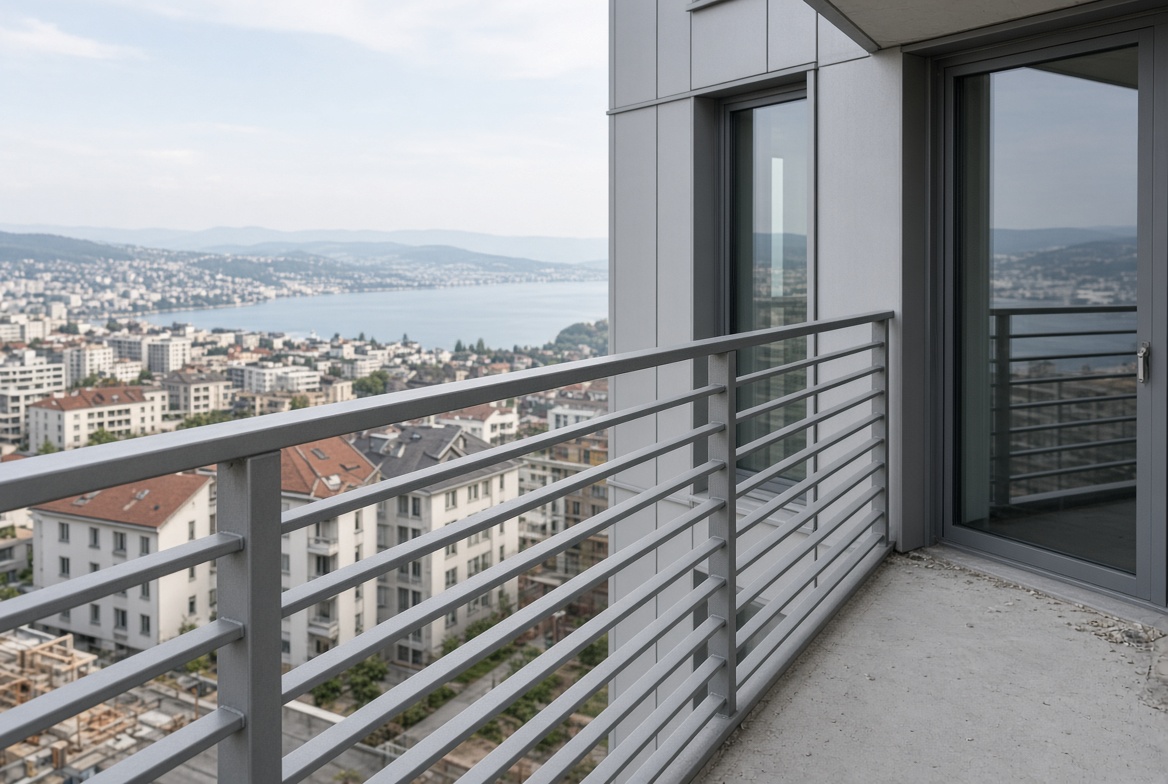
Take 4 photos on the phone: before, during, after, a detail.
In the chat:
Add this job to the gallery.
Place: [CITY]. Work: [WHAT YOU INSTALLED].
Use the 4 photos I just uploaded.
Short caption. No fake client name.
Link the card to the matching service page.
Then Publish / Update so the live site gets the new photos. Then in Search Console → inspect that gallery URL → Request indexing.
3. One extra place page a week
Only a town you already worked. New photos from that job. Not a copy-paste with the city name swapped.
4. Answer in 5 minutes
Google and the form send people who want a number this week. A quote request that sits until Monday is a lost job. The site cannot fix that.
This week
Tonight: fill the brackets, Create, check the quote button.
Tomorrow: domain + Search Console verify + connect GSC + submit sitemap + request indexing on the 10 URLs.
This week: real photos on Home and two service pages.
Every job after that: gallery + review SMS + request indexing on the new gallery URL.
Month 2, only if the first pages already get quotes and you answer them: Robot-Speed can add more pages and work on Google + AI answers. If the first screen cannot close a quote, more articles will not save you.
Checklist
- Brackets filled with your business (not the proof site)
- Quote or Call works on a phone
- Site language matches the searches (no mix)
- Domain live
- Search Console verified
- Search Console connected in the builder
- Sitemap submitted
- Home + 10 pages requested for indexing
- Dummy photos gone
- Gallery exists for real jobs
- Review SMS ready
- Someone who does not work with you passed the 8-second test
- You answer the form
Now build yours
The prompt from this guide is already in the box — replace the brackets with your own details and hit create.