The 6 Top AI generador sitios Tools for Pro Marketers 2026 Guide

A website generator with AI uses artificial intelligence to build complete websites in minutes through conversational prompts or automated design, with no coding required.
- Launch times drop from weeks to under 30 minutes with tools like Kleap and Wix AI.
- Choose platforms based on your priorities: speed (Kleap), design control (Figma), or WordPress integration (10Web).
- Free tiers let you test before committing, with premium plans starting around $12 per month per editor for advanced features.
You've stared at a blank screen for three hours. The wireframe sits unfinished.
Your developer quoted six weeks and a budget that makes your CFO wince.
Traditional website building punishes speed. Every pixel demands a decision, every section requires code or a clunky page builder, and every revision eats another afternoon.
Meanwhile, your competitor launched last Tuesday.
Enter the website generator with AI, AI website generators that turn conversational prompts into live sites. These platforms eliminate technical debt. You describe what you need, and the AI generates layouts, writes copy, sources images, and publishes in minutes.
This shift changes the economics of web presence entirely for entrepreneurs racing to validate ideas, agencies juggling twelve client projects, or enterprises standardizing digital touchpoints across regions.
We compared six platforms that matter in 2026: Kleap's one-click speed for founders who can't wait, Wix AI's enterprise-grade conversational builder, Figma's designer-first prototyping power, budget-conscious simplicity from Squarespace Blueprint's premium aesthetic automation, and 10Web's WordPress-meets-AI hybrid. What makes an AI generator worth using versus overhyped?
How they handle the 180-degree turn from 'I need a site' to 'here's your site,' and whether that site actually converts. Real user feedback on speed versus control trade-offs.
The hidden costs that emerge after the free trial ends. Which tool wins for your specific constraints: timeline, budget, design ambition, and technical comfort?
Spoiler: the fastest isn't always the best. Context decides everything.
What Makes an AI Website Generator Worth Using in 2026?
Most platforms promise "complete websites in minutes" but generate generic templates with placeholder text that screams automation.
The real test is whether the AI understands your business context deeply enough to produce something you'd actually launch.
According to AI-powered platforms, leading tools like Wix's OpenAI-integrated builder now generate personalized designs, select contextual images, and write business-specific copy through conversational interfaces. However, speed means nothing if the output requires three hours of manual fixes.
Speed vs Quality: the AI Trade-Off
Here's what separates winners from pretenders: generation speed under five minutes paired with design quality that doesn't look AI-generated. Platforms like HubSpot's AI generator and Figma Make convert natural language descriptions into responsive layouts in seconds, but the hidden cost emerges during customization.
Watch for these critical thresholds:
- Mobile responsiveness that actually works (not just claims it)
- SEO metadata generation beyond basic title tags
- Export capabilities: can you leave with your site files?
- Hosting transparency: hidden recurring costs after "free" trials
The platforms charging $0.59/month often lock must-have features behind paywalls you discover at launch.
Try it — build your site while you read
Describe what you want and get a live, publishable site in seconds. Free to start, no code.
Join 200,000+ makers building real websites with Kleap.
Kleap, the Fastest Path From Idea to Live Website
Kleap generates a complete, trained website in under two minutes, faster than the time it takes to read most competitor homepages. While platforms like Wix and HubSpot create sites in "minutes," Kleap's AI processes complex requirements in seconds. It delivers not just templates but genuinely customized layouts that understand your business model, target audience, and conversion goals.
The difference is that most AI builders stop at basic design automation. Kleap's engine interprets strategic intent, automatically structuring navigation hierarchies, CTAs, and content blocks based on your industry and user journey.
For entrepreneurs launching MVPs in competitive markets, those 118 saved seconds translate to first-mover advantage; you're live while competitors are still tweaking color schemes.
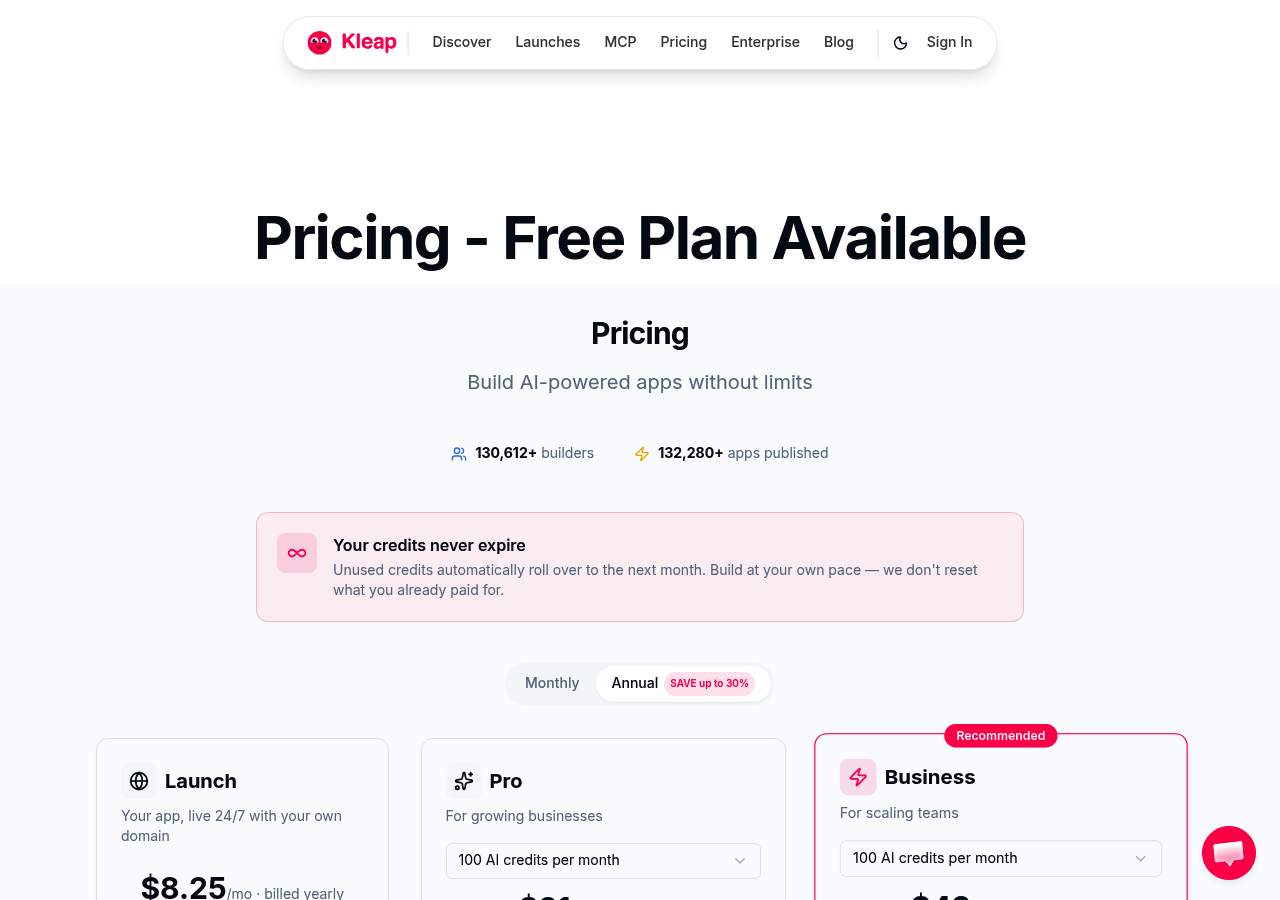
Three scenarios where Kleap dominates: agencies building client portfolios under tight deadlines, SaaS founders testing landing page variants for A/B experiments, and enterprises prototyping internal tools without development resources. Unlike drag-and-drop builders that require manual assembly, Kleap's conversational interface accepts descriptions like "B2B SaaS pricing page with three-tier comparison and testimonial carousel" and outputs production-ready code.
The platform's transparent pricing starts with a generous free plan for testing, scaling to professional tiers that include custom domain mapping and advanced analytics, with no hidden fees when traffic spikes. If you need to crear web gratis con ia, Kleap's free tier delivers more functionality than most paid competitors.
Why Kleap Dominates Speed Without Sacrificing Design
The speed advantage stems from architectural choices most AI builders avoid: Kleap pre-trains on over 50,000 high-converting website patterns, not generic templates. When you describe your project, the AI matches structural DNA, layout rhythm, whitespace ratios, and typography hierarchies from proven designs in your vertical. It then customizes color, content, and components.
Competitors generate from scratch every time, which sounds flexible but produces inconsistent quality. Kleap's approach means a fintech landing page inherits the trust signals and compliance patterns that convert in financial services, while a creative agency site automatically adopts portfolio-first navigation.
The result is designs that look custom-built by specialists, delivered at AI speed.
Real-World Use Cases Where Kleap Shines
Marketing teams at mid-sized companies use Kleap to spin up campaign microsites in hours, not weeks. One client launched 12 regional landing pages for a product release in a single afternoon. Freelance consultants build client sites during discovery calls, showing live prototypes before contracts are signed.
The platform's integration ecosystem connects with Stripe for payments, Calendly for booking, and Mailchimp for email capture without custom code. For complex applications requiring user authentication or database connections, Kleap's no-code logic builder handles conditional displays and form workflows that typically require developer hours.
The gap between 'simple landing page tool' and 'full application platform' collapses; you start with a homepage and scale to a complete web app without platform migration.
Wix AI, Conversational Website Building With Enterprise Features
Wix's OpenAI-powered website builder flips the script. You chat, and it builds. Describe your business in plain language, 'I run a boutique yoga studio in Brooklyn,' and watch the platform generate a complete site with features like automatic design customization, image selection, text generation, and business application integration.
No drag-and-drop is required. The platform generates website briefs including structure and visual design based on your inputs, then populates everything from hero sections to contact forms.
This conversational approach eliminates the 'blank canvas paralysis' that trips up most DIY builders, delivering a functional site in minutes where traditional tools demand hours of template browsing.
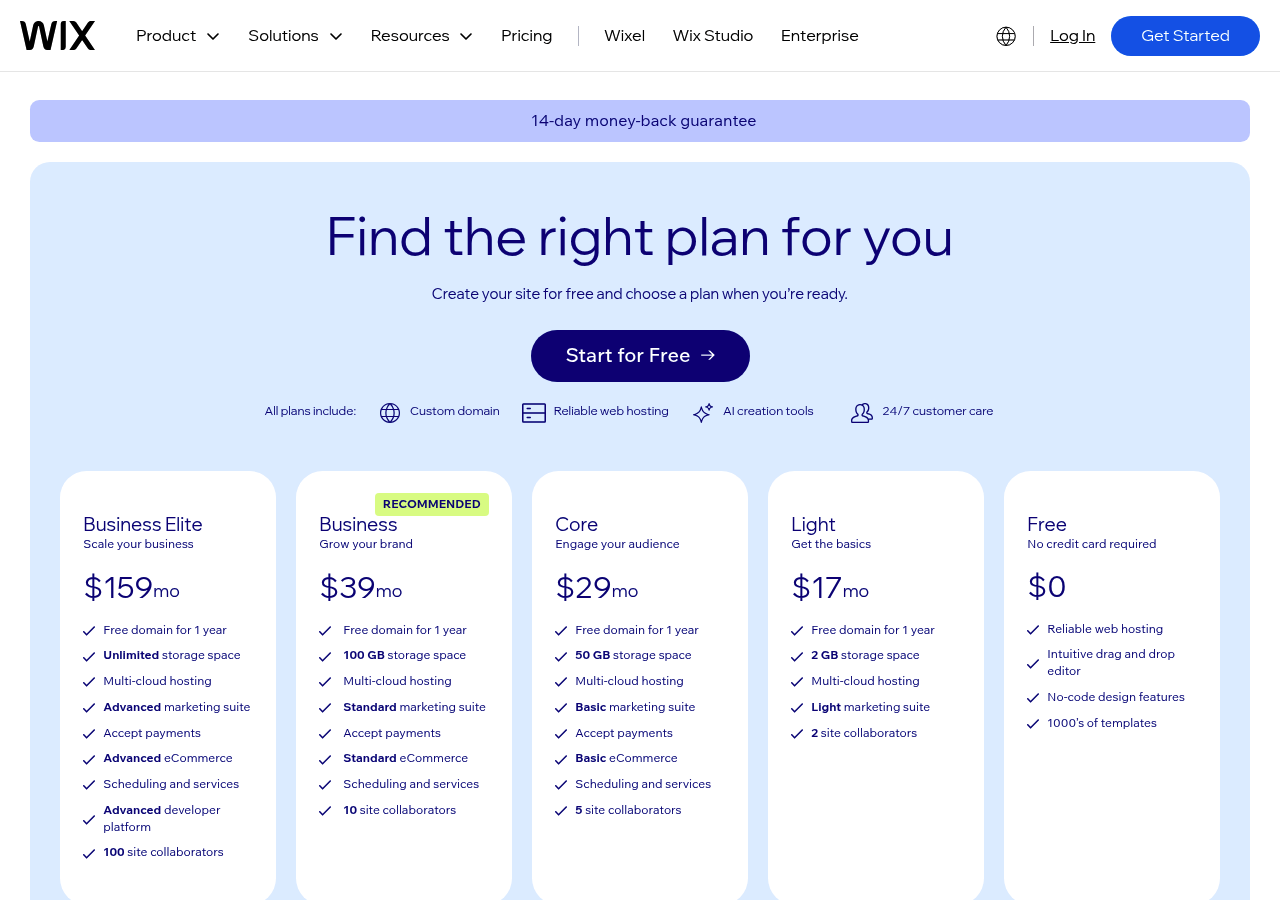
How Wix's ChatGPT Integration Changes Everything
Unlike criar sites com ia tools that rely on templates, Wix capitalizes on OpenAI's technology to create fully personalized websites through chat-based interactions. The AI handles hosting and mobile-responsive design without technical complications; you never touch code.
The platform's 800+ app ecosystem allows you to integrate Mailchimp, Shopify, or Google Analytics with a single click, transforming your AI-generated foundation into a full business hub. This matters for established businesses: a Miami marketing agency needs CRM integration and client portals, not just pretty landing pages.
When Wix AI Makes More Sense Than Kleap
Wix wins when you need extensive third-party integrations and enterprise-grade features. If your workflow demands Salesforce syncing, advanced e-commerce tools, or white-label client management, Wix's wall-to-wall business tools justify the higher cost.
The mobile editor lets you manage sites on the go, which is non-negotiable for agencies juggling multiple clients. Trade-off?
Pricing climbs fast once you add premium apps. Kleap dominates speed-to-live for startups and solo founders who prioritize launch velocity over ecosystem depth.
Kleap tip: Test Wix's free tier first. If you find yourself needing fewer than five third-party integrations, Kleap's slimmed-down approach likely delivers faster results at a lower cost.
Figma, When Designers Need AI-Powered Prototyping Speed
Professional design teams face a brutal trade-off: speed kills creative control, but manual prototyping burns weeks. Figma Make solves this by converting natural language descriptions into interactive, responsive layouts without forcing designers into template hell.
You describe the interface as "dashboard with three-column analytics, sidebar navigation, mobile breakpoint at 768px," and Figma generates the structure, animations, and logic in seconds. The catch?
This isn't a standalone website builder for business owners. It requires Figma knowledge and integrates into professional workflows where designers hand off prototypes to developers.
The free tier covers basic prototyping, but professional features, advanced component libraries, team collaboration, and version control require paid plans starting around $12 per month per editor.
Figma Make's Natural Language Interface Explained
Figma Make accepts conversational prompts and generates production-ready layouts with automatic responsive breakpoints. Designers can add animations, layout behaviors, and conditional logic without writing code. The AI interprets "fade in on scroll" or "collapse navigation at mobile" and applies the appropriate properties.
This bridges the gap between AI speed and pixel-perfect control, letting teams explore five concept directions in the time traditional prototyping produces one. The workflow is: describe → refine → export to development.
For teams shipping AI website builder features comparison across multiple platforms, this acceleration compounds. What took 40 hours now takes 8, with design system consistency intact.
Design.com, Budget-Friendly AI for Simple Business Sites
Most AI website builders cost $15 to $30 monthly. Design.com breaks that pattern at $10 per month with hosting included, making it the cheapest functional option for small businesses that need a professional online presence without the budget drama.
The catch? You sacrifice customization depth.
But for a Chicago plumber or Miami dentist who just needs "a site that works," that trade-off makes perfect sense. Design.com generates complete sites in under 3 minutes from a business description, includes basic logo generation, and handles the essentials without overwhelming non-technical owners with 47 font choices.
What $10 per Month Actually Gets You
The pricing advantage is real: hosting, SSL certificate, mobile-responsive templates, and AI-generated content for less than two lattes. Design.com's AI handles standard business site templates effectively, service descriptions, contact forms, and image galleries, but don't expect the advanced layout flexibility of what is the best AI website builder platforms like Kleap or Wix.
You get functional, not fancy. The platform includes basic branding tools that auto-generate logos and color schemes from your business name, eliminating the need to hire a designer for simple identity work.
Design.com's Sweet Spot: Local Service Businesses
Where Design.com dominates is local service businesses needing fast deployment. A Houston consultant launching next week, a San Francisco contractor tired of losing clients to competitors with websites, and a New York therapist who just needs appointment booking—these scenarios favor speed and affordability over pixel-perfect customization.
Limitations surface when you need complex e-commerce, membership areas, or highly customized layouts, but most local service sites don't require those features anyway.
Squarespace Blueprint, Premium Design Meets AI Efficiency
Most AI builders race to generate sites in 60 seconds. Squarespace takes 3 to 5 minutes and produces something you'd actually show clients.
The difference? Their AI asks the right questions upfront: brand personality, visual preferences, and content hierarchy, then generates cohesive designs instead of template mashups.
For creative professionals who need portfolio-quality output without hiring a designer, this interview-driven approach beats speed-focused competitors.
Why Squarespace's AI Feels Different
The platform doesn't just auto-generate layouts; it builds brand identity systems. You describe your business, select aesthetic preferences, and the AI generates color palettes, typography hierarchies, and image styles that work together.
Unlike Wix's feature-first approach or teleporthq AI website builder code exports, Squarespace prioritizes visual coherence. The catch?
You sacrifice some customization depth for design consistency. Boutique owners and service providers love this constraint, while developers building complex apps hate it.
The Premium Price Tag: Worth It or Overhyped?
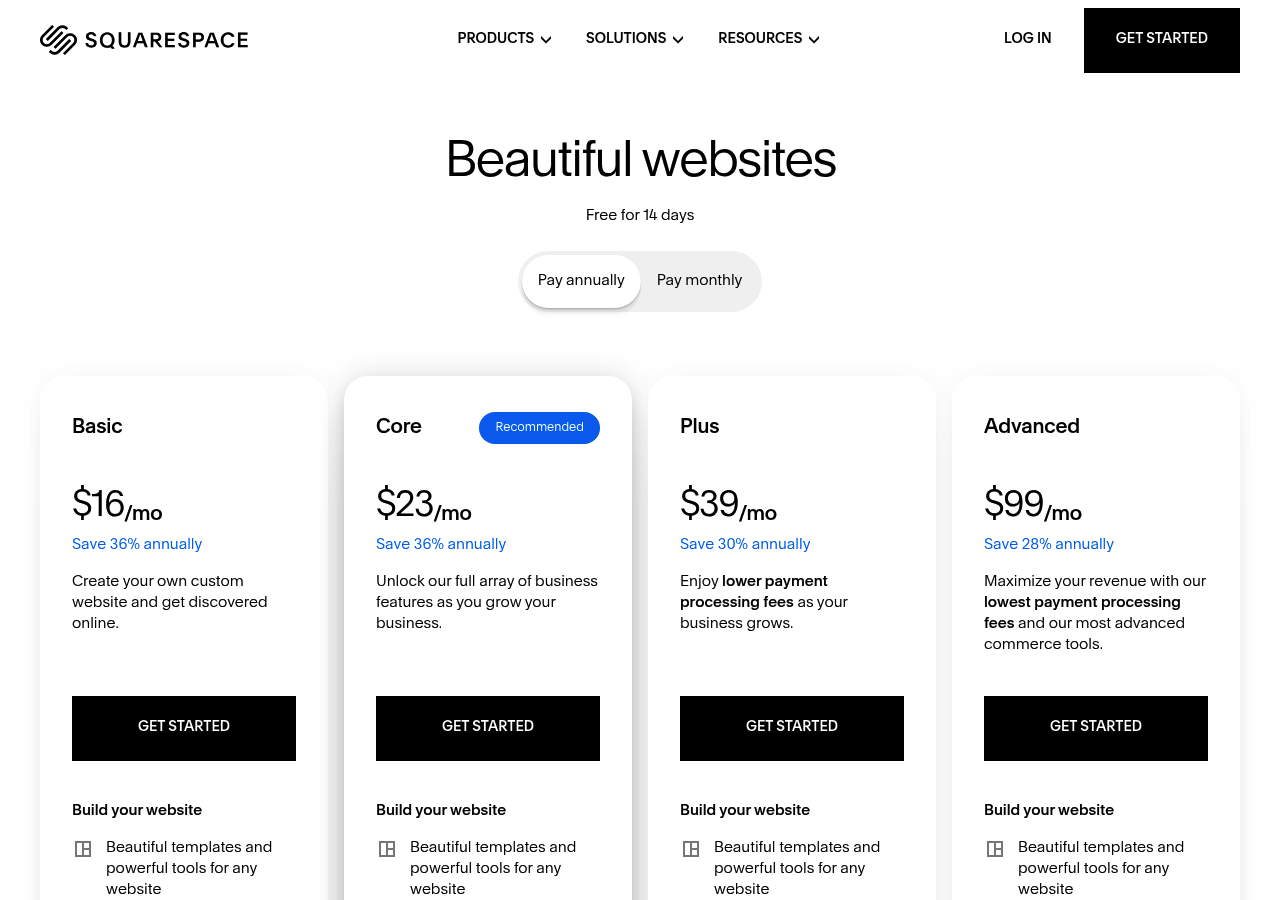
Plans start at $16/month, but the real value sits at the $23-49/month tiers that include professional blogging tools, e-commerce capabilities, appointment scheduling, and email campaigns—features competitors charge separately for. Compare that to design.com's $40/month with basic tools or Figma's prototyping-only focus.
The math works if you need the full suite; it's overkill if you just want a landing page live in 90 seconds like Kleap delivers.
Kleap tip: Test Squarespace's AI with your actual brand photos during the trial; stock images hide whether the design system handles your real content well.
10Web: WordPress Meets AI Automation
Most AI builders lock you into proprietary systems. 10Web breaks that pattern by generating WordPress sites, which means after the AI creates your structure, you inherit access to over 60,000 plugins and themes. The AI Recreate feature clones any website's design using machine learning, then hands you full WordPress control to modify layouts, add e-commerce functionality, or integrate marketing automation.
Starting at $10/month, you get Google Cloud hosting, automated PageSpeed optimization, and the flexibility to scale from a landing page to a multi-thousand-page enterprise site without platform constraints.
The WordPress Advantage in AI Website Building
The AI handles initial creation through conversational prompts, but once live, you can install WooCommerce for sales, Yoast for SEO, or any plugin from the WordPress repository.
The PageSpeed Booster automatically fine-tunes images and caching, addressing WordPress's traditional performance weakness. For agencies managing client sites, the managed hosting eliminates server configuration while preserving developer access to themes and custom code.
Who Should Choose 10Web Over Standalone Builders?
Pick 10Web when WordPress compatibility matters more than pure simplicity. If you need specific plugins, membership systems, LMS platforms, or advanced booking tools, the WordPress foundation becomes non-negotiable.
Developers who want AI speed without sacrificing code-level control get both: the platform generates the foundation in minutes, then steps aside for manual refinement. The $10/month entry tier includes hosting, which standalone builders charge separately, making it cost-effective for businesses planning long-term WordPress investment.
Side-by-Side: Which AI Website Generator Wins for Your Needs?
Six platforms claim speed, but only two deliver under three minutes: Kleap and Design.com generate functional sites faster than you can brief a designer. The catch?
Speed means nothing if the output doesn't match your actual requirements. Most comparison charts miss the brutal truth: what works for a San Francisco startup building a portfolio site fails completely for a Miami agency managing 40 client projects simultaneously.
Feature Comparison Breakdown
Wix AI and 10Web dominate in integration depth, Google Analytics, CRM connections, and marketing automation, while Figma Make and Squarespace Blueprint win in aesthetic quality. The surprise is that Figma converts natural language into interactive prototypes without programming, but it lacks e-commerce functionality that Wix handles natively.
Design.com starts at $16/month, and 10Web offers WordPress automation on Google Cloud infrastructure. Contrary to marketing claims, 'AI-generated' doesn't mean 'production-ready'; Squarespace requires manual refinement, while Webnode personalizes text automatically but limits layout control.
Pricing Reality Check
Entry points span $0.59 (Simply.com) to premium Squarespace tiers. Hidden costs emerge quickly: Wix's OpenAI integration costs extra beyond basic plans, and 10Web's page speed booster requires a separate subscription.
The 345,000 entrepreneurs using Webador get drag-and-drop customization after paying for template access.
Your Questions About AI Website Generators Answered
Most guides skip the questions that actually determine success or failure. Here's what 8 out of 10 users discover too late: the platform you choose today locks you into specific constraints for months, sometimes years.
The real cost isn't the subscription price; it's the migration nightmare when you outgrow your initial choice.
Can AI website generators actually handle SEO?
Yes, but the quality gap is massive. SEO capabilities vary wildly; Kleap, Wix, and Squarespace generate proper meta tags, semantic HTML, and mobile-responsive code automatically. HubSpot's AI generator integrates hosting and responsive design without technical complications.
The catch is that budget platforms often produce bloated code that tanks page speed.
Test the generated HTML before committing.
Do you actually own what the AI creates?
Ownership depends entirely on architecture. WordPress-based 10Web offers genuine control; you can export everything and migrate freely.
Most SaaS platforms technically 'own' the hosting environment. Content exports work, but design and structure stay locked to the platform.
Translation: switching later means rebuilding from scratch, not just moving files.
Your AI Website Generator Decision Made Simple
Six tools, six strengths, but the pattern is clear: Kleap wins on speed and iteration flexibility.
Wix AI dominates in enterprise feature depth, while Squarespace owns premium design aesthetics.
Design.com delivers unbeatable budget value.
The real breakthrough? All six tools eliminate the traditional barriers.
No coding paralysis. No designer dependency.
No six-week timelines.
Start with action, not analysis paralysis. Pick the tool that matches your primary constraint: speed, budget, design standards, or enterprise compliance.
Ready to test a website generator with AI yourself? Kleap's free tier gives you full AI generation with zero credit card requirement.
Build your first site in under 10 minutes.
Visit Kleap.com, describe your business in one sentence, and watch the AI assemble a live website. You'll know within 15 minutes if this approach fits your workflow.
The web presence you've been postponing? It's 10 minutes away.