AI presentation maker

Describe your topic. Download an editable PowerPoint file.
- TestedSame prompt, 10 runs on 7 November 2026 (production build): 10 of 10 delivered a 10-slide .pptx, a native chart in 10 of 10 (every file opened), median 52 s by Kleap's turn timer. 2 of the 10 turns hit a provider stream cut: the deck still came, written a second time, slower and with fewer speaker notes. Ask Kleap to revise the deck in the same chat. Times are Kleap's own timer for the AI's turn in our test (one run, or the median where we repeated it), not a promise: yours may take longer, and reading and checking the file comes on top.
- Free to startYour first try usually needs no account; to keep the result, Kleap asks for a free account, with no card. Each file uses Kleap usage, and the free plan's usage refills automatically.
- Using the boxEdit the example or write your own, then press Create. Facts you don't give are marked [to fill in]; targets Kleap works out itself are labelled as proposals.
What is an AI presentation maker?
An AI presentation maker turns a short brief into a finished slide deck. Kleap's AI presentation maker returns an editable PowerPoint (.pptx) in the chat: titled slides, speaker notes, pictures made for the deck and a native chart when your brief has numbers. Open it in PowerPoint, Keynote or Google Slides and keep editing.
An AI presentation maker is a tool that turns a short description of a topic into a finished slide deck: it writes the content, splits it into one idea per slide and gives each slide a layout. Kleap's AI presentation maker hands you a standard PowerPoint (.pptx) file instead of a deck locked inside a web editor. You describe the topic, the audience and the number of slides. Kleap chooses from ten slide layouts (cover, section, content, two columns, big numbers, quote, image, timeline, chart and closing), applies your brand colours and fonts when you give them, and writes speaker notes for the slides. Facts you did not give are marked [to fill in]; its own targets are labelled as proposals. The file opens in PowerPoint, Keynote or Google Slides, a copy stays in your project's files, and you can ask for a revised deck in the same chat. For an investor deck, use the AI pitch deck generator.
Presentation maker or pitch deck generator?
Use this page for any deck you present: a plan, a lesson, a report, a team update. Its test brief is a 10-slide Instagram plan for a Leeds bakery, and the slides follow the order the brief lists. Targets Kleap works out itself are labelled as proposals, and facts you leave out stay [to fill in].
A pitch deck is narrower: a fixed investor order (problem, solution, traction, market, team, the raise) and a funding ask. If the deck asks someone for money, start on that page; its box opens with an investor brief, and its example deck charts traction and the use of funds. Both pages return the same kind of file, an editable .pptx. A .pptx is a file you own and edit in PowerPoint, Keynote or Google Slides; an online editor such as Gamma keeps the deck in its own web editor, with its themes, and exports it when you ask.
Checked on 7 November 2026 by the Kleap product team. Test: “Make a 10-slide PowerPoint Instagram plan for Crumb & Co, a Leeds bakery. (details on the next line)”, a 10-slide .pptx (PowerPoint), 51 s by Kleap's turn timer.
Measured on
One real run of the prompt in the box above, unchanged: a fresh project, the real Kleap interface, a test account. Every number on this page comes from that run and its delivered file. Times are Kleap's own turn timer, shown under the reply in the chat. One run, not an average.
- Same prompt, 10 runs on 7 November 2026 (production build)
- 10 of 10 delivered a 10-slide .pptx; 10 of 10 files hold a native chart
- Median of Kleap's turn timer over all 10 runs
- 52 s (fastest 45 s, slowest 3 min 17 s)
- Turns with a provider stream cut
- 2 of 10 (the deck was written again)
- Kleap's turn timer (the deck on this page)
- 51 s
- Slides
- 10
- Native charts in the deck
- 1
- Generated pictures in the deck
- 3
- [to fill in] markers
- 0
See what this prompt creates
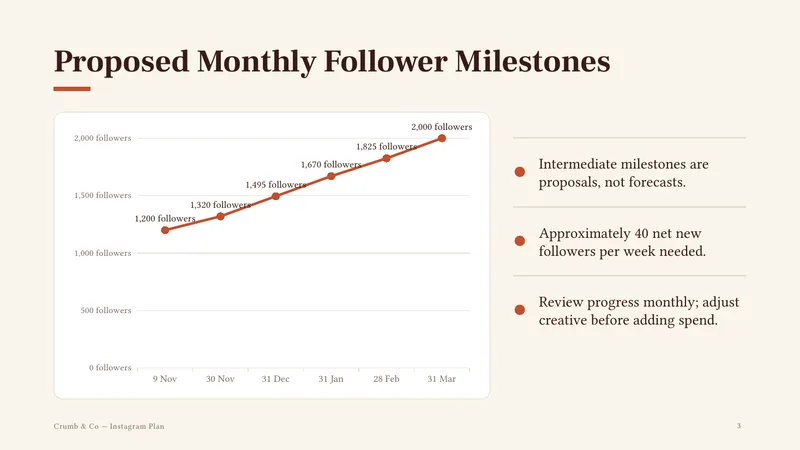
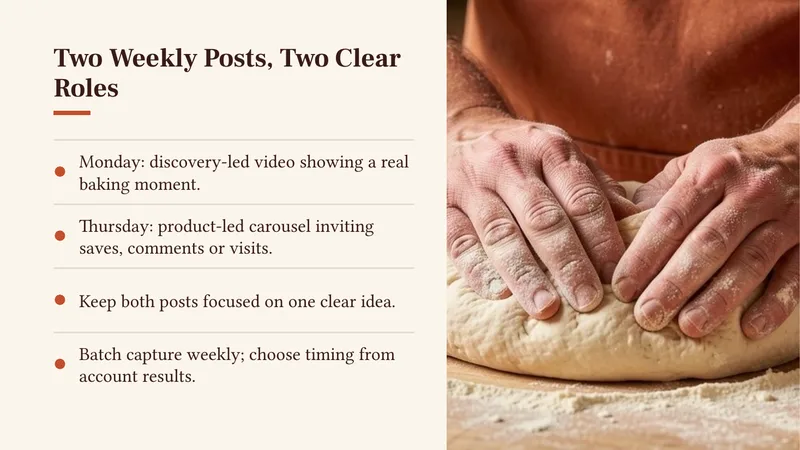
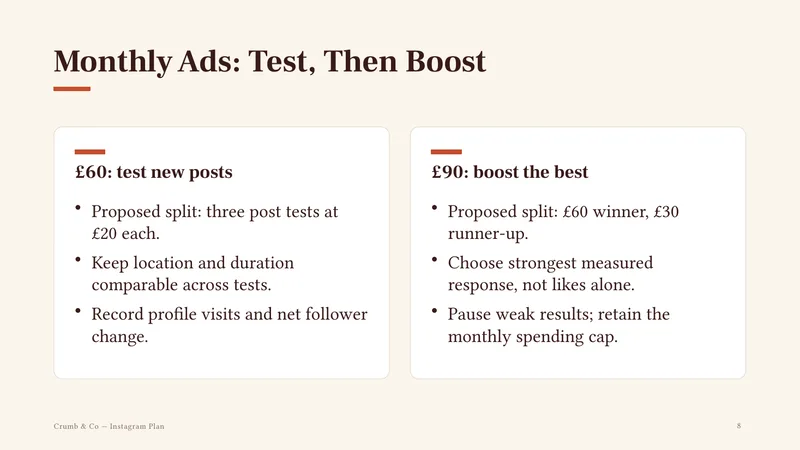
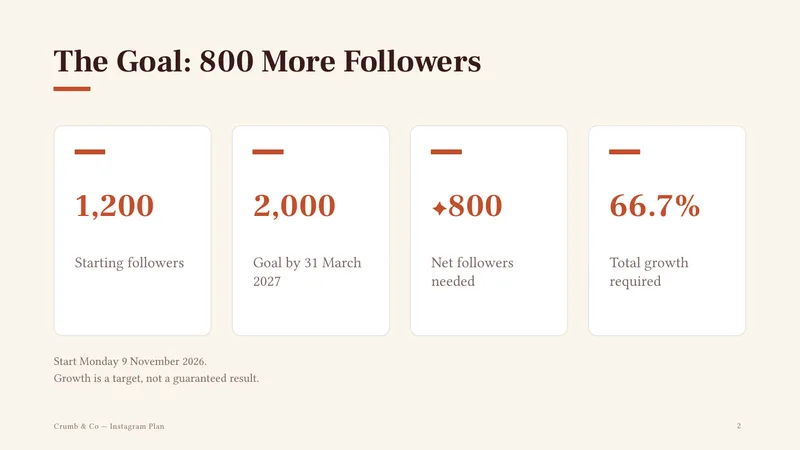
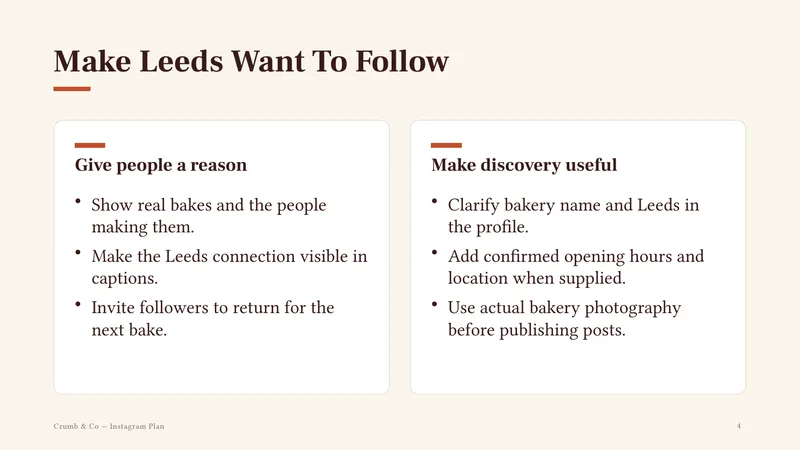
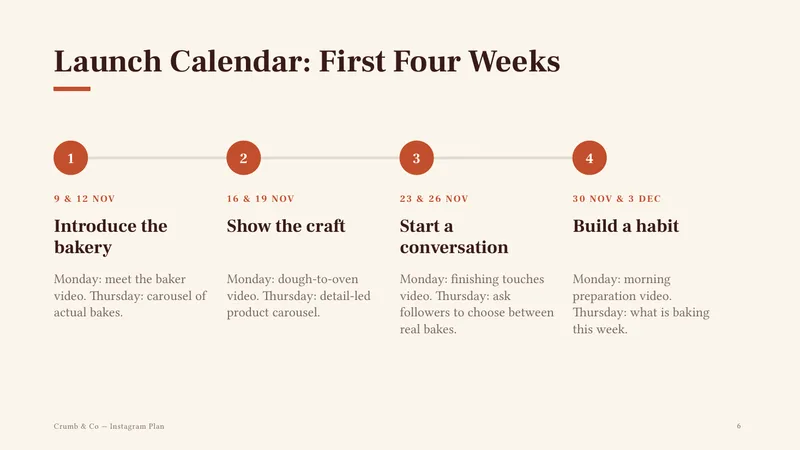
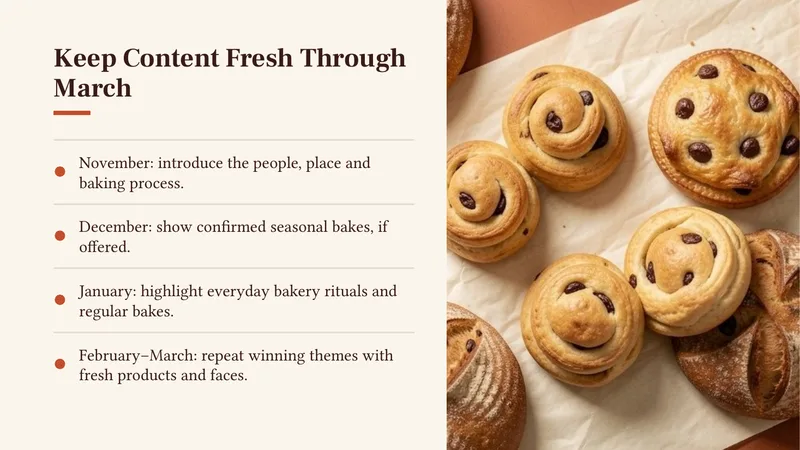
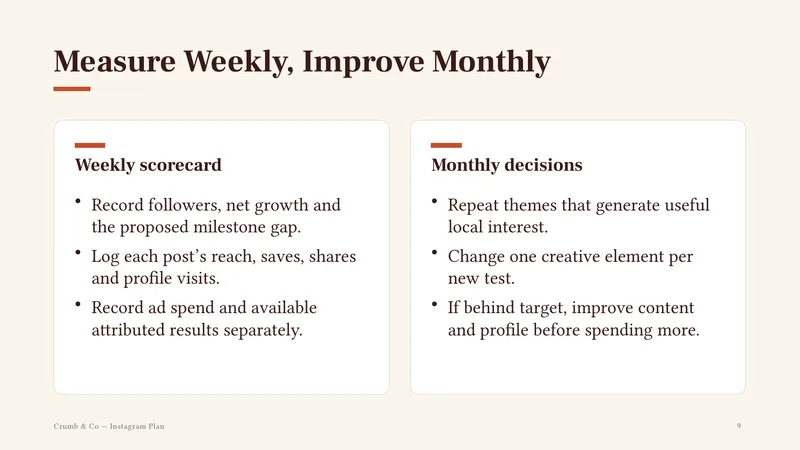
Real output of the prompt in the box above, generated with Kleap on 7 November 2026, rendered from the delivered file. Not a mockup. From the prompt in the box, unchanged, Kleap returned a 10-slide .pptx (223 KB) in 51 s by Kleap's turn timer, in one createDeliverable call, with no provider cut. It is run 1 of the 10 runs above (chat 138720): the first of the batch, not picked. The cover with the plan's dates and a generated photo; the goal as big numbers (1,200 followers today, 2,000 by 31 March 2027, +800 to gain, 66.7% growth); slide 3, a native PowerPoint line chart of monthly milestones from 1,200 on 9 November to 2,000 on 31 March, labelled as proposals, not forecasts; how to make Leeds want to follow; the two weekly posts and their roles; a launch calendar for the first four weeks; content themes through March; the £150 split as the prompt gives it (£60 to test, £90 to boost the best); a weekly scorecard and monthly decisions; a closing slide for Monday 9 November. Speaker notes on all 10 slides, 3 generated pictures inside the file.
What we checked in the delivered file
- 10 slides in the .pptx (ppt/slides/slide1.xml to slide10.xml), with speaker notes on 10 of 10 (374 words in all).
- Slide 3 holds a native chart (ppt/charts/chart1.xml, a line chart with its own data sheet): 9 Nov 1,200, 30 Nov 1,320, 31 Dec 1,495, 31 Jan 1,670, 28 Feb 1,825, 31 Mar 2,000. In PowerPoint, Edit Data changes the numbers and the line.
- 3 pictures inside the file (ppt/media), on slides 1, 5 and 7, made with Cloudflare Workers AI FLUX.2 klein-9b (the server's log for this app).
- Facts from the prompt: 1,200 followers, 2 posts a week, £150 split £60 and £90, 2,000 by 31 March 2027, start on Monday 9 November 2026. Labelled as proposals: the chart's milestones (1,320, 1,495, 1,670, 1,825) and the splits inside the ad budget (three £20 tests; £60 and £30 boosts).
- Every title and bullet is a real PowerPoint text box you can edit.
Show the exact prompt
Make a 10-slide PowerPoint Instagram plan for Crumb & Co, a Leeds bakery. Details: start Monday 9 November 2026; 1,200 followers; 2 posts a week; £150 a month for ads (£60 to test new posts, £90 to boost the best); goal 2,000 followers by 31 March 2027.
What happened next
Real follow-up messages sent in the same chat as the example above, on a production build with a test account. Kleap kept the project, so each change was one more message, not a new start. One run each, timed by Kleap's turn timer.
You:
Make slide 3 shorter and add our logo colour #C2410C.
Kleap: Kleap edited the stored deck instead of writing it again. Slide 3's title went from Proposed Monthly Follower Milestones to Follower Milestones and its three bullets to two ("Aim for about 40 net new followers weekly." and "Proposed checkpoints—not forecasts."); the new accent colour replaced the old one on every slide, the chart line included. The other 9 slides, the chart's numbers, the 3 pictures, the footer and all 374 words of speaker notes are exactly as they were (read in both files).
15 s · same chat · 7 November 2026
Before · Slide 3 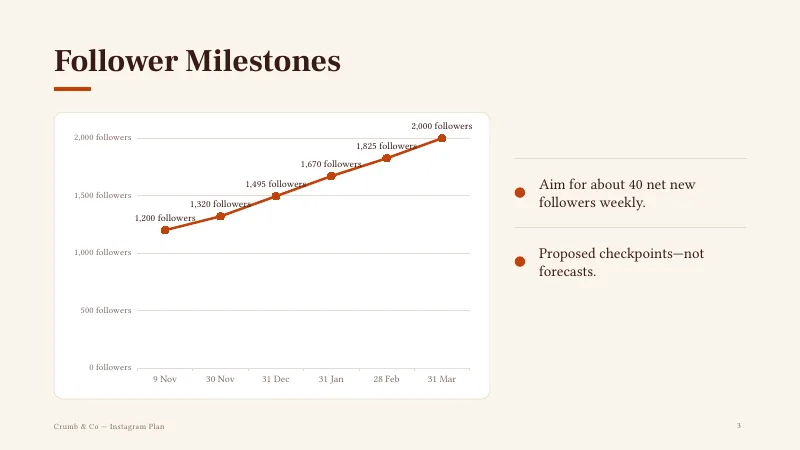
After · Slide 3
How we tested the AI Presentation Maker, and when to use something else
How this page was tested
- We pasted the box prompt into a new Kleap project, as written, and pressed Create.
- We opened the .pptx it returned and counted the slides, the speaker notes and the pictures in the file itself.
- Every date and amount on the slides was compared with the prompt; Kleap's own targets are labelled as proposals.
Good for
- A plan, a training deck or a talk you will present yourself
- A first deck to restyle in PowerPoint, Keynote or Google Slides
- Slides built only from the facts you give, with notes to speak from
Use something else for
- Charts drawn from your data: the deck has none.
- An investor deck with the usual sections: use the AI pitch deck generator
- Live co-editing with a team in the browser: the output is a file.
Decks for the meetings people actually have
Training and onboarding decks
Step-by-step sessions with a timeline of the first week and a slide for questions.
Teaching and talk slides
Plain-language slides for a class, a workshop or a conference talk, with speaker notes to speak from.
Reports and updates
Results in big numbers, what went well, what did not, and what happens next.
Proposals and sales decks
Offer, scope, timeline and price on separate slides, in your brand colours.
Event and workshop agendas
A clear order of the day, sections and a closing slide with contact details.
From topic to .pptx in three steps
Say what the deck is for
Name the topic, the audience and the number of slides. The box holds a sample request to rewrite.
Kleap writes and lays it out
It drafts one idea per slide, picks a layout for each and shows you the finished file in the chat.
Download and refine
Save the .pptx, or reply with changes such as a new tone, another slide or different colours.
How Kleap compares
Facts from each tool's own page, read on 9 November 2026 (follow the source link to check). Kleap's row describes what the example above shows.
Which tool for which case
Pick Manus when you want to edit and present the slides online too, with your own PowerPoint template applied. Pick Kimi when you start from text, a document or images and want editable slides in minutes. Pick Kleap when you want one .pptx file with speaker notes, a native chart and pictures from one request, revised in the same chat.
| Tool | What you get | Free path | Best at |
|---|---|---|---|
| Kleap | Editable .pptx with generated photos on the cover and image slides, opened in the chat | Your first try usually needs no account; to keep the result, Kleap asks for a free account, with no card. Pro from $25/month (see /pricing). | One chat also makes the site, documents and photos for the same business |
| Google's US top 3 for “ai presentation maker”, read 9 November 2026 | |||
| Manus AI PowerPoint generatorSource, checked 9 Nov 2026 | Slides from a prompt; export as PowerPoint (.pptx), PDF or web slides | Standard AI Slides free with 300 daily tokens (Manus's own list, rank 2) | Upload your own PowerPoint template; charts from CSV or Excel files |
| Kimi SlidesSource, checked 9 Nov 2026 | Editable slides from text, documents, images or templates | Not stated on the ranking page as read | The page is drawn by script; read from Google's snippet |
| Category leaders (not in this SERP, read 9 November 2026) | |||
| GammaSource, checked 9 Nov 2026 | Presentations with Gamma's agent; export to PowerPoint, PDF and more | “Start for free” (home page) | Freeform editing and smart layouts in its own editor; imports PowerPoints and PDFs |
Start free. Upgrade when you need more.
Your first try usually needs no account; to keep the result, Kleap asks for a free account, with no card. Files and images use your Kleap usage: free usage refills over time, and paid plans add much more.
Free
- Free usage that refills
- Free account to save your results and find them again
Pro
- Much more usage
- Custom domain for your Kleap websites
A deck you can actually open, edit and present
Most online slide makers keep your deck inside their own editor. Kleap writes the slides and then renders a regular PowerPoint file, so what you download is yours to open in PowerPoint, Keynote or Google Slides and change however you like.
Each slide is built from a layout that fits its content. A cover opens the deck, big numbers go on a stats slide, steps go on a timeline, comparisons go side by side, and a closing slide ends with a call to action. Give Kleap your brand colours and fonts and the deck follows them.
Presentation or pitch deck? A presentation explains a subject to an audience: a plan, a lesson, a team update, and its slides follow the subject. A pitch deck asks investors for money and follows the order they expect: problem, solution, traction, market, team, the ask. This page makes the first kind. For the second, the AI pitch deck generator for investor decks builds the investor order and leaves market sizes you do not give as [to fill in].
Questions, answered.
How do I make a presentation with AI in Kleap?
Describe the topic, the audience and the number of slides in the box at the top of this page, and name the format, for example a downloadable .pptx file. Kleap creates the deck and shows the download in the chat.
Is the result a real PowerPoint file?
Yes. Kleap renders a standard .pptx file. You can open it in PowerPoint, Keynote or Google Slides and keep editing it there.
Can I use my own colours and fonts?
Yes. Give Kleap your brand colours and fonts in the request and the deck follows them. If you leave them out, it uses a clean default palette.
What kinds of slides does it create?
It uses a cover, section dividers, content slides, two-column comparisons, big-number slides, quotes, timelines, charts and a closing slide, and picks the layout that fits what each slide says.
Can it add speaker notes?
Usually: the file tool asks for one or two sentences of notes per slide. In the 10 runs on 7 November 2026, 8 of the 8 decks written in one go had notes on every slide; the 2 decks written again after a provider stream cut had notes on only a few. The deck on this page is one of the 8 written in one go: notes on all 10 slides. Ask Kleap for notes on every slide if you speak from them.
Does it add pictures or charts?
Pictures, yes: Kleap generates photos for the cover and the image slides (3 in the example above, made with Cloudflare Workers AI FLUX.2 klein-9b) and places them in the .pptx. Charts, yes, when your prompt gives numbers that change over time or split a total: Kleap draws them as a native PowerPoint chart (bar or line) whose data you edit in PowerPoint. The deck above has one on slide 3; numbers Kleap works out between yours are labelled as proposals.
Can I change the deck afterwards?
Reply in the chat with what to change, such as a shorter slide, another slide or your brand colour: Kleap edits the stored deck and leaves the slides you did not name as they were. You can also edit the downloaded file directly.
Is the AI presentation maker free?
Your first try usually needs no account; to keep the result, Kleap asks for a free account, with no card. The deck, with the pictures made for it in the same request, uses your Kleap usage; the free plan's usage refills over time and the pricing section below compares plans.
Your slides are one description away.
Say what the deck is for and download a .pptx you can edit. The text boxes, the chart's data and the pictures stay editable in PowerPoint, Keynote or Google Slides.
Written by the Kleap product team. Checked on 9 November 2026 against the generated files and runs shown on this page.