AI document generator
Describe the document. Download an editable Word file.
- TestedTested once on 7 November 2026 with the prompt in the box: a 6-page Word proposal with 7 tables and 1414 words, 55 s by Kleap's turn timer on this test; ask Kleap to revise the file in the same chat. Times are Kleap's own timer for the AI's turn in our test (one run, or the median where we repeated it), not a promise: yours may take longer, and reading and checking the file comes on top.
- Free to startYour first try usually needs no account; to keep the result, Kleap asks for a free account, with no card. Each file uses Kleap usage, and the free plan's usage refills automatically.
- Using the boxReplace the sample with your request. The file is a .docx you keep editing in Word or Google Docs.
What is an AI document generator?
An AI document generator writes a complete document from a short brief: a proposal, a report, a policy or a letter. Kleap's AI document generator delivers an editable Word (.docx) file with headings and real tables, and shows the download in the chat. To change a section, ask in the same chat: Kleap edits the stored file.
What this page makes: one editable Word (.docx) file, written from a brief you type or paste (a proposal, report, policy or letter). What it is not: a fixed-layout PDF to print as is (see the AI PDF creator), a long chaptered book (the AI ebook generator), or legal advice.
An AI document generator writes a complete document from a short brief: a proposal, a report, a policy, meeting minutes or a letter, with the headings, lists and tables it needs. Kleap's AI document generator delivers an editable Word (.docx) file, because most of these documents still change after the first draft: you open it in Word or Google Docs and keep working. Say what the document is for, who reads it, the sections you want and the tone; Kleap writes it, builds real tables (a timeline, a price list) and shows the download in the chat. Reply with a change, such as a shorter summary or another section, and Kleap edits the stored file and changes the parts you name. Choose Word when the text will keep moving. When the layout must stay fixed for printing or sending, use the AI PDF creator; for a longer guide in chapters, use the AI ebook generator.
Word document, PDF or e-book?
Choose Word to keep editing the text, a PDF to share a layout that must not move, and an e-book for a guide in chapters with a cover and linked contents.
Pick by what happens to the file after you download it. If the text will keep changing (a proposal the client negotiates, a policy your team edits, minutes people correct), keep it here, as a Word file. The test document on this page is a client proposal with a price table and a week-by-week timeline.
If the layout must stay fixed for printing or sending, use the AI PDF creator. If it is a longer guide in chapters with a cover, use the AI ebook generator. The three pages start from the same box; only the file you get differs.
| Format | Use it for | What you can edit | Limits |
|---|---|---|---|
| Word (.docx), this page | Proposals, reports, policies, minutes, letters | All the text and tables, in Word, Google Docs or LibreOffice | Simple layout: headings, lists, tables, links; not legal advice |
| Checklists, handouts, one-pagers to print or send as they are | Nothing in the file: ask Kleap in the chat, or ask for Word too | A new PDF from your brief; it does not edit, convert or OCR a PDF you have | |
| E-book (PDF) | A guide in chapters with a cover and linked contents | Nothing in the file: ask Kleap in the chat | PDF only, no EPUB |
| Spreadsheet (.xlsx) | Budgets, trackers, tables that add up | Every cell; live formulas from common functions | No charts, pivot tables or macros |
| Invoice (PDF) | One invoice for one job | Nothing in the file: ask Kleap in the chat | Does not check tax rules, number your invoices or track payment |
Checked on 7 November 2026 by the Kleap product team. Test: “Write a client proposal as a Word (.docx) file for Smile Dental: a £4,800 website with online booking. (details on the next line)”, a 6-page Word proposal, 55 s by Kleap's turn timer.
Measured on
One real run of the prompt in the box above, unchanged: a fresh project, the real Kleap interface, a test account. Every number on this page comes from that run and its delivered file. Times are Kleap's own turn timer, shown under the reply in the chat. One run, not an average.
- Kleap's turn timer, on this test
- 55 s
- Pages (opened in LibreOffice)
- 6
- Words
- 1414
- Tables
- 7
- [to fill in] markers
- 1
See what this prompt creates
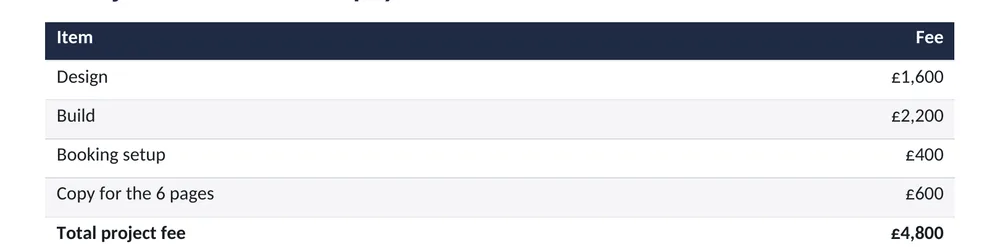
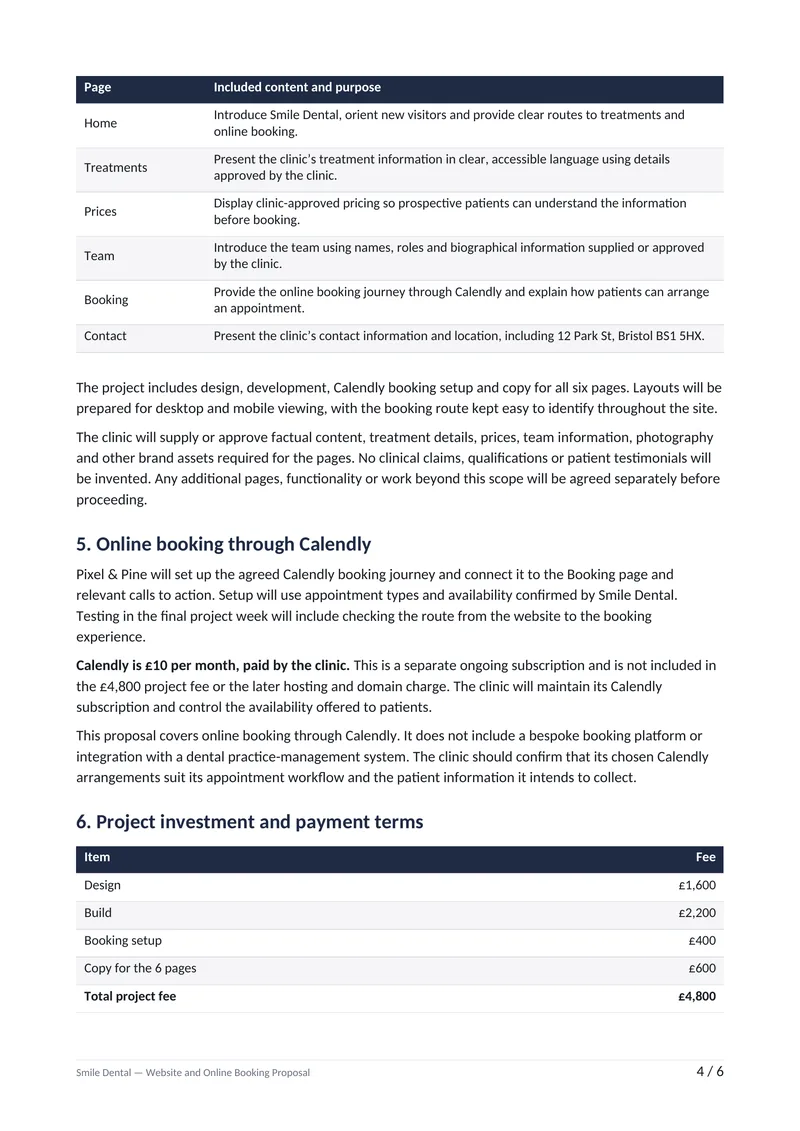
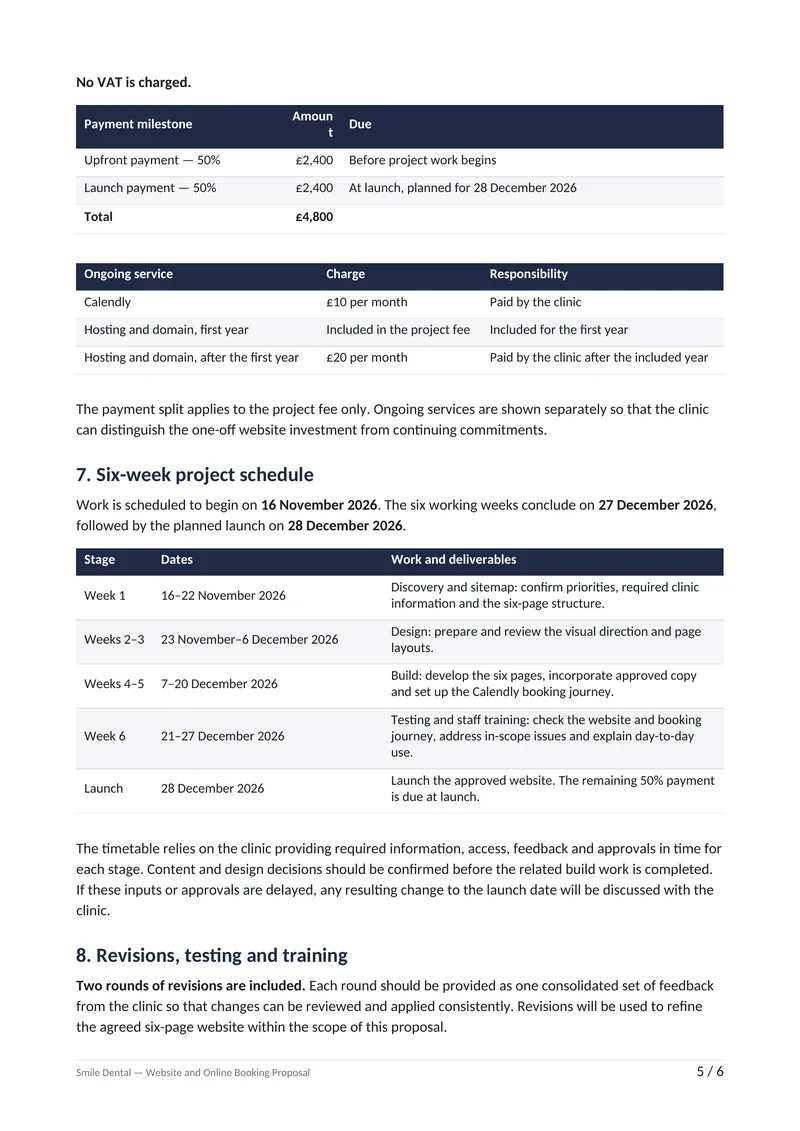
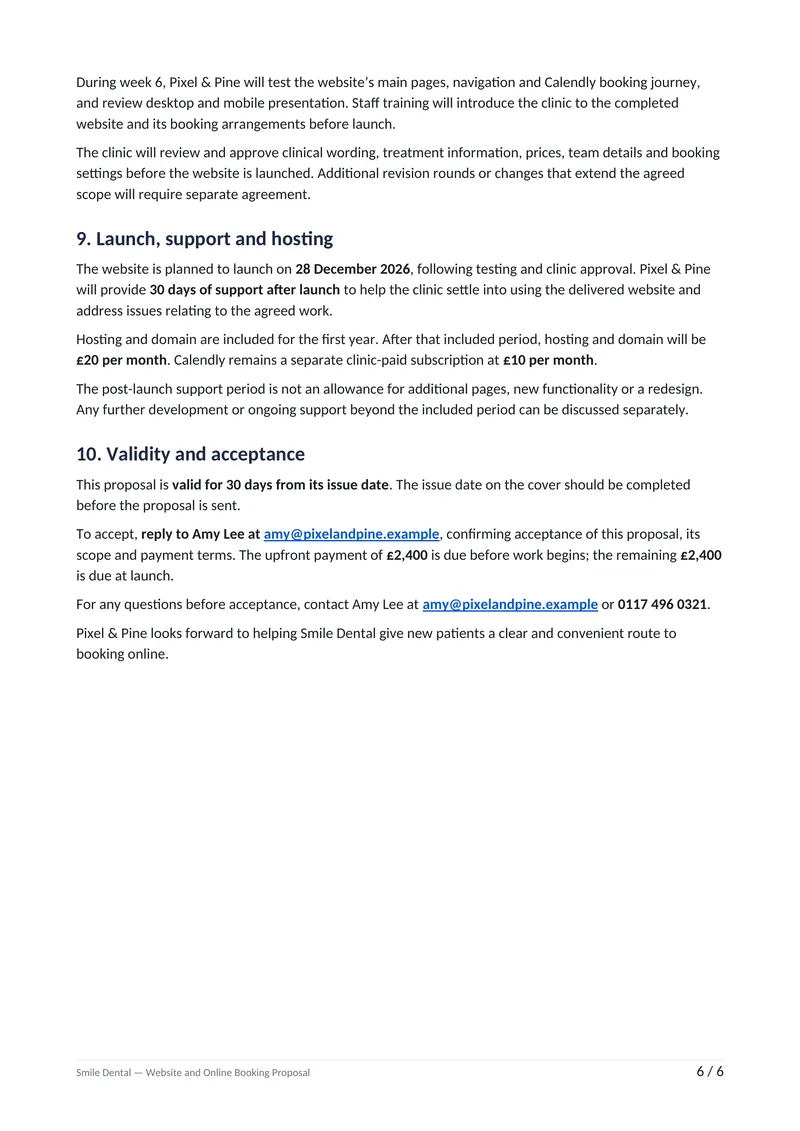
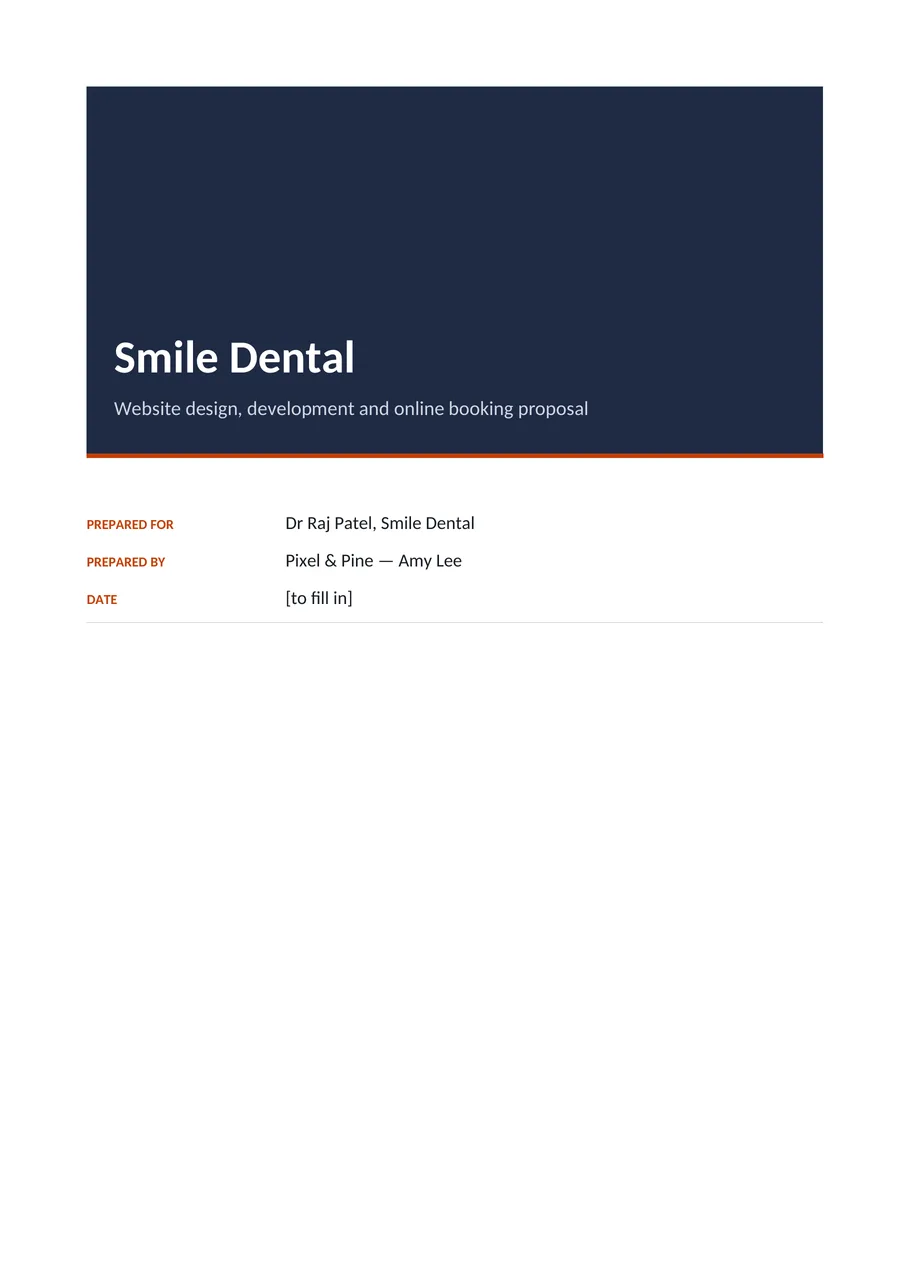
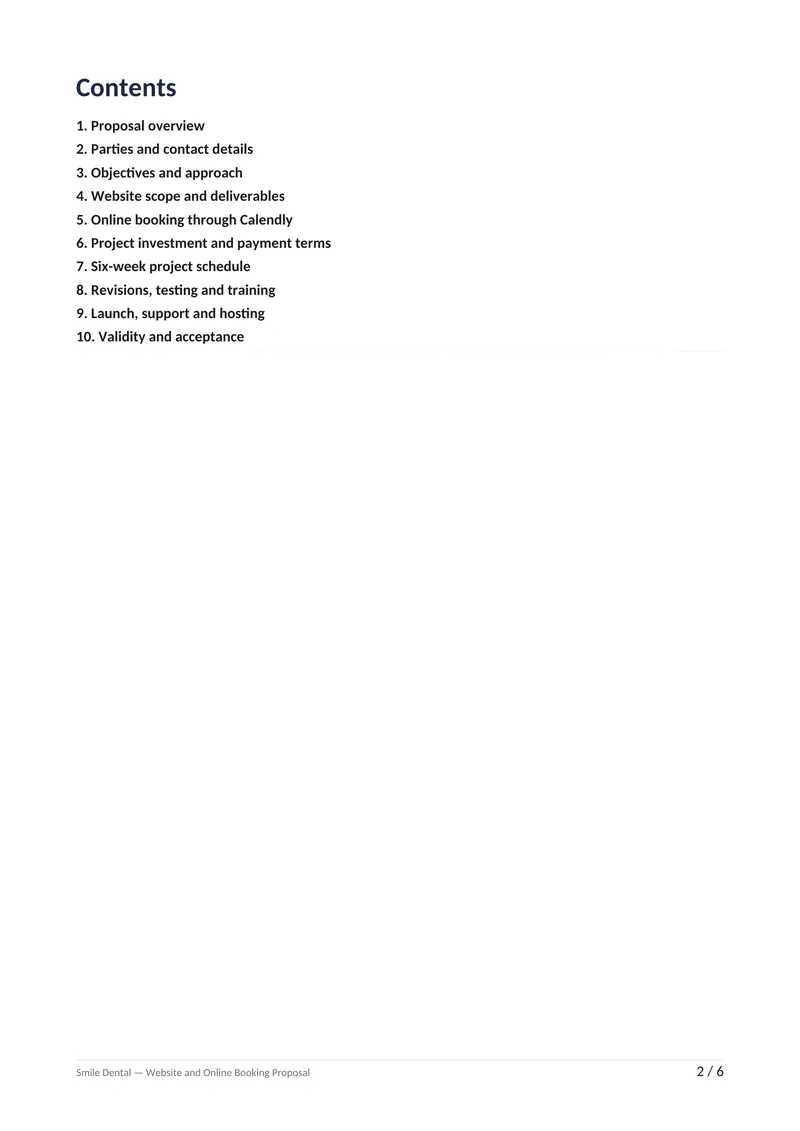
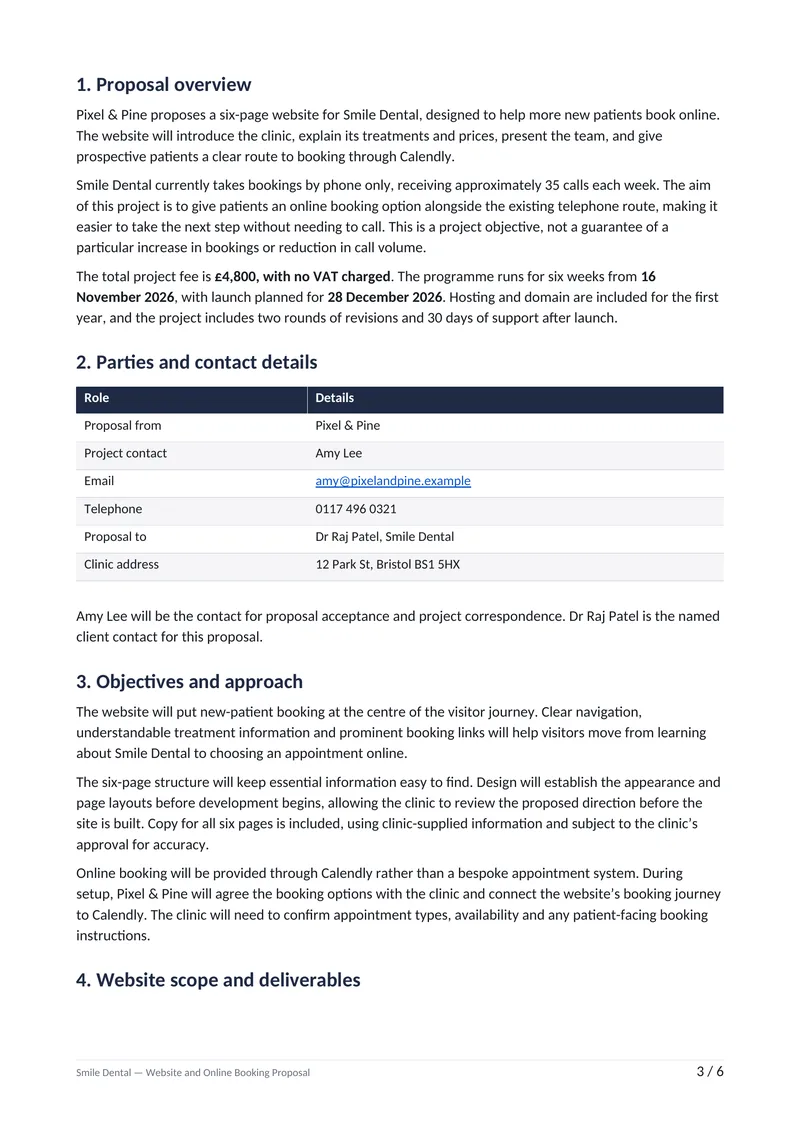
Real output of the prompt in the box above, generated with Kleap on 7 November 2026, rendered from the delivered file. Not a mockup. From the prompt in the box, unchanged, Kleap returned a 6-page Word proposal (1414 words, 7 tables) in 55 s by Kleap's turn timer: a cover, a contents page, then ten sections a clinic owner can read and sign. The objective in the clinic's terms (bookings by phone only today, about 35 calls a week, with no promised increase), a parties table, the six pages and what each one does, how Calendly booking works and that the clinic pays its £10 a month, the fee table (design £1,600, build £2,200, booking setup £400, copy £600: £4,800, no VAT), the two £2,400 payments, hosting at £20 a month after the first year, a six-week schedule table with real dates from 16 November to the 28 December launch, two revision rounds, 30 days of support, and how to accept. Every price and date is from the prompt. 1 [to fill in]: the proposal's own date on the cover, which the prompt did not give; the last section says to complete it before sending. One layout flaw: the Amount heading of the payment table wraps onto two lines.
What we checked in the delivered file
- 6 pages when the .docx is opened in LibreOffice; 7 tables in word/document.xml; 1414 words.
- Fee table: £1,600 + £2,200 + £400 + £600 = £4,800, no VAT; payments £2,400 + £2,400; Calendly's £10 a month stated as separate and paid by the clinic; hosting £20 a month after the first year.
- Schedule from the prompt: week 1 16–22 November 2026, design 23 November–6 December, build 7–20 December, testing and staff training 21–27 December, launch 28 December 2026; valid 30 days from the issue date.
- 1 [to fill in] marker: the date on the cover, which the prompt did not give (the names, address, contacts, scope, prices, schedule, terms and how to accept were all in it).
Show the exact prompt
Write a client proposal as a Word (.docx) file for Smile Dental: a £4,800 website with online booking. Details: from Pixel & Pine (Amy Lee, [email protected], 0117 496 0321) to Dr Raj Patel, Smile Dental, 12 Park St, Bristol BS1 5HX; goal: more new-patient bookings online (today by phone only, about 35 calls a week); a 6-page website (Home, Treatments, Prices, Team, Booking, Contact) with online booking through Calendly (£10 a month, paid by the clinic); £4,800, no VAT: design £1,600, build £2,200, booking setup £400, copy for the 6 pages £600; half upfront, half at launch; 6 weeks from 16 November 2026: discovery and sitemap in week 1, design in weeks 2-3, build in weeks 4-5, testing and staff training in week 6, launch 28 December; 2 rounds of revisions; 30 days of support after launch; hosting and domain included for the first year, then £20 a month; valid 30 days; accept by replying to Amy's e-mail.
How we tested the AI Document Generator, and when to use something else
How this page was tested
- The box prompt gives the parties, the scope, the price, the payment split and the dates; we sent it as written.
- We opened the .docx and counted its pages, tables and [to fill in] markers.
- Prices and dates in the file were matched to the prompt.
Good for
- Proposals, reports and policies with headings and tables
- A Word file you finish and send from your own account
- Long documents that would take an evening to lay out
Use something else for
- Facts you do not give: they come back as [to fill in].
- Editing an existing Word file in place.
- A printable one-off like a checklist: make it with the AI PDF creator
Everyday business documents, drafted for you
Proposals and quotes
Scope, timeline and pricing tables for a client.
Reports and briefs
Findings, recommendations and next steps in a readable layout.
Policies and procedures
Plain-language guidelines for a team, ready to review.
Meeting notes and agendas
Decisions, owners and deadlines pulled out of messy notes.
Letters and cover letters
Formal letters you finish with your own details.
Checklists and handouts
Step-by-step guides your team or customers can print.
From brief to document in three steps
State the purpose
Say what the document is, who reads it, how long it should be and the facts it must include.
Kleap drafts and formats
It writes the sections, adds lists and tables where they help, and renders a Word or PDF file.
Revise and download
Ask for changes in the chat, then save the file or keep editing it in Word.
How Kleap compares
Facts from each tool's own page, read on 9 November 2026 (follow the source link to check). Kleap's row describes what the example above shows.
Which tool for which case
Pick Templafy when a company needs branded drafts inside Word and PowerPoint from its own templates. Pick Sintra when you want AI agents to automate a whole workflow, documents included. Pick Free Document Maker when you need many free browser tools to create, edit and convert files and PDFs. Pick Kleap when one brief should become an editable Word file with headings and real tables, revised in the same chat.
| Tool | What you get | Free path | Best at |
|---|---|---|---|
| Kleap | Editable Word (.docx) with real tables | Your first try usually needs no account; to keep the result, Kleap asks for a free account, with no card. Pro from $25/month (see /pricing). | One chat for the document, the matching PDF and your website |
| Google's US top 3 for “ai document generator”, read 9 November 2026 | |||
| Templafy AI document generatorSource, checked 9 Nov 2026 | Branded drafts inside Word, PowerPoint and SharePoint from a prompt | Enterprise: 'Book a demo' or 'Try it now' | Uses your company's templates and content libraries |
| Sintra AISource, checked 9 Nov 2026 | AI helpers that automate business work, documents included (its own list ranks it first) | From $39/month (its list) | Its article compares 7 document generators |
| Free Document MakerSource, checked 9 Nov 2026 | Browser tools to create, edit and convert documents and PDFs | No registration, no watermark | 30+ tools, documents to media |
| Category leaders (not in this SERP, read 9 November 2026) | |||
| Microsoft Word with CopilotSource, checked 9 Nov 2026 | Copilot inside Word: rewrites, writing suggestions, visuals in your document | “Try for free” (Microsoft 365) | You edit the document yourself, with Copilot beside it |
Start free. Upgrade when you need more.
Your first try usually needs no account; to keep the result, Kleap asks for a free account, with no card. Files and images use your Kleap usage: free usage refills over time, and paid plans add much more.
Free
- Free usage that refills
- Free account to save your results and find them again
Pro
- Much more usage
- Custom domain for your Kleap websites
When do you need an editable Word document?
Use this page when the result is a Word (.docx) file you or a client will keep editing: a proposal, a policy, meeting minutes, a letter. For a fixed file to print or send as it is, use the AI PDF creator; for a short guide with a cover and chapters, the AI ebook generator.
Most documents follow a familiar shape: a title, a summary, a few sections, sometimes a table. Kleap handles the shape and the first draft of the words, so you spend your time on the parts that need your judgement, such as the facts, the figures and the tone.
You choose Word when you plan to keep editing and PDF when the document is ready to send. Either way you can ask for changes in the chat, such as a shorter summary or an extra section, and download the updated file.
Document, PDF or e-book? A document is a file you keep working on: a proposal you adjust before sending, a policy you update, so this page returns a Word file with real headings and tables. A PDF creator for checklists and handouts to print suits a file people read or tick as it is; an e-book generator for a short guide with a cover and chapters suits something you give away as a lead magnet.
Questions, answered.
Should I ask for Word, a PDF or an e-book?
Choose Word to keep editing the text, a PDF to share a layout that must not move, and an e-book for a guide in chapters with a cover and linked contents. This page makes the Word file; the [AI PDF creator](/ai-pdf-generator) and the [AI ebook generator](/ai-ebook-generator) make the other two.
Can it start from my notes or an old document?
Paste the notes or the old text into the request and say what to keep, what to change and which sections you want. Kleap writes a new Word file from them; it does not open and edit a Word file you upload in place.
Which formats can I get?
Word (.docx), PDF and Markdown for text documents. Ask for the one you need in your request.
Can I edit the document afterwards?
Yes. Ask in the same chat: Kleap edits the stored file and changes the parts you name, or open the Word file and edit it yourself.
Does it add tables?
Yes. Ask for a table of prices, a timeline or any comparison, and it is laid out in the document.
Can it write legal documents?
It can draft general business documents, but it does not provide legal advice. Have a qualified person review contracts and anything with legal consequences.
How long can the document be?
Short and medium documents work best. For a very long document, ask for it chapter by chapter and combine the pieces yourself.
Will it follow my company's exact layout?
Not a template you upload: Kleap lays the document out itself, with heading styles, lists and tables. Give it the section order, the wording that must stay and your contact details in the request, then change fonts or logos in Word.
Skip the blank page.
Describe the document you need and download it as a Word file (or ask for a PDF). Headings, lists and tables stay editable in Word.
Written by the Kleap product team. Checked on 9 November 2026 against the generated files and runs shown on this page.