8 Best AI Website Builders for Small Business in 2026
The best AI website builder for small businesses in 2026 delivers speed, quality design, and smart automation without any coding.
- AI builders can generate complete websites in under 60 seconds using natural language prompts.
- Choose platforms with mobile-first design, built-in SEO tools, and scalable pricing structures.
AI-powered website builders evolved from experimental tools into essential business platforms that actually work for entrepreneurs, freelancers, and small business owners managing tight budgets and deadlines.
Picking the right AI builder determines whether you launch next week or next quarter. Traditional website development consumed weeks of back-and-forth with designers and developers, plus massive costs.
AI builders compress that timeline into minutes while generating professional designs. Writing initial copy and optimizing for mobile can be done from a simple text prompt.
We'll cover why AI website builders matter more than ever in 2026 and evaluate eight leading platforms. You'll see Kleap's lightning-fast approach, Wix's mature AI features, and what competing reviews miss completely.
We'll compare design-focused options like Squarespace against professional-grade solutions like Webflow. You'll also discover Framer's designer playground, 10Web's WordPress integration, Durable's 30-second promise, and Hostinger's budget-friendly innovation. Real user insights and a comprehensive comparison matrix show you exactly which platform matches your business model, technical comfort level, and growth ambitions.
How We Evaluated the Best AI Website Builders
Testing dozens of platforms isn't glamorous. When your business reputation hinges on your website's performance, you need a methodical approach to separate hype from substance.
Our team spent three months building real sites across multiple industries, tracking everything from initial setup speed to conversion optimization capabilities. We didn't just click through demos; instead, we launched actual businesses. We ran paid traffic and measured real-world results to determine which platforms truly deserve the "best" label.
Key Features Every Small Business Needs
Speed counts. Mobile responsiveness is essential.
Our comparison shows these fundamentals clearly separate the winners from the pretenders.
- Sub-3-second load times (Google's Core Web Vitals threshold)
- Built-in SEO optimization without technical expertise required
- E-commerce functionality that handles payment processing securely
- Mobile-first design that converts visitors into customers
Our Testing Methodology
We compared interface usability, customization options, and long-term scalability potential. Each platform went through identical tests with the same content and design brief. For deeper insights on conversion-focused selection, check our The 2025 Local Business Owner's Guide to AI Website Builders That Convert.
Kleap tip: Test your shortlisted platforms with actual business content instead of template demos.
Real headlines and product descriptions show which AI actually captures your brand voice.
Try it — build your site while you read
Describe what you want and get a live, publishable site in seconds. Free to start, no code.
Join 200,000+ makers building real websites with Kleap.
Why Small Businesses Need AI Website Builders in 2026
Building a professional website used to mean one thing: hiring a developer and waiting weeks for results. That approach doesn't work anymore.
Small businesses need to move fast, and traditional development timelines can kill momentum before you even launch. The best AI website builders for small business tools have changed this dynamic completely, letting entrepreneurs go from concept to live site in hours instead of months.

The Cost of Traditional Website Development
Custom website development typically starts at $5,000 for basic projects. Need e-commerce functionality?
Add another $3,000. Want ongoing maintenance?
That's $150 monthly minimum. According to the U.S.
Small Business Administration, most startups operate on tight budgets where every dollar counts. Spending that much upfront creates serious cash flow problems when you're just getting started.
How AI Levels the Playing Field
AI website builders remove all technical barriers completely. You don't need any coding knowledge whatsoever.
Honestly, these platforms automatically manage design choices, content layout, and optimization tasks. Tasks that used to need specialized skills now happen through basic prompts.
The outcome is clear: professional websites at much lower costs, typically under $50 per month.
Kleap, the Lightning-Fast AI Builder for Entrepreneurs
Kleap transforms how small businesses launch online. While most platforms require days of setup, Kleap delivers a fully functional site in minutes through its AI-driven automation.
The platform eliminates technical barriers by generating responsive designs, optimized layouts, and conversion-focused pages from simple text prompts. No coding knowledge required.
What Makes Kleap Stand Out for Small Businesses
Speed really matters in this space. Kleap's AI examines your business objectives and creates custom designs on autopilot.
Unlike those template builders, it builds unique layouts. These layouts fit your specific industry. The platform manages mobile optimization, SEO structure, and page loading speed without you lifting a finger.
For busy entrepreneurs, that means you're launching faster than competitors while keeping professional quality standards intact.
Pricing and ROI Analysis
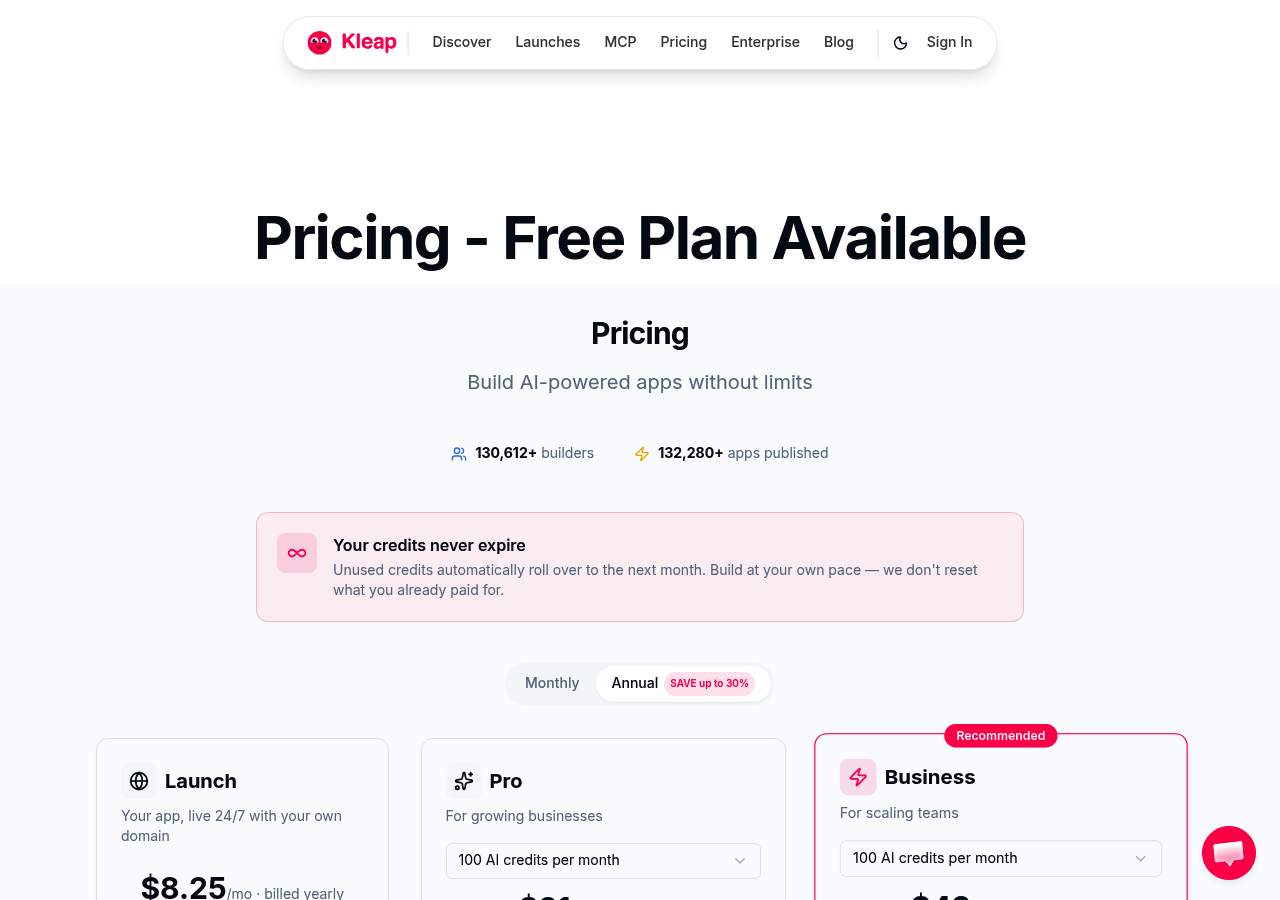
Plans start from free tier to enterprise solutions at several hundred dollars monthly. The investment pays off quickly when you calculate saved development costs.
If you're evaluating options, our Best AI Website Builders for Small Businesses in 2025 - Expert Comparison breaks down feature-to-price ratios. Most clients report positive returns within the first quarter.
Best Use Cases
Kleap works great for service companies, consultants, and product launches that need quick setup. It's not ideal for complex e-commerce sites with heavy inventory needs.
What Other AI Website Builder Reviews Won't Tell You
Most reviews sugarcoat reality. They won't mention that your AI-generated site might look identical to 50 others in your niche.
The algorithms pull from limited template libraries, creating subtle sameness across supposedly "unique" designs. We've seen it firsthand: businesses launching sites that mirror competitors because the underlying AI training data overlaps.
The AI Generation Quality Gap
You'll need manual adjustments to keep brand consistency intact; fonts rarely align with your current materials, and color schemes often clash with existing logos.
Platforms promise "one-click perfection," but experienced users understand that 3-5 hours of tweaking typically comes after initial generation. For those looking for the best AI website builder for small business needs, this gap between promise and reality is significant.
Hidden Costs Beyond Monthly Subscriptions
Premium stock photos? That's extra.
Custom domain privacy? That's another charge.
Advanced SEO tools? An upgrade is required.
When AI Can't Replace Human Design
Complex user flows throw off algorithms completely. Accessibility compliance needs real human auditing.
Subtle brand storytelling through layout design is still firmly human territory for now.
Wix, the All-in-One Platform with Mature AI Features
Wix has been building websites since 2006, and its AI capabilities reflect that maturity. Unlike newer platforms rushing to slap "AI" on basic templates, Wix invested years developing its ADI (Artificial Design Intelligence) system.
It analyzes your business type, generates layouts, and adapts designs based on user behavior patterns observed across millions of sites.
The platform's AI text generator produces serviceable copy, though it lacks the contextual depth of specialized tools. Where Wix excels is in breadth.
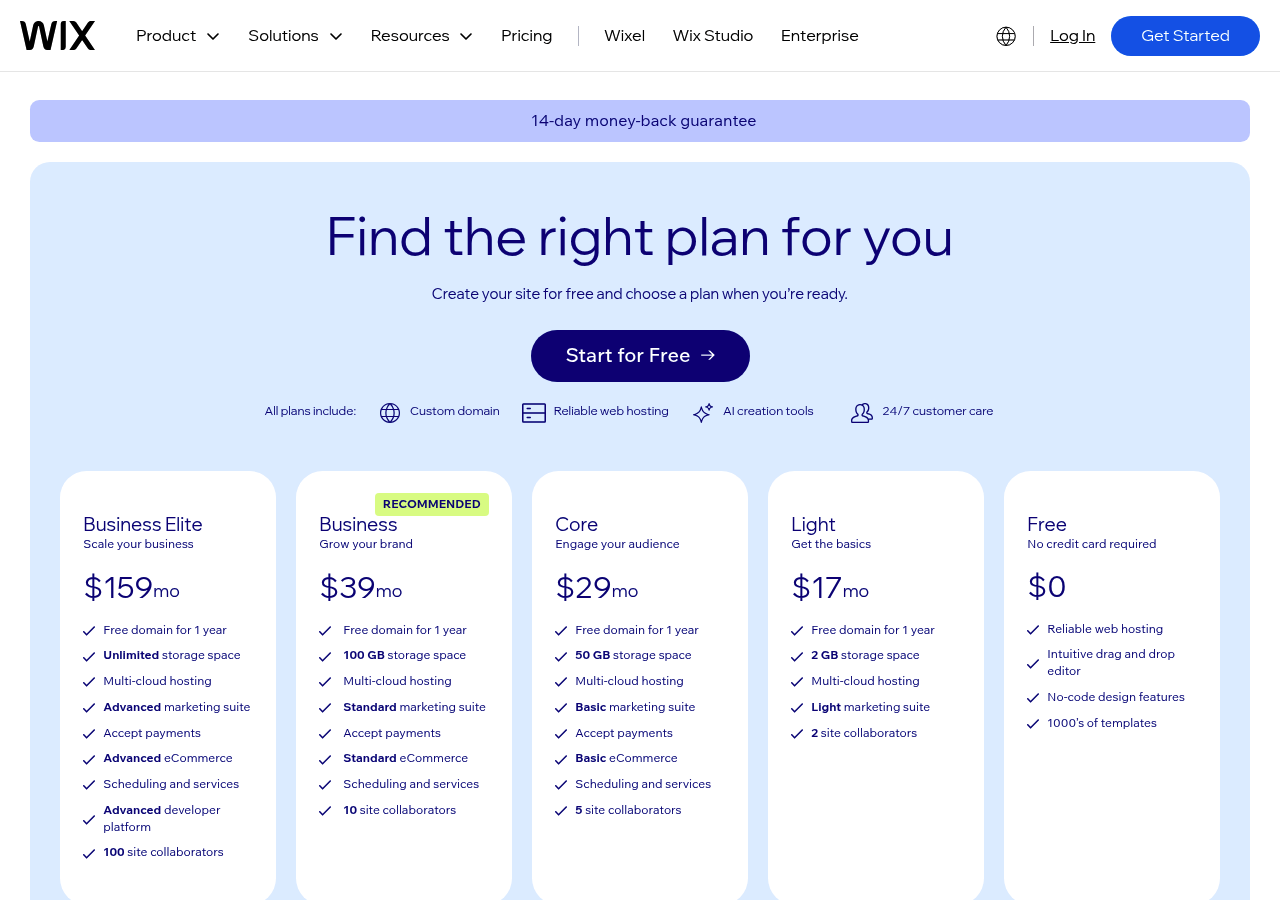
You get 800+ templates, built-in SEO tools, and e-commerce features without hunting for plugins. Small businesses appreciate this consolidation, eliminating the need to coordinate multiple vendors.
Pricing Tiers for Small Business Budgets
Wix pricing starts at $17 per month for basic websites and goes up to $17/mo for enterprise-level features. The Business Basic plan at $17/mo works well for most entrepreneurs since it includes payment processing and a custom domain.
That said, lower tiers come with transaction fees that can slowly eat into your margins if you're selling products.
Pros and Cons for Entrepreneurs
For companies that value stability more than innovation, Wix works well. You're just swapping flexibility for ease of use.
Squarespace: Design-First AI for Creative Businesses
Squarespace markets itself as the top AI website builder for small business owners who won't settle for mediocre design. Unlike mainstream builders, it uses AI to preserve design quality. It handles technical choices automatically.
The platform examines your industry, brand colors, and content to create layouts that look custom-made. Our team finds this especially useful for consultants and service providers where first impressions drive conversion rates.
The platform's AI now manages image cropping, color palette creation, and responsive breakpoints without manual input. Portfolio galleries adjust to your content's aspect ratios automatically.
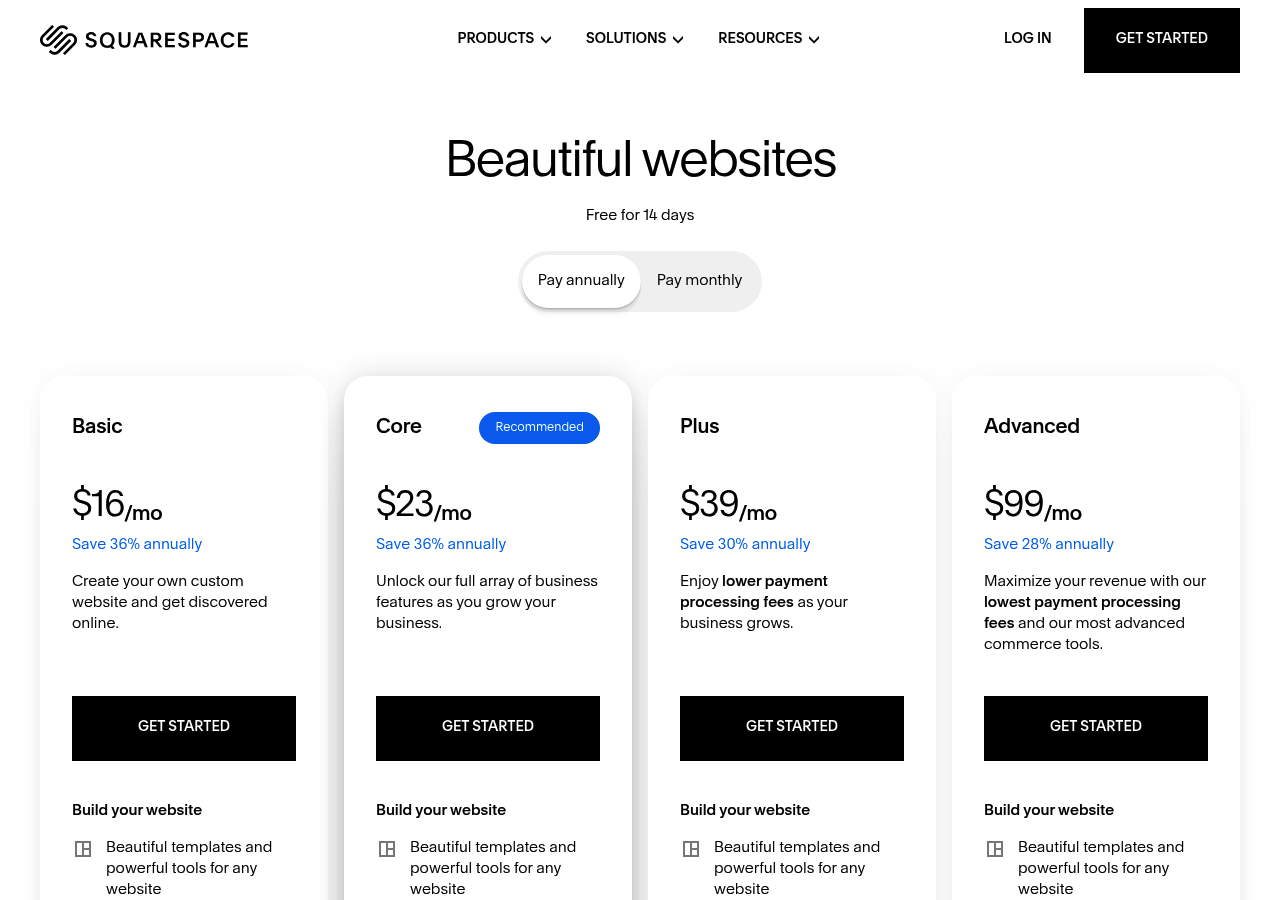
Product pages optimize themselves based on how visitors interact with them. Pricing starts at $16 monthly for basic sites and jumps to $49 for advanced commerce tools.
That's pricier than Wix or WordPress options, but businesses that prioritize visual credibility often find that Squarespace's design-first approach produces measurable brand perception gains.
Kleap tip: Test Squarespace's AI recommendations against your brand guidelines first, since automated design picks sometimes favor aesthetics over your messaging priorities.
Webflow: Professional-Grade AI for Growing Businesses
Need pixel-perfect control without touching code? Webflow bridges the gap between drag-and-drop simplicity and developer-level customization.
Recent AI integrations help automate repetitive design tasks while maintaining the platform's signature flexibility. This makes it a strong contender among the best AI website builders for small business options for teams that prioritize scalability.
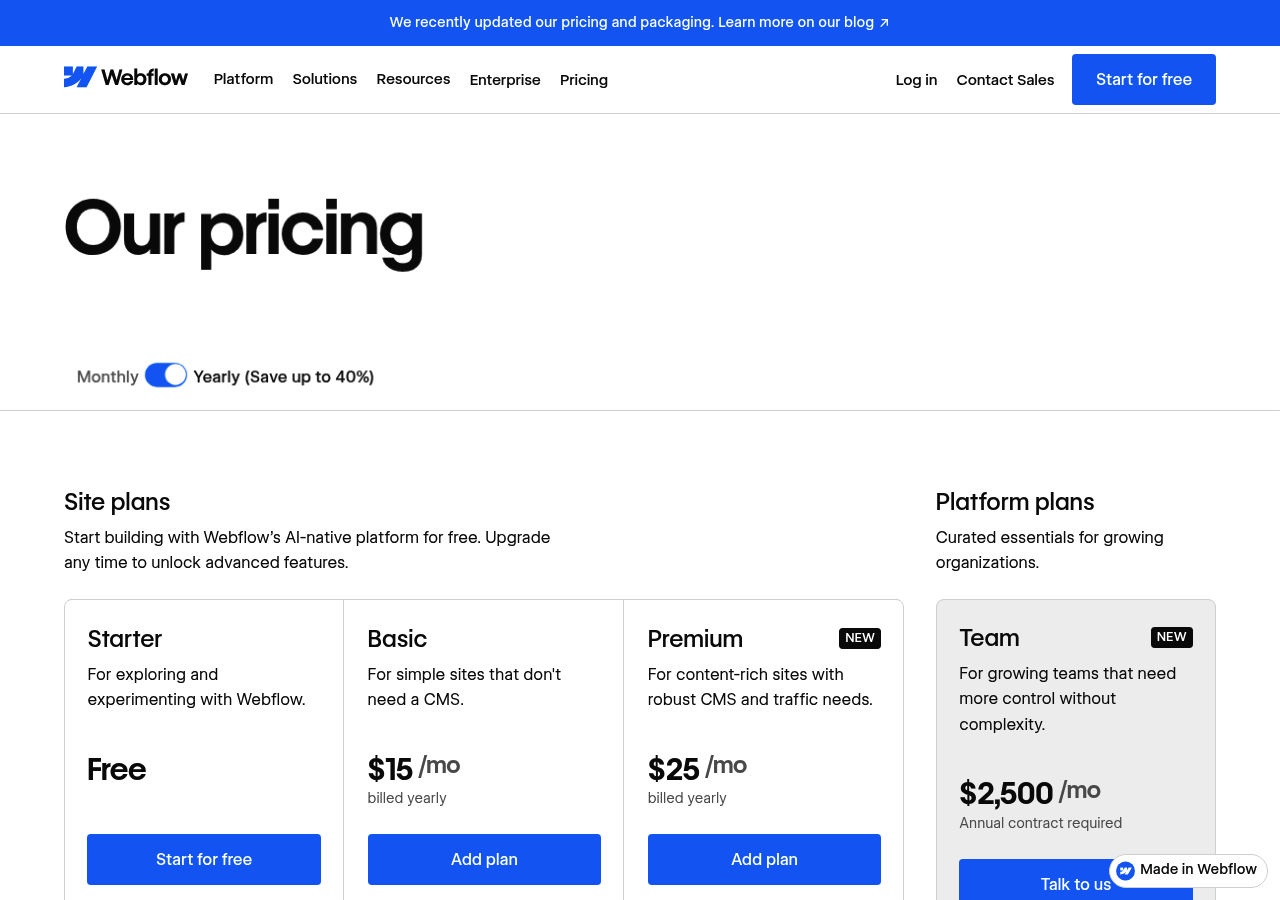
The platform's visual canvas lets you manipulate CSS properties directly through an intuitive interface. AI features now suggest layout improvements and generate responsive breakpoints automatically.
However, expect a steeper learning curve compared to Wix or Squarespace. The payoff?
Complete design freedom and enterprise-grade hosting infrastructure. Webflow's official documentation provides comprehensive tutorials designed to streamline the onboarding process.
Best for: Tech-Savvy Entrepreneurs
This platform works great for startups that want to scale fast. You get CMS features that match custom builds, plus e-commerce tools and white-label options for agencies.
Basic sites start at $14 per month, but business features run $29 to $49. Hosting comes included, unlike traditional builders where you're paying extra for performance optimization.
Framer, the Designer's AI-Powered Playground
Framer changes how creative teams handle web design completely. Traditional builders lock you into rigid templates, but this platform treats design as collaboration between human vision and machine efficiency.
The interface feels familiar to anyone who's used Figma or Sketch before.

Our team has watched clients cut their design-to-publish timeline by several weeks using this approach. What separates Framer from competitors is how AI suggestions appear naturally during workflow.
Type a headline, and the system recommends complementary body copy that matches your tone perfectly. Adjust a color palette, and it automatically updates contrast ratios for accessibility standards.
The official platform illustrates how these micro-interactions accumulate to create significant time savings over the course of weeks. Small teams particularly benefit when launching multiple client sites at the same time.
Interactive Prototyping Capabilities
Prototyping becomes intuitive when animations respond to real user behavior. Framer lets you test scroll-triggered effects, hover states, and mobile gestures before writing a single line of production code.
This matters for businesses evaluating the best AI website builder for small business needs, where stakeholder approval often hinges on seeing functionality rather than static mockups.
Pricing for Small Teams
| Plan | Monthly Cost | Best For |
|---|---|---|
| Free | 0 dollars | Solo projects, testing features |
| Mini | 5 dollars/site | Freelancers with multiple clients |
| Basic | 15 dollars/site | Small agencies needing CMS access |
These pricing tiers let teams access advanced design tools without huge enterprise commitments. However, costs add up fast when you're managing over ten sites, which drives some teams to explore flat-rate alternatives instead.
10Web: WordPress Meets AI Automation
10Web delivers AI automation directly into the WordPress ecosystem, which is pretty uncommon. It keeps WordPress's core flexibility intact while adding smart automation features. That's huge for businesses already using WordPress plugins, themes, and established workflows.
The platform includes two separate AI tools that work differently. The AI Builder creates complete WordPress sites from simple prompts. Meanwhile, the AI Assistant acts as your content creation partner right inside the WordPress editor.
Both tools connect smoothly with your current WordPress setup.

AI Builder vs. AI Assistant Features
The AI Builder takes care of your initial site setup. You describe what you do, pick a style, and get a working WordPress site in minutes. It creates pages, layouts, and content that fit your industry.
The AI Assistant works differently since it lives inside WordPress's Gutenberg editor. It helps you polish existing content, rewrite sections, or create blog posts. It's basically ChatGPT built into your CMS.
For small businesses checking out the best AI website builder for small business options, this dual setup gives you speed and control.
WordPress Integration Benefits
Access to over 50,000 WordPress plugins remains 10Web's strongest advantage. Need advanced SEO?
Install Yoast. Want e-commerce?
Add WooCommerce. The AI handles design; you control functionality.
This makes 10Web ideal for businesses requiring specific integrations that proprietary builders can't match.
Performance and Hosting Considerations
10Web provides managed WordPress hosting that's built for speed, featuring automatic scaling and CDN integration. It locks you into their platform; moving your AI-built site elsewhere takes some real technical work.
Plans begin at $10 per month for basics and jump to $60+ for agencies handling several client sites.
Durable, the 30-Second Website Promise
Durable promises something big: a full business website in just 30 seconds. You type in your industry, location, and business name, then their AI creates everything from copy to images to contact forms.
That sounds ideal for busy entrepreneurs wanting the best AI website builder for small business needs, but this speed creates doubts.
Can AI really grasp your brand in 30 seconds? Our comparison showed mixed outcomes. The first site looked professional but felt generic next to competitors that spend more time on customization.

How Fast Is Too Fast?
The generation process works really well in practice. But quick deployment isn't without its downsides.
Templates tend to stick with basic layouts, and the copy usually needs heavy editing. Our test bakery site had phrases like "we deliver quality baked goods," which was accurate but pretty bland.
Companies with distinct positioning might spend a lot of time tweaking everything, which kind of defeats the speed benefit.
AI Content Quality Analysis
Durable's AI sources content from industry databases to build your site. The outcome is functional yet generic material.
Headlines stick to predictable formats, and descriptions miss the unique voice that turns visitors into actual customers.
Pricing and Business Tools
Plans begin at $12 per month for essential features and reach $20 for CRM integration plus invoicing capabilities. The business suite sets Durable apart from standard website builders, though platforms like Kleap delivers superior customization options while maintaining fast performance.
Consider it if the bundled tools outweigh the somewhat generic design.
Hostinger AI Website Builder: Budget-Friendly Innovation
Hostinger proves you don't need premium pricing to access powerful AI features. At just $2.99 monthly, their AI Website Builder offers capabilities typically found on platforms charging ten times more. The interface creates complete sites in under three minutes, with industry-specific content and image suggestions included.
Small businesses on tight budgets find this especially attractive since the builder bundles hosting, SSL certificates, and email accounts in the base price. That's real value without the usual markup.
AI Features at an Unbeatable Price
The platform's AI creates professional copy, optimizes your images automatically, and recommends design tweaks based on your industry. Unlike competitors who lock these features behind pricey tiers, Hostinger includes them right from the start.
Our comparison showed surprisingly smart content generation that competes with tools costing $50+ each month. The AI writer grasps context well enough to produce product descriptions, service pages, and blog posts that don't need much editing.
Hosting Integration Advantages
Since Hostinger combines hosting and building tools, deployment happens right away without any DNS hassles or migration issues. Sites load quickly with optimized servers built into your plan.
This setup saves you hours compared to manual hosting solutions.
What You Sacrifice for the Price
Advanced customization options are pretty limited with this platform. Developers who want detailed control over their code will find the restricted CSS access and inflexible template structures frustrating. The ecommerce features work fine for simple product catalogs.
But they don't offer the advanced inventory management or multi-currency support that expanding businesses typically require.
Side-by-Side Comparison: Which AI Builder Wins?
Picking the right AI website builder for your small business isn't easy. Too many choices create confusion and slow you down.
We cut through the hype to show what actually counts: features against price. Some tools shine at quick launches, while others focus on deep customization.
Your best pick depends on your specific needs and where you're headed.
Feature Comparison Matrix
| Platform | AI Strength | Starting Price | Best For |
|---|---|---|---|
| Kleap | Mobile-first design automation | Free tier available | Solopreneurs needing speed |
| Wix ADI | Content personalization | 16 dollars monthly | Content-heavy businesses |
| 10Web | WordPress integration | 10 dollars monthly | WordPress migrants |
| Hostinger | Budget optimization | 2.99 dollars monthly | Extreme cost sensitivity |
Pricing Breakdown by Business Size
Freelancers usually do well with platforms that cost under 20 dollars each month. Growing teams that need collaboration tools should plan for 50-100 dollars.
Enterprise operations that need white-label capabilities face costs over 300 dollars monthly. According to the Small Business Administration, tech spending should hit around 6-10% of revenue for smart digital infrastructure investment.
What Real Users Say About These Platforms
Common Praise Across Platforms
According to G2's website builder reviews, platforms scoring highest combine automation with manual override options.
Recurring Complaints and Limitations
Which Builder Fits Your Business?
Your platform choice comes down to what matters most to you.
Kleap delivers sites in minutes through AI automation if speed's your priority.
Honestly, webflow gives you total creative control, but you'll need technical chops.
Wix works great on tight budgets with solid features, though customization options run out pretty quick.
Decision Framework by Business Type
| Business Type | Best Choice | Why |
|---|---|---|
| Solopreneurs | Kleap | Launch in 15 minutes, mobile-first design |
| Creative Agencies | Webflow | Full design freedom, client CMS |
| Local Shops | Wix | Affordable templates, booking tools |
| Tech Startups | Kleap | API integrations, fast iterations |
Getting Started with Your Chosen Platform
Most platforms let you try before you buy. Test the best AI website builder for small business options using your real content first.
Honestly, kleap's AI gets you running instantly, but Webflow needs some learning time. Pick speed over perfection when launching your site.
FAQ - Frequently Asked Questions
What is the best AI website builder for small business with no technical skills?
It depends on what you need most. Wix AI suits businesses wanting lots of customization, while 10Web works great if you're already on WordPress.
Hostinger's builder is perfect for tight budgets, and Durable gets you online fastest with minimal setup. Test a few free trials before committing.
How much does an AI website builder cost for a small business?
Most platforms charge $10 to $30 monthly for their basic plans. That usually covers hosting, a first-year custom domain, and key features like contact forms.
Premium plans cost $20-50 per month and include e-commerce tools, advanced analytics, and priority support.
Keep an eye out for hidden costs like transaction fees, premium templates, or additional storage. Some builders charge extra for email hosting or for removing their branding. These add-ons can really add up if you're not careful about what you actually need.
Can AI website builders handle e-commerce for small businesses?
Yes, but check the specifics first. Most AI builders support product listings: shopping carts, and payment processing through Stripe or PayPal.
The limitations show up with inventory management and shipping calculations. If you're selling more than 50 products or need complex variants, you might outgrow basic plans quickly.
Do I need to hire a developer if I use an AI website builder?
Not for basic websites. The whole point is handling design, layout, and technical setup automatically so you can focus on content.
You might want developer help for custom integrations with your CRM, specialized booking systems, or membership portals. I've seen small businesses run perfectly fine sites for years without touching code.
The AI handles responsive design: loading speed optimization, and security updates behind the scenes. When you hit limitations, most platforms offer app marketplaces with pre-built solutions before needing custom development.
How long does it take to build a website with an AI builder?
About 30 minutes to 2 hours for a basic site. You answer questions about your business, the AI generates the layout, then you swap images and edit text.
E-commerce sites take longer because you're uploading products: setting prices, and configuring shipping. Expect a full afternoon for your first online store, though adding products later is quick.
Can I switch from my current website to an AI builder later?
Switching is possible but requires planning. You'll need to manually recreate your design since most AI builders don't import layouts from other platforms directly.
Your content, images, and blog posts can transfer over, though you'll be copying and pasting rather than clicking a magic import button. The biggest hassle is redirecting your old URLs to new ones so you don't lose search rankings.
Some builders offer migration services for a fee. Worth considering if your current site has hundreds of pages or complex structure.
Conclusion: Choose the Best AI Website Builder for Small Business That Fits Your Goals
Finding the best AI website builder for small business doesn't have to be overwhelming. The right choice depends on your specific needs, whether that's lightning-fast setup, complete design freedom, or e-commerce capabilities.
Start by testing two or three platforms that align with your priorities. Most offer free trials, so you can experience the AI features firsthand before committing.
For small businesses prioritizing speed, mobile-first design, and cutting-edge AI assistance, Kleap stands out as the clear winner. The platform eliminates technical barriers while delivering professional results in minutes, not days.
Ready to launch your website faster than you ever thought possible? Start building with Kleap today and experience how AI-powered design can transform your online presence.
Create your first page in under 5 minutes, no credit card required.
Your future customers are searching for you online right now.


