7 Free AI Websites You Should Bookmark Today (Including an ai website gratis That Builds Itself)

7 genuinely free AI website tools exist today, including one that builds and deploys your site autonomously without a single line of code.
- At least 7 AI-powered platforms offer meaningful free tiers, not just limited trials
- Look beyond the homepage demo: the best free tools handle layout, copy, and publishing in one workflow
- Bookmarking the right stack now saves weeks of manual work and avoids expensive agency retainers
Most "free" web tools are free the way airports are free: you're in the building, but everything useful costs extra.
The promise of a free AI website has become a genuine reality for entrepreneurs, freelancers, and lean marketing teams who need a live site fast, without burning budget on developers or locked-in subscriptions.
Even so, the majority of people searching for free AI web tools end up on platforms that gate the one feature they actually need behind a paid plan, wasting hours before discovering the catch.
This article cuts through the noise to present seven AI tools that are legitimately free at a useful level, including one that doesn't just assist you but builds the entire site itself, autonomously, while you watch.
Try it — build your site while you read
Describe what you want and get a live, publishable site in seconds. Free to start, no code.
Join 200,000+ makers building real websites with Kleap.
Kleap, the Free AI Website Builder That Does Everything From One Prompt
Kleap is the top free AI website builder you can use right now, no credit card required. Type a single natural-language prompt, and it generates layout, copy, and structure automatically, publishing your site with free hosting and SSL included.
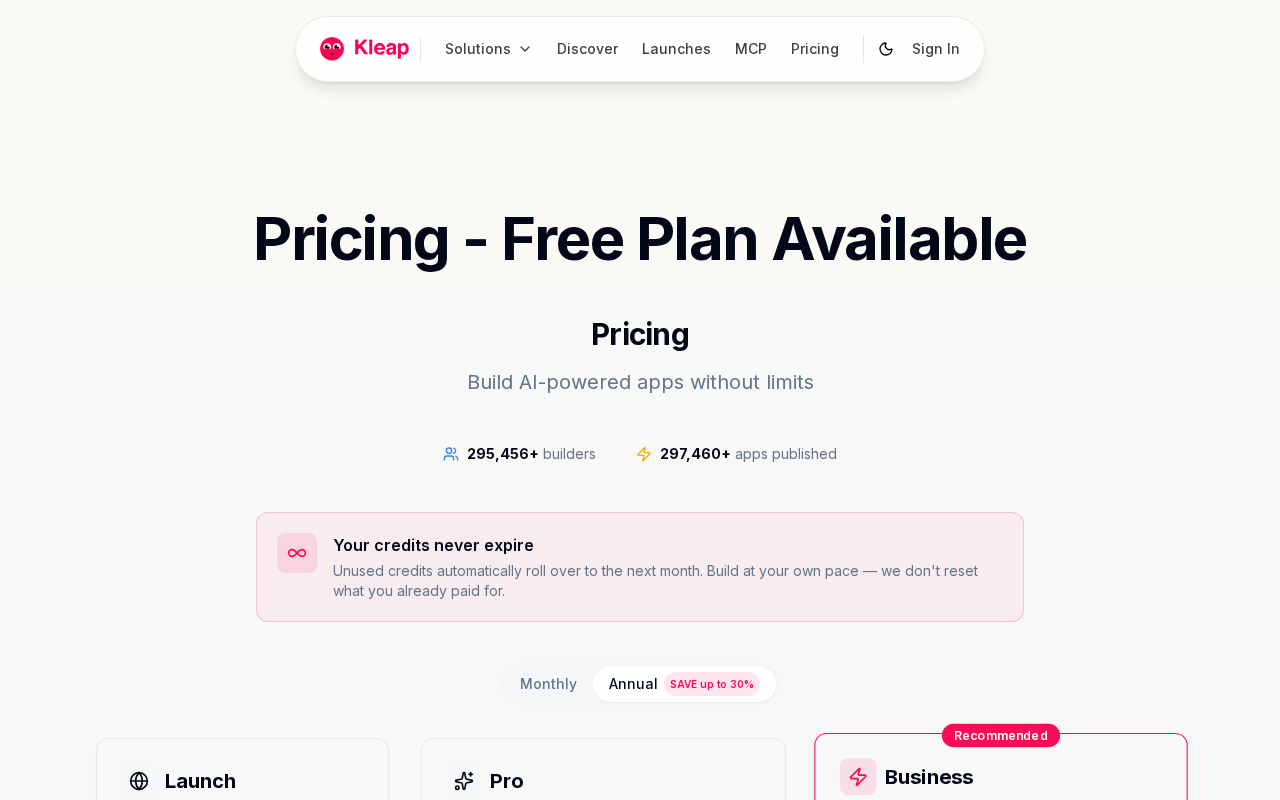
Free plan limitations worth knowing upfront: you get a Kleap subdomain, Kleap branding, and 5 AI credits per day. Publishing and hosting remain free forever regardless of plan.
From prompt to published site in minutes
Most builders make you choose a template, drag elements, rewrite placeholder text, and then figure out hosting separately. Kleap collapses that entire sequence into one step.
Describe your business in plain English, and the AI builds a complete, publish-ready site. No code, no design decisions, no separate hosting setup.
The workflow is genuinely different from legacy drag-and-drop tools, and understanding that gap is why our AI powered website creation tool vs hiring a developer cost analysis consistently surprises first-time readers.
What's included on the free plan
The free tier covers more than most competitors bundle into paid tiers. Here's exactly what you get at $0:
- 5 free AI credits per day, refreshed daily
- Free hosting and SSL, always included, no upgrade required
- Publishing and site viewing at no cost, permanently
- Websites, apps, landing pages, blogs, e-commerce stores, and portfolio sites
- Full code ownership and enterprise-grade security on every plan
When you're ready to remove branding or connect a custom domain, the Launch plan starts at $9/month and the Pro plan at $25/month. Neither is required to go live.
For teams scaling fast, our guide on free AI website builder with custom domain breaks down exactly when that upgrade pays off. Enterprise teams get custom pricing with dedicated support built in.
5 More Free AI Tools Worth Bookmarking Right Now
A free website is only half the stack. The other half?
Content, visuals, and copy that fill those pages without draining your budget. These five tools cover writing, image creation, and productivity; each has a genuine free tier and was chosen because it slots directly into a no-cost launch workflow alongside your AI website setup.
AI writing and content generators
ChatGPT (Free tier by OpenAI): The most accessible AI writing assistant available right now. The free tier runs on GPT-3.5, which handles blog drafts, product descriptions, and ad copy without a subscription.
Limit to know: the free plan excludes GPT-4o access and has usage caps during peak hours. Pair it with your teleporthq AI website builder workflow or any other builder to generate page copy in minutes.
Copy.ai (Free plan): Built specifically for marketing copy: landing page headlines, and email sequences. The free tier allows a set number of monthly runs, enough for a solo founder testing messaging.
It outputs structured copy faster than a general chatbot, which matters when you are populating a new site section by section.
AI image and visual creation tools
Adobe Firefly (Free credits): Adobe's generative image tool gives new users free monthly credits to produce commercial-safe visuals. Hero images, product mockups, social media graphics, all without licensing headaches.
Credits reset monthly, so consistent light users stay free indefinitely.
Canva AI (Free tier): Canva's Magic Studio features include text-to-image generation and background removal, both available on the free plan. The catch is a daily generation limit, but for a small business building its first site, that limit rarely bites.
Check how godaddy website builder AI features compares for integrated visual tools if you want everything under one roof.
Bing Image Creator (Free, unlimited): Powered by DALL-E, this tool generates four images per prompt at no cost. No account tier restrictions for basic generation.
Ideal for website banners and social thumbnails when your budget is exactly zero.
Kleap tip: Build your site on Kleap's free plan first, then use these tools to generate copy and visuals before upgrading. You will know exactly what paid features you need, and nothing gets spent on guesswork.
What Free AI Website Builders Won't Tell You (Industry Secrets)
Most "free forever" labels are marketing fiction. Before you invest hours building on any platform, here are the industry secrets that review sites consistently bury.

The hidden cost traps most free tools use
- The 30-day deletion trick. Dozens of platforms quietly unpublish or delete your site after a trial window. You build and share the link, but the site vanishes unless you upgrade. Real free tiers publish indefinitely.
- Branded subdomains that hurt your SEO. A URL like yoursite.builder.com signals to Google that you don't own your digital property. Free subdomains actively dilute your search authority, especially for local businesses in competitive markets like New York or Chicago.
- Lifetime credit traps. Some platforms give 3 total AI generation credits, ever. Others, like Kleap, give 5 AI credits per day with no expiry tricks. That gap is enormous when you're iterating on a launch.
- Code lock-in. Most free tiers keep your underlying code hostage. You can't export, migrate, or hand off to a developer. Kleap gives complete code ownership, which matters the moment you want to scale beyond the platform.
What separates a real free tier from a marketing trick
A genuine free tier does three things without asking for a credit card: publishes your site, hosts it with SSL included, and lets you return tomorrow with more AI credits. Kleap's free plan meets all three.
For a deeper look at how this compares to premium alternatives, see our breakdown of the framer AI website builder versus Kleap. If you're searching for a true fit, the test is simple: can you publish right now, for free, and come back tomorrow?
Most platforms quietly fail that test.
How to Get the Most Out of a Free AI Website in Under an Hour
Most people waste their first 20 minutes on a free AI website builder doing exactly the wrong thing: vague prompts, wrong site category, then a full restart. Skip that entirely.
Two decisions made upfront, before you type a single word, determine whether you publish in 45 minutes or spend the afternoon going in circles.

Writing a prompt that gets great results the first time
The single biggest differentiator between a polished result and a generic one is prompt specificity. A prompt like "make me a website" burns an AI credit and returns something forgettable.
A prompt such as "build a portfolio site for a Chicago-based freelance graphic designer targeting tech startups, with a dark minimal aesthetic, a projects page, an about section, and a contact form" produces something publishable. Four elements belong in every prompt: your industry, your target audience, your preferred tone, and the exact pages you need.
The 10-minute checklist before you hit publish
Before going live on any free AI website plan, run through this fast pre-launch check:
- Read every AI-generated paragraph for factual accuracy; AI writes fast, not always correctly.
- Switch to mobile preview and confirm the layout doesn't break on smaller screens.
- Verify all contact forms submit without errors.
- Confirm your free subdomain URL is clean and readable.
- Upgrade to the Launch plan ($9/month) only when a custom domain becomes a priority.
Choose your site category upfront, whether business, portfolio, blog, or store, because switching halfway through costs you AI credits from your daily free allocation. With the right prompt and this checklist, publishing a functional, seasoned-looking site within 60 minutes isn't optimistic.
It's the standard workflow.
Which Free AI Website Is Right for Your Goals in 2026?
The verdict depends entirely on what you're building. Kleap's free plan generates layout, copy, and structure from a single prompt, publishes instantly, and includes hosting and SSL at no cost.
The catch with most "free" builders: they block publishing until you pay. Kleap doesn't.
Matching the tool to your use case
- Freelancers and portfolio builders: Kleap's free tier covers launch-ready publishing immediately
- Small business owners: prioritize builders where hosting is genuinely free, not trial-gated
- E-commerce starters: confirm product listings work before upgrading
- Bloggers: pair AI writing with a free site builder for a zero-cost stack
When to upgrade from free to a paid plan
Upgrade to Kleap's Launch plan at $9/month when you need a custom domain. Step up to Pro from $25/month for branding removal and expanded AI credits.
Simple threshold, no surprises.
Kleap tip: Use your 5 free daily AI credits to test different layouts before committing to a paid plan. You'll know exactly what you're buying.
Frequently Asked Questions
Can I really build a website with AI for free, with no credit card required?
Yes. Kleap's free tier lets you go from idea to live website without entering payment details.
You describe what you need in plain language, and the AI builds it.
No coding, no trial period countdown, no card on file. The free plan is genuinely free to start, not a 7-day window before charges kick in.
What's the difference between a free AI website builder and a paid plan?
The free plan gets you off the ground. Paid plans start with Kleap's Launch tier at $9/month for a custom domain; Pro, from $25/month, adds expanded AI credits, advanced design controls, and priority support.
In practice, the free plan works well for testing an idea or launching a side project. Once you're driving real traffic or need a branded domain, upgrading makes sense.
The $50/month Business plan adds capacity for teams and higher-volume use cases. What most people underestimate is how much the custom domain alone changes how a business is perceived.
Do free AI website builders include hosting and SSL?
Most reputable ones do, and Kleap is no exception. Hosting and SSL certificates are included from day one, even on the free plan.
That means your site loads over HTTPS without any extra configuration. No hunting for a separate hosting provider, no manually installing a certificate.
It's one less thing to manage.
How many AI credits do I get on a free plan with Kleap?
Kleap's free tier gives you enough credits to build and launch a functional site. For exact credit allocations by plan, the Kleap pricing page provides the current breakdown, since limits can update as the platform evolves.
The honest answer: free credits cover initial builds well. Heavy iteration, multiple projects, or frequent redesigns will push you toward a paid plan faster than a single launch would.
Are free AI-generated websites good enough for a real business?
For many businesses, yes. A freelancer, a local service provider, or an early-stage startup can absolutely run on a free AI-built site while validating their offer.
The catch is usually branding. A free subdomain signals "early stage" to visitors in a way a custom domain doesn't.
Kleap's AI-designed layouts are genuinely professional, but the domain is where free plans show their limits. If you're running paid ads or pitching investors, the $25/month Pro plan pays for itself fast.
Which free AI website builder is best for beginners with no coding experience?
The best one is the one that removes every technical decision from your path. Kleap is built specifically around that principle: you describe what you want in natural language, and the AI handles layout, structure, and deployment.
No template hunting, no drag-and-drop frustration, no FTP setup. I've seen people go from blank page to published site in under an hour using this approach.
For beginners, the real differentiator isn't features, it's how few decisions the tool forces you to make before you're live. Kleap's full-stack AI agent, as described on their official site, is designed exactly for that zero-friction launch.
The Best Free AI Website Experience Isn't About Free
Most free tools give you a starting point. Kleap gives you a finished product.
That's the real gap separating the seven tools covered here: some hand you components, others hand you a live website from a single prompt. Only one does the latter without asking for a credit card first.
Your next step is simple. Go to Kleap, type what you want to build, and watch the AI handle design, structure, and hosting in one pass.
No tutorial required, no template hunting, no code.
Ready to see how fast a free AI website can actually go live? Start building on Kleap today, it's free to launch, and the first version of your site is one prompt away.
The builders who move fastest aren't the ones with the biggest budgets. They're the ones who stopped waiting for the perfect moment and just typed the first sentence.