AI headshot generator
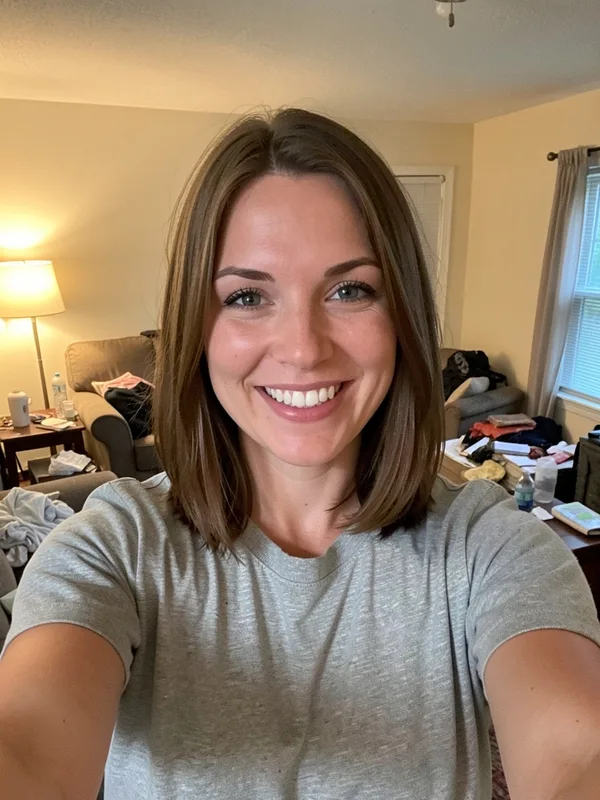
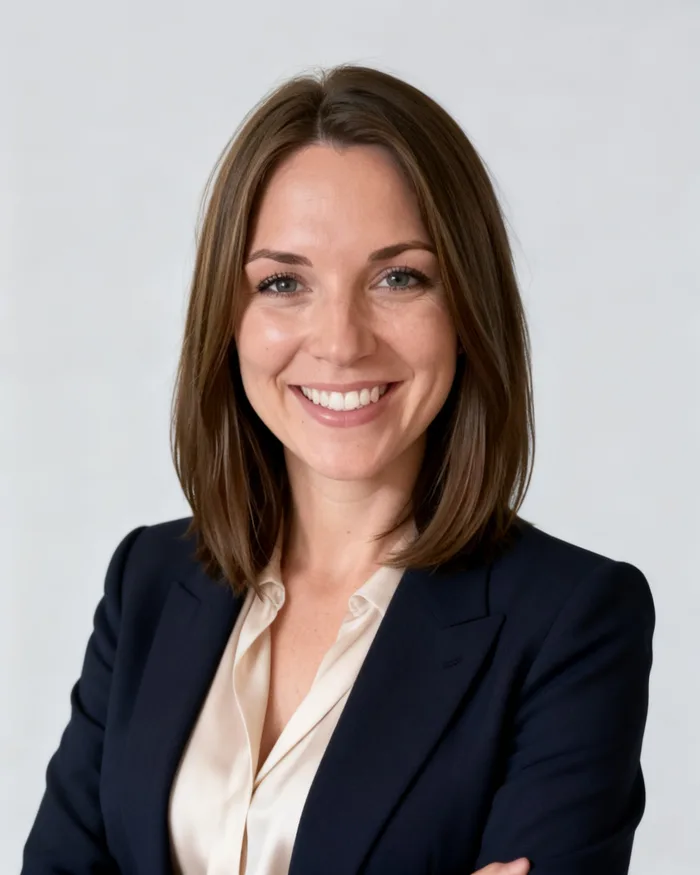
Kleap returns up to four re-drawn headshots from your photo: new pictures, not a pixel-precise retouch.
- TestedTested once on 6 November 2026 with the prompt in the box and one selfie: 4 studio headshots, 1 min 4 s by Kleap's turn timer; ask Kleap for another version in the same chat. Times are Kleap's own timer for the AI's turn in our test (one run, or the median where we repeated it), not a promise: yours may take longer, and reading and checking the file comes on top.
- Free to startYour first try usually needs no account; to keep the result, Kleap asks for a free account, with no card. Each file uses Kleap usage, and the free plan's usage refills automatically.
- Using the boxDrop your photo in the box (one clear, front-facing photo; Kleap asks for one if you forget); use only photos you have the right to use. It is saved in this project's files and sent to the image model as the reference; your photo itself is left as it is. AI can change small details of a face, so compare each version with your photo.
What is an AI headshot generator?
An AI headshot generator turns an ordinary photo of you into professional portraits: studio light, a plain background, business clothes. Kleap's AI headshot generator works from one photo you attach and returns four JPEG versions in the chat. The face is redrawn, so check that it still looks like you before you use one.
What this page makes: up to 4 JPEG headshots, redrawn from one photo of you plus a sentence (background, clothes, light). What it is not: a photo shoot, an ID, passport or visa photo, or a likeness guarantee: in our one test the 4 versions showed the same hair and smile when compared by eye, and small details of the face still changed.
An AI headshot generator turns an ordinary photo of a person into professional-looking portraits: studio light, a clean background and business clothing. Kleap's AI headshot generator returns up to four redrawn JPEG headshots from one photo you attach. The face is redrawn, not retouched, so the likeness is not guaranteed: you pick the closest version. Attach the photo, say the background, the outfit and the light you want, and the photo studio returns the versions at once in the chat, to download as JPEG files or reuse on your Kleap website. To change the look, write it in plain words: a darker background, a softer smile, a navy jacket. Compare every version with your photo before you put it on LinkedIn or a CV, and use only photos you have the right to use. There is no brush or mask, no multi-photo training and no team ordering flow: it is a quick way to a usable headshot.
Headshot, photo editor or product photos?
This page is for a photo of a person, for a CV, LinkedIn or a team page. The brief asks for studio light, a plain light-grey background and business clothes; you attach one photo and get four versions to choose from. It is not an ID, passport or visa photo.
To change the scene of any photo (the light, the season, people in the background) use the AI photo editor online. For an object you sell, use AI product photography. The three pages use the same photo studio; the brief in the box is what changes.
Checked on 6 November 2026 by the Kleap product team. Test: “Turn my attached photo into professional headshots of me. (details on the next line)”, 4 JPEG photos (Seedream 5), 1 min 4 s by Kleap's turn timer.
Measured on
One real run of the prompt in the box above, unchanged: a fresh project, the real Kleap interface, a test account. Every number on this page comes from that run and its delivered file. Times are Kleap's own turn timer, shown under the reply in the chat. One run, not an average.
- Kleap's turn timer, on this test
- 1 min 4 s
- Versions
- 4
- Model
- Seedream 5
- Format
- JPEG, no transparent PNG
See what this prompt creates
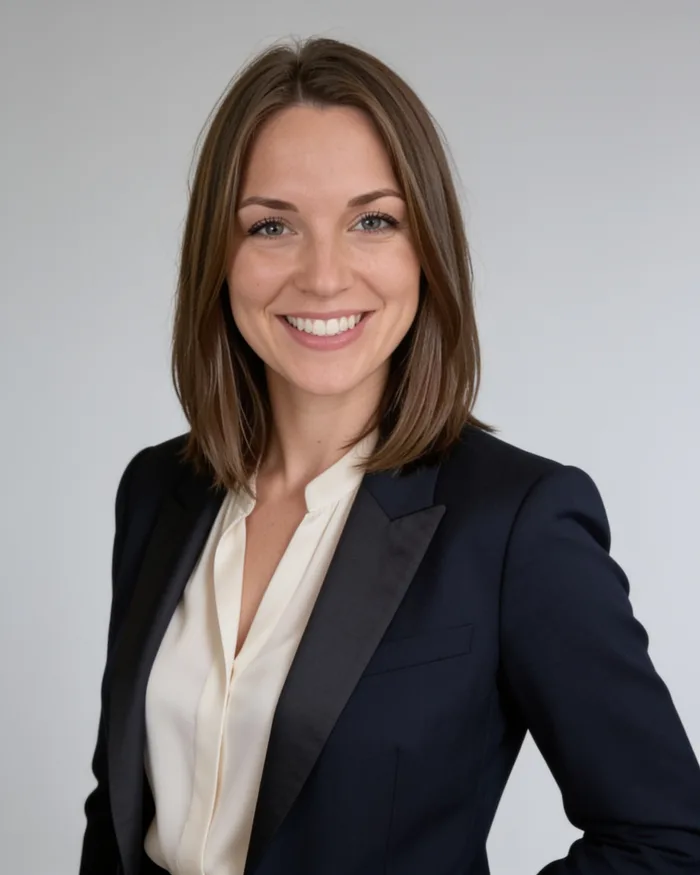
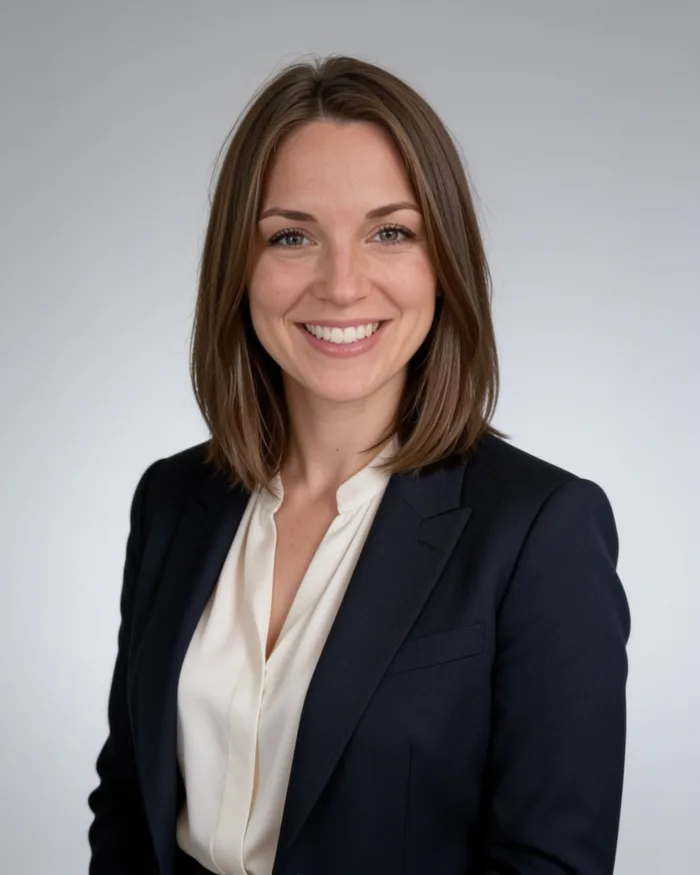
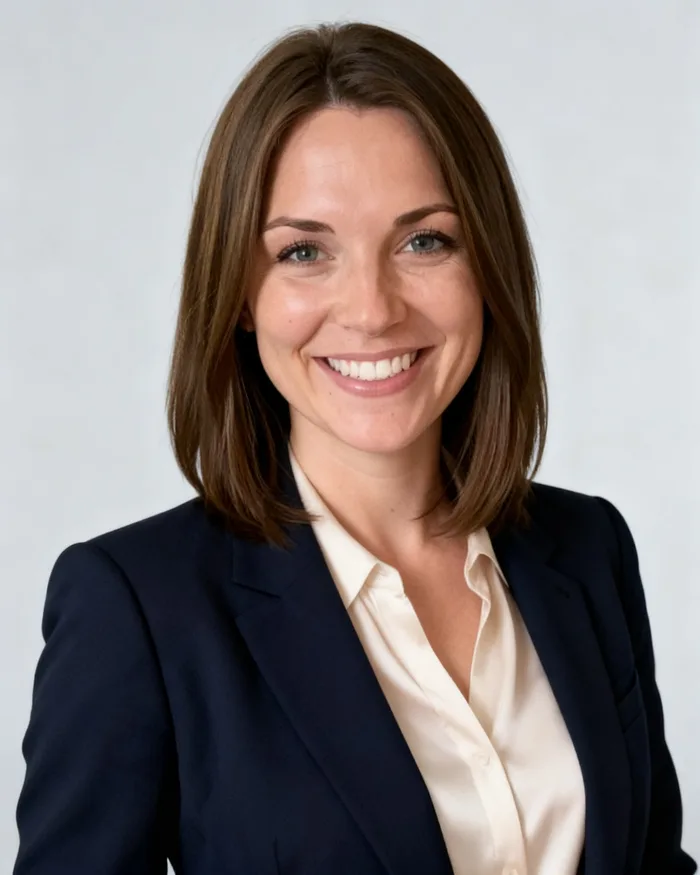
Real output of the prompt in the box above, generated with Kleap on 6 November 2026, rendered from the delivered file. Not a mockup. From one test selfie and the prompt in the box, sent as it is, Kleap returned 4 studio headshots in 1 min 4 s by Kleap's turn timer, all made with Seedream 5: a navy blazer over a cream top, a plain light-grey background, soft studio light. Side by side with the selfie (compared by eye, all 4 versions of this one test), the hair, smile and face shape read as the same woman; the clothes and framing are new, and small details of a face can shift between versions, so pick the one that looks like you.
What we checked in the delivered file
- 4 JPEG files, each labelled Seedream 5 in the chat (Made with Seedream 5).
- Background, clothing and light follow the prompt in all 4.
- Faces compared by eye with the selfie: same hair and smile; check the small details before you use one.
Show the exact prompt
Turn my attached photo into professional headshots of me. Details: soft studio light, plain light-grey background, smart business attire.
How we tested the AI Headshot Generator, and when to use something else
How this page was tested
- We attached one real photo and sent the box prompt as written.
- We compared the versions returned with the photo we sent.
- We noted where the face changed: it can, so you choose the closest one.
Good for
- A quick profile picture for LinkedIn, a team page or a CV
- Changing the background, light and clothing of a photo you have
- Trying several versions from one photo
Use something else for
- An exact likeness every time: the face can come out different.
- Packs trained on many selfies of you.
- Other edits to a photo: use the AI photo editor online
One photo, a whole set of professional portraits
LinkedIn profile photo
A calm background and business attire in a framing that reads well as a small circle.
CV and application photo
Head-and-shoulders portraits with even light and a plain backdrop for formal applications.
Team and About page portraits
Ask each person for the same background and light so a team page looks consistent.
Speaker and author bio photos
A slightly more editorial look for conference pages, book jackets and press kits.
Website portrait
Drop the portrait into the site Kleap builds for you, from the same account.
From selfie to headshot in three steps
Attach your best photo
Pick a sharp, front-facing picture with your whole face visible. A phone selfie in daylight is enough.
Describe the look
Choose the background, the light and the outfit in a sentence. The box already holds a ready-to-send request you can edit.
Pick a version and refine it
Kleap returns several versions in the chat. Save the one you like, or ask for a different jacket, background or crop.
How Kleap compares
Facts from each tool's own page, read on 9 November 2026 (follow the source link to check). Kleap's row describes what the example above shows.
Which tool for which case
Pick Canva when you want a headshot inside a design you are making and can wait for free credits. Pick Adobe Firefly when you want to describe the style and background and keep editing with Firefly tools. Pick HeadshotPro when you will pay for dozens of styles after one free HD headshot. Pick Kleap when four redrawn versions from one photo are enough, and you check the likeness yourself.
| Tool | What you get | Free path | Best at |
|---|---|---|---|
| Kleap | Up to 4 headshot versions from one photo, as JPEG | Your first try usually needs no account; to keep the result, Kleap asks for a free account, with no card. Pro from $25/month (see /pricing). | From one photo in the same chat as your CV and website |
| Google's US top 3 for “ai headshot generator”, read 9 November 2026 | |||
| Canva AI headshot generatorSource, checked 9 Nov 2026 | Headshots from a selfie; download a JPG or PNG | Two free credits, then wait 24 hours for more | Publish to LinkedIn from the editor |
| Adobe Firefly headshot generatorSource, checked 9 Nov 2026 | Headshots from a reference photo; style and background set with AI | Free with an Adobe account (free daily generations) | Keep editing with tools like Generative Fill |
| HeadshotPro free headshot generatorSource, checked 9 Nov 2026 | Several headshots from one selfie, different outfits and scenes | 1 free HD headshot, no sign-up, no credit card | Unlock the rest to generate dozens more |
| Category leaders (not in this SERP, read 9 November 2026) | |||
| BetterPicSource, checked 9 Nov 2026 | Upload a few pictures of yourself; pick from 150+ styles | Paid: 4K headshots starting at $35, money-back guarantee | A portfolio of headshots in less than an hour, sent by email |
Start free. Upgrade when you need more.
Your first try usually needs no account; to keep the result, Kleap asks for a free account, with no card. Files and images use your Kleap usage: free usage refills over time, and paid plans add much more.
Free
- Free usage that refills
- Free account to save your results and find them again
Pro
- Much more usage
- Custom domain for your Kleap websites
A headshot you can use the same day
A professional headshot normally means booking a photographer, travelling to a studio and waiting for retouched files. Kleap's photo studio starts from a photo you already have. You describe the background, light and clothing you want, and the studio generates several versions of you in that setting.
The first photo matters more than the prompt. A sharp, front-facing picture taken in daylight, with your face fully visible and no sunglasses, gives the studio the most to work with. If one version is close but not right, say what to change (a different jacket, a warmer background) and ask again.
Questions, answered.
Can I use it for a passport, visa or ID photo?
No. Official photos have size, background and expression rules, and Kleap checks none of them; each version is also a redrawn picture, not your face as the camera saw it. Use a photo booth or a photographer for official documents, and this page for LinkedIn, a CV or a team page.
What kind of photo should I upload?
A sharp, front-facing photo in good light with your full face visible works best. Avoid sunglasses, heavy filters, group shots and pictures where your face is small or cut off.
Will the headshot look like me?
Each version is a new picture generated from your photo, not a copy of it, so the face can come out different. In our one test (4 versions, compared by eye with the selfie) the hair, smile and face shape held in all four; skin, eyes and small details are still redrawn. Check the face, the hair and small details against your photo and use only the versions that look like you.
Can I choose the background and outfit?
Yes. Write them in the request: for example a plain grey backdrop and a navy blazer, or a softly blurred office and a casual shirt. You can change either one with a follow-up message.
Is the headshot good enough for LinkedIn?
Many people use a calm background, even light and a head-and-shoulders crop for LinkedIn, and you can ask for exactly that. Judge the versions on your own screen before you upload one.
How many versions do I get?
Kleap normally returns several versions of each request so you can pick the closest one. Ask for one single version if you prefer.
Does it need several photos or a training step?
No. It works from one photo (up to four if you attach more) and trains no model of your face. That is why it is quick, and also why the likeness can drift: services that ask for 10 or more selfies build a model of you first.
Can I make matching headshots for a whole team?
There is no team flow. Each person sends their own photo with the same sentence (for example a plain light-grey background, soft studio light, navy jacket), so the set looks alike; compare each face with its owner before you publish the team page.
Related tools
Your next profile photo is one message away.
Attach a photo, describe the look and get professional versions back. Compare each version with your face before you use one.
Written by the Kleap product team. Checked on 9 November 2026 against the generated files and runs shown on this page.