AI photo editor online, free
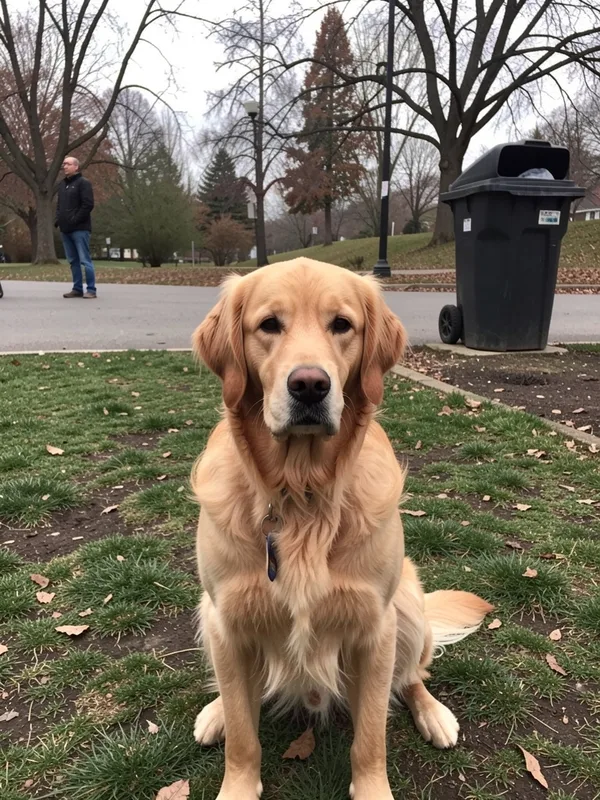
Add a photo and describe the new version. Kleap redraws the whole picture; you cannot retouch one precise area.
- TestedTested once on 6 November 2026 with the prompt in the box and one photo: 4 redrawn versions, 53 s by Kleap's turn timer; ask Kleap for another version in the same chat. Times are Kleap's own timer for the AI's turn in our test (one run, or the median where we repeated it), not a promise: yours may take longer, and reading and checking the file comes on top.
- Free to startYour first try usually needs no account; to keep the result, Kleap asks for a free account, with no card. Each file uses Kleap usage, and the free plan's usage refills automatically.
- Using the boxKleap redraws the whole picture from your photo and your sentence with an AI image model: it is not a pixel editor, so there is no brush, mask or layer, and fine details come out new. Drop your photo in the box (use only photos you have the right to use; it is saved in this project's files and sent to the image model as the reference) and compare each version with your original.
What is an AI photo editor online free?
An AI photo editor online changes a photo from a written instruction, in the browser. Kleap is an AI photo editor online, free to start: it redraws the whole picture from your photo and returns four JPEG versions in the chat. It can relight a scene or take people out of it, but the rest is drawn again too.
What this page makes: up to 4 JPEG versions, redrawn from one photo you attach plus a sentence. What it is not: a pixel editor. There is no selection, brush, mask, layer, upscaler or transparent PNG, and the parts you did not mention are drawn again too.
An AI photo editor online changes a picture from a written instruction instead of brushes and layers. Kleap is an AI photo editor online, free to start, that redraws an uploaded photo from your written instructions. It does not provide a brush, mask, layer or pixel-level selection: use it for scene-level changes (a cleaner background, warmer light, another style), not precise retouching. It returns up to four redrawn JPEG versions in the chat and you pick the one that fits. The whole picture is drawn again, so fine details, text and faces can shift: compare each version with your original. Attach up to four photos, describe the change, then download the versions or place them on your Kleap website. You can name the image model (Seedream, Nano Banana, Qwen or FLUX) or leave it on automatic, and refine with follow-up messages. For packshots of a product, see AI product photography; for portraits, the AI headshot generator.
Photo editor, headshot or product photos?
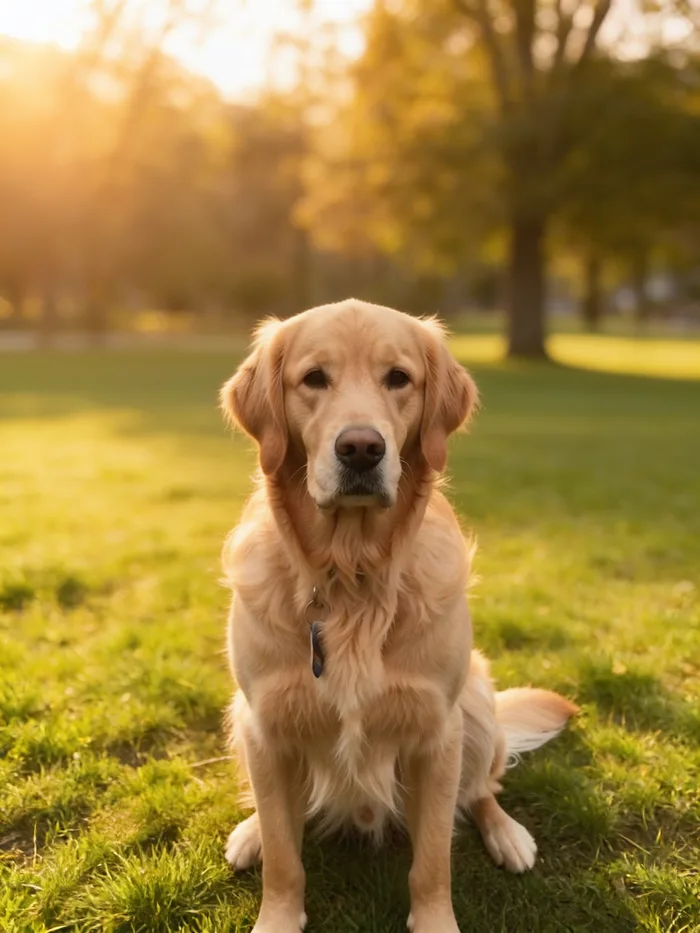
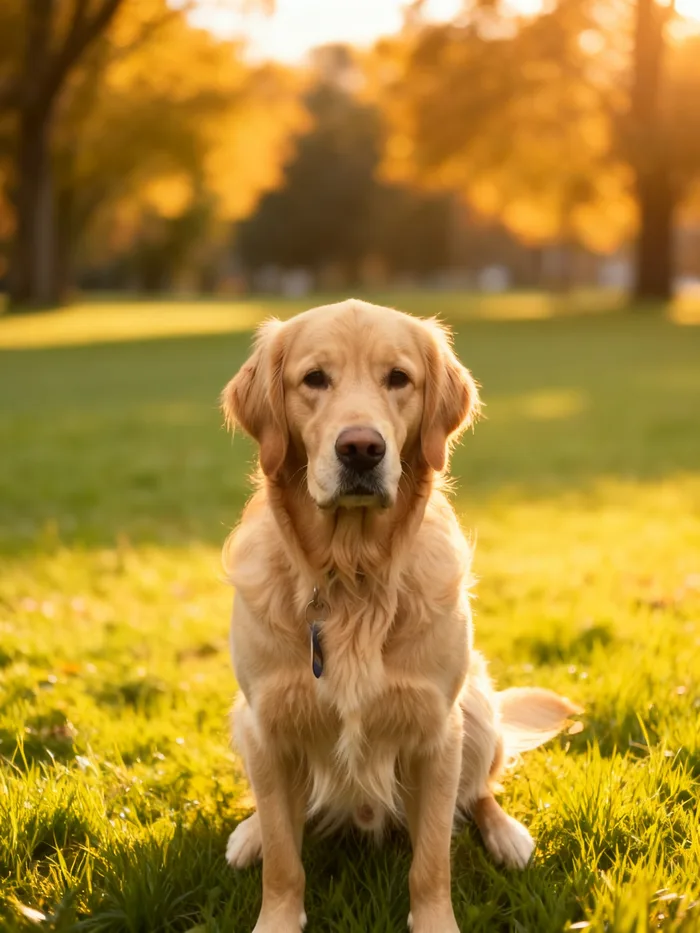
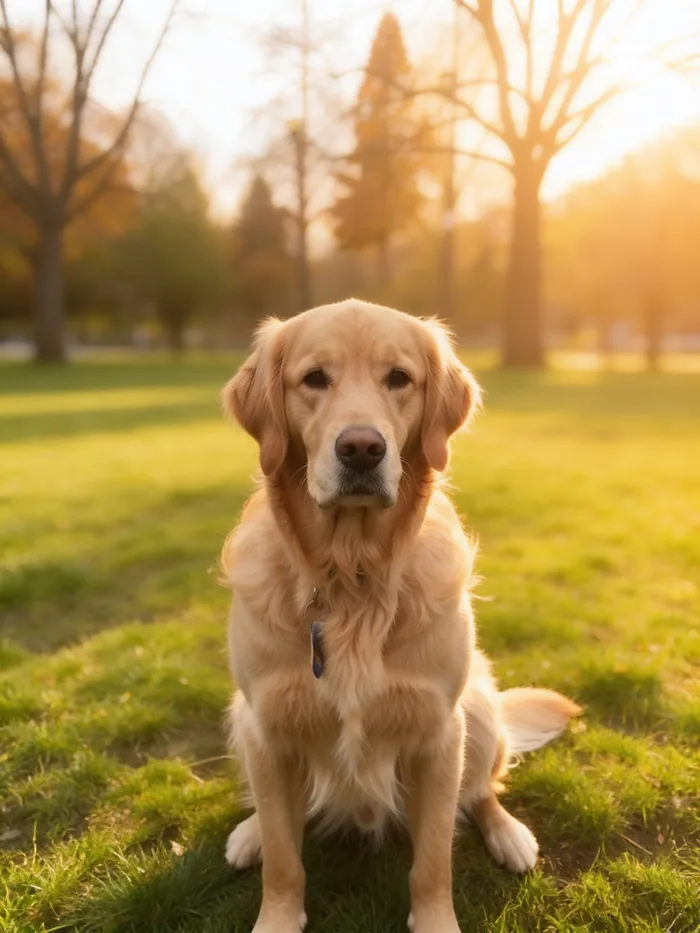
Use this page to change a scene: the light, the weather, the background, people who should not be there. In our one test (4 versions, checked by eye) the person and the bin behind the dog were gone in all four, and the park was drawn again around him. For a change that must leave every other pixel alone, use a local-edit tool.
For portraits of yourself, the AI headshot generator keeps the brief on face, light and clothes. For an object you sell, AI product photography asks for packshots on white.
| Task | Kleap (redraws the photo) | Local retouching editor |
|---|---|---|
| Take people or objects out of the background | Yes: in our one test (4 versions, checked by eye) the passer-by and the bin were gone in all 4, and the rest of the picture was drawn again | Yes: only the area you paint over changes |
| Change the light, the season or the style | Yes, from one sentence: our test asked for warm golden light | By hand, with adjustment layers or filters |
| Leave the rest of the picture untouched, pixel for pixel | No: every version is a new picture | Yes |
| Keep faces, text and logos identical | Not guaranteed: compare each version with your original | Yes, if you do not paint over them |
| Transparent PNG cut-out | No: JPEG files only | Yes |
Checked on 6 November 2026 by the Kleap product team. Test: “Redraw my attached photo of my dog in a sunny park. (details on the next line)”, 4 JPEG photos (Seedream 5), 53 s by Kleap's turn timer.
Measured on
One real run of the prompt in the box above, unchanged: a fresh project, the real Kleap interface, a test account. Every number on this page comes from that run and its delivered file. Times are Kleap's own turn timer, shown under the reply in the chat. One run, not an average.
- Kleap's turn timer, on this test
- 53 s
- Versions
- 4
- Model
- Seedream 5
- Format
- JPEG, no transparent PNG
See what this prompt creates
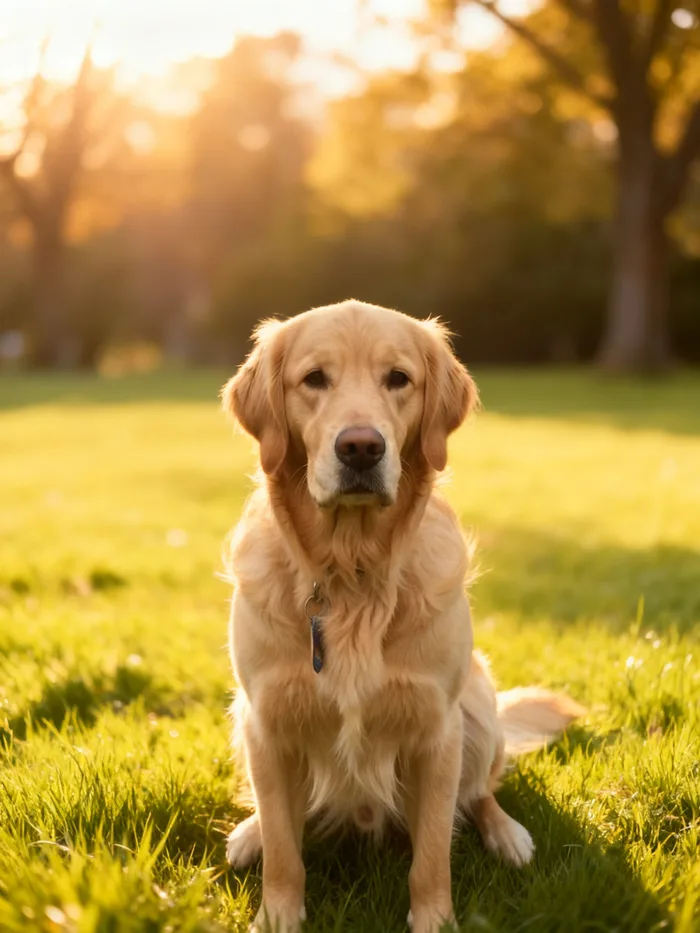
Real output of the prompt in the box above, generated with Kleap on 6 November 2026, rendered from the delivered file. Not a mockup. From the test photo and the prompt in the box, sent as it is, Kleap returned 4 redrawn versions in 53 s by Kleap's turn timer, all made with Seedream 5. Checked by eye on all four: the passer-by and the bin are gone, the light is a warm low sun and the grass and trees are cleaner. The dog is redrawn too: same breed, pose and collar, but the fur, the face and the park around it are new pixels, not the original ones. That is how this editor works: it redraws the whole picture from your description.
What we checked in the delivered file
- 4 JPEG files, each labelled Seedream 5 in the chat.
- Passer-by and bin gone in all 4; warm light in all 4.
- The whole picture is redrawn: the dog's fur and face are new pixels, close to the original but not identical.
Show the exact prompt
Redraw my attached photo of my dog in a sunny park. Details: no people or bin behind him, warm golden light, clean natural colours.
How we tested the AI Photo Editor Online, and when to use something else
How this page was tested
- We attached one real photo and sent the box prompt as written.
- We compared each version with the original: what was removed, what changed.
- The whole picture is regenerated, not retouched pixel by pixel: we say so on this page.
Good for
- Removing people or clutter and changing the light or the scene
- A cleaner version of a casual photo for a post or a site
- Edits you can describe in a sentence
Use something else for
- Brush, mask, layers or exact pixel retouching.
- A transparent PNG or upscaling.
- Just a smaller file: use the free image compressor
Every common photo fix, from one prompt box
Remove an object or a person
Ask for the bin, the cable or the passer-by to disappear and the gap to be filled naturally.
Swap or clean the background
Put the subject on a plain colour, a studio backdrop or a new place.
Brighten and relight
Rescue a dark or flat picture by asking for warmer, brighter or softer light.
Season and weather
Turn a grey day into a sunny one, or summer into autumn, in a new version of the scene.
Restyle a picture
Turn it into film, illustration, a magazine look or a different season.
Product and profile photos
Prepare a product shot or a portrait, with the same chat that also builds your website.
Edit a photo in three steps
Attach the photo
Use “Add a photo” in the prompt box, or drop the picture onto it. Phone pictures and downloaded images both work.
Write the edit
Say what to remove, replace, fix or restyle. The box holds an example request that you can rewrite.
Compare and refine
Kleap returns several versions. Keep the best one or reply with the next small change.
How Kleap compares
Facts from each tool's own page, read on 9 November 2026 (follow the source link to check). Kleap's row describes what the example above shows.
Which tool for which case
Pick IObit when you want a free prompt edit with no sign-up. Pick Microsoft Designer when the edited photo goes into a design with templates and fonts. Pick AI Photo Magic Editor or Canva when you want to brush over the exact area to change. Pick Kleap when a sentence should redraw a whole scene and the same chat then uses the photo in a site, a deck or a document.
| Tool | What you get | Free path | Best at |
|---|---|---|---|
| Kleap | Up to 4 redrawn versions as JPEG, model of your choice | Your first try usually needs no account; to keep the result, Kleap asks for a free account, with no card. Pro from $25/month (see /pricing). | The same chat can then use the photo on a site or in a video, on request |
| Google's US top 3 for “ai photo editor online free”, read 9 November 2026 | |||
| Microsoft Designer photo editorSource, checked 9 Nov 2026 | Edit a photo by telling the editor what you want in a prompt | Free (page title); sign in with a Microsoft account if prompted | Photos inside designs: themes, colours, fonts and backgrounds |
| IObit AI Photo Editor FreeSource, checked 9 Nov 2026 | Describe the change: retouching, style adjustments, object edits | “100% free with zero signup required” | Change a scene, a look or a pose from a text prompt |
| AI Photo Magic Editor (Google Play)Source, checked 9 Nov 2026 | Android app: remove objects, replace backgrounds, art styles | Contains ads (Google Play listing) | Brush tools for masking and lasso selections |
| Category leaders (not in this SERP, read 9 November 2026) | |||
| Canva photo editorSource, checked 9 Nov 2026 | Magic Eraser: click a subject or brush over it; a background generator from a text prompt | Free online photo editor | Edits that keep the rest of the photo: brush over just the part to remove |
Start free. Upgrade when you need more.
Your first try usually needs no account; to keep the result, Kleap asks for a free account, with no card. Files and images use your Kleap usage: free usage refills over time, and paid plans add much more.
Free
- Free usage that refills
- Free account to save your results and find them again
Pro
- Much more usage
- Custom domain for your Kleap websites
Photo editing without layers, masks or sliders
Traditional photo editors ask you to learn selections, layers and masks before a stray stranger disappears from a holiday shot. Kleap flips that: you attach the picture and write what you want to be different, and the photo studio redraws the whole picture with it.
That covers the jobs people search for most: removing an object or a person, replacing or cleaning up a background, brightening a dark photo and restyling a picture. Each result is a redrawn picture, not your original pixels: it is the right tool when the change matters more than every detail staying the same. You can follow up on any result in the same chat until it looks right.
Questions, answered.
Can I change one part of the photo and keep the rest exactly?
No. There is no selection, brush or mask: Kleap redraws the whole photo from your sentence, so the parts you did not mention come back slightly different too. Name what must stay (the face, the collar, the sign) and compare it with your original; for an edit that must leave every other pixel alone, use a local-edit tool.
Can it remove an object or a person from a photo?
Not the way an eraser does. Kleap redraws the whole picture as a JPEG, so a person or an object you ask to leave can go (in our one test, checked by eye, the person and the bin behind the dog were gone in all four versions), but the rest of the scene is drawn again too: the background, the light and small details change. To erase one thing and keep every other pixel, use a local-edit tool such as Adobe Firefly's Generative Remove.
Can it upscale, sharpen or cut out a photo?
No. Kleap redraws the picture from your photo and your sentence, so it has no upscaler, no sharpening filter, no brush and no transparent cut-out. Use a dedicated tool for those jobs, and Kleap when you want to describe a change.
Can I change the background?
Yes. Describe the new background, such as a plain white wall, an office or a beach, and the subject stays in front of it. Kleap does not cut the subject out onto a transparent PNG: the studio redraws the whole photo as a JPEG with the new background.
Is this AI photo editor online and free?
It runs in the browser: nothing to install. Your first try usually needs no account; to keep the result, Kleap asks for a free account, with no card. Each set of versions uses your Kleap usage, and the free plan's usage refills over time.
Will the person or pet in my photo look the same?
Close, not identical. In our one test (4 versions, compared by eye) the dog had the same breed, pose and collar in all four, but its fur and face were new pixels. Faces, text and logos are redrawn like the rest, so compare them with your original before you post a version.
How do I write the edit so it works?
Say what must go, what must change and what must stay, in plain words: “no people or bin behind him, warm golden light, keep his red collar”. If one version is close but one detail is off, ask for another version in the same chat and name that detail.
Can I choose the image model?
Yes. Name Seedream, Nano Banana, Qwen or FLUX in your message, or leave it on automatic; our test used Seedream 5. Every model redraws the picture: none of them masks one area and keeps the rest pixel for pixel.
Related tools
Describe the edit, keep the best version.
Attach a photo, say what to change and compare the versions Kleap sends back. Each version is a new picture: keep the one that looks right.
Written by the Kleap product team. Checked on 9 November 2026 against the generated files and runs shown on this page.