8 Free AI Website Builders Online in 2026, Compared
An AI website builder free online uses artificial intelligence to generate complete websites in minutes, with eight leading platforms offering free tiers in 2026.
Most free plans include AI-generated layouts, mobile responsiveness, and basic hosting without credit card requirements
Compare template flexibility, design control, and export options before committing to a platform
Free tiers work best for testing concepts, portfolio sites, or low-traffic projects before scaling to paid plans
Building a website used to mean weeks of coding or expensive developer fees. Not anymore.
Artificial intelligence has fundamentally changed how quickly anyone can launch a professional site, regardless of technical background. The AI website builder free online category has exploded with platforms that generate layouts, write copy, and optimize designs through simple text prompts or brief questionnaires.
Whether you're launching a freelance portfolio, testing a business idea, or building an agency client site, these tools eliminate the traditional barriers. Speed matters when you're validating concepts or racing competitors to market.
We've reviewed the landscape to find which platforms actually deliver on their promises. You'll see how Kleap stands out for power users, why Wix offers enterprise features in free mode, where Canva excels for visual brands, and which hidden gem serves European businesses best.
The breakdown covers Figma's collaboration tools, Design.com's logo integration, Framer's clean code output, and how WordPress evolved with 10Web's AI layer.
By the end, you'll know exactly which builder matches your project type, technical comfort level, and growth timeline, without wasting hours on platforms that don't fit your needs.
Why Free AI Website Builders Are Transforming Business in 2026
Creating a website used to mean hiring developers or wrestling with complicated templates for weeks. Not anymore.
In 2026, AI-powered website builders have matured from experimental tools into legitimate business solutions. These platforms now generate professional sites in minutes, not months, and many offer robust free tiers that would have cost thousands of dollars just three years ago.

The AI Revolution in Website Development
The shift happened fast. Between 2023 and 2026, machine learning algorithms learned to understand brand identity, write conversion-focused copy, and design layouts that actually convert visitors.
What changed? Training data expanded massively.
AI systems analyzed millions of successful websites, learning which design patterns work for specific industries. Small businesses and solopreneurs benefit most; they get enterprise-level capabilities without the enterprise budget.
What Makes a Free AI Website Builder Worth Using
Speed matters. A functional site in 10 minutes versus 10 days changes everything for startups testing ideas or agencies managing multiple clients.
The best free options include hosting, SSL certificates, and mobile optimization, features that alone would cost 50 to 100 dollars monthly elsewhere.
Try it — build your site while you read
Describe what you want and get a live, publishable site in seconds. Free to start, no code.
Join 200,000+ makers building real websites with Kleap.
Kleap, the Most Powerful AI Website Builder Free Online
Most free plans tease you with 10-20 AI credits. Kleap flips that script entirely.
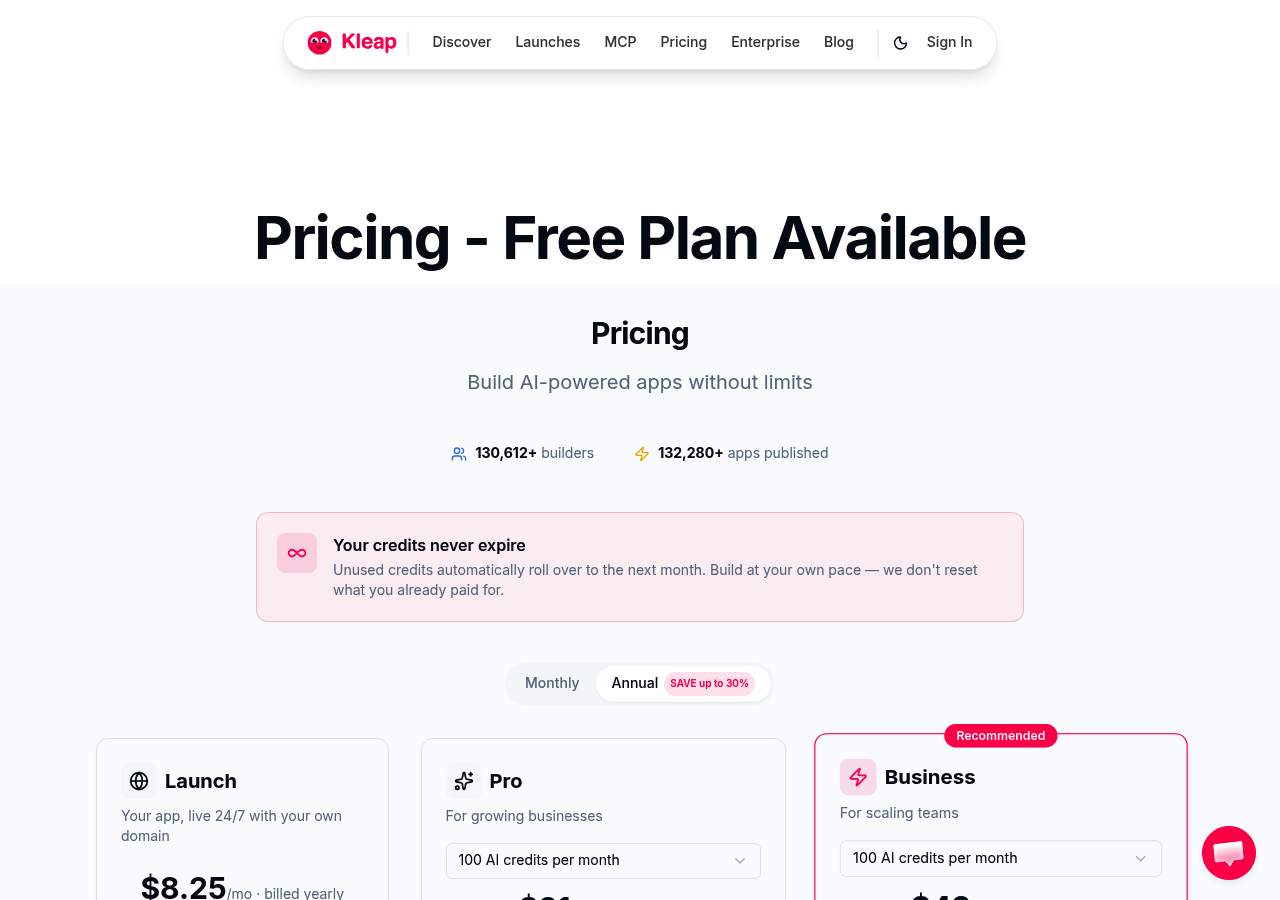
Their free tier delivers 750 AI credits monthly, enough to generate dozens of pages, while competitors cap you at basic landing pages. You get unlimited pages, full e-commerce with product listings, hosting, SSL certificates, and built-in analytics.
All at zero cost. The catch?
A 9% Stripe transaction fee and a small Kleap badge. For bootstrapped startups testing market fit, that trade-off beats paying $25 monthly elsewhere.
Over 2.5 million users have already published 118,888+ apps through the platform, proving the model works at scale.
Unmatched AI Credits and Unlimited Pages on Free Plan
Here's the breakdown: competitors lock free users into 1-3 pages and place 'Powered by X' watermarks everywhere. Kleap removes those artificial limits.
Your free account supports 2,500 email subscribers, unlimited product catalog entries, and custom forms, capabilities normally locked behind $25/month paywalls. The only real constraint is the kleap.co subdomain, which disappears when you upgrade to the $25/mo Start plan.
That tier also cuts the Stripe fee to 3% and unlocks 7,500 AI credits monthly. Compare that to platforms charging $29 for similar features, and the value gap becomes obvious.
Why Entrepreneurs Choose Kleap Over Competitors
Platform lock-in kills flexibility. Kleap hands you the generated code, HTML, CSS, and JavaScript, so you can migrate anytime without ransom fees.
No proprietary formats. No export restrictions.
The 9% transaction fee on the free plan sounds steep until you realize you're avoiding monthly subscriptions entirely during your first revenue year. A side hustle earning $500 monthly pays $45 in fees versus $300 annually for a standard builder subscription.
Once revenue justifies it, upgrading to the Pro plan ($25/month, 2% Stripe fee) becomes a no-brainer. Enterprise teams get VIP support and managed migration for high-traffic projects requiring custom code injection.
Kleap Pricing and Feature Breakdown
Yearly billing knocks 20-30% off these rates; the Start plan drops to roughly $99 annually. Agencies managing client sites appreciate the Grow tier's white-label options and increased storage quotas.
For a detailed comparison of how Kleap stacks up against other top contenders, check out our Best Free AI Website Builder 2025 Complete Guide. The transparent pricing and true ownership model explain why conversion rates from free to paid users remain industry-leading.
How We Evaluated These 8 Free AI Website Builders
We tested each AI website builder free online tool for two weeks, creating actual sites across different industries. Our team focused on what matters most: how quickly the AI generates usable designs and whether those designs actually look professional.
Speed varied wildly; some platforms delivered complete sites in under 60 seconds, while others required multiple revision rounds.
Our Testing Methodology and Criteria
Each builder was scored across five dimensions. AI generation quality topped our list, followed by design flexibility (can you override the AI's choices without fighting the interface?).
We tracked upgrade prompts; how aggressively does the platform push paid plans? Export rights surprised us: several 'free' tools lock your content permanently.
Before committing, read our analysis of Website AI Builder Free? 4 Hidden Costs You Need to Know.
Free Plan Limitations That Actually Matter
Storage caps rarely hurt small sites. What does hurt them?
Forced branding, limited pages (typically 5-10), and disabled contact forms. Some platforms restrict AI regenerations to three attempts monthly, which is frustrating when you're refining your design.
Kleap tip: Test the AI with your actual business description during the trial period, not with generic placeholder text; output quality varies significantly based on input specificity.
Wix AI Website Builder: Enterprise Features with Free Tier
Wix splits its AI offerings between two distinct systems. ADI (Artificial Design Intelligence) handles basic sites through a questionnaire-driven interface.
Studio, meanwhile, targets developers with advanced customization and coding capabilities. This dual approach covers both ends of the market, though newcomers often find the choice confusing at first.
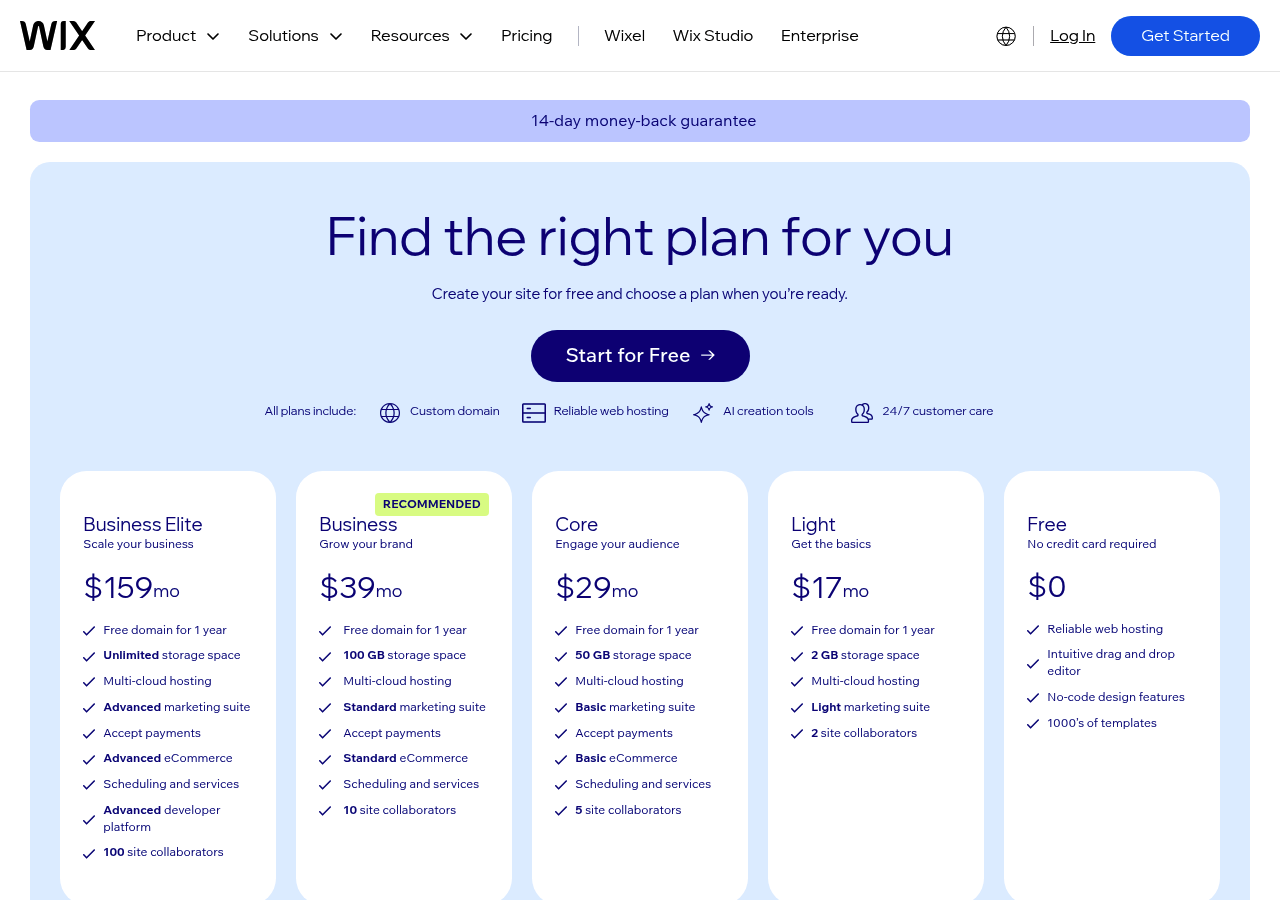
Photo by Valery Fedotov on Unsplash
The free tier includes heavy Wix branding across every page. Storage is capped at 500MB, and bandwidth remains severely limited.
Your domain reads "username.wixsite.com/sitename" instead of something professional. While the paid plans unlock robust e-commerce tools and advanced SEO features, the free version feels restrictive for serious business use.
The app marketplace does offer over 300 integrations, giving you flexibility once you upgrade beyond the constrained starter package.
Wix ADI vs Wix Studio AI Capabilities
ADI generates complete sites in under three minutes by analyzing your industry and design preferences. Studio provides granular control over every element, including custom code injection and responsive breakpoints.
Most users seeking an AI website builder for free online start with ADI, then migrate to Studio as technical requirements grow. The transition requires relearning the interface, which can frustrate teams mid-project.
Free Plan Limitations and Branding Requirements
Wix displays prominent branding in your site's header and footer. You cannot remove these without upgrading to at least the $17/month plan.
The 500MB storage fills quickly with high-resolution images, forcing early upgrades. Bandwidth throttling kicks in after modest traffic spikes, making the free tier unsuitable for marketing campaigns or product launches.
Canva Websites: Design-First AI for Creative Professionals
Canva Websites transforms the typical workflow for visual creators. Instead of building a site from scratch, you tap into over 100 million design assets already within Canva's ecosystem.
The platform analyzes your existing brand elements, colors, fonts, and logos, and generates layout suggestions that maintain visual consistency. This approach works brilliantly if you're a designer, photographer, or content creator who already uses Canva for graphics.
From Design to Website in Minutes
The builder interprets your design history and proposes templates that match your style. You can drag elements directly from past projects into your site.
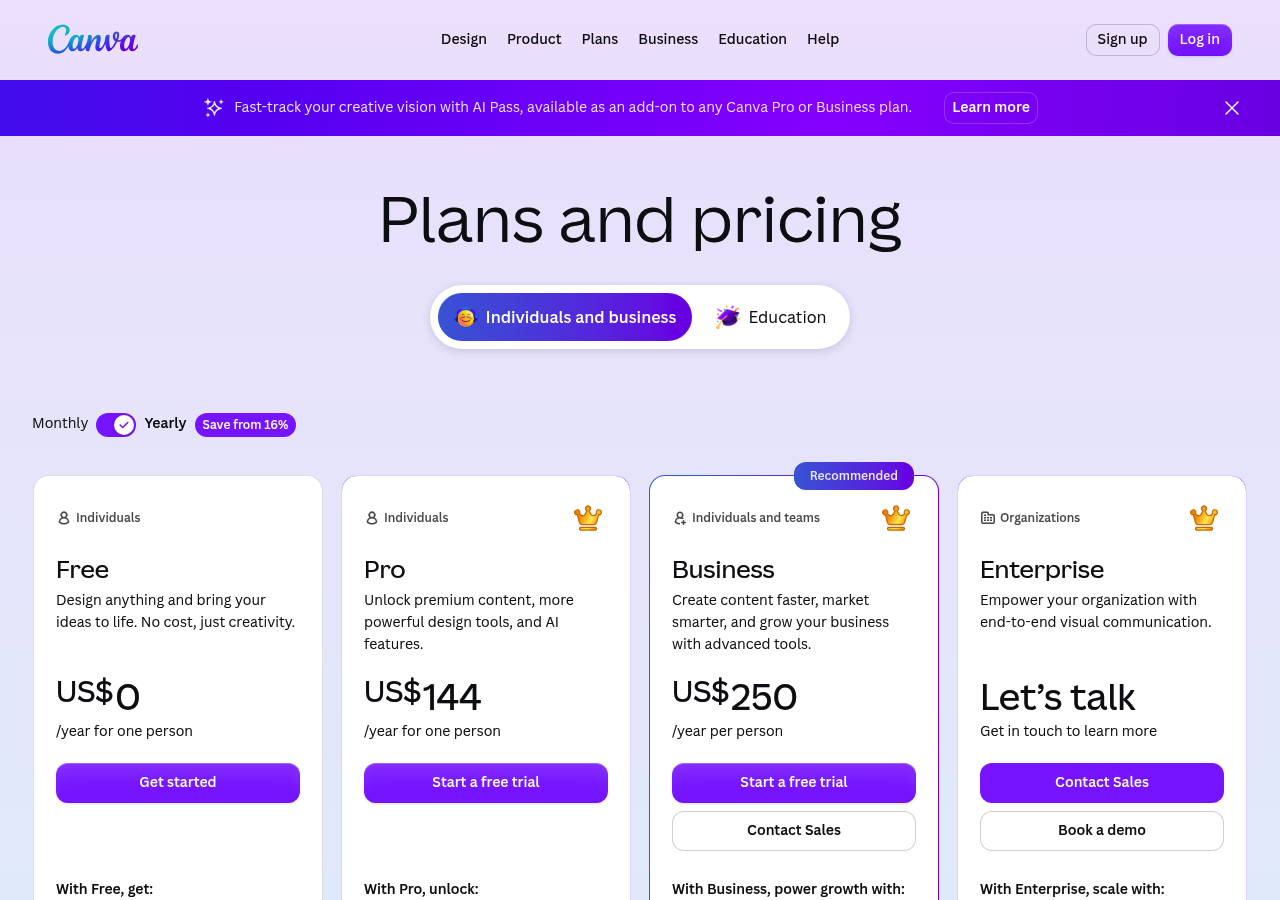
The free tier includes hosting and a Canva subdomain, making it a viable option as an AI website builder free online. However, advanced e-commerce features and custom domains require upgrading to paid plans starting around $10/mo annually.
Best Use Cases for Canva's Website Builder
Portfolios and landing pages shine here. A freelance illustrator can showcase their work without touching code.
If you need complex checkout flows or membership systems, the platform shows its limits. It excels at visual storytelling, not technical depth.
WebWave AI, the Hidden Gem for European Businesses
WebWave positions itself as Europe's answer to American AI website builders, with a bold claim: complete site generation in three minutes. The platform combines speed with strict GDPR compliance, hosting data exclusively on European servers, which is a significant advantage for businesses navigating privacy regulations.
Unlike many competitors that treat AI as a one-time setup tool, WebWave embeds an ongoing AI assistant that refines content and suggests SEO improvements as your site evolves.

Photo by Masood Aslami on Unsplash
3-Minute AI Website Generation Process
The platform's AI questionnaire captures your business model, target audience, and aesthetic preferences before generating a fully structured site. Built-in marketing tools, email campaigns, analytics dashboards, and contact forms launch simultaneously.
However, the free tier restricts you to 1GB of bandwidth and basic templates. Paid plans start at roughly $8 monthly (converted from euros), unlocking unlimited bandwidth and advanced customization.
For businesses requiring full design control, solutions like Kleap offer more flexibility from the start.
Kleap tip: If GDPR compliance is non-negotiable, verify server locations in your builder's terms; some "European" platforms still route data through US infrastructure.
Figma AI: Best for Designer-Developer Collaboration
Figma isn't technically an AI website builder free online in the traditional sense. It's something different.
A design platform that teams use to craft interfaces before development begins. The AI features here focus on streamlining collaborative workflows rather than generating complete sites.
Auto-layout suggestions predict spacing patterns, while smart components adapt based on content changes. This is perfect for agencies managing multiple client projects simultaneously.
AI-Powered Prototyping and Design Systems
The platform excels at maintaining consistency across large design systems. AI detects when designers deviate from established patterns and offers corrections.
Real-time collaboration means developers can inspect specifications while designers work, eliminating lengthy handoff delays. The free tier supports up to three projects, which is sufficient for freelancers testing client concepts.
Deployment requires separate development work, though export features generate clean code snippets that speed up implementation.
Who Should Consider Figma for Websites
Enterprise teams benefit most from Figma's capabilities. Organizations with dedicated design and engineering departments find value in the seamless transition from mockup to production.
Marketing agencies handling ongoing client relationships appreciate version control features that track design evolution. However, solo entrepreneurs seeking immediate deployment should explore alternatives like Figma's official resources to understand workflow requirements before committing.
AI Logos That Build Your Brand Identity at Design.com
Design.com takes a different route than typical AI website builder free online platforms. Instead of starting with page layouts, you begin by generating a logo through their AI system.
Answer a few branding questions, and the algorithm produces dozens of logo variations with coordinated color palettes and font pairings. This approach works exceptionally well for brand-new businesses that lack visual identity assets.
You get a cohesive brand kit from day one, which then extends into website elements.

Photo by Zendure Power Station on Unsplash
From Logo to Full Website with AI
Once your logo exists, Design.com's website builder incorporates those brand colors and typography automatically. The AI suggests layouts that match your logo's aesthetic.
It's simple. However, the free version severely limits logo downloads and website functionality.
You can preview designs endlessly, but exporting high-resolution files or publishing a site requires upgrading to paid plans starting around $50 monthly. For startups building everything from scratch, this integrated approach justifies the cost.
Just don't expect meaningful free access beyond initial exploration.
Pricing Reality Behind the Free Promise
The 'free' label is somewhat misleading. You generate logos without payment, but watermarked previews don't help launch a business.
Premium plans unlock full-resolution files, social media kits, and website publishing. Most users inevitably upgrade within days.
Framer AI: Code-Quality Output Without Coding
Framer AI distinguishes itself by generating actual React code beneath the surface. You describe your vision in plain language, and the system translates that into functional, animated components.
This differs from many AI website builder free online tools that lock you into proprietary systems. The output remains editable by developers if you later need custom adjustments.
That flexibility matters for teams with evolving technical needs.
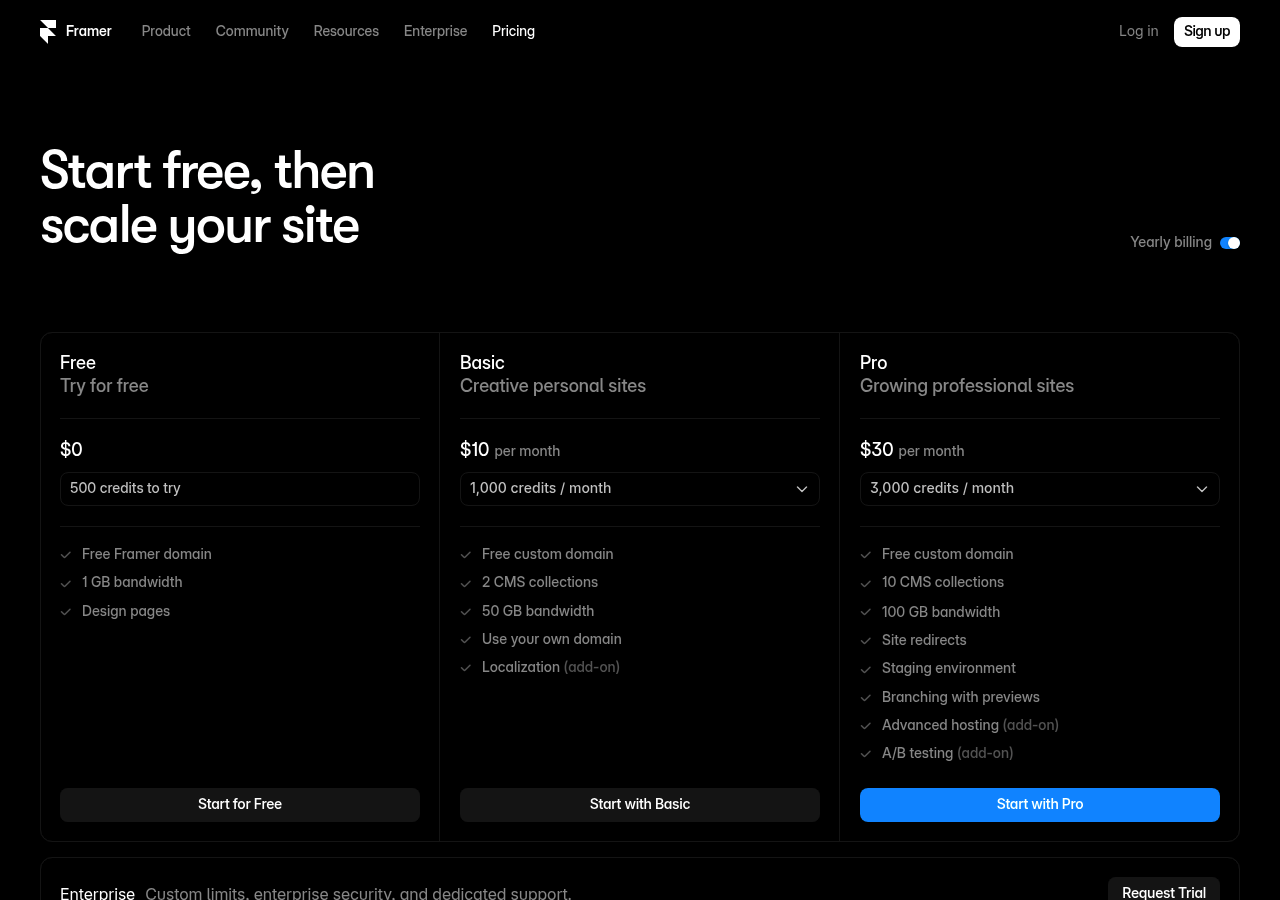
Photo by Antonio Cerbino on Unsplash
Professional-Grade Animations and Interactions
The platform excels at motion design elements that typically require JavaScript expertise. Scroll-triggered effects, hover states, and complex transitions emerge from simple prompts.
Framer's CMS handles dynamic content like blogs or portfolios without coding. Our experience shows it outperforms simpler builders when clients demand polished, interactive experiences.
Free Plan Features vs. Kleap's Offering
Framer's free tier restricts users to two published sites, which limits experimentation for agencies managing multiple clients. Kleap provides broader access without such constraints, allowing you to test concepts across various projects.
Framer's steeper learning curve also demands more time investment compared to Kleap's streamlined workflow.
WordPress Meets Artificial Intelligence with 10Web AI Builder
10Web targets a specific niche: WordPress users seeking AI acceleration without abandoning their familiar ecosystem. Unlike standalone builders, this platform transforms existing WordPress sites into AI-optimized versions while maintaining core functionality.
The hook? You upload screenshots of your current site, and the AI recreates it with modern code and performance enhancements.
However, the approach comes with strings attached, specifically a managed hosting requirement that bundles infrastructure with the builder itself.
Photo by Standsome Worklifestyle on Unsplash
Converting WordPress Sites with AI
The standout feature involves site migration. Upload images of your existing pages, and 10Web's AI analyzes layouts, content hierarchy, and design patterns to generate WordPress-compatible code.
This appeals to businesses with legacy sites needing modernization without starting from scratch. However, free access is limited, and you'll hit hosting costs quickly.
Managed Hosting and AI Assistant Combo
10Web bundles managed WordPress hosting with its AI tools, creating an all-in-one package. The AI assistant handles technical tasks like plugin updates and security patches.
For WordPress loyalists, this integration streamlines workflows. Yet those seeking a truly free AI website builder experience will find the hosting requirement restrictive compared to platforms offering standalone builders.
Side-by-Side Comparison: Which AI Builder Wins for Your Needs
Choosing the right AI website builder depends on what you actually need. Free tiers vary wildly; some tools offer unlimited pages but impose heavy branding on your site, while others limit you to one page but allow custom domains.
The real differentiator? AI credit allocation.
Most platforms ration AI generation tokens aggressively on free plans (think 10 or 50 credits monthly), forcing upgrades for anything beyond basic text tweaks.

Photo by Declan Sun on Unsplash
Feature Comparison Matrix
Our team tested all eight builders across five critical dimensions. E-commerce capabilities separate casual tools from revenue-focused platforms, Durable and 10Web charge transaction fees (3, 6% on lower tiers), whereas Kleap integrates Stripe directly with zero markup.
Branding removal typically costs $17/mo, $17/month, but some providers like Wix AI bundle it into mid-tier plans. Storage limits matter less than AI credits for iterative design work.
Builder | Free AI Credits | Pages | E-commerce Fees | Branding Removal |
|---|---|---|---|---|
Wix AI | 25/month | Unlimited | 3%+ transaction | $16/month |
Durable | 30 builds | 3 max | 4, 6% | $12/month |
Kleap | 50/month | 5 | 0% (Stripe direct) | $19/month |
10Web | 20/month | Unlimited | 2, 3% | $10/month |
Hostinger AI | 15/month | 10 | N/A | Bundled $2.99 |
Free Plan Limitations Compared
Subdomain restrictions plague most free options. Only Kleap and Framer allow custom domain mapping without upgrading (though DNS setup requires technical comfort).
Storage caps range from 500MB to 10GB, but watch API limits more closely, Zapier integrations and form submissions often hit paywalls. According to Kleap's official documentation, pro tiers unlock 7,500, 15,000 AI credits monthly, enough for weekly content refreshes.
Priority support becomes essential when launching time-sensitive campaigns.
What Real Users Say About These AI Website Builders
User reviews reveal consistent patterns. Most praise the speed of AI-powered platforms, with creators launching sites in under an hour instead of weeks.
Kleap stands out with over 2.5 million happy users and 113,000+ builders actively publishing projects. Common complaints?
Limited template flexibility on budget tiers and occasional AI misinterpretations of brand voice. Support responsiveness varies wildly, some platforms answer within minutes, others take days.
Success Stories and Common Complaints
Freelancers love the rapid deployment for client projects. One frequent pain point: exporting limitations that lock users into specific ecosystems.
Learning curves differ significantly, beginners master basic builders in 30 minutes, while advanced customization tools require 3-4 hours of exploration.
User Satisfaction Ratings Across Platforms
Ratings cluster around 4.2-4.6 stars across major review sites. Enterprise teams report mixed experiences with white-label features.
Real-world timelines show most users publish functional sites within 2-5 hours of starting, though e-commerce integration adds complexity. Check G2's verified reviews for detailed breakdowns by use case.
Your Questions About Free AI Website Builders Answered
Yes, you can build a genuinely professional site for free. Most platforms offering ai website builder free online options provide complete design tools, hosting, and basic features without charging a cent.
The catch? Free plans typically limit you to a subdomain (yoursite.platform.com), display provider branding, and cap storage around 500MB to 1GB.
Custom domains usually require paid upgrades starting at $10 to $15 monthly.
Ownership varies by provider. Some platforms grant you full code export rights, while others keep generated assets proprietary.
Review terms carefully before investing hours. Generation speed surprises most users; expect a functional site in 3 to 7 minutes after answering initial prompts.
Switching providers later is possible but rarely seamless. Most tools don't offer standardized export formats, meaning you'll likely need to rebuild from scratch.
According to industry standards, migrating between different website builders often requires manual content transfer rather than automated processes.
Start Building Your AI-Powered Website Today
You've seen what these tools can do. Now it's your turn.
The longer you wait, the more potential customers slip through your fingers. Every day without a professional website is money left on the table.
Our Top 3 Picks by Use Case
Choose based on your priority. Need maximum features without spending a dime?
Kleap delivers the most generous free tier we've reviewed; no credit card tricks, just real functionality. Already comfortable with WordPress? 10Web integrates seamlessly with your existing setup.
If you're a designer who lives in Canva or Figma, those platforms let you export directly to live sites.
Next Steps to Launch Your Site
Here's what to do right now: Sign up for Kleap's free plan. You'll have a working site in under an hour.
Add your core pages: home, services, and contact. Connect your domain later if needed.
The AI website builder's free online approach means you're testing real features, not limitations. Start today, refine tomorrow, and launch this week.
FAQ - Frequently Asked Questions
Can you really build a professional website for free with AI in 2026?
Yes, but with clear boundaries. The AI generates pages instantly, handles design choices, and creates content from your prompts.
That part works remarkably well.
The catch comes with hosting limits, branding requirements, and feature restrictions. Most free plans cap you at 3 to 5 pages, force platform branding on your site, and restrict custom domains.
For a portfolio or test project, these limitations rarely matter. For client-facing business sites, they become deal-breakers fast.
What are the biggest limitations of free AI website builder plans?
Storage hits first. Expect caps between 500MB and 2GB, which sounds generous until you add image galleries or video content.
Most free plans block custom domains entirely, leaving you stuck with generic URLs that undermine credibility.
SEO tools get locked behind paywalls too. You cannot edit meta descriptions, customize URLs, or access analytics dashboards without upgrading.
E-commerce features stay completely off-limits on free tiers, meaning no payment processing or inventory management. The AI still builds your site structure beautifully, but growth options vanish quickly.
Do I own the website code generated by AI builders?
Ownership depends entirely on the platform's terms. Some builders grant you full rights to exported code, while others keep it locked within their ecosystem.
Check two things before committing: export options and licensing terms. Platforms like Framer allow code export with commercial rights.
Others treat the generated code as proprietary, preventing you from moving it elsewhere. Read the terms carefully, especially if you plan to sell the site or migrate later.
Proprietary platforms work fine for long-term users, but they trap your content if you ever need to leave.
How long does it actually take to build a website with AI?
Initial generation takes under five minutes. You answer prompts about your business, pick a style, and the AI delivers a complete draft with text, images, and navigation.
Customization adds the real time. Refining copy, swapping placeholder images, adjusting layouts, and tweaking colors easily consumes two to four hours for a polished result.
Complex sites with custom integrations or advanced features stretch into days of work. The AI handles the grunt work instantly, but making the site truly yours still requires manual effort.
Think of it as cutting project time by 70%, not eliminating work entirely.
Can I switch from one AI website builder to another later?
Switching proves painful without export features. If your current platform locks the code, you essentially rebuild from scratch on the new tool.
Content transfers easily through copy-paste, but design work gets lost completely.
Before launching, verify export capabilities. HTML/CSS export gives you an escape route, letting you move the entire site to another platform or custom hosting.
Proprietary systems force you to stay or restart. I have seen businesses abandon six months of customization because they picked a closed platform initially.
Choose carefully upfront to avoid that trap.
Conclusion: Start Building with the Best AI Website Builder Free Online Today
We've explored eight powerful AI website builder free online tools that can launch your digital presence in 2026. Each platform offers unique strengths depending on your needs.
For most users, Kleap delivers the winning combination of speed, AI intelligence, and professional results without coding. If you prioritize e-commerce functionality, Wix provides robust selling features.
Need maximum design flexibility? Framer gives you granular control.
The smartest move? Stop overthinking and start building.
Pick the tool that matches your primary goal, test the free tier, and launch your first page within an hour.
Ready to create your website in minutes? The Kleap platform makes it simple to transform your ideas into a live site using AI.
Visit Kleap today and watch your vision come to life faster than you thought possible.


