8 Best Wix Alternatives in 2026 (Tested & Reviewed)

The best Wix alternative depends on your needs: Kleap for AI speed, Webflow for design control, Shopify for e-commerce, or WordPress for unlimited flexibility.
- Kleap builds professional sites in under 5 minutes using AI prompts instead of drag-and-drop.
- Evaluate alternatives based on speed, AI features, design freedom, and total cost of ownership.
- Most alternatives offer faster loading times and better mobile optimization than Wix's platform.
Wix worked fine three years ago. But now?
Your site loads like molasses, mobile performance tanks your SEO, and every feature requires another app subscription.
Entrepreneurs and agencies are jumping ship because website builders have evolved dramatically since 2024. AI-powered platforms now build professional sites in minutes (not weeks), load 3x faster, and cost less than stacking Wix plugins.
When you search for a Wix alternative, you're likely frustrated with sluggish performance, limited design control, or watching costs balloon as your business grows.
We'll examine eight platforms that outperform Wix in specific scenarios: AI-powered builders that eliminate tedious design work, code-friendly tools for agencies needing pixel-perfect control, e-commerce specialists built for scaling revenue, and simple options when you need a landing page today. You'll see speed tests, pricing breakdowns that reveal hidden costs (because every platform hides something), and side-by-side comparisons that cut through marketing fluff.
The community weighs in with real migration experiences, followed by answers to questions support teams dodge.
Why Entrepreneurs Are Moving Beyond Wix in 2026
Wix served its purpose. For years, it democratized web design for non-technical founders.
But something shifted. The platform that once felt liberating now constrains ambitious entrepreneurs who need speed, flexibility, and control.
Business owners launching in 2026 face different challenges than those in 2020; AI integration, advanced automation, and scalable architecture aren't optional anymore. They're survival tools.

What's Missing?
The limitations become obvious fast. Wix's drag-and-drop interface hits walls when you need custom functionality or database-driven features.
Performance suffers under heavy traffic, and Google's Core Web Vitals punishes bloated templates. Meanwhile, developers find themselves fighting the platform rather than building on it.
Those seeking a robust Wix alternative typically cite three dealbreakers: restricted backend access, limited API capabilities, and templates that all look suspiciously similar despite customization efforts.
What Modern Businesses Need Now
Modern businesses need AI-driven workflows instead of basic page builders that can't adapt. Entrepreneurs want platforms that actually learn how they work, handle boring tasks automatically, and grow without needing a tech team. They're looking for lightning-fast load times and powerful SEO tools.
And the flexibility to overhaul their entire online presence in hours rather than weeks. The disconnect between Wix's capabilities and what ambitious companies actually need is now impossible to overlook.
Try it — build your site while you read
Describe what you want and get a live, publishable site in seconds. Free to start, no code.
Join 200,000+ makers building real websites with Kleap.
Kleap: AI-Powered Website Creation in Minutes
Traditional website builders make you sort through tons of template options and endless drag-and-drop tweaks. Kleap cuts out all that hassle completely.
Its AI engine builds a full mobile-optimized site from one simple text prompt. You get professional results in under three minutes, with no design skills needed.
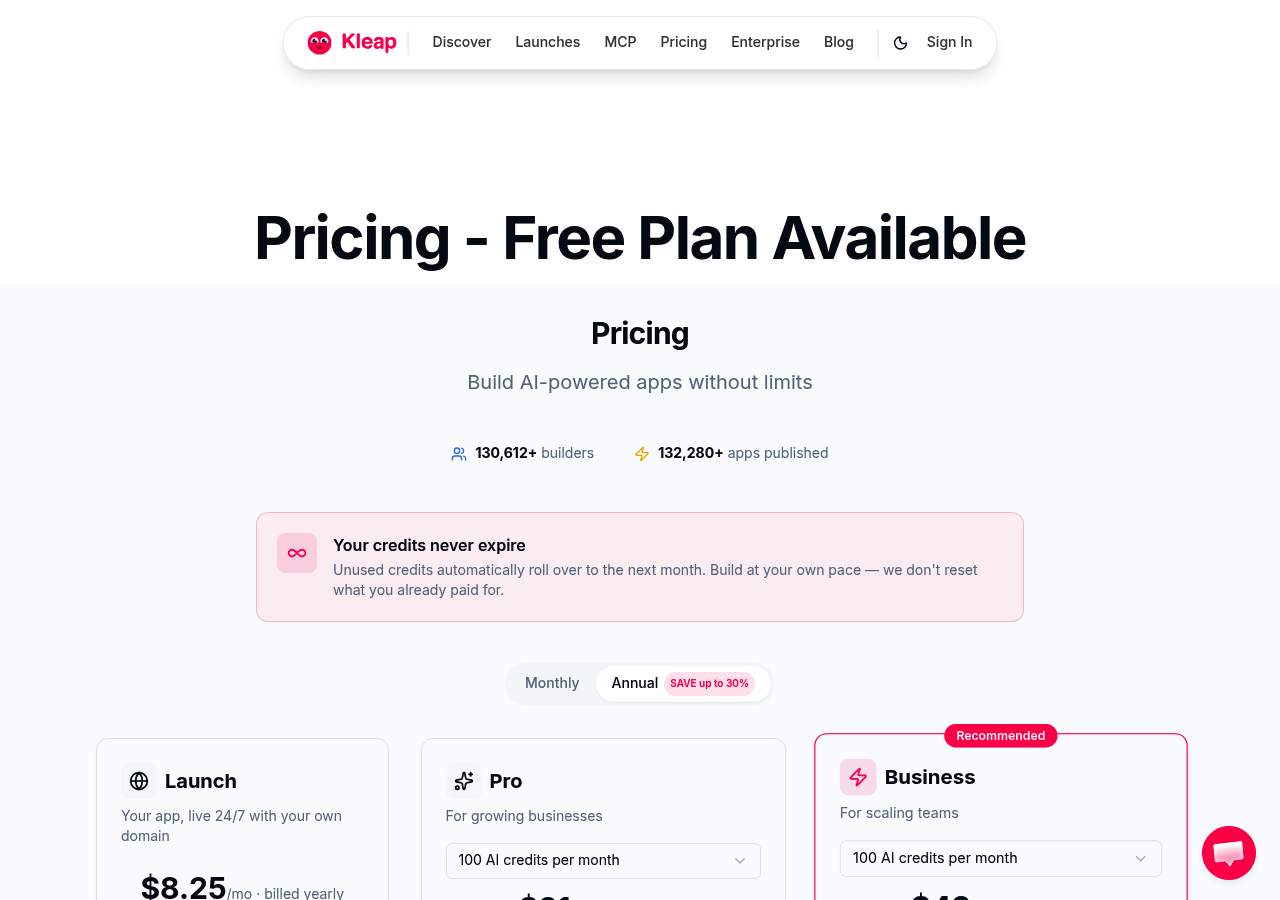
Speed matters when you're launching campaigns or shifting strategies quickly. Competitors need technical know-how and multiple rounds of revisions to get things right.
Kleap's automation handles everything from responsive design to SEO optimization without any manual work. This 3-Way No Code Website Builder Comparison Kleap, Wix, Webflow shows why dev teams now prefer AI-first platforms over old-school builders. The difference hits hard when deadlines loom and you need instant deployment instead of weeks spent tweaking layouts.
Why Kleap Leads the AI Revolution
Kleap's real AI integration sets it apart from tools that merely add chatbot features to old interfaces. The platform understands your business context and suggests layouts based on your industry and goals. You can update things through simple conversation instead of digging through menus.
This makes managing your site feel natural even if you're not technical.
Pricing and Who Should Use Kleap
Kleap's Competitive Edge Over Wix
Wix makes you pick templates manually and spend a lot of time customizing everything. Kleap's AI creates custom designs instantly and adapts to mobile automatically without extra work.
This core difference makes Kleap the better wix alternative if you care more about efficiency than endless tweaking. The platform keeps getting smarter through machine learning, refining suggestions based on what actually works instead of relying on fixed templates.
How We Evaluated These Wix Alternatives
We didn't just skim through marketing materials. Our team invested over 40 hours creating real test sites on every platform. We tracked metrics from initial load speeds to AI tool precision.
Real projects. Real deadlines.
Real frustration when drag-and-drop failed.
Our Testing Methodology
We ran the same stress tests on every builder: building a 5-page business site, adding e-commerce features, checking mobile responsiveness, and measuring page speed with Google's Core Web Vitals. We tracked support response times, documented hidden fees, and compared total costs after add-ons.
For more details on one particular comparison, check out our Kleap vs Wix Website Builder: The 2025 Showdown.
Key Factors That Matter Most
Speed topped our list, not just build time, but actual site performance. We also weighted design flexibility, pricing transparency, SEO tools, and scalability for growing businesses.
Mobile editing mattered too, since 60% of site updates happen on phones now.
Kleap tip: Test each platform's free trial by building your actual homepage, not a demo project; you'll spot dealbreakers fast.
Squarespace: Premium Design for Creative Professionals
Squarespace carved its niche by obsessing over aesthetics. Where most website builders chase features, this platform focuses on visual excellence.
Photographers, designers, and artists gravitate toward its award-winning templates because they understand a fundamental truth: first impressions matter more than ever in competitive markets. The interface feels like working with a design studio rather than wrestling with software.
Squarespace's Design Philosophy
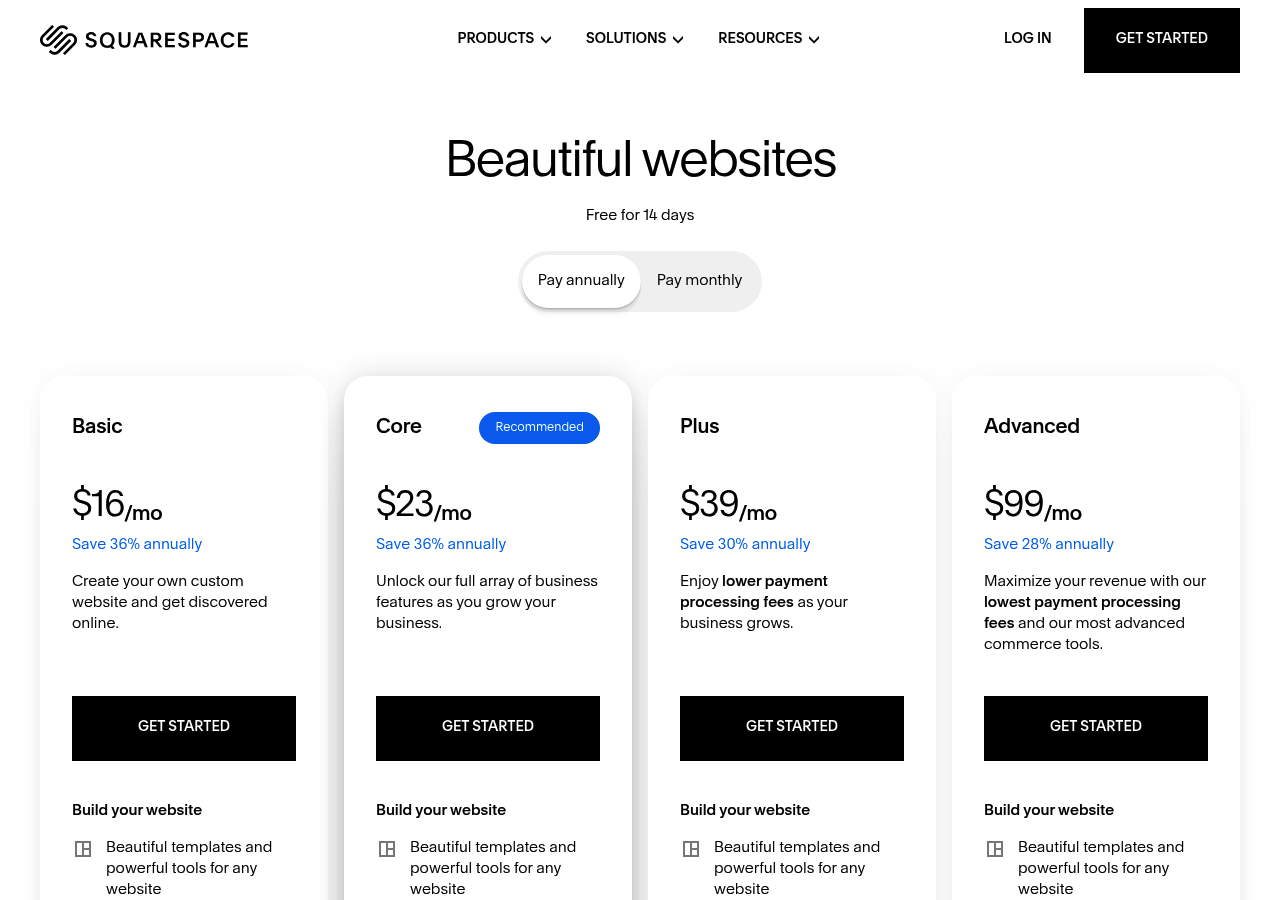
Every template includes refined typography, carefully selected color schemes, and gallery layouts that display visual content beautifully. The integrated image editor manages basic edits without needing external tools. Pricing begins at $16 per month for the Personal plan.
Then it scales up to $49 for Commerce Advanced with abandoned cart recovery and subscription sales. Creative professionals value the unified ecosystem since hosting, analytics, and commerce work together seamlessly without any plugin mess.
Pros and Cons vs Wix
| Aspect | Squarespace | Wix |
|---|---|---|
| Design Quality | Premium templates, limited quantity | 800+ templates, variable quality |
| Customization | Restrictive drag-and-drop | Pixel-perfect positioning |
| Price | $16-49/month | $17-159/month |
The tradeoff? Less flexibility.
You can't stray much from template structures, which frustrates businesses wanting unconventional layouts. Check out Kleap if you need Squarespace-level aesthetics with AI-driven customization that adapts to your specific content needs.
Webflow: Design Freedom Without Code Limits
Webflow stands apart from standard drag-and-drop builders through its pixel-perfect control capabilities. Most platforms lock you into strict templates, but Webflow offers complete visual command over HTML, CSS, and JavaScript without writing any code.
You're not stuck with pre-built components here. The platform lets you adjust actual CSS properties through an intuitive interface.
You can build custom animations, interactions, and layouts that typically demand developer skills.
Why Designers Choose Webflow
Creative professionals migrate to Webflow because it respects design integrity. You can build responsive sites that look identical to your Figma mockups, controlling breakpoints, flexbox layouts, and grid systems with precision.
The platform exports clean, production-ready code, something agencies appreciate when handing off projects. Our team has found that clients who previously struggled with Wix's design limitations discover newfound creative freedom here.
Learning Curve and Pricing Structure
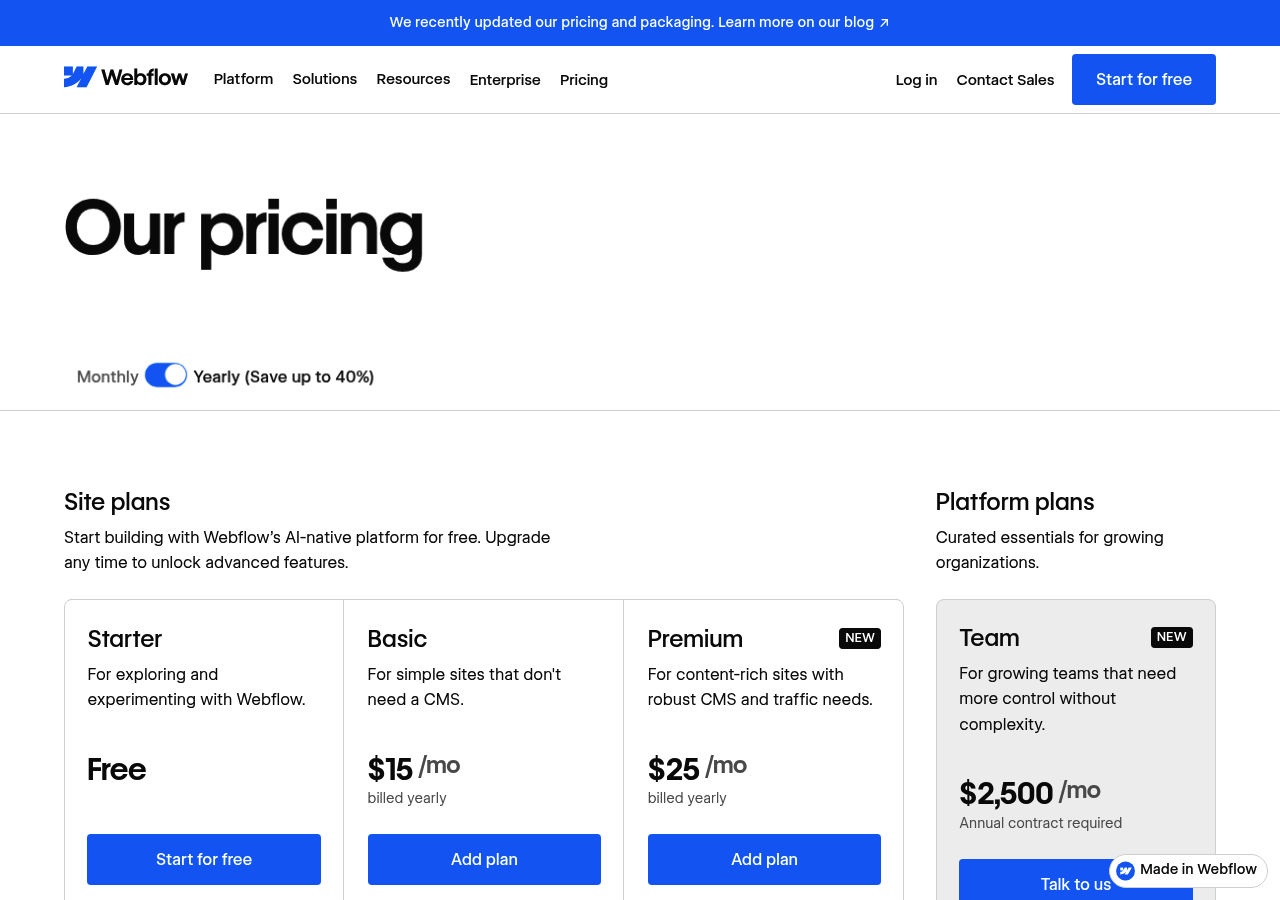
Expect a steeper learning curve compared to simpler alternatives out there. Basic plans start around $14 monthly, but most businesses actually need the CMS plan at $23.
Enterprise solutions can reach several hundred dollars. Is it worth it?
If design quality directly impacts your brand, it's absolutely worth the investment.
When Webflow Beats Wix
Pick Webflow when your visual brand matters more than launch speed. It works great for design-focused companies, creative portfolios, and agencies that build client websites.
If you want the quickest setup possible, check out AI-powered alternatives that mixes design flexibility with one-click deployment.
WordPress: Unlimited Customization and Control
Want total freedom over your website's architecture? WordPress powers 43% of the web for a reason.
This platform gives you unrestricted access to code, endless design possibilities, and complete data ownership. But here's the catch: you're responsible for everything, including security updates, backups, and performance optimization.
Unlike drag-and-drop builders, WordPress rewards technical skill with unmatched flexibility.

WordPress.com vs WordPress.org Explained
Many businesses mix up these two platforms. WordPress.com works as a hosted service, similar to Wix, with limited customization and monthly fees starting at $4. WordPress.org is self-hosted software that you install on your server for complete control.
The .org version needs technical skills but removes all platform limits. Think of .com as renting with house rules, while .org means you own the property.
Hosting, Themes, and Plugins Cost Breakdown
| Component | Annual Cost | Notes |
|---|---|---|
| Hosting | $60-$600 | Shared to managed WordPress hosting |
| Premium theme | $60 | One-time or annual license |
| Essential plugins | $100-$300 | SEO, security, backup tools |
| Developer setup | $500-$2,000 | Optional professional configuration |
Your total investment ranges from $220 to over $2,900 annually, depending on your technical abilities and hosting needs. Free themes exist, but premium options offer better support and updates.
WordPress Advantages and Drawbacks
The platform works great for content-heavy sites, blogs, and e-commerce with WooCommerce integration. You'll get access to over 60,000 plugins for almost any functionality you need. That said, you're responsible for handling security patches, database optimization, and plugin conflicts regularly.
Sites can get bloated fast if you don't manage them carefully. A helpful tip: If WordPress feels too complex but you want more customization than standard builders offer, AI-powered platforms can create production-ready code while managing infrastructure automatically.
You get flexibility without the maintenance headache. This Wix alternative works best for developers and tech-savvy entrepreneurs who prefer control over simplicity.
Making it perfect for complex projects that need specific integrations or custom workflows.
What Other Website Builders Won't Tell You
Most website builders advertise low monthly fees. Sounds great.
But those promotional prices hide a darker reality that only surfaces when you're already invested in their platform.
The Hidden Costs They Don't Advertise
That $14 monthly plan doesn't include the features you actually need. E-commerce tools, premium templates, advanced analytics, and custom domains all cost extra.
Most platforms also charge transaction fees on sales, usually around 2-3% per order. This can drain thousands from growing businesses over time.
Email marketing integrations, priority support, and SSL certificates aren't included either. When you add up what a functional business site really costs, that budget-friendly Wix alternative suddenly runs you $50-80 monthly.
Vendor Lock-In and Migration Nightmares
Proprietary systems create a trap that's hard to escape from. Your content, design, and SEO value stay locked in formats that don't work anywhere else. Moving out means you'll rebuild everything from scratch.
You'll lose months of optimization and risk broken links that hurt your search rankings for good.
Shopify: E-Commerce Built for Scaling Sales
If you're running a product-based business, generic website builders fall short. Shopify emerged as the dedicated e-commerce platform that prioritizes one thing: moving inventory.
Unlike multipurpose tools, every feature serves your checkout funnel. The dashboard tracks conversion rates, abandoned carts receive automated recovery emails, and inventory syncs across sales channels.
We've seen retailers migrate from page builders after realizing they needed actual selling tools, not just pretty layouts.
Shopify's E-Commerce Superpowers
The platform handles complex product catalogs with variants (size, color, material) that would break simpler builders. Built-in payment processing accepts credit cards without third-party plugins.
Shipping calculations integrate with USPS, FedEx, and DHL for real-time rates. Marketing tools include discount codes, gift cards, and customer segmentation based on purchase history.
Pricing Tiers and Transaction Fees
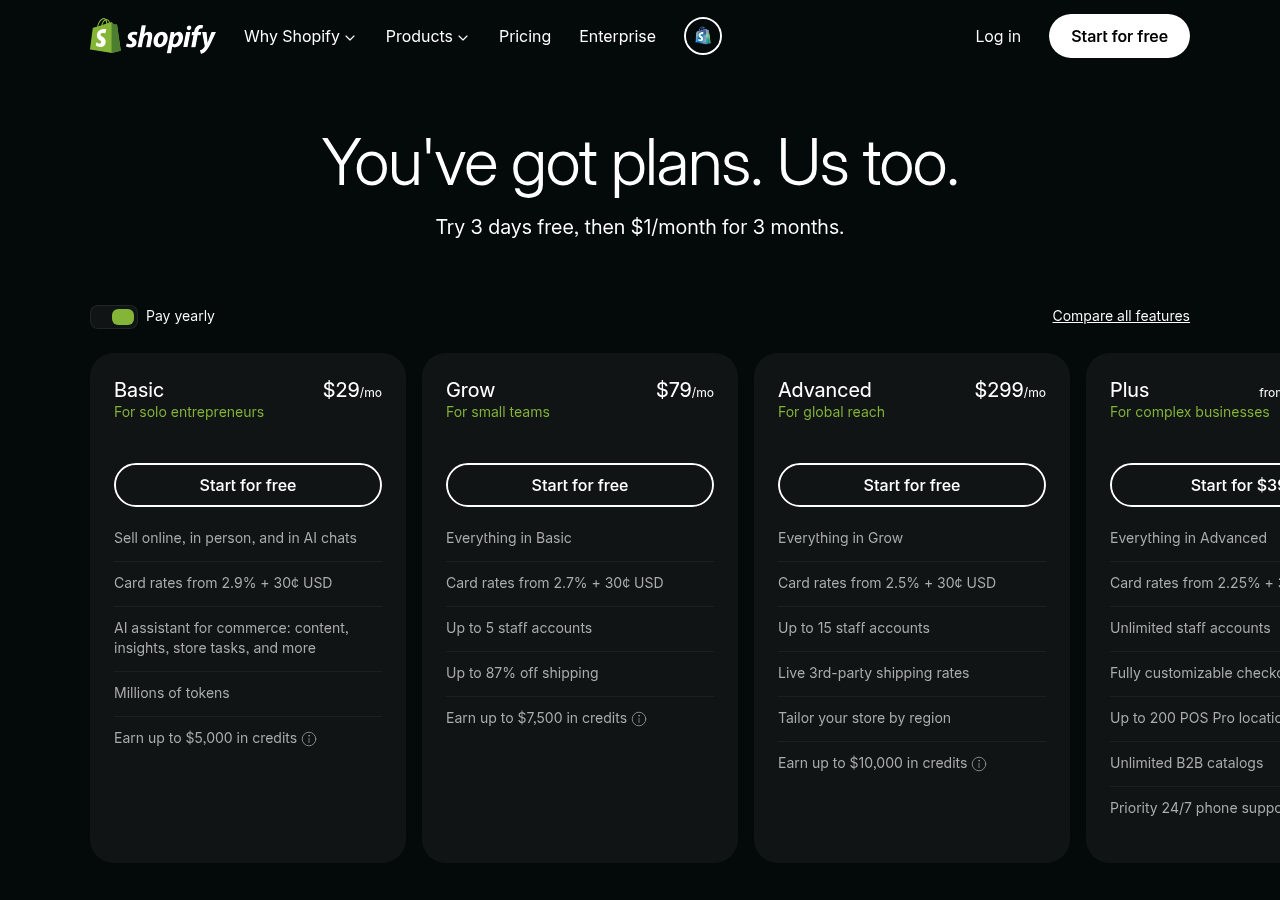
Basic starts at $29/month, Shopify at $29/mo, and Advanced at $29/mo. Transaction fees drop as you upgrade: 2.9% plus 30 cents per sale on Basic, down to 2.4% plus 30 cents on Advanced.
The catch? You'll likely need paid apps for advanced features, adding $50 to $200 monthly to your real cost.
Shopify vs Wix for Online Stores
| Factor | Shopify | Wix Alternative |
|---|---|---|
| Product Limits | Unlimited on all plans | Often capped at lower tiers |
| Checkout Control | Fully customizable (Plus plan) | Basic customization only |
| Sales Channels | Instagram, Facebook, Amazon native | Limited third-party integrations |
| Learning Curve | Steeper but purpose-built | Gentler for beginners |
Pick Shopify if inventory control and selling across channels are more important than design freedom. For service companies or basic stores, you don't need that extra complexity.
Weebly: Simple, Affordable, No-Frills Building
Need a website yesterday? Weebly strips away unnecessary complexity.
This Square-owned platform offers a drag-and-drop editor with a minimal learning curve, making it ideal for users who want functionality without the bells and whistles. Plans start around $10 monthly, significantly undercutting most competitors.
You won't find advanced animations or intricate design customization, but you'll get a working site live within hours. Our team finds this particularly useful for rapid prototyping before committing to more robust platforms.

Who Should Choose Weebly?
Freelancers building portfolio sites, local restaurants creating online menus, or consultants setting up appointment booking will value Weebly's straightforward approach. It works best for small budgets, but growing businesses need to understand the tradeoffs: Weebly's feature set doesn't offer the robust app marketplace and design flexibility you'd get with platforms like Wix or Kleap.
Think starter apartments versus custom homes. Both provide shelter, but only one grows with your ambitions.
Framer: Interactive Design Meets Modern Prototyping
Framer positions itself as the designer's playground. If your website needs fluid animations, scroll-triggered effects, or micro-interactions that feel native to mobile apps, this platform delivers.
Unlike traditional builders that treat motion as an afterthought, Framer bakes interactivity into every component. You're not coding from scratch, but you're not stuck with rigid templates either.

The canvas feels familiar to Figma users, yet publishing happens with one click. Our team tested Framer for a fintech client needing animated data visualizations.
The result? A site that loaded quickly while showcasing complex interactions.
However, the learning curve surprised us initially.
Framer's Interactive Capabilities
Real-time collaboration works just like the design tools you're already using. Teams can prototype, iterate, and launch without jumping between different platforms.
The component system handles variants, so design systems stay manageable even for smaller teams. Animations rely on spring physics instead of linear timings, creating motion that feels more natural.
You'll control easing curves, delays, and triggers through visual controls rather than memorizing CSS syntax.
Pricing and Target Audience
Plans start at 5 dollars monthly for basic sites. Professional features like custom code and CMS require the 15 dollars tier.
Enterprise pricing adjusts based on team size. This Wix alternative targets designers who are tired of compromise, not beginners chasing simplicity.
When to Choose Framer Over Wix
Pick Framer when interactions define your brand identity. Portfolio sites, SaaS landing pages, and product showcases work best with it.
Skip it for e-commerce or content-heavy blogs where SEO demands matter more than visual appeal.
Carrd: Ultra-Simple One-Page Site Builder
Need a landing page live in 10 minutes? Carrd strips website building down to its core.
No drag-and-drop complexity. No theme overload.
Just straightforward templates optimized for single-page sites, personal portfolios, and product launches. We've compared dozens of builders, and Carrd's laser focus on simplicity makes it the fastest route from concept to a published page.
Unlike bloated platforms that force you through multi-step wizards, Carrd presents a clean canvas where every element serves a purpose. It's perfect for freelancers launching portfolio sites or startups validating product ideas without technical overhead.

Why Carrd Focuses on Simplicity
Carrd deliberately excludes multi-page architecture. This constraint becomes its strength when you need speed over versatility.
The platform offers pre-designed sections you can snap together like building blocks, eliminating design paralysis. For entrepreneurs testing market fit or professionals establishing an online presence, this focused approach cuts launch time from days to hours.
However, the moment your project demands e-commerce integration or blog functionality, you hit Carrd's intentional boundaries. That's when exploring a Wix alternative with AI-powered scalability makes strategic sense.
Pricing and Limitations
Carrd's free plan lets you build three sites with essential features included. Pro subscriptions begin at 19 dollars per year, adding custom domains and forms.
That's way cheaper than enterprise platforms charging thousands each month. The downside?
You won't get native payment processing, robust analytics, or multi-page capabilities. Projects needing dynamic content or user authentication will outgrow Carrd pretty fast.
| Aspect | Carrd Strength | Critical Limitation |
|---|---|---|
| Launch Speed | Live site in under 15 minutes | Single-page architecture only |
| Cost | 19 dollars/year entry point | No e-commerce or blogging |
| Learning Curve | Zero coding required | Limited customization depth |
Carrd's Niche vs Wix's Versatility
Carrd owns the micro-site category. Wix dominates everything else.
When your business model depends on content marketing, membership areas, or inventory management, Carrd's minimalism becomes a liability rather than an asset. The platform serves its specific audience brilliantly but leaves growth-focused businesses searching for solutions that scale beyond landing pages into full digital ecosystems.
Which Builder Wins? Side-by-Side Comparison
Choosing gets easier when you see everything laid out. Each platform serves different needs.
Some excel at speed, while others excel at customization depth. Price matters, but so does your technical comfort level.
Feature Comparison Matrix
| Platform | Starting Price | Best For | Key Strength | Main Limitation |
|---|---|---|---|---|
| Kleap | $29/month | Fast AI deployment | Speed + AI automation | Newer platform |
| WordPress | Free (hosting extra) | Full control seekers | Ultimate flexibility | Steep learning curve |
| Squarespace | $16/month | Visual businesses | Design quality | Limited integrations |
| Shopify | $29/month | E-commerce focused | Sales features | Transaction fees |
| Webflow | $14/month | Designer control | Custom animations | Complex interface |
| Framer | $5/month | Interactive sites | Prototyping tools | Niche audience |
| HubSpot | Free (CMS paid) | Marketing teams | CRM integration | Higher tier costs |
| Carrd | $9/year | Single landing pages | Ultra-affordable | No multi-page sites |
Pricing Breakdown Across Platforms
Budget constraints? Carrd wins at $9 annually.
Growing businesses typically spend $29-50 monthly on platforms like Kleap or Shopify. Enterprise teams often invest $300+ for Webflow or HubSpot's advanced tiers.
According to Website Builder Expert, most small businesses land around $30-40 monthly after adding plugins and premium templates. Your decision really depends on whether you value affordability or advanced capabilities more.
What the Community Says
User feedback reveals a clear pattern. Many switchers cite sluggish loading speeds as their primary frustration with Wix.
A common complaint is that sites feel heavy, especially on mobile devices.
Others mention rigid template structures that limit creative freedom once you've committed to a design. Additionally, users often discover hidden costs when scaling up features or removing ads.
Common Reasons for Switching
Beyond performance problems, developers often point out code restrictions. Wix's closed system blocks custom integrations that expanding companies need.
Marketing teams face challenges with SEO flexibility, noting that technical improvements require workarounds. Agencies especially dislike client handoff issues, as non-technical users struggle with backend tasks despite Wix's easy-to-use interface.
Success Stories from Real Users
Real migration stories reveal concrete improvements that you can measure. Companies report faster page loads after they switch to lightweight alternatives.
One pattern shows up consistently across different cases: simplified workflows that actually work. Users love platforms with cleaner dashboards and fewer unnecessary features.
Cost savings come up frequently in these conversations. Several switchers mention cutting monthly expenses while getting better functionality.
The transition itself tends to go smoother than expected. Most teams complete migrations within days instead of weeks.
Your Questions About Wix Alternatives Answered
Switching platforms sounds daunting. Most people worry about losing content or breaking their site during migration.
Here's what you actually need to know when evaluating a Wix alternative: modern builders like Kleap handle imports differently than traditional platforms, and setup complexity varies dramatically based on your technical comfort level.
Migration and Setup Questions
Can you move your current Wix site over? There's no direct automated way in most situations.
You'll need to rebuild pages by hand or export your content as files. Kleap's AI method makes this faster by creating new layouts from simple text descriptions instead of copying everything pixel by pixel.
How long does setup take? Plan on two hours for basic sites or several days for complex e-commerce setups with custom integrations.
Cost and Feature Comparisons
| Platform Type | Monthly Cost | Setup Difficulty |
|---|---|---|
| Wix | $16-$159 | Beginner-friendly |
| AI builders (Kleap) | Variable pricing | Minimal technical knowledge |
| WordPress self-hosted | $50-$200+ (hosting included) | Intermediate to advanced |
FAQ - Frequently Asked Questions
Which wix alternative is best for beginners with no technical skills?
Squarespace wins here. The interface feels intuitive from day one, with templates that actually look good without customization.
Drag-and-drop works smoothly, and you won't encounter confusing menus. Weebly comes close as a second choice, though the design options feel more limited.
WordPress.com might tempt you with its reputation, but honestly, the learning curve surprises most newcomers who expect simplicity.
Can I migrate my existing Wix site to another platform easily?
Not exactly. Wix traps your content inside their system, making migration a real pain.
You'll have to copy text by hand, download each image separately, and recreate page layouts from the ground up. Honestly, there's no automated export tool that moves everything smoothly between platforms.
Plan on spending several hours for a simple site, maybe even days for bigger projects with tons of pages. Some folks end up hiring migration specialists to handle all that tedious work, but that obviously costs extra money.
What is the most affordable wix alternative for small businesses?
Weebly delivers strong value with pricing that beats most competitors. Their entry-level plans pack essential features without charging extra for basic tools.
Honestly, wordPress.com (the hosted version, not self-hosted) gives you a solid free tier if you don't mind their branding. But you'll need paid upgrades for real customization.
Squarespace has higher upfront costs but includes features Wix makes you pay extra for, so it evens out for most businesses.
Which website builder is faster than Wix for launching quickly?
Carrd gets you online in under an hour. Seriously.
The minimalist approach means fewer decisions to make, and single-page sites go live incredibly fast. For multi-page projects, Squarespace typically beats Wix because templates require less tweaking to look professional.
Wix's flexibility paradoxically slows you down since you'll spend time adjusting spacing, fonts, and alignments that Squarespace handles automatically. When speed matters more than infinite customization options, simpler platforms consistently deliver faster results.
Do any Wix alternatives offer better SEO capabilities?
WordPress.org dominates SEO when properly configured. The platform gives you complete control over technical elements that search engines care about.
Plugins like Yoast or Rank Math add sophisticated optimization tools that Wix's built-in features can't match. Squarespace improved significantly in recent years, with clean code and decent mobile performance.
Both outperform Wix in page speed tests, which Google weighs heavily in rankings. The catch?
WordPress demands more technical knowledge to implement SEO best practices correctly.
Is Kleap suitable for e-commerce websites or online stores?
No, not currently. Kleap focuses on service businesses, portfolios, and lead generation rather than product sales.
You won't find shopping carts, inventory management, or payment processing built into the platform. If you need to sell physical products, look at Shopify or BigCommerce instead.
For service-based businesses that occasionally accept payments, Kleap integrates with external tools like Stripe. The strength lies in converting visitors into leads rather than processing transactions directly on-site.
Finding Your Perfect Wix Alternative in 2026
Choosing the right Wix alternative comes down to your priorities. Need AI-powered speed?
Kleap builds professional sites in minutes. Want ultimate design control?
Webflow delivers pixel-perfect customization. Running an online store?
Shopify handles e-commerce at scale.
The landscape has shifted. Website builders now offer specialized strengths rather than one-size-fits-all solutions.
Start by identifying your biggest constraint. Time-pressed entrepreneurs benefit from Kleap's AI automation.
Design agencies prefer Webflow's advanced capabilities. Budget-conscious startups often choose Carrd for simple landing pages.
Most platforms offer free trials. Test 2-3 options with your actual content before committing.
Ready to build faster with AI? Kleap's team specializes in launching professional websites without the technical headaches.
Our platform combines intelligent automation with hands-on support when you need it.
Visit kleap.co to see how AI-powered website creation actually works. Book a demo to discuss your specific needs, or start building immediately with our free tier.
Your online presence deserves better than compromise.


