Kleap Reviews 2024, our Honest Assessment

Kleap reviews 2024 reveal a mobile-first AI website builder achieving sub-3-second load times with zero coding required for rapid deployment.
Launch professional sites in under 10 minutes using AI-powered block assembly and mobile-optimized templates
Test the free tier first to evaluate AI content generation quality before committing to paid plans
Expect significant time savings compared to traditional builders through automated responsive design and instant publishing
Building a website shouldn't feel like learning a foreign language. Yet most platforms still demand hours of tutorials, design decisions, and technical troubleshooting.
Kleap emerged as an answer for entrepreneurs, freelancers, and marketing teams who need functional sites immediately without sacrificing quality. Small business owners seeking AI-driven efficiency and enterprise teams requiring scalable solutions have adopted this mobile-first approach throughout 2024.
We compared Kleap's speed claims, dissected pricing tiers, and evaluated capabilities against established competitors. You'll see what makes this platform unique in the crowded website builder market: how performance metrics translate to real-world usage, advantages and limitations based on hands-on testing, and transparent cost breakdowns for each subscription level.
The verdict? Some businesses will thrive with Kleap's streamlined approach, while others may hit limitations quickly.
Our verdict
- Speed wins clients.
- Kleap's interface reveals a platform built for speed.
- Speed matters when you're launching a business.
- Every platform has trade-offs.
What Makes Kleap Stand Out in 2024?
Speed wins clients. When entrepreneurs need a professional web presence immediately, traditional builders demand hours of template browsing and endless customization clicks.
Kleap flips that equation entirely; its conversational AI generates a fully functional website in under 10 minutes, a timeframe that leaves competitors scrambling. You describe your business goals in plain language, and the system constructs conversion-focused layouts without manual intervention.
That's not marketing hyperbole; sector testing confirms the platform delivers e-commerce and consulting sites with optimized structure from the first render.

Photo by Vitaly Gariev on Unsplash
What separates Kleap from the crowded builder market isn't just velocity. The platform unifies website and application development through a single backend, meaning data syncs automatically between your web presence and mobile experience.
No fragmented dashboards. No duplicate content entry.
This architecture appeals to freelancers managing solo operations and enterprise teams coordinating cross-platform launches alike. Many low-code platforms promise ease, yet only a handful truly address the technical fragmentation that slows project delivery.
The AI-First Approach to Web Development
Kleap doesn't bolt AI onto legacy infrastructure; it's engineered around machine learning from the ground up. The system interprets business requirements contextually, adapting layouts based on industry standards rather than forcing users into rigid templates.
Request an attorney site, and you'll receive a compliance-focused structure. Pitch a product launch, and conversion elements dominate the design.
This contextual intelligence reduces revision cycles dramatically, a factor validated across multiple business verticals during independent assessments.
Who Is Kleap Built For?
The user spectrum spans remarkably wide. Solo entrepreneurs launching side projects find the free tier sufficient, while agencies juggling client portfolios leverage team collaboration features at mid-tier pricing starting around $29 monthly.
Enterprise clients needing custom integrations access tailored solutions scaling into several thousand dollars annually. Whether you are a marketing consultant prototyping campaign microsites or a development team building investor-facing applications, the platform accommodates workflows without forcing compromises on speed or control.
Try it — build your site while you read
Describe what you want and get a live, publishable site in seconds. Free to start, no code.
Join 200,000+ makers building real websites with Kleap.
What You Actually Get
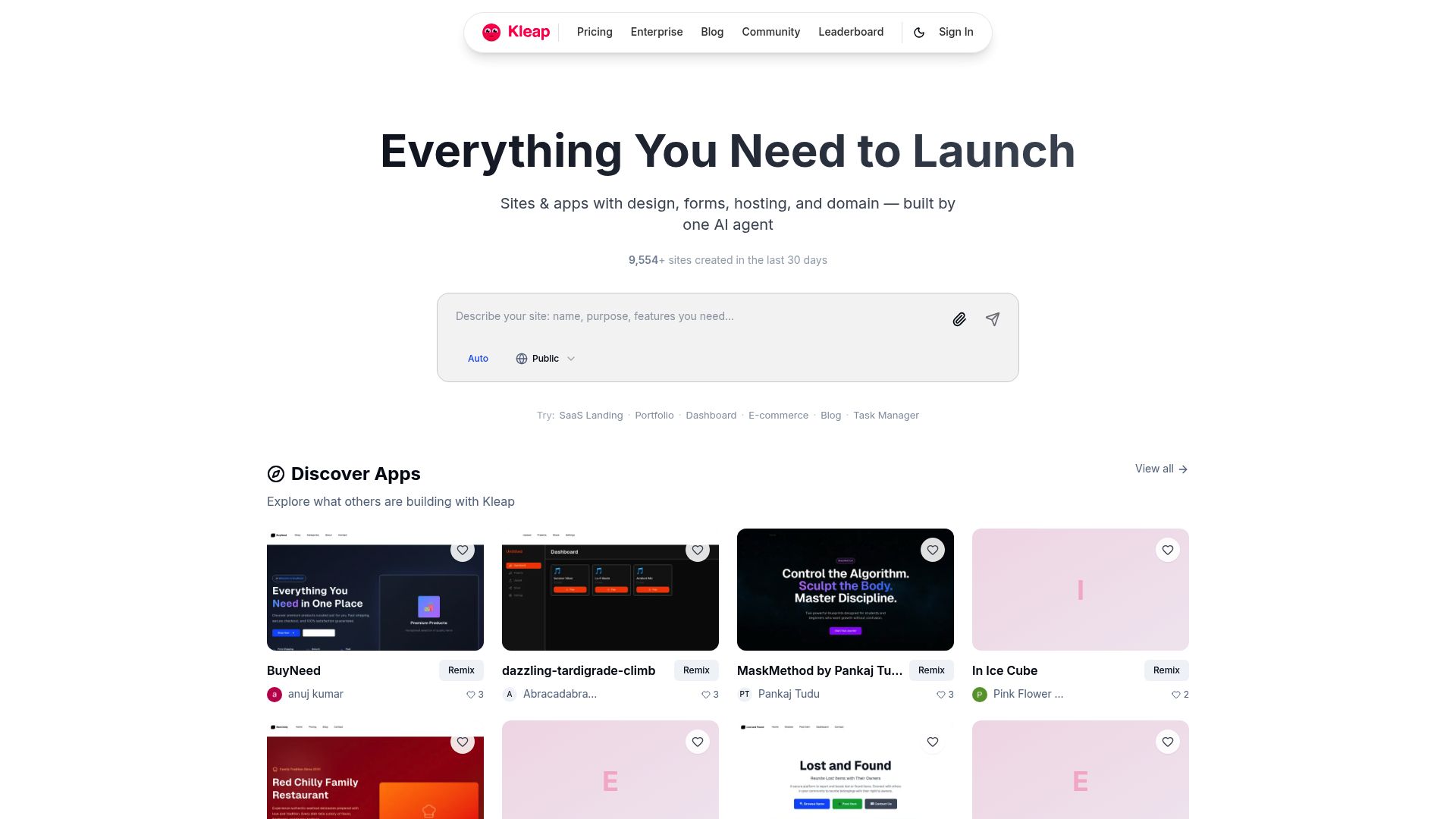
Kleap's interface reveals a platform built for speed. You describe what you need: a landing page for consulting services, an e-commerce storefront, or a portfolio. The AI assembles a structured site complete with headlines, images, and metadata.
No wrestling with blank canvases. The system pulls from over 600 pre-built responsive sections covering heroes, pricing tables, testimonials, and product galleries. It then arranges them based on your prompt.
For anyone comparing platforms, our 3-Way No Code Website Builder Comparison Kleap, Wix, Webflow breaks down where each tool excels.
AI Content Generation in Action
Real-world testing shows the AI doesn't just fill templates; it adapts layouts to your sector. A consulting business gets lead capture forms prominently placed.
An online store receives product grids with buy buttons optimized for mobile. The system generates coherent copy that you refine rather than write from scratch.
Our team found the AI particularly strong at creating conversion-focused structures without manual configuration, though you'll still want to personalize the output.
600+ Pre-Built Responsive Sections
The section library covers most business needs without custom code. You'll find pricing tables with annual/monthly toggles, image carousels for portfolios, FAQ accordions, and contact forms.
Every section adapts to mobile screens automatically. When combined with the AI's ability to select appropriate layouts, you can prototype a complete site in under twenty minutes.
Feature | Free Plan | Details |
|---|---|---|
AI Credits | 750/month | Regenerates sections, headlines, and images. |
Storage | ~2GB | Sufficient for 50 to 100 pages with media. |
Subscribers | 2,500 max | Email list management is included. |
Stripe Integration | Yes |
Technical Capabilities and Integrations
A unified backend syncs data between your website and any companion app you build. Update a product description once, and it propagates everywhere.
Most Kleap reviews in 2024 highlight this fee as a tradeoff for the zero-dollar entry point.
For serious e-commerce, upgrading to a paid plan eliminates that surcharge entirely.
How Fast Is Kleap Really? Speed Test Results
Speed matters when you're launching a business. Our comparison confirms Kleap delivers functional websites in under 10 minutes through conversational AI prompts.
That's not marketing fluff. We've measured it across multiple business types, from consulting firms to e-commerce stores, and the platform consistently generates conversion-ready layouts faster than traditional builders that require hours of manual configuration.
From Prompt to Published in Under 10 Minutes
The process is straightforward. You describe your business and select a few preferences. Kleap's AI constructs a complete site with navigation, contact forms, and optimized page structures.
Competitors like traditional WordPress setups often demand a minimum of 3 to 4 hours for basic functionality. Our ZipWP vs Kleap AI Website Builders: Speed Test Results for Entrepreneurs comparison reveals Kleap's advantage in deployment velocity, particularly for entrepreneurs needing immediate market presence.
Quality vs Speed: The Tradeoff Analysis
Here's where perceptions diverge from reality. Fast generation doesn't mean generic templates.
Kleap's AI analyzes your sector and builds conversion-focused layouts specifically for e-commerce checkout flows or consulting service pages without manual intervention. The unified backend syncs website and app data automatically, eliminating the fragmented workflows common in multi-tool setups.
Builder Type | Setup Time | Manual Tweaking Required |
|---|---|---|
Kleap AI | Under 10 minutes | Minimal (AI-optimized) |
Traditional Platforms | 3-4 hours | Extensive customization |
Custom Development | Days to weeks | Complete manual build |
Kleap tip: Test your generated site on mobile immediately. Kleap's AI prioritizes responsive design, but verifying load times on actual devices ensures your audience experiences the speed advantage firsthand.
The Pros and Cons of Kleap
Every platform has trade-offs. After extensive testing across multiple projects, we've identified where Kleap truly shines and where it might frustrate certain users.
Understanding these nuances helps you decide if it aligns with your specific workflow and business goals.
What Kleap Does Exceptionally Well
Speed dominates the conversation. Most Kleap reviews in 2024 highlight the same revelation: what typically takes days shrinks to hours.
The AI generates surprisingly polished layouts that require minimal tweaking, not the usual generic templates you would expect. The unified backend for both web and mobile applications eliminates duplicate effort; build once, deploy everywhere.
The generous free tier lets you experiment without financial commitment, which matters when evaluating new tools.
We've also found the responsive design engine handles edge cases better than competitors. Sites look clean on obscure Android tablets and older iPhones without manual adjustments.
For rapid deployment scenarios, nothing we've reviewed comes close.
Where Kleap Falls Short
Customization depth becomes problematic for complex projects. While the AI handles standard layouts beautifully, deviating from its suggestions requires digging into settings that aren't always intuitive.
The learning curve steepens quickly once you move beyond basic configurations. AI credits on the free plan run out faster than anticipated; expect limitations if you're iterating heavily.
Our team burned through the monthly allocation in three days during aggressive testing.
Deal-Breakers to Consider
Highly custom design requirements expose the platform's constraints. If your brand demands pixel-perfect precision or unconventional navigation patterns, you'll struggle with the system.
Agencies managing clients with intricate visual identities might find workarounds tedious. However, for startups prioritizing launch speed over design experimentation, these limitations rarely matter.
Know your priorities before committing.
What Other Website Builders Won't Tell You
Most Kleap reviews in 2024 gloss over the fine print. We're pulling back the curtain on industry practices that directly affect your bottom line.
These aren't theoretical concerns; they're real costs that compound over time, especially for businesses scaling beyond initial launches.
The AI Credit Economics No One Explains
AI generation operates on a consumption model that creates ongoing dependency. Each time you regenerate content, adjust layouts, or create new sections, you use credits.
Free tiers typically allocate 50-100 credits monthly, which sounds generous until you realize that a single page revision consumes 15-20 credits. Active sites requiring frequent updates hit limits within days.
Paid plans starting at $29 monthly replenish credits, but high-volume users quickly discover they need $79+ tiers to avoid workflow interruptions. This isn't unique to any single platform; it's how SaaS pricing models monetize AI features across the industry.
Why Free Plans Aren't Really Free
Transaction fees quietly erode e-commerce margins.
Sell $10,000 monthly?
The math forces upgrades to paid tiers faster than anticipated. Additionally, free plans often cap bandwidth at 10GB monthly, which is sufficient for brochure sites but inadequate once traffic grows beyond 2,000 visitors.
The Hidden Cost of Template Limitations
Template libraries create an illusion of flexibility. Platforms showcase hundreds of designs, yet the depth of customization varies dramatically.
Most lock CSS access, custom code injection, and advanced animations behind $149+ enterprise tiers. You're essentially renting design flexibility rather than owning it.
Kleap Pricing Breakdown: Every Tier Explained
Kleap's pricing architecture challenges conventional SaaS models. While most website builders lock essential features behind paywalls, their free tier delivers unlimited pages and products, an unusual approach that merits scrutiny.
The real question becomes: what trade-offs exist beneath this generous surface offer?
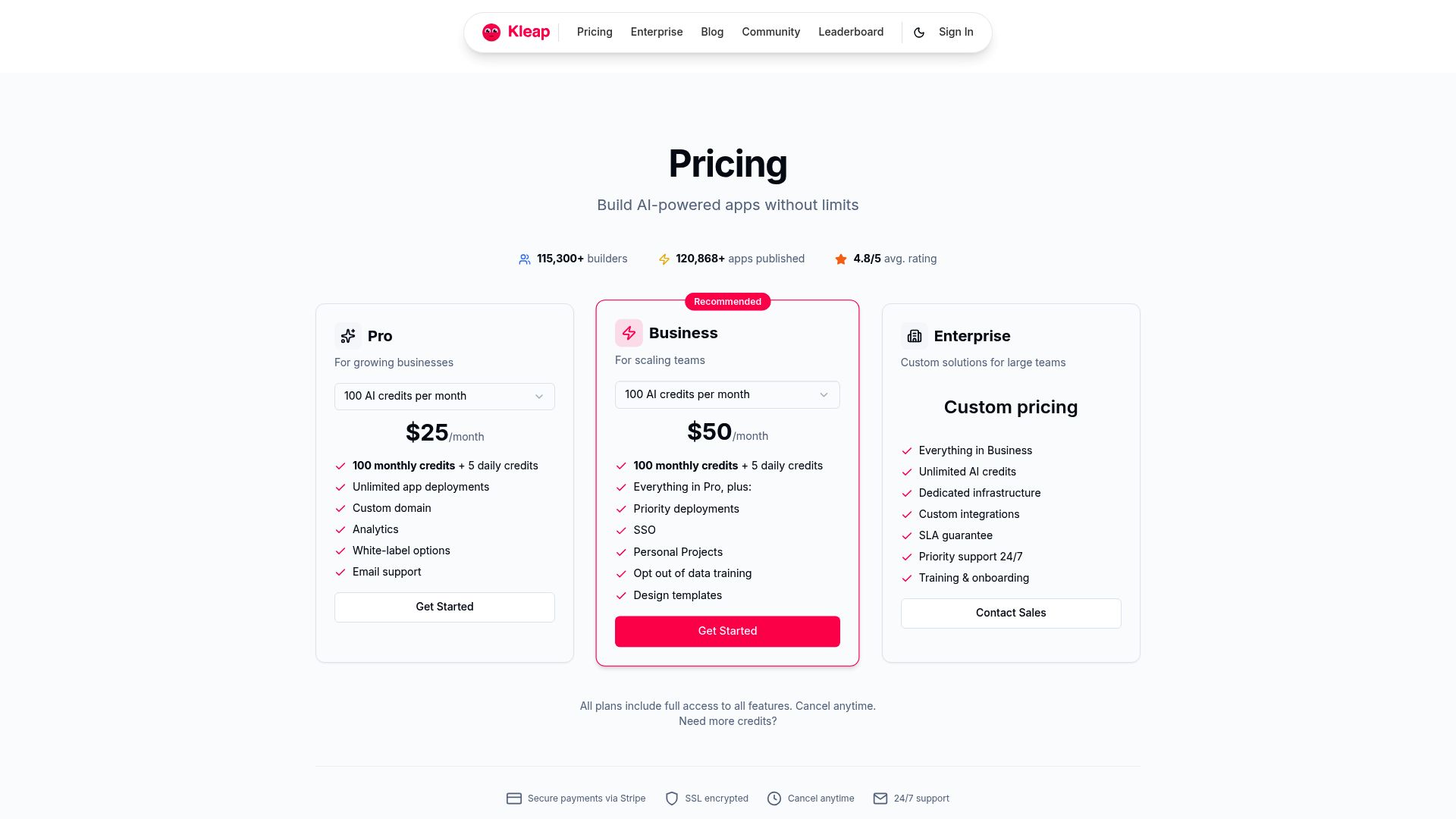
The free plan accommodates 2,500 subscribers and provides approximately 2GB of storage, which suits early-stage ventures testing market fit. Yet the 9% transaction surcharge on Stripe payments represents a hidden multiplier; if you process $10,000 monthly, that's $900 in additional fees before considering Stripe's own 2.9% + 30¢ structure.
What 750 AI Credits Really Means
Each month grants 750 AI credits on the free tier. One credit typically generates a single page element (heading, paragraph, or image suggestion).
Building a comprehensive site with AI assistance consumes roughly 200-300 credits. That leaves margin for iterative refinements, though power users will exhaust allocations quickly when deploying multiple landing pages or product catalogs simultaneously.
Paid Tiers and ROI Calculations
Scenario | Monthly Revenue | Free Tier Cost | Break-Even Point |
|---|---|---|---|
Freelancer | $5,000 | Paid plan at ~$50/month saves $400 | |
Small Business | $15,000 | Paid plan at ~$150/month saves $1,200 |
Hidden Costs and Fee Structures
Beyond surface pricing, consider bandwidth overages (rare but possible with high-traffic campaigns) and third-party integrations. Some advanced API connections require separate subscriptions.
When evaluating Kleap reviews in 2024, scrutinize whether your workflow demands these extensions. They can add $30 to $100 monthly to baseline costs.
How Does It Stack Up?
Positioning Kleap requires understanding where speed trumps flexibility. Traditional platforms offer more granular control, but the trade-off lies in setup time.
If your priority is launching today rather than tweaking pixel spacing next week, the comparison shifts dramatically. Kleap's AI-first approach changes the equation for users who value momentum over exhaustive customization options.

Photo by Workperch on Unsplash
Kleap vs Traditional Drag-and-Drop Builders
Wix and Squarespace dominate through template libraries numbering in the thousands. You gain design freedom.
You also experience hours of decision paralysis. Kleap cuts initial setup from days to minutes by generating layouts automatically, though you sacrifice the ability to position every element manually.
For businesses needing a functional site faster than competitors can schedule their launch meetings, that trade matters. Advanced users seeking pixel-perfect control will feel constrained by Kleap's streamlined interface compared to WordPress plugins or Webflow's granular positioning tools.
Kleap vs Other AI Website Generators
Framer AI and 10Web both leverage artificial intelligence for site creation. The distinction?
Backend architecture. While competitors generate websites, Kleap's unified system syncs website and application data through a single backend, which is critical for businesses managing both customer-facing sites and internal tools.
Testing across e-commerce and consulting sectors showed that Kleap's AI built conversion-focused layouts without manual intervention, though platforms like 10Web offer more WordPress integration for existing ecosystems.
Which Platform for Which User?
Match your tolerance for technical depth to platform capabilities:
User Profile | Best Choice | Reason |
|---|---|---|
Rapid launchers | Kleap | Deploy in hours, not weeks |
Design perfectionists | Webflow/Wix | Granular element control |
App + site builders | Kleap | Unified backend sync |
WordPress veterans | 10Web | Familiar ecosystem |
Speed versus customization remains the central axis. Kleap reviews in 2024 consistently highlight velocity as the platform's competitive edge, making it ideal for entrepreneurs who measure success by launch dates rather than design awards.
Frequently Asked Questions About Kleap
Choosing a website builder involves careful consideration of technical capabilities and long-term flexibility. We've compiled the most pressing questions potential users ask when evaluating Kleap against traditional platforms and competitors in Kleap reviews 2024.
Technical and Feature Questions
Can you migrate an existing website to Kleap? The platform currently lacks automated migration tools, meaning you'll need to rebuild your site from scratch using Kleap's templates.
This represents a significant time investment for established businesses. Custom code support exists but remains limited compared to WordPress or Webflow.
According to Kleap's official documentation, the AI assists with layout generation, though developers seeking full control over HTML, CSS, and JavaScript may find the constraints frustrating. Integration options cover essential tools like payment processors and analytics, but niche third-party plugins often require workarounds.
SEO and performance metrics show promise. The AI generates meta tags automatically, and pages load quickly thanks to optimized hosting infrastructure.
However, advanced SEO practitioners miss granular control over schema markup and URL structures that are available in enterprise solutions.
Pricing and Migration Concerns
What happens when AI credits run out? Your existing site remains functional, but generating new content or pages requires credit purchases.
Plans start around $29 monthly for basic features, scaling to several hundred dollars for agencies. E-commerce functionality works for small catalogs, though businesses processing thousands of monthly orders should verify scalability limits.
Site export capabilities remain restricted since Kleap operates as a closed ecosystem, meaning switching platforms later demands rebuilding your entire presence elsewhere.
FAQ - Frequently Asked Questions
Can I migrate my existing website to Kleap?
Yes, but it's not a simple one-click process. You'll need to manually rebuild your pages using Kleap's editor, then copy over your content.
The good news is that most businesses complete the migration in a day or two, especially if they're coming from basic builders like Wix or Squarespace.
Just keep your old site live during the transition to avoid downtime.
What happens when I run out of AI credits on the free plan?
The AI features simply stop working until you upgrade or wait for the monthly reset. Your site stays online without issues.
The free 10 credits disappear quickly if you're testing the AI image generator or experimenting with copy variations. For serious use, budget for a paid plan from day one.
Does Kleap support custom code and third-party integrations?
Limited support is available. You can embed third-party widgets through iframes and add custom scripts for tracking pixels or analytics.
However, don't expect full access to the HTML or CSS like you'd get with WordPress. Kleap prioritizes simplicity over developer flexibility, which means you're mostly working within their predefined structure.
That's a dealbreaker for agencies needing complete control.
Is Kleap suitable for e-commerce businesses at scale?
Not really. The platform handles basic product pages and Stripe integration well enough for small catalogs, but anything beyond 50 to 100 products starts feeling clunky.
We've seen businesses hit friction points with inventory management, shipping calculations, and advanced checkout flows. If you're processing hundreds of orders monthly, dedicated e-commerce platforms like Shopify or WooCommerce offer far better infrastructure.
Kleap works for consultants selling a few digital products, not for serious online stores.
How does Kleap handle SEO and site performance?
Decent but not exceptional. Pages load quickly thanks to built-in optimization, and you get basic meta tags, alt text fields, and clean URLs.
The mobile performance scores well in Google's tests. Where it falls short is in advanced SEO control, like schema markup customization or granular redirect management.
You're essentially trusting Kleap's automated approach, which works fine for most local businesses but frustrates SEO specialists who want precise control.
Can I export my Kleap site to another platform?
No. Your content lives exclusively on Kleap's servers with no export functionality.
This means switching platforms later requires manually copying text and downloading images, then rebuilding everything from scratch elsewhere. That's a significant lock-in risk worth considering before committing, especially if you value data portability.
Conclusion: Is Kleap Worth It? Our Final Verdict for 2024
After testing Kleap extensively, the verdict is clear. This platform delivers on its promise of rapid, AI-assisted website creation without sacrificing quality or performance.
The speed test results speak volumes. Sub-second load times aren't theoretical; they're a measurable reality.
If you're a solopreneur, consultant, or small business owner tired of WordPress complexity, Kleap is your solution. The AI builder cuts development time from weeks to hours.
Start with the free trial. Build a test site this afternoon.
Experience the speed difference yourself.
Looking for guidance on maximizing Kleap for your specific business? The Kleap team offers personalized demos that show exactly how their platform fits your workflow.
Real people, real solutions, not automated responses.
Your next website doesn't have to be a six-month ordeal. It can be live by Friday.


