AI PDF creator
Describe it. Download a print-ready PDF.
- TestedTested once on 6 November 2026 with the prompt in the box: a 2-page printable checklist, 31 s by Kleap's turn timer; ask Kleap to revise the file in the same chat. Times are Kleap's own timer for the AI's turn in our test (one run, or the median where we repeated it), not a promise: yours may take longer, and reading and checking the file comes on top.
- Free to startYour first try usually needs no account; to keep the result, Kleap asks for a free account, with no card. Each file uses Kleap usage, and the free plan's usage refills automatically.
- Using the boxText must be in Latin, Greek or Cyrillic script; for other scripts ask for a Word file.
What is an AI pdf creator?
An AI PDF creator writes a new document and sets it as a fixed-layout PDF that prints and opens the same everywhere. Kleap's AI PDF creator is made for short, structured files: checklists with tick boxes, price lists, guides and handouts. It shows the PDF in the chat; to change it, ask there and Kleap edits the stored PDF.
What this page makes: a new fixed-layout PDF, written from a brief you type or paste (a checklist, price list, guide or handout). What it is not: a PDF editor or converter: it does not edit, merge, compress, sign or convert a PDF you already have, and it does not OCR scanned pages.
An AI PDF creator writes the content of a document and sets it as a fixed-layout PDF, the format you print, attach to an email or hand out because it looks the same everywhere. Kleap's AI PDF creator is made for short, structured files: checklists with tick boxes, price lists, guides, one-pagers and handouts. Describe what the PDF should say and who it is for; Kleap writes it, lays it out with headings, lists, tables, quotes and page numbers (a link in the text stays clickable), and shows the PDF in the chat to download. Reply with a change and Kleap edits the stored PDF. Text must be in Latin, Greek or Cyrillic script (English, French, Spanish, German, Russian and similar); for Arabic, Chinese, Hebrew or Japanese, ask for a Word file instead, and emoji are left out. When the reader needs to edit the text, use the AI document generator; for a guide in chapters, the AI ebook generator.
PDF, Word document or e-book?
Choose Word to keep editing the text, a PDF to share a layout that must not move, and an e-book for a guide in chapters with a cover and linked contents.
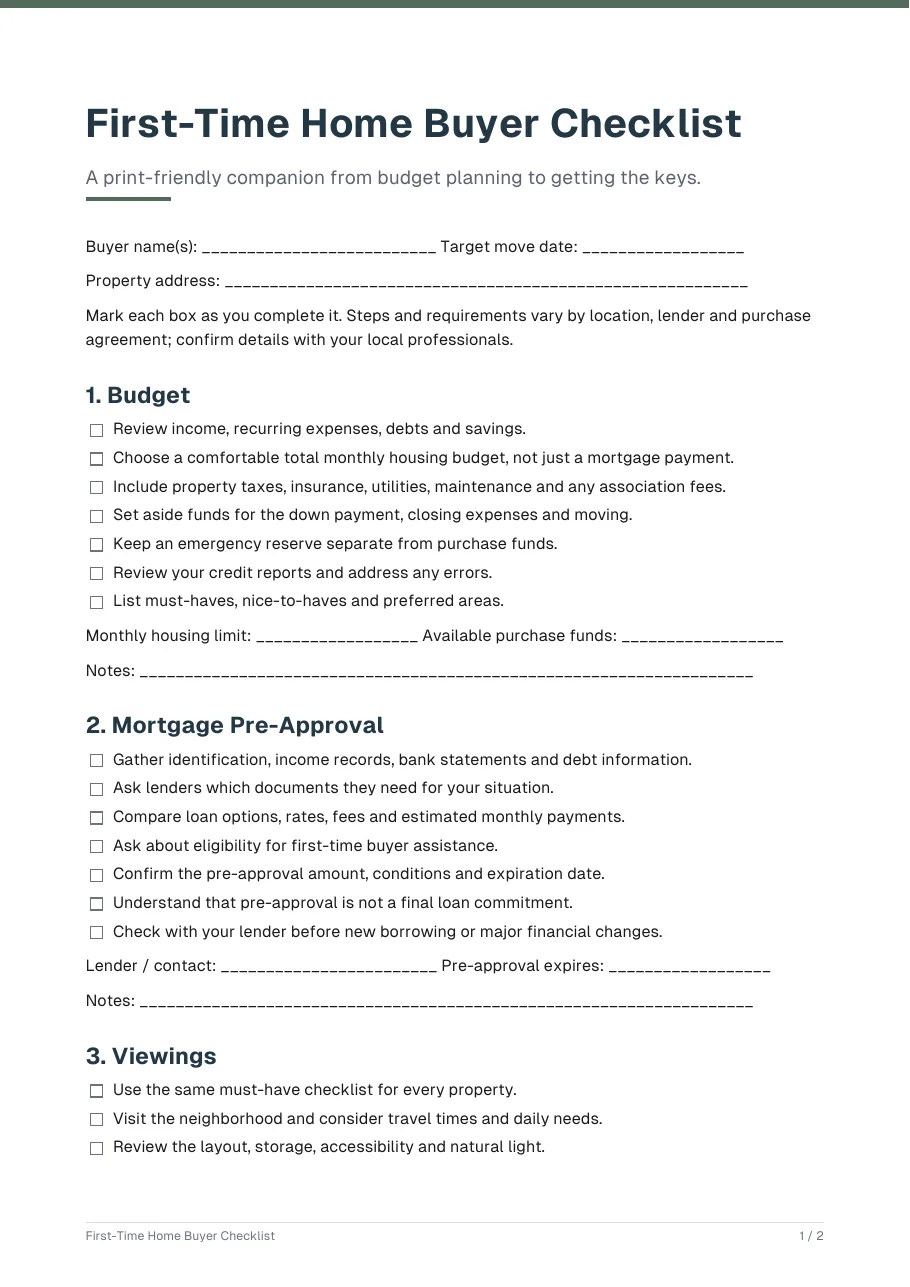
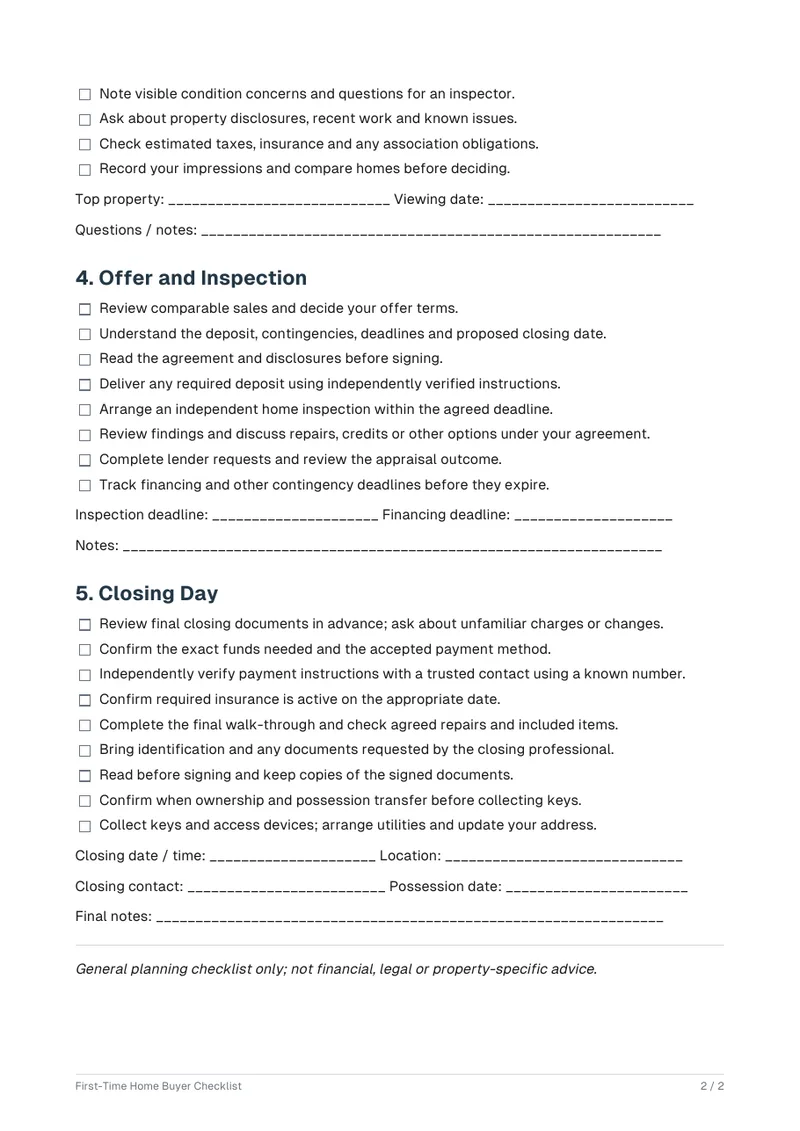
A PDF is for reading and printing, not for editing. Choose it for a checklist someone ticks on paper, a price list you attach to an e-mail, a handout for a class. The test PDF on this page is a 2-page first-time home buyer checklist with tick boxes, in five stages.
When the reader must change the text, use the AI document generator for a Word file. When the content is a longer guide in chapters with a cover, use the AI ebook generator. This page writes a new PDF; to merge, split or compress PDFs you already have, use a PDF tool.
Checked on 6 November 2026 by the Kleap product team. Test: “Make a printable first-time home buyer checklist as a PDF. (details on the next line)”, a printable PDF, 31 s by Kleap's turn timer.
Measured on
One real run of the prompt in the box above, unchanged: a fresh project, the real Kleap interface, a test account. Every number on this page comes from that run and its delivered file. Times are Kleap's own turn timer, shown under the reply in the chat. One run, not an average.
- Kleap's turn timer, on this test
- 31 s
- Pages
- 2
- File size
- 22 KB (.pdf)
- [to fill in] markers
- 0
See what this prompt creates
Real output of the prompt in the box above, generated with Kleap on 6 November 2026, rendered from the delivered file. Not a mockup. From the prompt in the box, unchanged, Kleap returned a 2-page PDF (22 KB) in 31 s by Kleap's turn timer: a title, a one-line purpose, write-in lines for the buyer's name, target move date and address, then the five stages the prompt names (budget, mortgage pre-approval, viewings, offer and inspection, closing day), 38 tick-box items in all, each stage ending with write-in lines (monthly limit, lender, top property, inspection and financing deadlines, closing details). It closes with a note that this is a general planning checklist, not financial, legal or property-specific advice. 0 [to fill in] markers: a checklist needs no figures. The tick boxes are printed, not fillable form fields, and it has no links (the prompt gave none).
What we checked in the delivered file
- 2 pages in the PDF (pdfinfo), numbered 1 / 2 and 2 / 2 in the footer.
- The five stages of the prompt, in its order, with 38 tick-box items and write-in lines per stage.
- 0 [to fill in] markers, no numbers the prompt did not ask for, and 0 links (read with pdf-lib).
Show the exact prompt
Make a printable first-time home buyer checklist as a PDF. Details: 5 stages: budget, mortgage pre-approval, viewings, offer and inspection, closing day.
How we tested the AI PDF Creator, and when to use something else
How this page was tested
- We sent the box prompt as written and opened the PDF.
- We counted its pages (pdfinfo) and searched its text for [to fill in].
- We read the five stages the prompt names in the PDF text, in order.
Good for
- Checklists, guides, handouts and one-pagers to print or share
- A fixed layout that looks the same everywhere
- Content you describe, written and laid out for you
Use something else for
- Editing, merging or converting an existing PDF.
- Fillable form fields: the PDF is static.
- A long read with chapters: use the AI ebook generator
Short PDFs that do one job well
Checklists and guides
Step lists you can print and tick off.
Price lists and menus
Services and prices in a clean table.
Welcome and house-rules sheets
Information guests or new clients need on day one.
One-page handouts
A summary for a workshop, class or meeting.
Lead magnets
A short free guide you offer on your website in exchange for an email address.
From description to PDF in three steps
Describe the content
Say what the PDF is, who it is for, how long it should be and any facts that must appear.
Kleap writes and lays it out
It drafts the text, sets headings, lists and tables, and renders the PDF in the chat.
Check and download
Ask for changes in plain words, then save the PDF to print or send.
How Kleap compares
Facts from each tool's own page, read on 9 November 2026 (follow the source link to check). Kleap's row describes what the example above shows.
Which tool for which case
Pick AI Doc Maker when you want PDFs and Word files with templates and no sign-up. Pick Canva when you want to design the PDF yourself on a template. Pick Inkfluence AI for a long PDF with chapters and a designed cover. Pick Kleap when you want a new print-ready PDF from a brief, and a Word copy too if you will edit it.
| Tool | What you get | Free path | Best at |
|---|---|---|---|
| Kleap | Print-ready PDF with links and page numbers | Your first try usually needs no account; to keep the result, Kleap asks for a free account, with no card. Pro from $25/month (see /pricing). | Writes the content too; no template or API to set up |
| Google's US top 3 for “ai pdf creator”, read 9 November 2026 | |||
| AI Doc MakerSource, checked 9 Nov 2026 | Create, convert and format PDFs; chat to create print-ready documents | Free, no sign-up required (Google's snippet of its home page) | Templates for PDFs, Word documents and reports |
| Canva PDF makerSource, checked 9 Nov 2026 | Design a PDF on a template: replace the sample text, add graphics | “Canva's free PDF maker” | Share, present and print the same design |
| Inkfluence AI free AI PDF creatorSource, checked 9 Nov 2026 | Writes the whole PDF (chapters, sections, prose) with layout and a matching cover | A finished printable PDF “on the free plan” | Paste text or Markdown and download a clean PDF |
| Category leaders (not in this SERP, read 9 November 2026) | |||
| Adobe Acrobat AI AssistantSource, checked 9 Nov 2026 | Turns your files into an AI workspace: summaries, podcasts and visuals | “Free trial” (page button) | Works on the PDFs and files you already have |
Start free. Upgrade when you need more.
Your first try usually needs no account; to keep the result, Kleap asks for a free account, with no card. Files and images use your Kleap usage: free usage refills over time, and paid plans add much more.
Free
- Free usage that refills
- Free account to save your results and find them again
Pro
- Much more usage
- Custom domain for your Kleap websites
When is a PDF the right file?
Make a PDF from a brief when you need a file to share as it is: it looks the same on every screen and printer (a checklist, a price list, a handout, house rules). If the text will need editing later, ask for a Word file as well: Kleap can return both from one request, as the resume page test did, or use the AI document generator. For a longer guide with a cover, contents and chapters, use the AI ebook generator.
A lot of PDFs are simple: a checklist, a price list, a guest guide, a one-page handout. They still take time in a design tool or a word processor. With Kleap you describe the content and the audience, and the file is laid out for you.
The renderer sets headings, bullet lists, tables, quotes and images, numbers the pages, and keeps a link in the text clickable (the tested checklist contained none). For longer, book-length writing, see the e-book page. For a document you plan to keep editing, ask for Word instead.
PDF, Word document or e-book? Choose a PDF when the file should look the same everywhere and is read, printed or ticked rather than edited: a checklist, a handout, a one-page guide. If you will rewrite it, an AI document generator that returns an editable Word file is the better start; if it is a longer guide with a cover and linked chapters, use the AI e-book generator.
Questions, answered.
Can it edit, merge or convert a PDF I already have?
No. This page writes a new PDF from your brief. It does not edit, merge, compress, sign or convert an existing PDF, and it does not OCR scanned pages: use a PDF tool such as Adobe Acrobat online or iLovePDF for those. If you have the text, paste it into the request and Kleap sets it as a new PDF.
What kind of PDF does it make well?
Short, structured files people print or keep: checklists with tick boxes, price lists, guides and handouts. Our test was a 2-page first-time home buyer checklist with tick boxes and numbered pages.
Can I turn my own text into a PDF?
Yes. Paste your text into the request and ask for a formatted PDF. Kleap sets it with headings, lists and tables.
Does the PDF have clickable links and page numbers?
Pages are always numbered. A link in the text is clickable; the tested checklist contained none, so its PDF has no links.
Can it include images?
It can place images that have a public web address. For your own pictures, upload them to a Kleap project or ask for the layout without images.
Can I edit the PDF afterwards?
Reply in the chat to change the content and Kleap edits the stored PDF. If you want a file you can edit directly, ask for a Word document instead.
Should I ask for a PDF, a Word file or an e-book?
Choose Word to keep editing the text, a PDF to share a layout that must not move, and an e-book for a guide in chapters with a cover and linked contents. For Word, use the [AI document generator](/ai-document-generator); for chapters, the [AI ebook generator](/ai-ebook-generator).
Describe it, download it, send it.
Tell Kleap what the PDF should say and get a formatted file back. Made to print or share as it is, not to edit afterwards.
Written by the Kleap product team. Checked on 9 November 2026 against the generated files and runs shown on this page.