AI quotation generator
Describe the job and the prices. Download a PDF quotation.
- TestedIn our test on 6 Nov 2026, the request in the box gave the PDF quotation 19 seconds after Create. Times are Kleap's own timer for the AI's turn in our test (one run, or the median where we repeated it), not a promise: yours may take longer, and reading and checking the file comes on top.
- Free to startYour first try usually needs no account; to keep the result, Kleap asks for a free account, with no card. Each file uses Kleap usage, and the free plan's usage refills automatically.
- Using the boxThe box holds a sample painting job. Press Create for the PDF, or put your own client, items and prices in its place. Check every price before you send it.
What is an AI quotation generator?
An AI quotation generator turns a short description of a job (who it is for, what you will do, what each part costs, how long the price holds) into a laid-out quote. Kleap's AI quotation generator returns it as a PDF: your business and the client, a quotation number, a table of items with quantities, unit prices and amounts, the total, the validity period and any terms you state, such as a deposit. It multiplies and adds the amounts itself; anything you leave out, like the issue date in our test, is marked [to fill in] rather than guessed. To change a line or add a discount, say so and a corrected PDF comes back. It is not quoting software: there is no e-signature, no acceptance tracking and no reminder, so you download the quote and send it yourself, then ask the same chat for the invoice once the client says yes.
Checked on 6 November 2026 by the Kleap product team. Test: “Create a PDF quotation Q-0107 from Brightside Painting to Jordan Lee: 2 rooms at $450 each and trim work at $180, valid for 30 days.”, .pdf, 19 s to the file.
Measured on
One real run of the prompt above: a fresh project, the real Kleap interface, a test account. Times run from the request reaching Kleap to the file being saved (photos: from pressing Create to the end of the reply). One run, not an average.
- Time to the file
- 19 s
- Pages
- 1
- Total computed
- $1,080.00
- Left [to fill in]
- 2 (issue date, tax)
See what this prompt creates
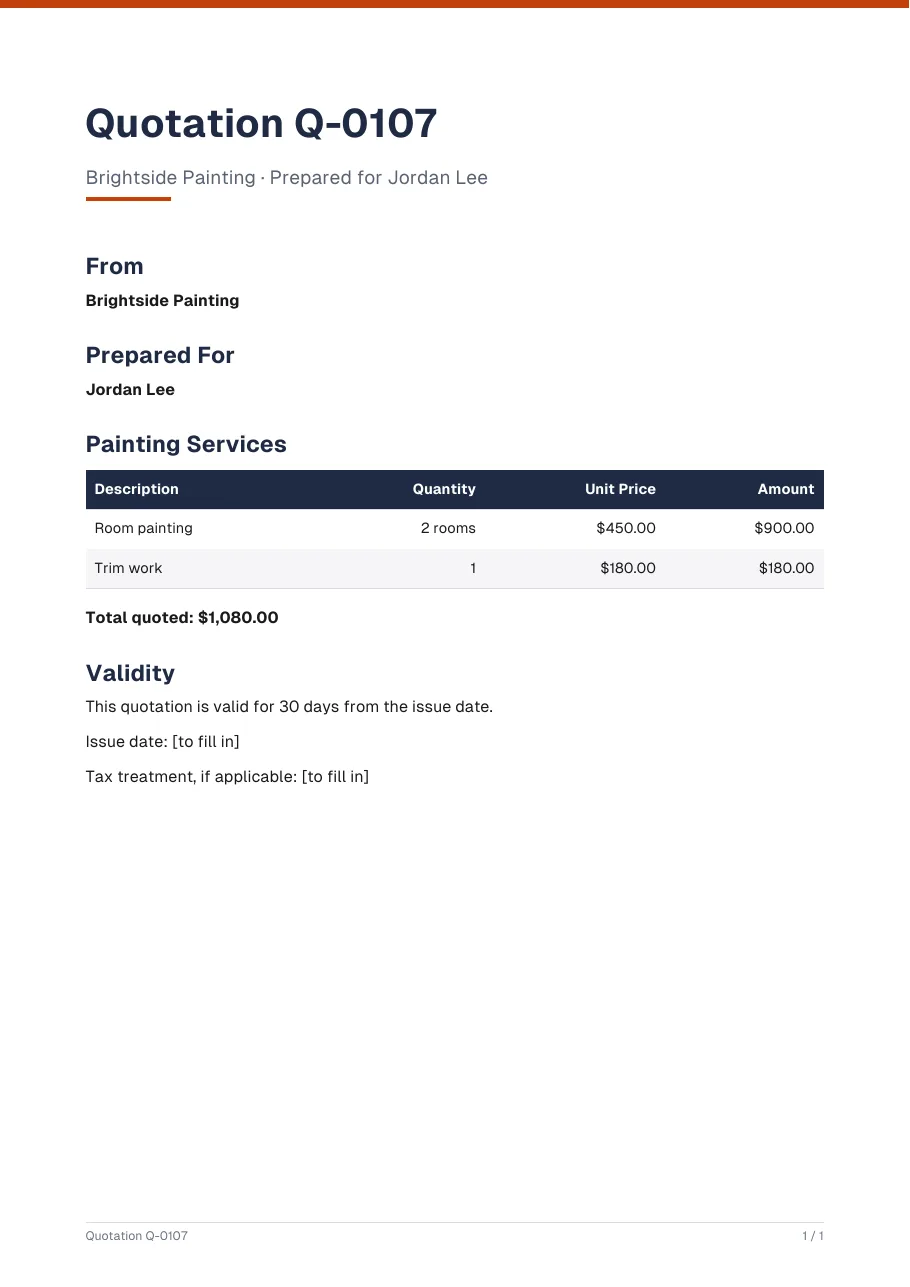
Real output of the prompt in the box above, generated with Kleap on 6 November 2026, rendered from the delivered file. Not a mockup. With the request in the box, Kleap returned a one-page PDF quotation 19 seconds after Create: a title band with the number, from and prepared-for blocks, a priced table and the validity. The total is computed: 2 rooms × $450 + trim work $180 = $1,080.00. The prompt gave no issue date and no tax, so the PDF shows 2 [to fill in] markers instead of inventing them.
What we checked in the delivered file
- Room painting: 2 rooms × $450.00 = $900.00; trim work: 1 × $180.00 = $180.00.
- Total quoted $1,080.00, the sum of the two lines.
- "This quotation is valid for 30 days from the issue date", as the prompt asks.
- Issue date and tax treatment read [to fill in]: the prompt gave neither.
Show the exact prompt
Create a PDF quotation Q-0107 from Brightside Painting to Jordan Lee: 2 rooms at $450 each and trim work at $180, valid for 30 days.
Quotes for trades, services and projects
Trade quotes
Painting, plumbing, repairs: labour and materials on separate lines.
Project quotes
Design, development or consulting split into priced phases.
Per-guest or per-unit quotes
Catering, events or products priced by quantity.
Quotes with deposit terms
A deposit to book the date and the balance on completion.
Quotes in any currency
Dollars, euros, pounds or francs, with the tax you state.
From job to quotation in three steps
Describe the job
Who the quote is from and to, each item with its price, the tax rate and how long the price is valid.
Kleap prices it
It builds the line table, adds up the subtotal, applies your tax rate and prints the total and the validity date.
Check it and send it
Ask for a changed item or a discount, download the PDF and send it to the client yourself.
How Kleap compares
Facts from each tool's own page, read on 6 November 2026 (follow the source link to check). Kleap's row describes what the example above shows.
Which tool for which case
Pick Manus when you want an agent to research and draft service, product or B2B quotes with custom terms. Pick Kleap when you describe the job in a sentence and want the priced PDF straight away, with the total worked out, then the invoice and your website from the same chat.
| Tool | What you get | Free path | Best at |
|---|---|---|---|
| Kleap | PDF quotation with line items, total and validity date | Your first try usually needs no account; to keep the result, Kleap asks for a free account, with no card. Pro from $25/month (see /pricing). | The invoice for the same job and your website come from the same project |
| Google's US top 3 for “ai quotation generator”, read 6 November 2026 | |||
| Manus quotation generatorSource, checked 6 Nov 2026 | Quotations in professional document formats you can export as PDF | Free daily credits for new users | Service, product and B2B quotes with itemized pricing and custom terms |
Start free. Upgrade when you need more.
Your first try usually needs no account; to keep the result, Kleap asks for a free account, with no card. Files and images use your Kleap usage: free usage refills over time, and paid plans add much more.
Free
- Free usage that refills
- Free account to save your results and find them again
Pro
- Much more usage
- Custom domain for your Kleap websites
A quote the client can say yes to
A quotation tells a client what the work is, what it costs and how long the price holds. Kleap lays out the items you give it, adds them up, applies the tax rate you state and prints the validity date, so the client sees one clear total before the job starts.
Once the client accepts, the AI invoice generator turns the same job into an invoice, and a longer proposal with scope and timeline is a Word file away with the AI document generator. Rules on tax and on what a quote commits you to differ by country: Kleap uses your details and gives no legal or tax advice.
Questions, answered.
What is the difference between a quotation and an invoice?
A quotation is sent before the work, to say what it will cost and how long that price holds. An invoice is sent after, to ask for payment. Kleap makes both; the invoice page uses the same layout.
Does the quotation calculate the total for me?
Yes. It multiplies quantities by prices, adds them up and applies the tax rate you give. Check the numbers yourself before you send the quote.
Can I add a deposit or payment terms?
Yes. Write the terms in your request, such as a 30% deposit to book the date and the balance on completion, and they are printed on the quotation.
How long is the quote valid?
As long as you say. Give a number of days or a date in the request and the quotation shows it; without one, ask Kleap to add it.
Can the client accept the quote online?
Not from the PDF. It can carry a line for the client to sign, but there is no e-signature or acceptance tracking. Kleap can build a quote request page on your website if you want clients to ask online.
Can I turn the accepted quote into an invoice?
Yes. Ask in the same chat for an invoice for the accepted quotation and Kleap makes the invoice PDF with the same items.
Send a clear price today.
List the work and download a quotation as a PDF. Try it without an account; sign up free when Kleap asks, to keep your files.
Written by the Kleap product team. Checked on 9 November 2026 against the generated files and runs shown on this page.