5 Best AI Website Builders for Consultants (2026)
The best AI website builder for consulting firms lets you launch a credible, client-ready site in hours, not weeks, without a developer on retainer.
- Speed matters: the right tool gets you from blank page to published site in a single session
- Look for AI that generates industry-specific copy, not generic filler that undermines your expertise
- Credibility converts: a well-structured consulting site built with the right AI tool can outperform a hand-coded site built six months later
Most consulting firms lose their first clients not to a competitor, but to a blank browser tab where their website should have been.
The gap between "we need a site" and "we have a site" used to cost weeks of agency back-and-forth, thousands in design fees, and a final product that was already outdated by launch day. The rise of the AI website builder for consulting firms has quietly closed that gap, giving solo strategists and boutique firms the same qualified online presence that once required a full creative team.
For entrepreneurs, agency owners, and independent consultants who need to move fast without looking cheap, the tool you pick matters more than most guides admit.
This evaluation cuts through the noise to identify which AI builders actually understand professional services, and which ones just dress up a generic template with a chatbot.
Try it — build your site while you read
Describe what you want and get a live, publishable site in seconds. Free to start, no code.
Join 200,000+ makers building real websites with Kleap.
Why Consulting Firms Need More Than a Generic Website Builder
A prospective client decides whether to book a discovery call within seconds of landing on your site. That judgment happens before a single word is read.
Generic drag-and-drop builders produce sites that look fine for a coffee shop or a freelance photographer, but consulting is a credibility business, and a template-heavy site signals exactly the wrong thing to a CFO evaluating vendors.

Why design and functionality both matter
Design alone won't close deals. Consulting firms need working infrastructure baked in: appointment booking that syncs with your calendar, client portals for secure document exchange, and lead-capture forms that feed directly into a CRM.
Without these, a beautiful site is just a digital brochure. Every week spent bolting on third-party tools is revenue left on the table, and for firms billing at consulting rates, that delay compounds fast.
What sets consulting website needs apart from other businesses
Data governance is where most generic builders quietly fail. Consulting work involves sensitive client information, which means GDPR/CCPA readiness, SSO controls, and opt-out of AI data training are not nice-to-haves; they are non-negotiable.
The right platform combines fast AI-powered launch with enterprise-grade privacy controls, so you go live in hours rather than weeks without compromising client trust.
The 5 Best AI Website Builders for Consulting Firms Ranked
Most consulting firms waste weeks on website projects that should take hours. The five tools below change that equation, but only one was actually built with professional services workflows in mind from day one.

1. Kleap, The all-in-one AI launch platform built for professional services
Imagine a New York management consultancy that needs a live site with appointment booking, a client portal, and GDPR-ready document security, all built before Friday's pitch. Kleap delivers exactly that in roughly 20 minutes, using natural-language prompts to generate the entire structure.
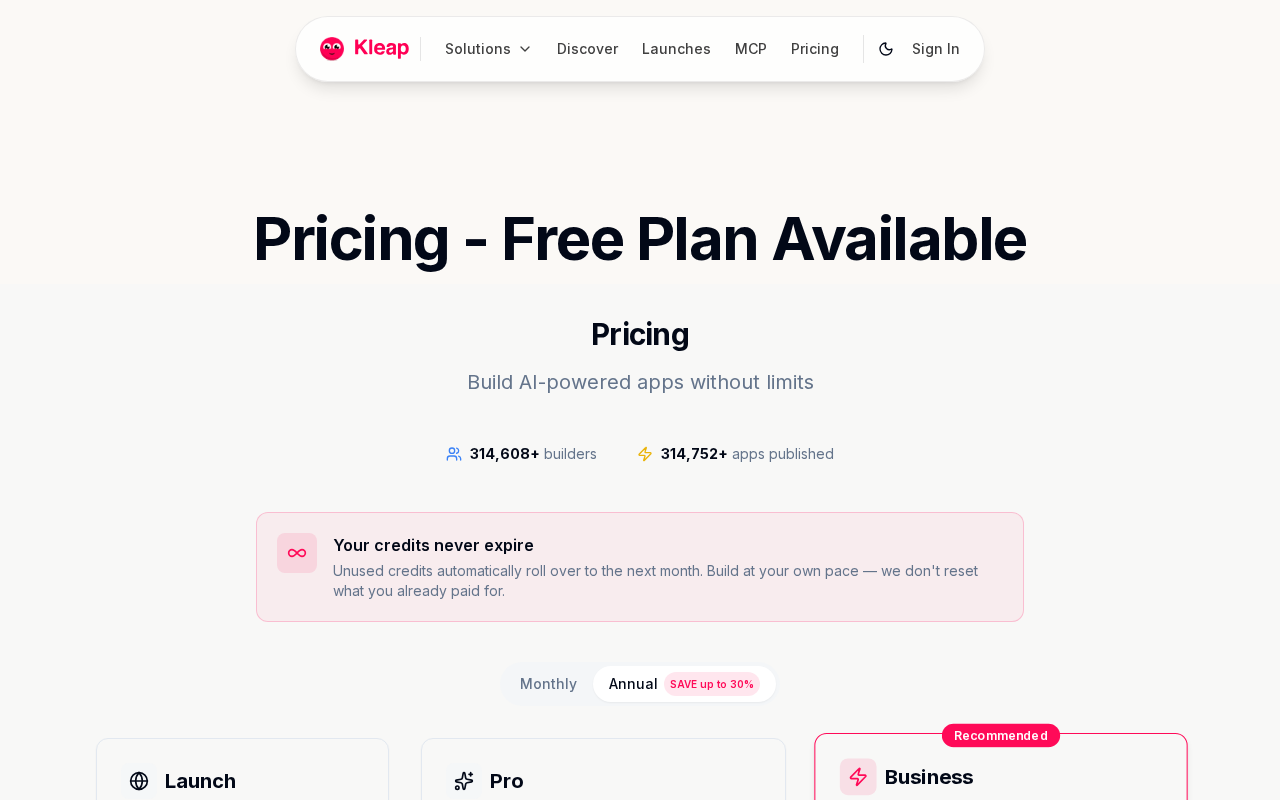
No developer, no agency retainer. The free plan includes 5 AI credits per day, while Pro ($25/month) and Business ($50/month) each tap into 100 credits monthly plus SSO, private projects, and data-training opt-out. These features matter enormously when handling client-sensitive work.
For a boutique firm ready to launch fast, the free AI website builder with custom domain path through Kleap is genuinely hard to beat.
Kleap tip: Use the dedicated professional-services template as your starting prompt, then layer in your firm's case studies and testimonials immediately. Kleap's lead-capture forms go live the moment your site does, so you start collecting inquiries from hour one.
2-5. Other strong contenders worth considering
Beyond Kleap, several platforms serve consulting-adjacent needs, each with a distinct fit:
- Webflow AI: Best for design-forward boutique firms that want pixel-level control. Steeper learning curve, but strong CMS for thought-leadership content.
- Framer AI: Ideal for solo consultants who prioritize visual polish and fast iteration. Limited native booking or portal functionality.
- Wix AI Site Builder: Good entry point for small consultancies on tight budgets. Template variety is broad, though enterprise governance features are thin.
- Squarespace AI: Reliable for established firms wanting low maintenance. Integrations are solid, but AI generation depth lags behind dedicated builders.
The teleporthq AI website builder is also worth examining if your team has developer resources and wants granular code control alongside AI-assisted generation. For most consulting firms, though, the combination of speed, compliance readiness, and built-in client workflows makes Kleap the clearest starting point.
What Other AI Builders Won't Tell You About Consulting Websites
The fine print is where consulting practices get hurt. Most platforms bury critical limitations beneath "free forever" promises, then reveal the real terms only after you have migrated your client materials, built your workflows, and invested weeks of setup time.
By then, switching costs are high enough that most firms just stay.

The hidden costs most platforms bury in fine print
Hosting, custom domains, and SSL certificates appear "included" in marketing copy, then quietly move behind a paywall the moment you need them live. Template lock-in compounds the problem: platforms that withhold code ownership trap your entire digital presence inside their ecosystem with no exit strategy.
Kleap's approach differs: publishing, hosting, and site previewing stay free, always, with transparent upgrade paths rather than surprise gates.
SEO readiness is another casualty. For most builders, structured metadata, sitemap generation, and local search optimization are premium add-ons.
Consulting firms competing for niche search terms in Chicago or Houston can't afford to start ranking six months late. Our breakdown of godaddy website builder AI features shows exactly how incumbents handle and hide these capabilities.
Why data privacy is the most overlooked feature for consultants
Here's what almost nobody discusses openly: many AI builders train their models on your uploaded content by default. For a consulting firm handling sensitive client deliverables, strategy documents, or proprietary frameworks, that default setting is a material risk.
Kleap's Business tier includes SSO, private projects, and explicit data-training controls, features that address the governance concerns that actually matter when client confidentiality is non-negotiable.
Kleap vs. The Competition: a Feature-by-Feature Breakdown for Consultants
Most consultants shopping for an AI website builder for consulting firms compare tools on design alone. Wrong priority.
The features that actually determine ROI are client portals, booking integrations, data governance, and team controls, and that's exactly where the field separates fast.
Side-by-side: client portals, booking, and data governance
Kleap bundles appointment booking, CRM integration, document security, and GDPR/CCPA compliance readiness natively, with no third-party plugins required. Competitors in this space typically handle one or two of these well, then force you into paid integrations for the rest.
The hidden cost adds up fast: a separate scheduling tool, a compliance plugin, a forms add-on. With Kleap, those are already in the workflow from day one.
Data governance is the detail most comparison guides skip entirely. Kleap's Business plan includes SSO, private projects, and the option to opt out of data training. These features matter enormously when client-sensitive strategy work lives inside your platform.
That's not standard across the category.
Which plan fits a solo consultant vs. A boutique firm vs. An enterprise team
- Solo consultants: The free tier or Launch plan at $9/month covers fast launch, professional design, booking, and hosting. No overbuilding needed.
- Boutique firms (2-10 people): Pro at $25/month unlocks team collaboration, branding controls, and private projects. A Chicago boutique strategy firm, for instance, gets a client-facing site plus internal project separation, all under one subscription.
- Enterprise consulting teams: Business at $50/month or custom Enterprise pricing delivers SSO, unlimited AI credits by arrangement, and data-training opt-out. These are table stakes for firms handling sensitive client mandates.
Analytics, SEO, and payments come natively across Kleap's tiers, whereas most competing tools treat these as premium add-ons or third-party dependencies. For consulting firms where every tool in the stack represents a security surface, fewer integrations isn't just convenient.
It's a governance decision.
How to Launch Your Consulting Firm's AI Website in Under an Hour
Most consultants assume building a credible website takes weeks. With Kleap, the entire process, from blank page to live, client-ready site, fits inside a single afternoon.
No developer, no agency retainer, no waiting.

Step-by-step, from first prompt to live consulting site with Kleap
- Sign up free, no credit card required. You get five AI credits daily on the free plan, enough to iterate and refine.
- Describe your firm in plain language, something like "a management consulting firm in Houston specializing in operational efficiency." The AI generates a full layout from that single sentence.
- Review and customize, adjust brand colors, upload your logo, and refine the copy to match your firm's voice.
- Add client-facing features, appointment booking, a secure client portal or contact form, and individual service pages each take minutes to configure.
- Connect your custom domain and publish — hosting is always free on Kleap, so going live costs nothing extra.
What to customize first to win client trust immediately
Trust signals matter more than aesthetics in consulting. Prioritize your About page, a clear services breakdown, and visible social proof, such as case studies or testimonials, before anything else.
Booking widgets placed above the fold convert significantly better than buried contact forms. Kleap's GDPR/CCPA-ready compliance features also signal credibility to enterprise prospects from day one.
Kleap tip: Open up SEO settings and analytics before hitting publish. Capturing organic traffic from the moment your site goes live means your consulting pipeline starts building immediately, not weeks later.
Frequently Asked Questions
Can I build a consulting website for free with an AI builder?
Yes. Kleap offers a free tier that lets you build and launch a fully functional consulting website without spending a dollar upfront.
The free plan covers core design, hosting, and publishing. When your firm grows and needs custom domains or advanced features, paid plans start at $25/month.
Do AI website builders include appointment booking for consulting firms?
Most AI builders handle forms and lead capture natively, though dedicated calendar booking typically requires an integration with a third-party scheduling tool.
In practice, Kleap's form capabilities handle initial client inquiries well. For full appointment scheduling, connecting an external booking service through your site works cleanly and takes minutes to set up.
How secure are AI-built websites for handling client-sensitive information?
Security is where many consultants hesitate, and the concern is legitimate. Kleap is built with enterprise-grade security standards, which means your client data and contact forms are protected at a level that rivals custom-built solutions.
What nobody mentions: the real vulnerability in most consulting sites isn't the builder, it's misconfigured forms or unencrypted contact submissions. Kleap handles that infrastructure layer for you, so you're not relying on a plugin stack that someone forgot to update.
How long does it take to launch a consulting firm website with Kleap?
Realistically? A few hours from first prompt to live site.
I've seen consulting teams go from blank slate to a published, domain-connected website in a single afternoon.
The AI handles layout, copy structure, and design decisions simultaneously. You're not waiting on a developer's sprint cycle or a designer's revision round.
The bottleneck becomes your own content, not the tool.
What features should a consulting firm prioritize in an AI website builder?
Three things matter more than anything else: custom domain support, professional contact forms with lead capture, and a design system that signals credibility to enterprise clients.
Beyond that, look for full code ownership so you're never locked into a platform's terms, and hosting that doesn't go down during a pitch. Kleap covers all of these across its plans, including the free tier for the fundamentals.
Does Kleap offer team collaboration features for consulting agencies?
Yes, and this is where the Business and Enterprise tiers genuinely pull ahead of simpler builders.
For agencies managing multiple client projects simultaneously, the ability to have team members working across different site builds without stepping on each other's changes is non-negotiable. Kleap's Business plan, from $50/month, addresses this, while Enterprise pricing is customized for larger agency workflows with dedicated support baked in.
The Right AI Website Builder for Consulting Firms Changes How Prospects Decide Before They Ever Contact You
Generic builders hand you a template. Kleap hands you a first impression that closes deals.
Consulting firms operate in a trust economy where your website is often the only thing standing between a prospect and a competitor. An AI website builder for consulting firms that understands professional services isn't a nice-to-have; it's the difference between a site that generates inquiries and one that quietly loses them.
Start building with Kleap today, free, no code required. Describe your firm, your services, and your positioning in plain language, and Kleap's AI handles the rest, from layout to live in minutes.
Need a professional consulting website that launches fast and positions you as the expert in the room? Start free on Kleap → and see your site live before the end of the day.
The firms that move fastest in 2026 won't be the ones who spent three months on a website; they'll be the ones who launched in an afternoon and started winning clients the same week.