Budget tracker app
Set a budget per category. Kleap builds the app that tracks it.
- TestedIn our test on 6 Nov 2026, the request in the box gave a working budget tracker app 265 seconds after Create. Times are Kleap's own timer for the AI's turn in our test (one run, or the median where we repeated it), not a promise: yours may take longer, and reading and checking the file comes on top.
- Free to startNo card. Your first try usually needs no account; Kleap asks you to sign up, free, to keep the app. Building uses Kleap usage, and the free plan’s usage refills automatically.
- Using the boxThe box holds a sample budget. Press Create to build it, or describe your own categories and month. It shows what you type; it does not connect to your bank.
What is a budget tracker?
A budget tracker starts from what you plan to spend and shows, category by category, how much is left. From this page, Kleap builds it as your own small web app. In our test, one sentence gave a working tracker in 265 seconds: you create categories with a monthly budget, log each expense with a description, category, date and amount, and the app shows the total planned, the total spent, what is left, the share of the budget used, and per category what is left or how far it is over. Months can be switched, and budgets and expenses are saved in two tables of the app's database, private to each signed-in account. We set three budgets and logged five expenses; every total was right. It does not connect to a bank or give financial advice. Ask in the same chat for warnings, shared budgets or yearly views.
Checked on 6 November 2026 by the Kleap product team. Test: “Build a monthly budget tracker web app where I set a budget for each category, log what I spend and see how much is left.”, web app, 265 s to the end of the turn that built the app.
Measured on
One real run of the prompt above: a fresh project, the real Kleap interface, a test account. Times run from the request reaching Kleap to the end of the turn that built the app. One run, not an average.
- Time to the working app
- 265 s
- Screens
- 1 (overview, budgets, spending log)
- Database tables used
- 2 (categories, expenses)
See what this prompt creates
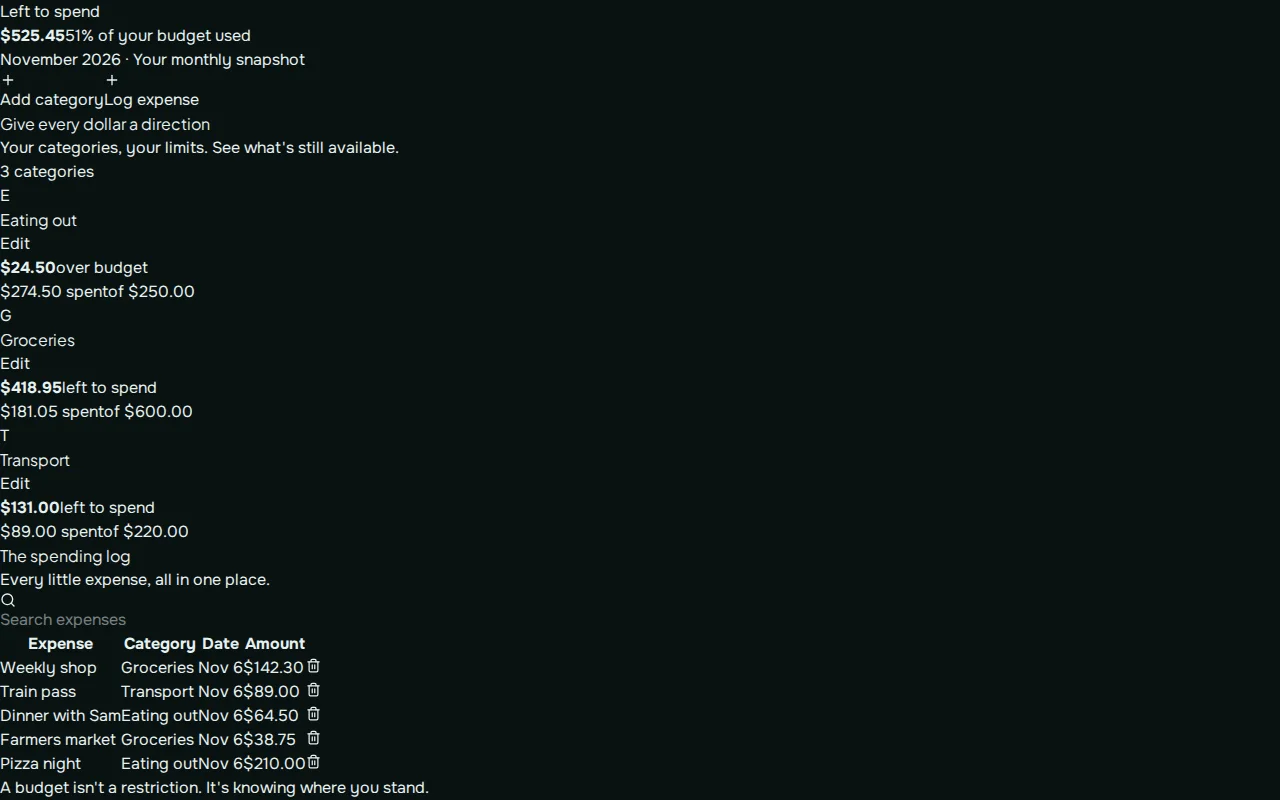
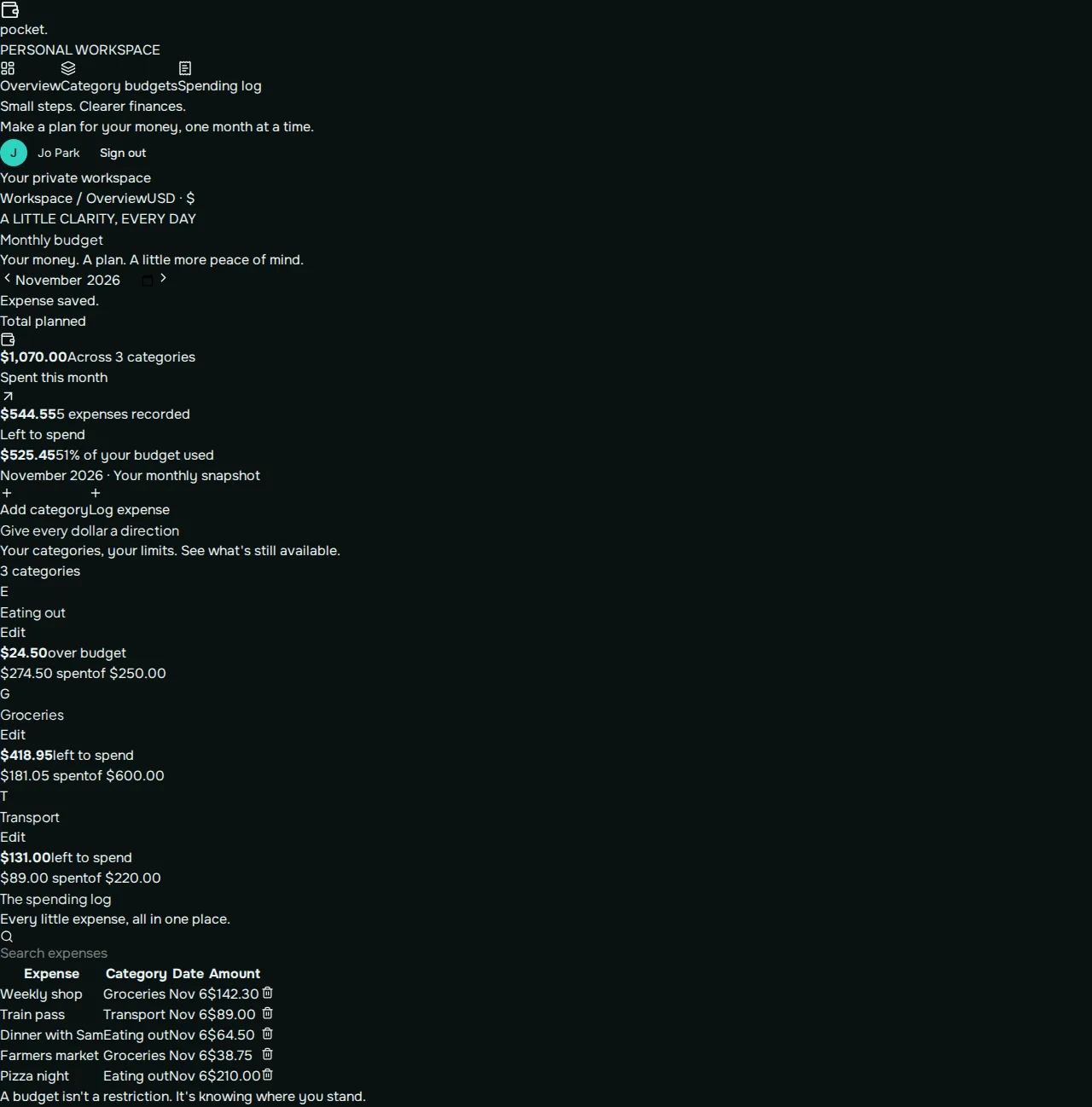
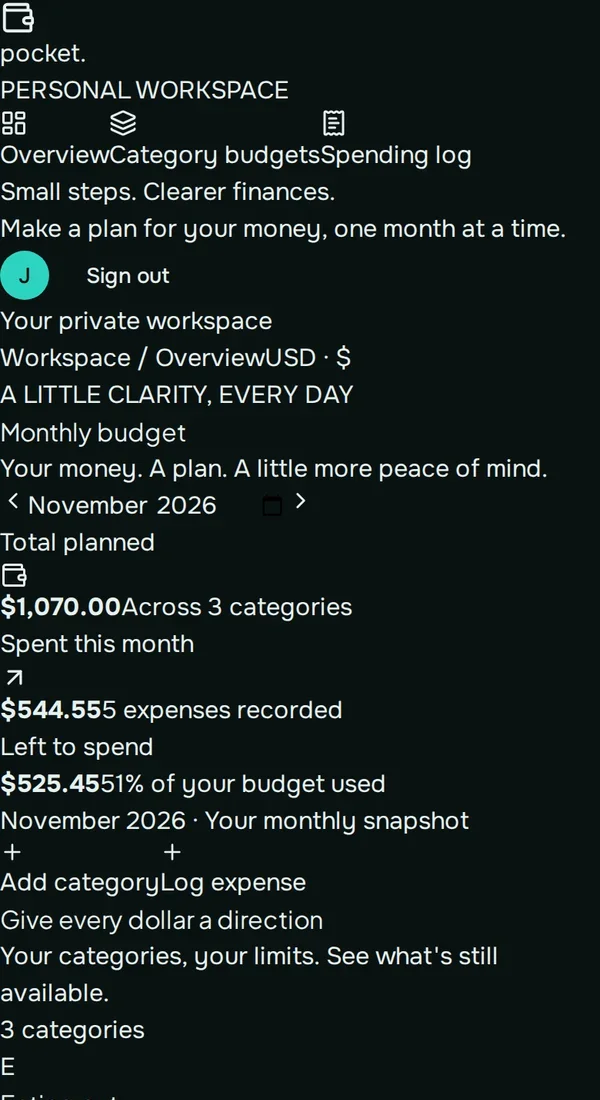
Real screenshots of the app Kleap built from the prompt in the box above, on 6 November 2026, in the Kleap preview. Not a mockup. With the request in the box, Kleap built a budget tracker in 265 seconds. We set budgets for groceries ($600), transport ($220) and eating out ($250) and logged five expenses. The app showed $1,070.00 planned, $544.55 spent, $525.45 left (51% used), groceries $418.95 left, and eating out $24.50 over budget. Every figure checks out.
What we checked in the app’s code
- Categories with a monthly budget, added and edited in a dialog (BudgetTracker.tsx).
- Expenses with a description, category, date and amount, in a spending log you can search; entries can be edited and deleted.
- Totals planned, spent and left, the share used, and per category "left to spend" or "over budget".
- A month picker with previous and next month.
- Saved in two tables, budget_categories and budget_expenses, private to the signed-in account.
- Our 5 expenses gave $544.55 spent and $525.45 left; eating out at $274.50 of $250.00 showed $24.50 over budget.
Show the exact prompt
Build a monthly budget tracker web app where I set a budget for each category, log what I spend and see how much is left.
Budgets for real life
Household budgets
Monthly categories for one or two people.
Student budgets
A weekly amount and what is left until Sunday.
Event budgets
Deposits, balances and what each item costs.
Team budgets
Cost lines per quarter for a department.
Savings goals
A target, monthly saving and the date you reach it.
From budget to a working tracker in three steps
Set your budgets
Your categories and how much each one gets this month.
Kleap builds the app
It writes the budget view, the form to log spending and what is left, and creates the tables.
Log real spending
Add this week's purchases in the preview, ask for any change, then publish it.
How Kleap compares
Facts from each tool's own page, read on 6 November 2026 (follow the source link to check). Kleap's row describes what the example above shows.
Which tool for which case
Pick YNAB when you want a full budgeting method and a service that connects to your accounts, with a 34-day trial. Pick Manus when you have bank statements and want them categorized into a budget. Pick Kleap when you want a simple budget app of your own, with your categories and rules, changed by asking.
| Tool | What you get | Free path | Best at |
|---|---|---|---|
| Kleap | A working budget tracker web app you own | Your first try usually needs no account; to keep the result, Kleap asks for a free account, with no card. Pro from $25/month (see /pricing). | Edit it by chat, publish it on a kleap.io address or your own domain |
| Google's US top 3 for “budget tracker”, read 6 November 2026 | |||
| YNABSource, checked 6 Nov 2026 | Budgeting app and method | 34-day free trial, then $109 a year | A full budgeting method with guides |
| Manus budget trackerSource, checked 6 Nov 2026 | Bank statements categorized into a personal budget | Free daily credits | Works from CSV or Excel statements |
Start free. Upgrade when you need more.
Your first try usually needs no account; to keep the result, Kleap asks for a free account, with no card. Files and images use your Kleap usage: free usage refills over time, and paid plans add much more.
Free
- Free usage that refills
- Free account to save your results and find them again
Pro
- Much more usage
- Custom domain for your Kleap websites
What is the difference between a budget tracker and an expense tracker?
An expense tracker records what you spent. A budget tracker starts from what you plan to spend and shows, category by category, how much is left. The second one answers the question people ask in the middle of the month: can we still afford this?
Kleap builds the budget tracker as a small web app that keeps your budgets and purchases in its database. If you would rather plan the year in a file, ask the AI spreadsheet generator for a budget sheet with live formulas.
Questions, answered.
Does the budget tracker connect to my bank account?
No. You log spending yourself. Nothing in the app reads your bank, which also means no bank login is shared.
Can two people share one budget?
Yes, if you ask: Kleap adds sign-in so both of you log into the same budget. Check what each account sees before you share it.
Can it warn me before I overspend?
Ask for it. The full example turns a bar orange at 80% and red above 100% of a category's budget.
Can I keep past months?
Ask for a new-month button that keeps the history, as in the full example.
Is a budget app or a spreadsheet better?
A spreadsheet suits planning a year at a desk. An app suits logging spending on a phone during the month. Kleap makes both.
Is my budget data private?
In our test each signed-in account saw only its own budgets and expenses, kept in the app's own database. Nothing is shared with a bank or a third party.
See what is left, every day.
Set your budgets and Kleap builds the tracker. Try it without an account; sign up free when Kleap asks, to keep it.
Written by the Kleap product team. Checked on 9 November 2026 against the generated files and runs shown on this page.