Expense tracker app
Name your categories. Kleap builds the app where you log and total expenses.
- TestedIn our test on 6 Nov 2026, the request in the box gave a working expense tracker app 208 seconds after Create. Times are Kleap's own timer for the AI's turn in our test (one run, or the median where we repeated it), not a promise: yours may take longer, and reading and checking the file comes on top.
- Free to startNo card. Your first try usually needs no account; Kleap asks you to sign up, free, to keep the app. Building uses Kleap usage, and the free plan’s usage refills automatically.
- Using the boxThe box holds a sample tracker. Press Create to build it, or describe your own categories and fields. Prefer a file? The spreadsheet page makes it in Excel.
What is an expense tracker?
An expense tracker records what you spend, when and on what, so you can see where the money went. From this page, Kleap builds the tracker as your own web app rather than a template to fill in. In our test, one sentence gave a working tracker in 208 seconds: you log an expense with a date, a category from a list of nine and an amount, and the app shows this month's total, the total per category with its share, and a dated history. Expenses are saved in the app's database, private to each signed-in account. We logged six expenses and the totals added up to the cent. It does not connect to a bank, read receipts or file taxes; to turn a receipt photo into rows, use the receipt scanner, and for a file instead of an app, the spreadsheet generator.
Checked on 6 November 2026 by the Kleap product team. Test: “Build an expense tracker web app where I log each expense with a date, category and amount, and see this month's total per category.”, web app, 208 s to the end of the turn that built the app.
Measured on
One real run of the prompt above: a fresh project, the real Kleap interface, a test account. Times run from the request reaching Kleap to the end of the turn that built the app. One run, not an average.
- Time to the working app
- 208 s
- Screens
- 1
- Database tables used
- 1 (expenses)
See what this prompt creates
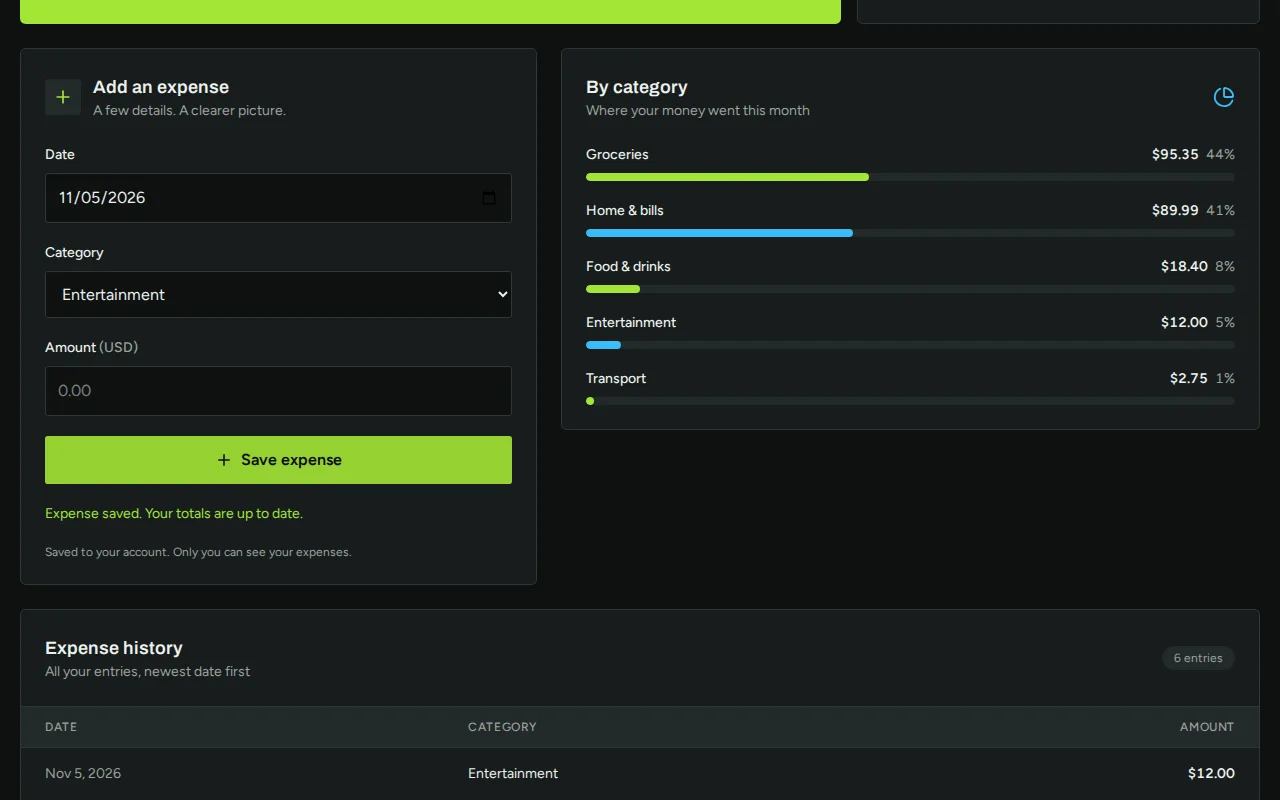
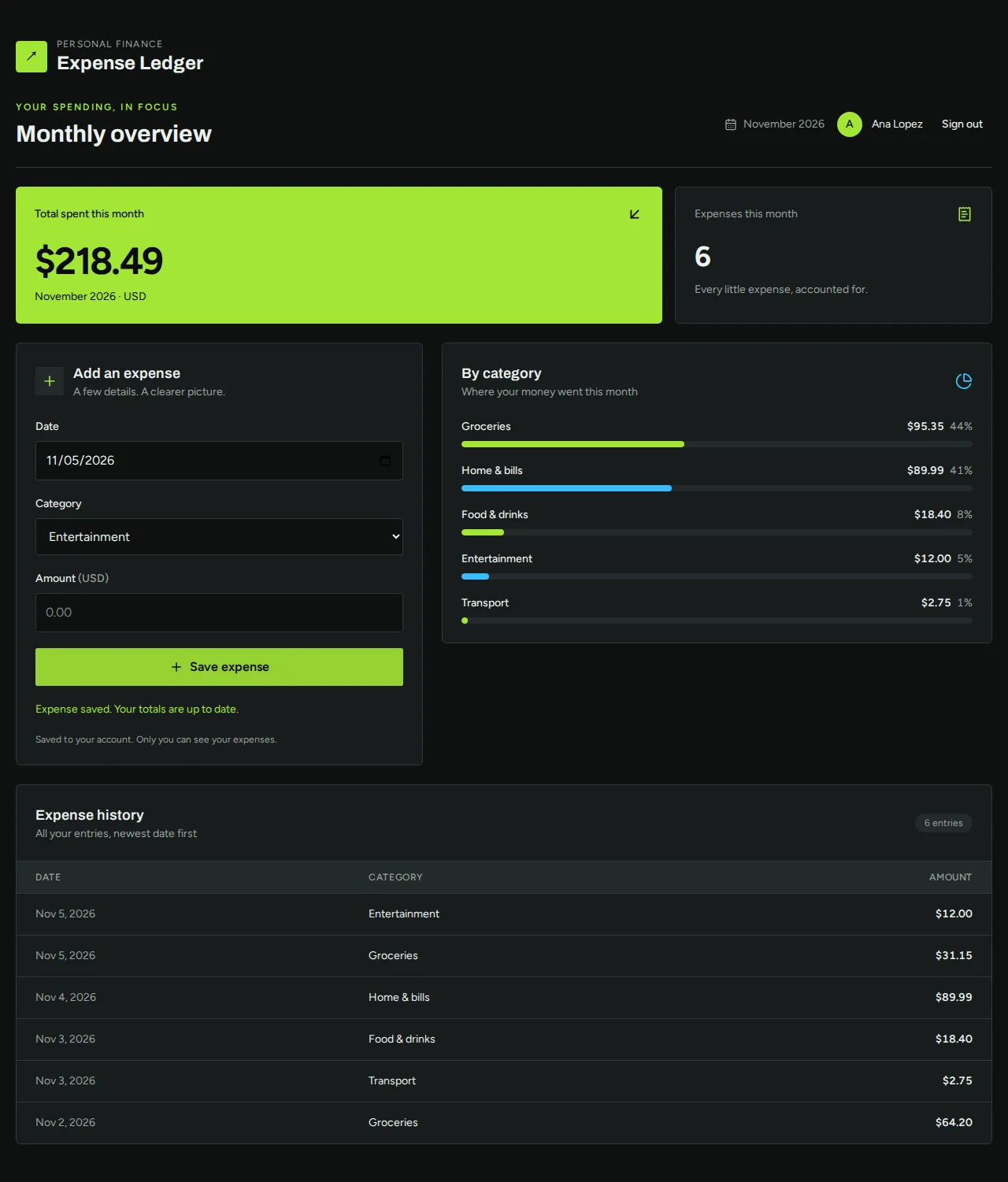
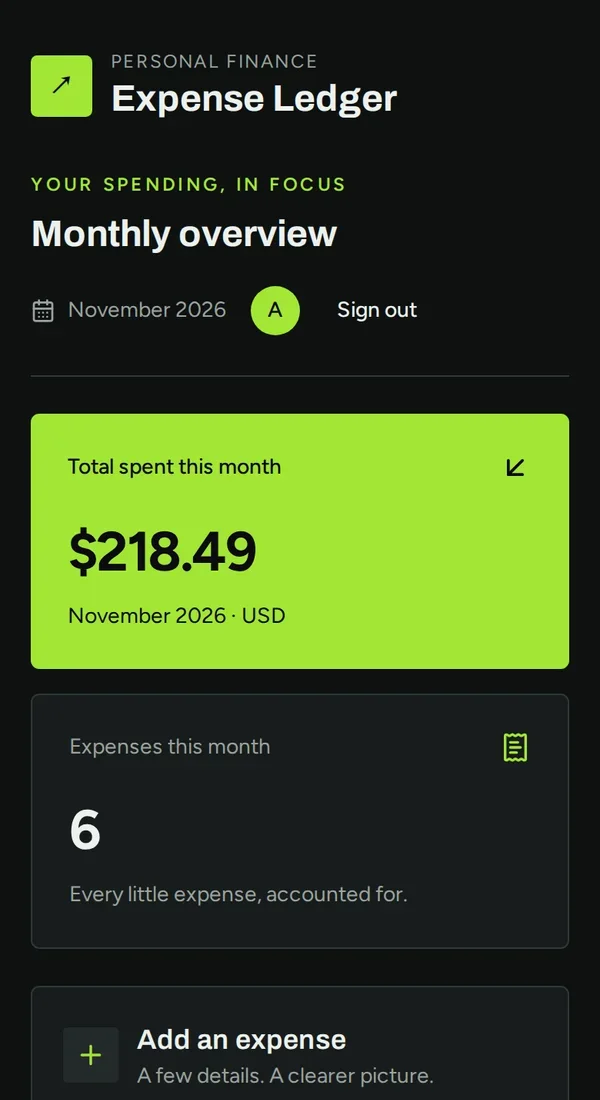
Real screenshots of the app Kleap built from the prompt in the box above, on 6 November 2026, in the Kleap preview. Not a mockup. With the request in the box, Kleap built an expense tracker in 208 seconds. We created an account and logged six expenses from 2 to 5 November. The app showed $218.49 spent this month, groceries $95.35 (44%) and home and bills $89.99 (41%), and every entry in a dated history; the numbers match our own sum to the cent.
What we checked in the app’s code
- A form with date, a category (9 to choose from) and an amount in USD.
- This month's total, the number of expenses and a breakdown per category with its share.
- A history of every entry, newest date first.
- Saved in the table expenses, private to each signed-in account.
- We logged 6 expenses: total $218.49, groceries $95.35 (44%), matching our own sum.
- No edit or delete button in this first version: ask for them.
Show the exact prompt
Build an expense tracker web app where I log each expense with a date, category and amount, and see this month's total per category.
Trackers for the way you spend
Small business expenses
Categories your accountant expects, with a CSV export.
Shared trip costs
Who paid, who owes, settled at the end.
Project cost tracking
Costs per client project against its budget.
Household expenses
A shared list for two with monthly totals.
Mileage and travel
Trips, distance and costs in one log.
From categories to a working tracker in three steps
Describe what you log
The fields of an expense and the categories you use.
Kleap builds the app
It writes the form, the list and the monthly totals, and creates the table that keeps them.
Log a real expense
Add a few in the preview, ask for any change, then publish it.
How Kleap compares
Facts from each tool's own page, read on 6 November 2026 (follow the source link to check). Kleap's row describes what the example above shows.
Which tool for which case
Pick Manus when you have receipts and bank statements and want a categorized report back as a spreadsheet. Pick Kleap when you want an app where expenses are logged as they happen, with your categories, totals that update, and changes made by asking.
| Tool | What you get | Free path | Best at |
|---|---|---|---|
| Kleap | A working expense tracker web app you own | Your first try usually needs no account; to keep the result, Kleap asks for a free account, with no card. Pro from $25/month (see /pricing). | Edit it by chat, publish it on a kleap.io address or your own domain |
| Google's US top 3 for “expense tracker”, read 6 November 2026 | |||
| Manus expense trackerSource, checked 6 Nov 2026 | Receipts and bank statements turned into a categorized Excel spreadsheet | Up to 300 free credits to get started | Can post the finished sheet to a Slack channel |
Start free. Upgrade when you need more.
Your first try usually needs no account; to keep the result, Kleap asks for a free account, with no card. Files and images use your Kleap usage: free usage refills over time, and paid plans add much more.
Free
- Free usage that refills
- Free account to save your results and find them again
Pro
- Much more usage
- Custom domain for your Kleap websites
An expense tracker as an app, or as a spreadsheet?
Both work. A spreadsheet is a file you open and send; the AI spreadsheet generator makes one in Excel with live totals. An app is better when expenses are added on the go from a phone, when two people log into the same list, or when the totals should be on screen without anyone opening a file.
Kleap builds the app with your categories and keeps every expense in its database. To turn a photo of a receipt into rows, see the receipt scanner; to plan spending against limits, the budget tracker.
Questions, answered.
Where are my expenses stored?
In the app's own database, in a table of expenses. In our test each signed-in account saw only its own expenses.
Can the expense tracker connect to my bank?
No. Expenses are typed in. Bank imports need a bank data provider, which this app does not include.
Can I export my expenses?
Ask for a CSV download in the request, as in the full example, and the app gets a download button.
Can two people log expenses in the same tracker?
Yes, if you ask for it: describe who logs expenses and Kleap adds sign-in and shared data. Check what each person can see before you share it.
Should I use the app or a spreadsheet?
A spreadsheet if you want a file to send; an app if expenses are logged from a phone or by several people. Kleap makes both.
Can it scan receipts?
This app does not read photos. Kleap can read a receipt photo in the chat and turn it into a spreadsheet; see the receipt scanner page.
Know where the money went.
Name your categories and Kleap builds the tracker. Try it without an account; sign up free when Kleap asks, to keep it.
Written by the Kleap product team. Checked on 9 November 2026 against the generated files and runs shown on this page.