Salary calculator app

Describe the calculator. Kleap builds a working one you can use, change and publish.
- TestedIn our test on 6 Nov 2026, the request in the box gave a working salary calculator app 101 seconds after Create. Times are Kleap's own timer for the AI's turn in our test (one run, or the median where we repeated it), not a promise: yours may take longer, and reading and checking the file comes on top.
- Free to startNo card. Your first try usually needs no account; Kleap asks you to sign up, free, to keep the app. Building uses Kleap usage, and the free plan’s usage refills automatically.
- Using the boxThe box holds a sample calculator. Press Create to build it, or describe your own rules. It uses the tax rate you type, not your country's tax tables.
What is a salary calculator?
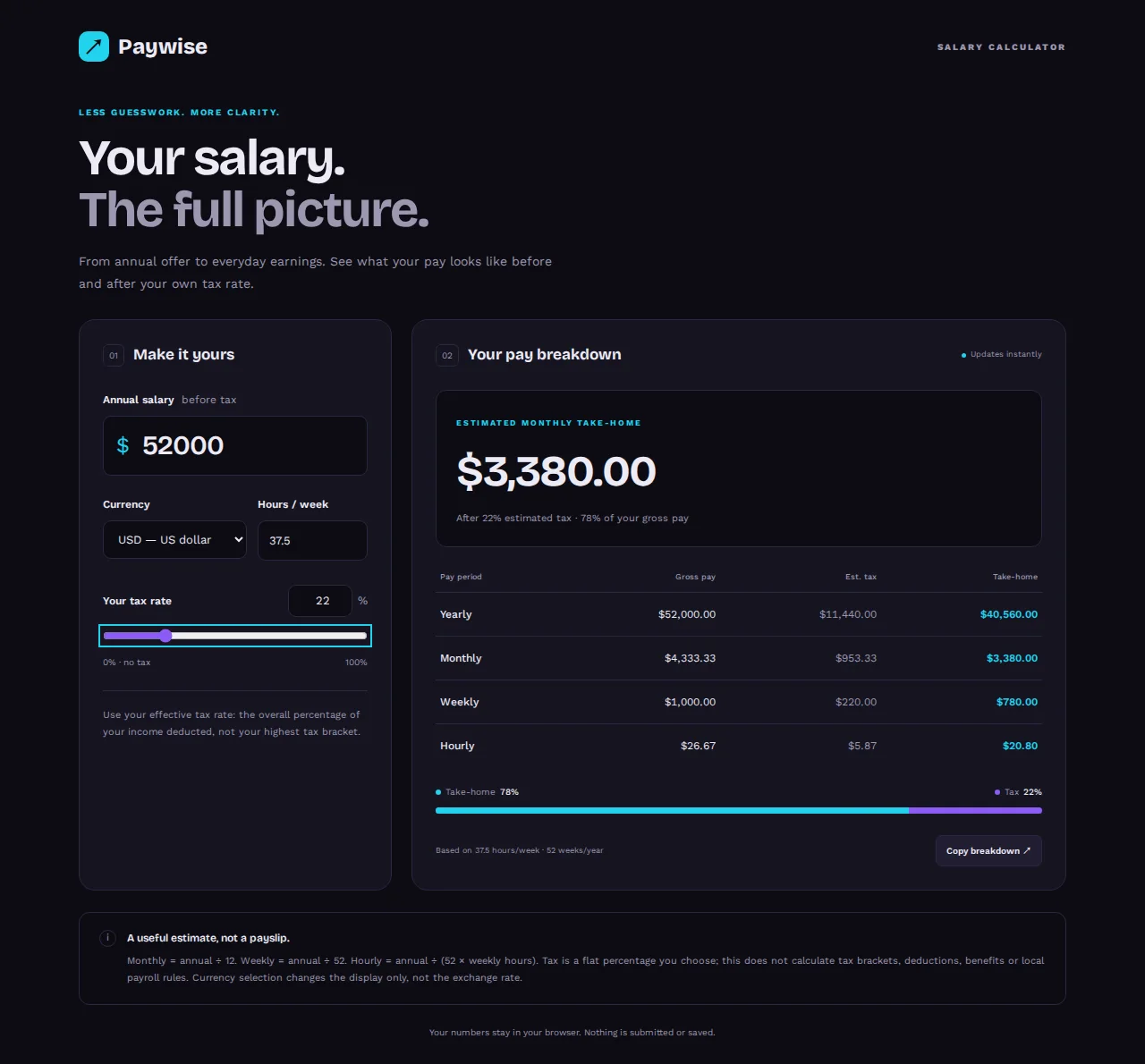
A salary calculator turns a yearly salary into what it means per month, per week and per hour, before and after tax. From this page, Kleap builds a salary calculator you own, as a small web app you can change and put on your site. In our test, one sentence gave a working calculator in 101 seconds: fields for the yearly salary, a currency, hours per week and your own tax rate (with a slider), and a table of gross pay, estimated tax and take-home pay per year, month, week and hour that updates as you type. We entered $52,000 at 37.5 hours and 22% tax and got $3,380.00 a month and $20.80 an hour, both right. It applies one flat rate you choose; it does not know tax bands, deductions or payroll rules, and the page says so. Nothing is saved: the numbers stay in the browser.
Checked on 6 November 2026 by the Kleap product team. Test: “Build a salary calculator web app that turns a yearly salary into monthly, weekly and hourly pay, with a field for my own tax rate.”, web app, 101 s to the end of the turn that built the app.
Measured on
One real run of the prompt above: a fresh project, the real Kleap interface, a test account. Times run from the request reaching Kleap to the end of the turn that built the app. One run, not an average.
- Time to the working app
- 101 s
- Screens
- 1
- Database tables
- 0 (nothing is saved)
See what this prompt creates
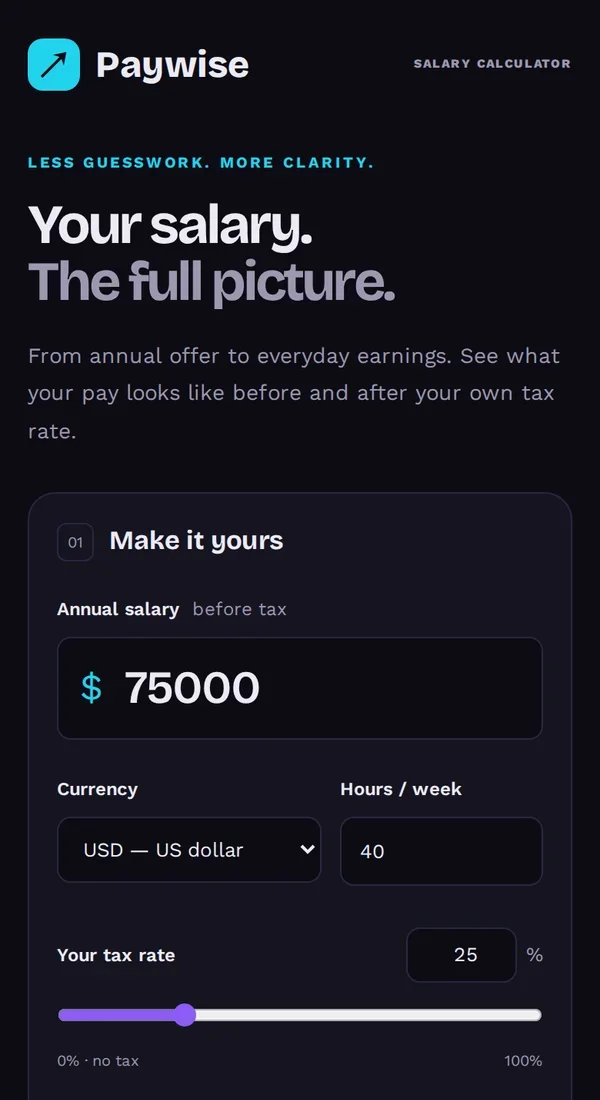
Real screenshots of the app Kleap built from the prompt in the box above, on 6 November 2026, in the Kleap preview. Not a mockup. With the request in the box, Kleap built a salary calculator in 101 seconds. We typed a $52,000 salary, 37.5 hours a week and a 22% tax rate: it showed $40,560.00 take-home a year, $3,380.00 a month, $780.00 a week and $20.80 an hour, all correct. Under the results it says it applies a flat rate and is not a payslip.
What we checked in the app’s code
- Inputs: yearly salary, currency (USD, GBP, EUR, CAD, AUD), hours per week and tax rate, with a slider (index.astro).
- Gross pay, estimated tax and take-home for year, month, week and hour, updated as you type.
- Formulas shown on the page: monthly = annual ÷ 12, weekly = annual ÷ 52, hourly = annual ÷ (52 × weekly hours).
- $52,000 at 37.5 h and 22% gave $40,560.00, $3,380.00, $780.00 and $20.80: all correct.
- The page says the tax is a flat rate, not brackets or payroll rules, and that nothing is saved.
Show the exact prompt
Build a salary calculator web app that turns a yearly salary into monthly, weekly and hourly pay, with a field for my own tax rate.
Pay calculators for real uses
Careers page calculator
Candidates see what a salary means per month and per hour.
Offer comparison
Two or three offers side by side, with the yearly difference.
Freelance rate calculator
Target income in, day rate and hourly rate out.
Hourly to salary converter
An hourly rate turned into weekly, monthly and yearly pay.
Raise calculator
What a percentage raise adds per month and per year.
From rules to a working calculator in three steps
Describe the calculator
What people type in (salary, hours, tax rate) and what they should see (monthly, weekly, hourly pay).
Kleap builds the app
It writes the calculator, the layout and the wording, and shows it working in the preview.
Try it and publish it
Type real numbers, ask for any change, then publish it on a kleap.io address or your own domain.
How Kleap compares
Facts from each tool's own page, read on 6 November 2026 (follow the source link to check). Kleap's row describes what the example above shows.
Which tool for which case
Pick Calculator.net when you only need to convert one salary today. Pick SmartAsset when you need US take-home pay after federal, state and local taxes. Pick Manus when you want an analysis or report of your compensation. Pick Kleap when you want your OWN calculator, with your rules and your brand, that you can change by chat and put on your website.
| Tool | What you get | Free path | Best at |
|---|---|---|---|
| Kleap | A working salary calculator web app you own | Your first try usually needs no account; to keep the result, Kleap asks for a free account, with no card. Pro from $25/month (see /pricing). | Edit it by chat, publish it on a kleap.io address or your own domain |
| Google's US top 3 for “salary calculator”, read 6 November 2026 | |||
| Calculator.net salary calculatorSource, checked 6 Nov 2026 | Converts a salary between hourly, biweekly, monthly and annual amounts | Free calculator | Adjusts for holidays and vacation days |
| SmartAsset paycheck calculatorSource, checked 6 Nov 2026 | Hourly and salary take-home pay after federal, state and local taxes | Free paycheck calculator | US taxes only |
| Manus salary calculatorSource, checked 6 Nov 2026 | Compensation analysis exported as a document or interactive dashboard | Free daily credits for new users | Works through a conversation about your earnings |
Start free. Upgrade when you need more.
Your first try usually needs no account; to keep the result, Kleap asks for a free account, with no card. Files and images use your Kleap usage: free usage refills over time, and paid plans add much more.
Free
- Free usage that refills
- Free account to save your results and find them again
Pro
- Much more usage
- Custom domain for your Kleap websites
Why build a salary calculator instead of using one?
Public salary calculators answer one person's question once. A calculator you own does a job again and again: on a careers page it shows candidates what a salary means per month; in a small team it turns a rate into a monthly budget; for a recruiter it compares two offers in front of the client.
Kleap builds that calculator as a small web app. You decide the inputs, the rules and the wording, and you can change any of them by asking. When the numbers should live in a file instead, the AI spreadsheet generator makes an Excel sheet with live formulas.
Questions, answered.
Does the salary calculator know my country's taxes?
No. It uses the rules you describe, such as a flat tax rate the visitor types. It is not a payroll engine and does not know tax bands, so say that on the page if others will use it.
Can I put the salary calculator on my website?
Yes. Publish it on a kleap.io address or connect your own domain, and link to it from your site.
Can I change how the calculator works later?
Yes. Ask in the chat, for example to add a bonus field or to show pay per day, and Kleap updates the app.
Does it work on a phone?
Kleap builds the layout for phones and computers. Check it on your own phone in the preview before you publish.
Can it compare two salaries?
Yes, if you ask for it. The full example above asks for two offers side by side.
Is building a calculator free?
You can try it without an account, then keep it with a free account. Building uses Kleap usage; the free plan's usage refills automatically.
Your calculator, working today.
Describe the rules and Kleap builds the calculator. Try it without an account; sign up free when Kleap asks, to keep it.
Written by the Kleap product team. Checked on 9 November 2026 against the generated files and runs shown on this page.