Employee scheduling app
List your staff and shifts. Kleap builds the weekly schedule app.
- TestedIn our test on 6 Nov 2026, the request in the box gave a working scheduling app 473 seconds after Create. Times are Kleap's own timer for the AI's turn in our test (one run, or the median where we repeated it), not a promise: yours may take longer, and reading and checking the file comes on top.
- Free to startNo card. Your first try usually needs no account; Kleap asks you to sign up, free, to keep the app. Building uses Kleap usage, and the free plan’s usage refills automatically.
- Using the boxThe box holds a sample schedule. Press Create to build it, or describe your own shifts, roles and rules.
What is an employee scheduling app?
An employee scheduling app is where a manager puts staff on shifts and everyone sees the week at a glance. From this page, Kleap builds that app for your team instead of renting you a scheduling service. In our test, one sentence gave a working app in 473 seconds: you add staff with a name and a role, assign them to morning, afternoon or evening shifts on each day of a Monday-to-Sunday grid, and see how many shifts are covered and how many are open. Staff and shifts are saved in the app's database behind a sign-in. It does not clock hours, run payroll or text staff about their shifts; rules such as a 40-hour warning or two people on every close are things you describe, and Kleap adds them. Publish it and share one link with the team.
Checked on 6 November 2026 by the Kleap product team. Test: “Build an employee scheduling web app where I add staff and assign them to morning, afternoon or evening shifts for each day of the week.”, web app, 473 s to the end of the turn that built the app.
Measured on
One real run of the prompt above: a fresh project, the real Kleap interface, a test account. Times run from the request reaching Kleap to the end of the turn that built the app. One run, not an average.
- Time to the working app
- 473 s
- Screens
- 1 (with team and coverage views)
- Database tables used
- 2 (staff, shifts)
See what this prompt creates
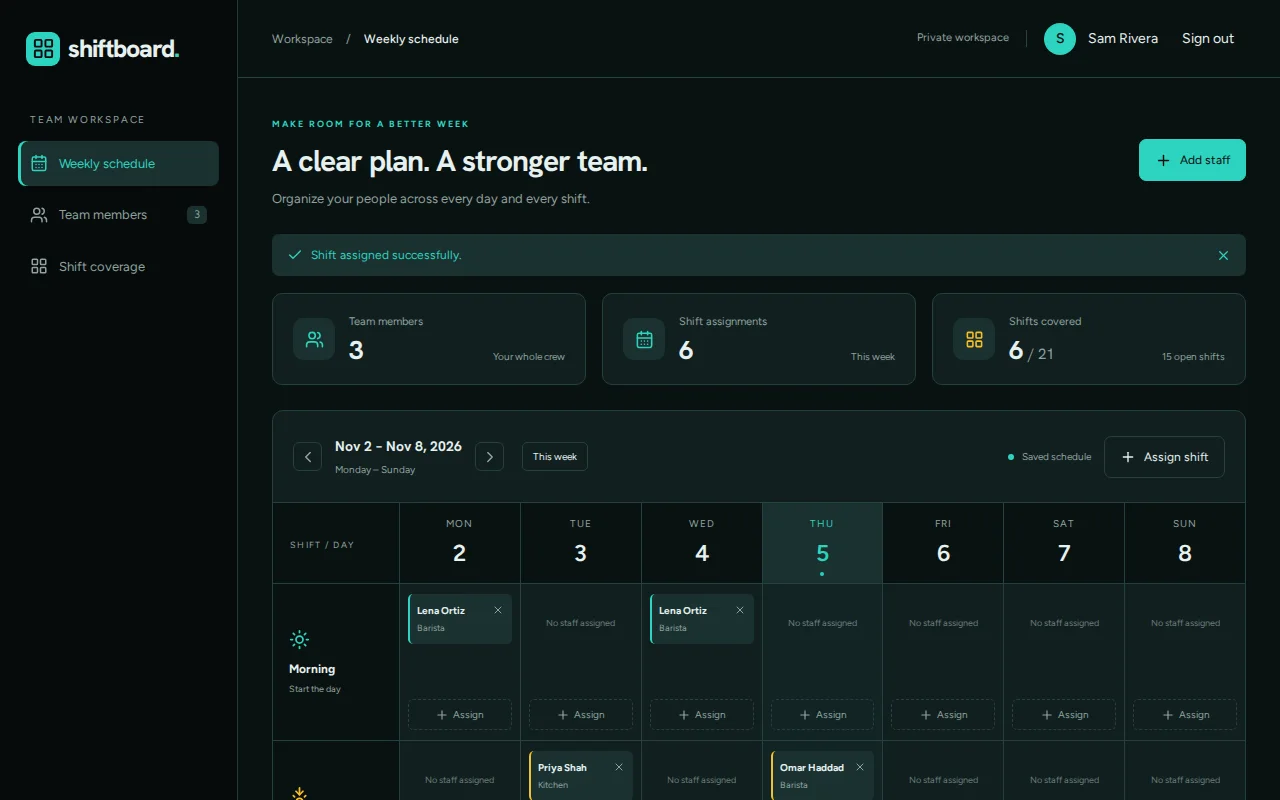
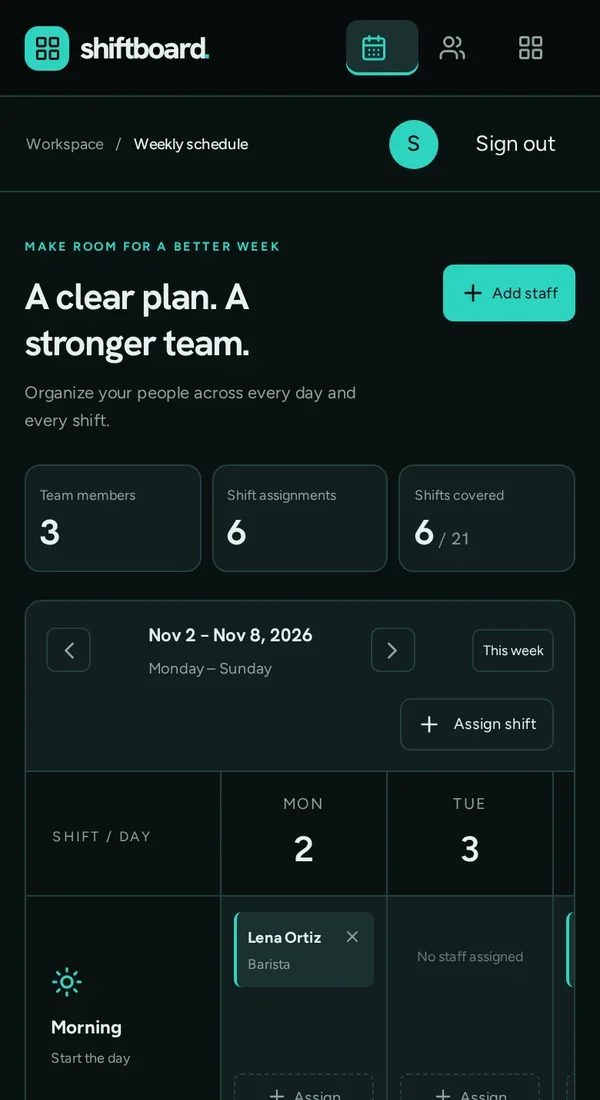
Real screenshots of the app Kleap built from the prompt in the box above, on 6 November 2026, in the Kleap preview. Not a mockup. With the request in the box, Kleap built a scheduling app in 473 seconds. We created an account, added three people (Lena, barista; Omar, barista; Priya, kitchen) and assigned six shifts across the week. The app counted 6 of 21 shifts covered and 15 open. Screenshots from the same preview build the builder shows.
What we checked in the app’s code
- Add staff with a full name and a role, and remove them (ShiftPlanner.tsx).
- An Assign shift dialog: employee, day of the shown week and shift (Morning, Afternoon or Evening); a shift can hold several people.
- Previous week, next week and This week buttons, plus counters for team members, assignments and shifts covered out of 21.
- Saved in two tables, scheduler_staff and scheduler_assignments, behind a sign-in.
- We created an account, added 3 staff and 6 shifts; the app showed 6 / 21 covered and 15 open shifts.
Show the exact prompt
Build an employee scheduling web app where I add staff and assign them to morning, afternoon or evening shifts for each day of the week.
Schedules for small teams
Café and restaurant rotas
Open, mid and close shifts across seven days.
Clinic sessions
Roles per session so each one is covered.
Volunteer sign-ups
Shifts with places that people claim.
Shop opening hours
Weekly hours per person and a print view.
On-call rotations
Who is on call each week, in turn.
From shifts to a working schedule in three steps
List staff and shifts
Who works, which shifts exist, and the rules you care about.
Kleap builds the app
It writes the week view, the forms to add staff and shifts, and the tables that keep them.
Plan a real week
Fill this week in the preview, ask for any change, then publish it for the team.
How Kleap compares
Facts from each tool's own page, read on 6 November 2026 (follow the source link to check). Kleap's row describes what the example above shows.
Which tool for which case
Pick Homebase when you want scheduling with a time clock and payroll add-ons; its Basic plan is free for one location and up to 10 employees. Pick When I Work for scheduling and time tracking per user per month. Pick Manus for a generated schedule to export as a PDF. Pick Kleap when you want a schedule app built around your own shifts and rules, which you change by asking.
| Tool | What you get | Free path | Best at |
|---|---|---|---|
| Kleap | A working scheduling web app with your shifts | Your first try usually needs no account; to keep the result, Kleap asks for a free account, with no card. Pro from $25/month (see /pricing). | Edit it by chat, publish it on a kleap.io address or your own domain |
| Google's US top 3 for “employee scheduling app”, read 6 November 2026 | |||
| HomebaseSource, checked 6 Nov 2026 | Team scheduling, time clock and payroll add-on | Basic $0 per location per month: 1 location, up to 10 employees | Point-of-sale integration on the Basic plan |
| When I WorkSource, checked 6 Nov 2026 | Employee scheduling, time tracking and workforce management | From $2.50 per user per month; 14-day free trial | Payroll through its Rippling partnership |
| Manus shift scheduling assistantSource, checked 6 Nov 2026 | A generated schedule, exported as a PDF or shared by link | Free to start | Handles availability in the conversation |
Start free. Upgrade when you need more.
Your first try usually needs no account; to keep the result, Kleap asks for a free account, with no card. Files and images use your Kleap usage: free usage refills over time, and paid plans add much more.
Free
- Free usage that refills
- Free account to save your results and find them again
Pro
- Much more usage
- Custom domain for your Kleap websites
When is a scheduling app of your own worth it?
Scheduling software is built for the average shop. A small team often has one rule that matters more than all the features: two people on every close, no one above 40 hours, the kitchen covered before the front. An app built on those rules is often simpler than a big tool you have to work around.
Kleap builds the schedule as a web app with the staff and shifts kept in its database. For a printable rota you can send, ask the AI spreadsheet generator for an Excel version, and a team list with roles and contacts fits an employee directory.
Questions, answered.
Can staff see the schedule on their phone?
Not in the app from our test: it was private to the manager's account. Ask Kleap for a read-only view or for staff accounts, then check it on a phone before you share the link.
Can the employee scheduling app warn me about too many hours?
If you ask for it. Describe the rule, such as a warning above 40 hours a week or on overlapping shifts, and Kleap builds the check.
Does it track hours worked or run payroll?
No. It plans shifts. A time clock or payroll is a different tool; Homebase and When I Work include those.
Can I copy last week's schedule?
Ask for a copy-last-week button in the request, as in the full example, and it is built in.
Can staff swap shifts?
Only if you describe how a swap works. A swap request needs sign-in and a rule for who approves it, so test it with two accounts before you rely on it.
Are the staff and shifts saved?
Yes, in two tables of the app's own database (staff and shift assignments), private to the signed-in account.
Next week's schedule, in one app.
List your staff and shifts and Kleap builds the app. Try it without an account; sign up free when Kleap asks, to keep it.
Written by the Kleap product team. Checked on 9 November 2026 against the generated files and runs shown on this page.