Receipt scanner to Excel
=SUM(E2:E6)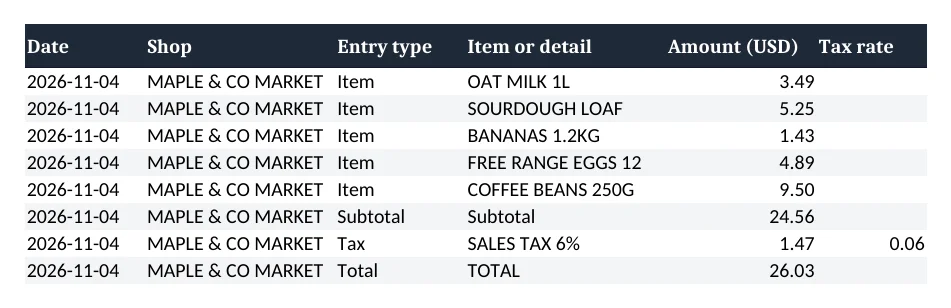
Drop a photo of a receipt. Download the rows as an Excel file.
- TestedIn our test on 6 Nov 2026, the request in the box and one receipt photo gave the Excel file 22 seconds after Create. Times are Kleap's own timer for the AI's turn in our test (one run, or the median where we repeated it), not a promise: yours may take longer, and reading and checking the file comes on top.
- Free to startYour first try usually needs no account; to keep the result, Kleap asks for a free account, with no card. Each file uses Kleap usage, and the free plan's usage refills automatically.
- Using the boxDrop your receipt photo in the box, or attach it with the + button, then press Create. Check every amount against the paper receipt.
What is a receipt scanner?
A receipt scanner reads the text on a photo of a receipt and turns it into data you can add up. Kleap does it in the chat: drop the photo, and Kleap's AI reads the shop, the date, each line and its price, the tax and the total, then returns an Excel file with one row per item, live SUM formulas for the subtotal and the total, and a second sheet with the other details it found (address, receipt number, time). In our test every amount in the sheet matched the receipt, and the subtotal formula gave the printed subtotal. Kleap is not a phone app that scans in the background or files receipts for you: you attach the photos, and you check the numbers, because a faded, folded or handwritten receipt can be misread. To log expenses as they happen instead, Kleap can build an expense tracker app.
Checked on 6 November 2026 by the Kleap product team. Test: “Turn the receipt in my photo into an Excel sheet with the date, shop, each item, the tax and the total.”, .xlsx (Excel), from one receipt photo, 22 s to the file.
Measured on
One real run of the prompt above: a fresh project, the real Kleap interface, a test account. Times run from the request reaching Kleap to the file being saved (photos: from pressing Create to the end of the reply). One run, not an average.
- Time to the file
- 22 s
- Total read
- 26.03, as printed
- Sheets
- 2
- Live formulas
- 2 (subtotal, total)
See what this prompt creates
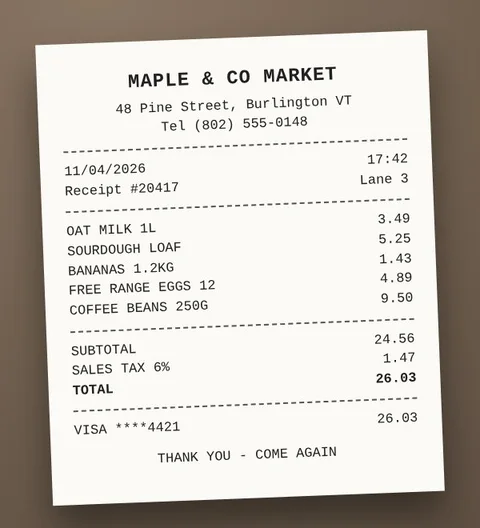
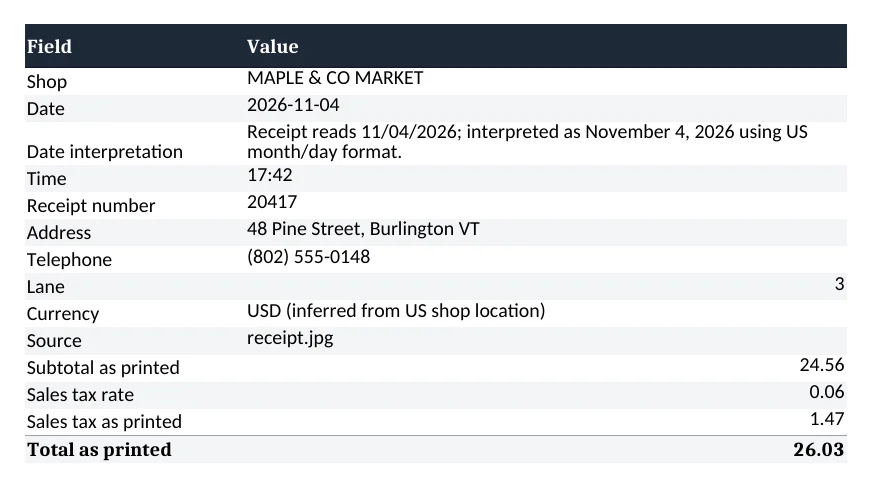
Real output of the prompt in the box above, generated with Kleap on 6 November 2026, rendered from the delivered file. Not a mockup. With the request in the box and our test receipt (a grocery receipt image we made, shown on the left), Kleap returned an Excel file 22 seconds after Create. The Receipt sheet has one row per item, the subtotal as =SUM(E2:E6) = 24.56, the 6% tax of 1.47 and the total as =SUM(E7:E8) = 26.03, the same as the paper. A second sheet keeps the address, time, receipt number and how it read the date.
| Cell | Row | Formula |
|---|---|---|
| Receipt!E7 | Subtotal | =SUM(E2:E6) |
| Receipt!E9 | Total | =SUM(E7:E8) |
What we checked in the delivered file
- 5 item rows, each price as printed: 3.49, 5.25, 1.43, 4.89, 9.50.
- Subtotal =SUM(E2:E6) = 24.56 and total =SUM(E7:E8) = 26.03, both equal to the printed figures.
- Tax 1.47 at a 6% rate, copied from the receipt.
- Date 11/04/2026 read as 4 November 2026 (US format), and the sheet says so.
- Header row frozen and filters on both sheets.
Show the exact prompt
Turn the receipt in my photo into an Excel sheet with the date, shop, each item, the tax and the total.
Sheets from the receipts you have
Expense reports
Receipts of the month in one sheet with a total.
Bill splits
A restaurant bill shared between friends.
Category totals
Groceries, fuel, office: a total per category.
CSV for accounting
One row per item, ready to import.
Warranty records
What you bought, where and when.
From receipt photo to Excel in three steps
Drop the photo
Take a clear photo of the receipt, flat and in good light, and drop it in the box.
Kleap reads it
It reads the shop, date, items, tax and total, and builds the sheet with SUM formulas.
Check and download
Compare the amounts with the paper, ask for a fix or a category column, and download the file.
How Kleap compares
Facts from each tool's own page, read on 6 November 2026 (follow the source link to check). Kleap's row describes what the example above shows.
Which tool for which case
Pick Shoeboxed when you want a receipt service that scans paper and digital receipts every month, from $9 a month. Pick Manus when you want receipts tracked and exported to CSV for QuickBooks or Xero. Pick Kleap when you have a few receipt photos and want an Excel sheet with live totals now, then an expense app or a report from the same chat.
| Tool | What you get | Free path | Best at |
|---|---|---|---|
| Kleap | Excel sheet read from your receipt photo, with live SUM totals | Your first try usually needs no account; to keep the result, Kleap asks for a free account, with no card. Pro from $25/month (see /pricing). | Reads photos you attach in the chat; check every amount |
| Google's US top 3 for “receipt scanner”, read 6 November 2026 | |||
| ShoeboxedSource, checked 6 Nov 2026 | Receipt scanning and mileage tracking, CSV export | Plans from $9 a month; 30-day money-back guarantee | Scans paper receipts you mail in |
| Manus receipt trackerSource, checked 6 Nov 2026 | Receipts scanned, categorized and exported to CSV | Free plan with a limited number of receipt scans a month | CSV works with QuickBooks and Xero |
Start free. Upgrade when you need more.
Your first try usually needs no account; to keep the result, Kleap asks for a free account, with no card. Files and images use your Kleap usage: free usage refills over time, and paid plans add much more.
Free
- Free usage that refills
- Free account to save your results and find them again
Pro
- Much more usage
- Custom domain for your Kleap websites
From a pile of receipts to numbers you can add up
Most receipts end up as a photo on a phone. Typing them into a spreadsheet is slow and easy to get wrong. Kleap reads the photo for you and lays out the rows, so your job is to check them, not to type them.
For a sheet you keep filling every month, the AI spreadsheet generator builds the tracker with categories and live totals, and an expense tracker app lets you log expenses from your phone as they happen.
Questions, answered.
How do I scan a receipt with Kleap?
Drop a photo of the receipt in the box at the top of this page (or attach it with the + button), keep the request that is there and press Create. Kleap returns the Excel file in the chat.
How accurate is the receipt scanner?
In our test every amount matched the receipt. A clear, flat photo reads best; faded, folded or handwritten receipts can be misread, so compare the sheet with the paper before you use it.
Can I scan several receipts at once?
You can attach several photos in one message and ask for one sheet, as in the full example. Our measured test used one receipt.
Does it add up the total for me?
The sheet uses live SUM formulas for the subtotal and the total, so it adds up in Excel, Google Sheets or Numbers, and you can compare it with the printed total.
Can I get a CSV instead of Excel?
Yes. Ask for a CSV file in your request and Kleap makes one; a CSV keeps the values but not the formulas.
Is there a receipt scanning app to install?
No. Kleap works in the browser: you attach the photo in the chat. If you want an app to log expenses, Kleap can build one for you.
Your receipts, in a sheet.
Drop a receipt photo and download the Excel file. Try it without an account; sign up free when Kleap asks, to keep your files.
Written by the Kleap product team. Checked on 9 November 2026 against the generated files and runs shown on this page.